Matrix Group International

Author: Joanna Pineda

  • How Are You Integrating Google Plus Into Your Life?

    How Are You Integrating Google Plus Into Your Life?

    So I’ve been on Google Plus for a while now. Actually, I’ve had an account for a while now, having received an invitation early, but I rarely post updates and I rarely read updates from my various circles. I’m simply struggling to integrate it into my life.

    It’s not that I don’t like Google Plus. On the contrary, I like the interface, I like that it’s so easy to add people to circles and post updates to only specific circles, and I like that the interface is (for now, at least) nice and clean, not cluttered with ads.

    It’s just that I’m feeling saturated. I already have my routine of posting interesting news items to Twitter, posting personal updates on Facebook, uploading my weekly video interviews to YouTube, checking into FourSquare when I go out to eat or visit a new place, and blogging once a week.

    The question for me has become: what place should Google Plus occupy in my life?

    I guess I could simply post the same updates to a bunch of social networks, but that doesn’t make sense to me. If I’m connected with the same people on multiple networks, they would see the same posts and that’s no fun and a waste of time.

    Perhaps Google Plus will become, like Twitter, another public persona for me, whereas Facebook is the network I reserve for family, friends and close network.

    Sean Parker, a co-founder of original music file-sharing service Napster and a prominent Facebook shareholder, says that, “power users have gone to Twitter or to Google+.” Could this be true? In my case, my techiest of friends and co-workers seem to be more active on Google+ these days but my network is still firmly on Facebook. And yet, Google+ is grabbing subscribers fast. GooglePlusWiki says that there are now over 20M people on the network.

    After pondering this issue for a while now, here’s where what I’m thinking. Although the majority of my network is still not on Google+, I need to be on it. Because no one network will dominate and it will be hard to ignore Google+. Just as I tell clients that they need to be on Facebook, Twitter, YouTube, LinkedIn and Flickr because their audiences are on these networks, I know that I need to be on all the major networks personally. I will figure out where to find the time to post to Google+. I will repeat some posts because there is some overlap in connections but it’s not 100%. I will hope that HootSuite will soon let me post to Google+ in addition to Twitter and Facebook. And I will figure out what brainspace Google+ will occupy.

    How about you? Are you on Google+? What is Google+ doing to your Facebook and Twitter updates? Are you posting different things? How are you integrating Google+ into your day?

  • If This Then That

    If This Then That

    Put the internet to work for you by creating tasks that let you plug information from one service into another.

  • How Steve Jobs and Apple Changed My Life as a Mom

    How Steve Jobs and Apple Changed My Life as a Mom

    I was driving home from dinner tonight when I heard on the radio that Steve Jobs had died. This blog post will be one of zillions proclaiming how Apple, under Steve Jobs’ leadership, changed lives.

    My story is simple. My many Apple products made it easy to share the wonders I call my sons and made technology easy at home. I’ve been an Apple fan for a long time and have slowly accumulated a collection of Apple products.

    Apple Should Have a Campaign About How Macs are for Moms

    My Mac is my mommy machine. I use iPhoto to store and manage my over 30,000 photos, mostly of my sons and photos from our travels around the world. And when I want to share photos with my family, I select the photos I want and then ask iPhoto to send lower resolution versions, so I don’t clog e-mail inboxes with photos that are 4MEG each — no need to resize the images first, which means my mom gets photos nearly every week!

    At the end of each year, I made video slideshows of my children’s activities using iDVD. The themes make it easy to put together a great looking DVD and I get a terrific keepsake from the year.

    My older son learned how to use a computer on our Mac (the baby isn’t old enough but he’s definitely interested). He immediately understood the intuitive user interface and can play games, watch videos and surf the web.

    iChat and now FaceTime make it easy to stay in touch with Grandma, who lives in California. She loves that she can see the boys, although she often frets about how she looks (as if the boys care, they love her!).

    Apple Devices Make Home Networking Easy(ier)

    I joke with my techie husband that setting up a home wireless network is not for mere mortals, although I have to admit that Apple has made it easy. We have Airport base stations around the house to ensure that have a good wi-fi signal thoughout our 4-story townhome.

    We’ve set up speakers in the different parts of the house and downloaded an app that lets me control the Mac and send music or radio programs to different parts of the house.

    We’ve owned an Apple TV for many years. We use it to watch movies, watch YouTube videos on the big screen, and enjoy our photos. We were worried that Apple would discontinue the Apple TV for lack of sales but it looks like this device will be around for a while. Thank goodness!

    I don’t think I could live without my iPad at this point. My husband, older son and I were vying for iPad time so much time that we now have 2 of these tablets at home. I use my iPad to check my schedule, check weather, check e-mail, surf the web, find recipes, play games, manage my user manuals, listen to music, watch movies on Netflix, and so on and so forth.

    Finally, I love how all my Apple purchases (music, apps, games, movies and shows) are done through my one iTunes account. And I absolutely adore how synching my devices regularly means I can enjoy these purchases on all (or most) of our devices — PC, iPad, iPod Touch and Apple TV.

    Thank you, Steve Jobs. Thank you, Apple

    If you haven’t already noticed, I’m a huge Apple fan and a big consumer of Apple products. I’m passionate about Apple products because the products clearly were developed with end users like me in mind. I love the form factor of the devices, I love the easy user interface, I love the diversity of the apps and functions, and I love how all the products work together.

    Thank you, Steve Jobs for making my life as a mom better.

  • Another Killer iPad Use: Storing My User Manuals

    Another Killer iPad Use: Storing My User Manuals

    I have a giant stack of user manuals in my house. Manuals for the stove, the microwave, the gas fireplace, the digital camera, the DVR, the game consoles, yada, yada. Yes, I’m the type of person who actually reads user manuals so I can use my devices better and do my own troubleshooting when there’s a problem. When I don’t have a user manual for a device, I look for it online and bookmark or download the PDF.

    Well, I’m going paperless with my user manuals because they’re all going into my iPad.

    Just imagine this: all (or most) of my manuals in one portable device, searchable, and including a dictionary and ability to write notes. Here’s how to do it:

    • Download the PDF to the computer that you use to synch and back up your iPad.
    • Drag the PDF to your Books collection in iTunes
    • The next time you synch your iPad, voila!, the user manual is now on your iPad

    This means I can get rid of the ugly stacks in my house and I never have to worry that a manufacturer will remove a user manual for an aging device.  Want to learn more? This article from MakeUseOf shows you how to paginate, bookmark and annotate in iBooks. Love it!

  • Firefox Web Developer Toolbar

    Firefox Web Developer Toolbar

    If you’re a web developer or a web manager, you NEED this Firefox add-on. You can troubleshoot code, add grid-lines, modify text and styles in temp mode, and more. It’s free and fabulous!

  • Why Your Organization Needs a Mobile Strategy

    Why Your Organization Needs a Mobile Strategy

    Woman on a mobile phoneDuring a meeting with other CEOs last month, I noticed that nobody pulled out their laptops; instead, every person with a device was using an iPad. At least two of my clients have said they’ve turned in their laptops in favor of tablets. And a mom friend says she manages her entire household with her blackberry.

    In case you hadn’t noticed, the world is going mobile. Check out these amazing statistics:

    Which is why I think every organization needs a mobile strategy. Here are my top recommendations for getting started:

    Include Mobile in All Of Your Marketing and IT Activities

    Over a dozen years ago, I urged clients to be the person in the room who always said, “what about the Web?” Today, appoint yourself as the person who says, “what about mobile?” Know what tools you have available in your mobile toolbox, including mobile stylesheets, mobile sites, text messaging, and apps. Talk to your customers and ask them if, how and when they access your website and e-mails on a mobile device.

    Budget for Mobile Initiatives

    I believe mobile needs its own line item in your budget or it needs to added to your marketing and IT activities. For example, do you have the hardware you need to view your website on an iPad, Android phone, iPhone, iPad or Android tablet? Be sure to ask your Web partner (like Matrix Group!) to help you budget for mobile, whether it’s developing an app for your convention, designing a mobile version of your website, or using text messages to generate traffic at your exhibit hall.

    Planning a Website Redesign? Plan for a Responsive Design!

    Here at Matrix Group, we’re really excited about building websites that look and behave differently depending on the size, platform and orientation of the device, including widescreen monitors, standard size monitors, tablets and smartphones. Responsive Web design uses a mix of flexible grids and layouts, images and javascript to customize the experience for the device. For example, if I’m looking at a website on a smartphone, the large branding area could disappear and the horizontal navigation might turn into vertical text navigation. If your organization is thinking of redesigning your website, please consider a responsive design. You will spend more time and money on wireframes and design, but the results will be worth it. Just imagine: less pinching and squinting for smartphone users and lots of gestures and swipes on tablets.

    Pay Attention To Your Mobile Stats

    As always, pay attention to your usage reports. Google Analytics has a whole, new set of reports that tell you what your mobile users are doing and what devices they are on. I’m using our usage reports to figure out what functions to include in a new mobile version of our MatrixMaxx software since we don’t believe mobile users want to use ALL database function.

    How about you? What’s your organization’s mobile strategy? How are you getting started? What kind of results are you seeing?

  • Videolicious

    Videolicious

    Videolicious is an iPhone app that creates a finished video, edited and layered together like a professional video editor—automatically!

  • Does Your Organization Have a Social Sharing Strategy?

    According to a study by ShareThis, the social sharing widget that you see on many websites, Facebook accounts for 38% of sharing traffic on the web. And that’s just the percent of people who click through. If you add links shared but not clicked, the number goes up to a whopping 56%. Which means that if we (the collective “we” since there are over 700 million of us now on Facebook) want to share a link with the world, we do it through Facebook.

    This totally makes sense to me. When I find something new, cool, interesting, amazing or whatever, I immediately post it to Facebook and Twitter (increasingly, Google + as well, but more on that in a future blog post).  And I rely on my network of friends, co-workers, clients and business colleagues to find out about other new, cool, interesting and amazing things.

    So I got to thinking. If social sharing is an important means by which we (again, the collective “we”) learn about new sites, we can’t and shouldn’t leave this sharing to chance. Sure, most websites now have a ShareThis widget, but is this enough? I say no. I think every organization needs a social sharing strategy that includes the following:

    • What you want people to share. Do you want visitors to share your home page? Individual articles? Donation pages?
    • How you want people to share. Do you want visitors to send an e-mail, post to their social networks, save to their social bookmarking pages, all of the above?
    • Regular review of analytics to find out what and how people are sharing links on your site. Be sure to review your usage reports, ShareThis account and other reports to find out what’s popular, how people are sharing, and learn why certaini articles or posts generate activity.
    • Design and CSS guidelines that make your site shareable. For example, if you share a link on Facebook, Facebook automatically indexes the images and allows you to cycle through the images and select one to include with the link. If your organization logo is set up as a background image in your CSS or the logo is not whole, your logo can’t be included in the link.
    • Calls to action to encourage sharing. While many of us will share our favorite links on our own, other won’t unless prompted, so I think it’s important to have calls to action to encourage sharing. It’s also a good idea to test calls to action on a regular basis to find out which calls to action work best.

    The design and front-end team at Matrix Group has developed a set of guidelines for setting up web pages so that titles are complete and the proper images are included in links. Be sure to test the shareability of your site on a regular basis and address issues with your web design or maintenance team.

    How about you?  What’s your platform of choice for sharing links?

  • Can One Little Sticker Change the World?

    Can One Little Sticker Change the World?

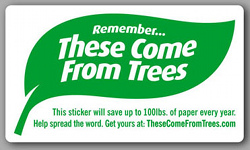
    These Come From Trees StickerEarlier this year, I was in the bathroom at my son’s elementary school when I saw the sticker you see at left on the mirror above the sink. I was intrigued by the promise that one sticker would “save up to 100 lbs. of paper every year.”

    So I visited the website (TheseComeFromTrees.com) and ordered a bunch of stickers for Matrix Group. Jessica, who is on the “green team,” put stickers everywhere we use paper: in the bathrooms, the kitchen, all the printers.

    Curious to see if the little stickers would make a difference, I started paying attention to the amount of paper waste in the women’s bathroom. Here’s what I found: in the women’s bathroom, the trash bin for paper hand towels used to fill up before lunchtime. Today, the bin does not fill up at all during the day. This is consistent every day. The women of Matrix Group are absolutely using fewer hand towels in the bathroom. Could the little sticker really be making a difference?

    We haven’t reduced the number of female staff, so that couldn’t be the cause. And I can’t imagine that we’re using the bathroom any less. So I started talking to my co-workers and they all agreed that because of the sticker, they are using 1 paper hand towel instead of 2. We had effectively halved our paper consumption!

    This got me thinking. How had a little sticker changed behavior?

    I attended a presentation last week by Don Schmincke of the Schmincke Research Alliance. He effectively articulated why management consulting doesn’t work: You can’t change behavior by changing the process. You need to change people’s beliefs in order to change their behavior. People need to believe and understand why doing something is important and necessary.

    So how did the little sticker make me change my beliefs? In this case, I don’t think the sticker changed my beliefs, but it did help me connect the dots between trees and my paper consumption. The little sticker also made it easy for me to do good: just think about where paper towels come from and use fewer!

    This reminds me of signs that remind us that stormwater drains go into a nearby river or bay. Even though I already don’t litter, I’m extra careful when I see that a gutter or drain will dump into a body of water.

    Or how about the gauge in my Honda Hybrid that tells me how many miles per gallon I’m averaging on a tank of gas? There is a number that I shoot for with every tank. When the gauge tells me I’m below that number, I look for ways to change my driving to up that number: I coast more, I don’t speed, I use distance to slow down, I turn off the AC, yada, yada.

    The question is: in our daily lives, what other signs and reminders could help us be more productive, healthier, greener, nicer? What labels and signs have helped you make a difference in your life?

    P.S. I hope you’ll consider ordering stickers for your home and office. Heck, I’m thinking of buying a bunch and plastering them in bathrooms of bars and restaurants all over town! Won’t you join me?

  • AppSumo

    AppSumo

    For tech geeks only, you’ll get daily deals on books, training, development tools, videos and more. The deals are great and the copy is hilarious.