Matrix Group International

Tag: Project Management

  • New Year’s Resolutions For Your Website in 2024

    New Year’s Resolutions For Your Website in 2024

    It’s the New Year and all of us are bubbling over with resolutions. So many of us resolve to exercise more, be kinder, spend more time with family, and so on. What about our websites? Shouldn’t we have resolutions for making our websites, email, and social media accounts better?

    I am a big fan of Dan Pink, author of the best-selling books Drive, When, The Power of Regret, and so many others. He also has a video podcast that he calls the Pinkcast. Each podcast is only 2-3 minutes long and they’re full of amazing insights and advice. In this Pinkcast, he talks about how to make New Year’s resolutions like a pro. The process includes making a list of your regrets, picking the one thing that bugs you the most, and then focusing on just that in the new year.

    What Are Your Website Regrets?


    Getting back to your website, what are your regrets about your website from the last year? Here is what I hear from clients. They wish:

    • They blogged more often
    • They had better visuals on their website
    • They had cleaned up their website by deleting the old stuff and making sure what was left was current and fresh
    • Their website was better optimized for mobile
    • They had a better handle on their website analytics and what it means for their organization
    • Their content was better optimized for Google
    • Their site search was better
    • Their website did a better job of storytelling
    • Their join or registration process was easier
    • Their website templates were more flexible

    This is a pretty long list of regrets. Each of the items above is important and worth focusing on. BUT if you focus on all of them, it will be sometime before you see progress. AND not making any progress on your goals and resolutions early in the year could set you up for another year of regrets. So how and where do you start? 

    Pick 1 or 2 Regrets to Focus on in 2024


    Start by picking just one of your regrets, or maybe even 2, and turn them into goals. Which one is most important that if addressed, would yield the most benefit for your organization? 

    The key here is making specific enough goals that you end up with an action plan and a timeline. 

    For example, if one of your goals is to make your organization’s join process better, your action plan might have these steps:

    • Look at Google Analytics to see what kind of traffic the join page gets and where people abandon.
    • Meet with your membership database and marketing team to map the member join process and map the journey. Where are the friction points?
    • Ask your web team, AMS team or website vendor for suggestions for making the journey better.
    • Resolve to have something, anything done, by the first quarter of 2024.
    • Monitor the results weekly.
    • Repeat until the next set of improvements will bring in only marginal benefits.

    If your goal is to clean up the dead and outdated content on your website, your action plan might look like this:

    • Ask your web manager or web vendor to create an updated inventory of all of the content on your website.
    • Look at your Google Analytics to see where traffic is going and where it’s not going.
    • Do some searches on your site. Is old content dominating the results?
    • Resolve to make some decisions about 5 types of content, eg., news, blogs, annual meeting information, etc. A decision could be: Delete all but the last three years of news, or delete all but the last two years of annual meeting information (except session handouts, which will live in a separate database).
    • Set aside 1 hour per week to do this work. If you set aside too much, it will become onerous. If you allocate less time, you won’t make enough progress.
    • Distribute the work to a team of staff and monitor your work and results monthly, including whether and how traffic and site search are improving.

    Once you’ve got one one of your regrets tackled (at least for now), tackle the next one. And so and so forth. 

    Of course, your organization could opt for a total website redesign, which would presumably help you tackle a whole lot of regrets, challenges, and issues. Barring that, however, focusing on one thing at a time will give you the mental energy to actually make a difference on that item that’s been bugging you.

    What are your biggest website regrets from last year? What “regrets” are you planning on tackling first this year? Leave a comment and let us know!


    Need some help planning, strategizing, and/or getting the right technology in place to reach your goals and clear your year of regrets? That’s our expertise! We’d love to partner with you to help your organization thrive this year – in the digital space and beyond. Get in touch and we’ll schedule a time to tackle those “regrets” together!
  • Navigating Your Responsibilities as a Leader During COVID-19 Crisis

    Navigating Your Responsibilities as a Leader During COVID-19 Crisis

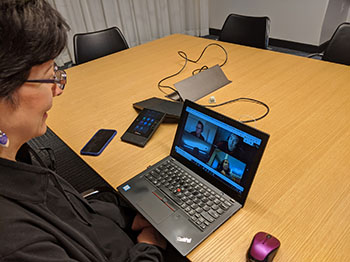
    CEO Joanna Pineda on video conferenceThere’s no question that this COVID-19 pandemic is proving to be a test of leadership. As a CEO of Matrix Group, I have responsibilities to my employees, my clients, my clients’ customers, my employees’ families, and certainly our own family.

    Many of you know that I’m a member of Vistage, which is the world’s largest executive coaching organization. My group of 16 CEOs (run by trained coach Peter Schwartz) has been meeting regularly to help us navigate this crisis. As Pete says, “CEOs bring the weather,” meaning we can bring sunshine and energy to any situation, or we can dampen spirits and projects with our attitude and energy level.

    So what’s working for me and my family?

    Work From Home Extended to All Staff

    My leadership team decided early to send everyone home. It’s been three weeks and I’m hoping that this decision will keep everyone healthy. Of course, it helps that last year, when we moved to our new office, CTO Maki Kato proclaimed that we would no longer have a server room. So the remaining on-premise services went into the cloud or moved to a SaaS (software as a service) platform. Even our office admin can work from home because our phone system allows her to answer and route calls from home, and our accounting system is in the cloud.

    Asynchronous Work

    Expecting staff to work the same hours is just not realistic these days. Many of us are home with kids, so I made the decision to allow asynchronous work. Since we have good task management systems and good oversight, our productivity has not gone down. While it’s exhausting for parents to work and school/oversee their kids, at least they can relax knowing that it’s okay to say “I’ll be offline for a couple of hours because little Johnny is having a meltdown and we are going outside for a couple of hours.”

    More Frequent Staff and Family Meetings

    I do a daily huddle with my husband and kids, a daily huddle with my biz dev team, a weekly huddle with my Directors, and a weekly huddle with all staff. These check-ins are more frequent than they used to be, but they’re allowing me to keep tabs on how folks are doing emotionally and physically, and determine who might need extra support. We start every meeting with a Matrix Group fundamental and ask if anyone would like to check in and tell us how they’re feeling. Note that we start with feelings, not tasks.

    Business as Usual, When Possible

    To the extent possible, we are working as if it’s business as usual. We are blessed and grateful that our work has been largely unaffected. Our clients need us to continue work on their websites, database and mobile apps; update their websites, keep communications flowing to their members, and provide back-up for sick staff. So while we’re working, we try to block out the terrible things happening outside our homes, because we can and because we must.

    One of my DEVs said that he sometimes almost forgets we’re in lockdown until the Instacart delivery guy comes around and he’s wearing a mask. I hope that by keeping our spirits up AND staying home, we are doing our part to stay healthy and not spread this sickness.

    Sharing Zoom, Making More Calls

    I’ve always been a telephone gal. I like to connect with people via phone. These days, I’m making more phone calls, to people I rarely call, or haven’t called in decades. It lightens my heart. I’ve also allowed my staff to use our Zoom accounts to organize Zoom meetups for their own families, friends and clubs. Janna is doing a virtual knitting group meetup every week. And last night, I think there was a meeting of werewolves.

    I don’t have time for a new hobby, extra baking, puzzles, or a TV marathon. But I do have time for some phone or Zoom calls, and my Duolingo streak (I’m learning Italian and practicing my French) continues!

    Preparing for the Worst

    My friend Heinan Landa wisely told me that I need to prepare for the time when people I know start getting sick or even start dying. How will I support a family member? A sick employee? The sick parent of an employee? How do we keep working going so that the company stays productive? How do I do this with compassion and understanding? I don’t have the answers but I’m working on it.

    What are YOU doing to help your company and family weather this storm? Please share. And be well.


  • How We’re Using Agile and SCRUM to Manage our Office Move

    How We’re Using Agile and SCRUM to Manage our Office Move

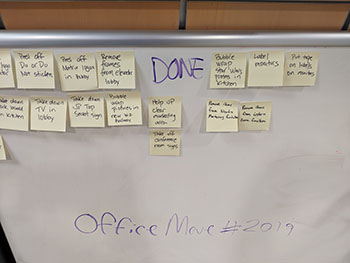
    SCRUM board for Matrix Group MoveMatrix Group is moving! We’ve been in this office for ten years and it’s time. Our needs have changed, and my creative team (yes, even developers are creative types, in my opinion) needs a change of scenery.

    As with all moves, there are about a million tasks that need to be done. So how are we managing all of these tasks, while still doing work for our clients?

    Ten years ago, we set up a SCRUM board for the weekend of the move. This time around, we’re using weekly sprints and a SCRUM board for the entire process. Here’s how we’re managing the work:

    • We have a Move Team that meets twice a week to see how we’re doing against the mammoth task list and timeline that we established a couple of months ago.
    • The timeline, tasks and decisions are stored in a Google doc. The tasks are grouped by week, so in essence, we’re doing one week sprints.
    • Maria is in charge of managing the Google doc, marking things done, adding details, and documenting decisions. I guess you could say she’s the SCRUM Master. Even though she’s remote, she knows everything happening as part of this move.
    • I’m the Project Owner because I’m the one who ultimately decided that we needed to move. And I make the high level decisions about what we’re moving, what the new office will look like, timing and budget.
    • To get the zillion tasks done, we set up a SCRUM Board in our lobby. Starting Monday, the Move Team has been writing down tasks that need to be done and sticking them on a TO DO board.
    • Staff have been grabbing tasks and doing them. Some tasks take 15 minutes, some longer. Once a task is done, the post-it is moved to the DONE board.
    • Move Team members add tasks to the TO DO board as they come up. The list of TO DO items will likely grow as we get closer to the move.

    The SCRUM Board works because:

    • Everyone can help, according to their availability and schedule.
    • We have a visual on the amount of work to be done.
    • The move becomes a shared responsibility, not just a task for the admin team or the Move Team.

    It’s only been a couple of days but already, the results have been amazing.

    During the actual move weekend, we’ll have music and food so that the task of setting up the new office isn’t a drag, but rather a party and a celebration!

  • When Redesigning Your Website, Don’t Confuse Goals with Requirements

    When Redesigning Your Website, Don’t Confuse Goals with Requirements

    I read a lot of RFPs and I attend a lot of website redesign kickoff meetings. The most important questions I ask are, “Why redesign? Why now?”

    I usually get answers like:

    • Our website needs to mobile-friendly
    • The website needs a faceted search
    • Our site search sucks
    • The website isn’t user-friendly

    While these are all perfectly good reasons, I think of these statements as requirements, not goals.

    When Matrix Group is working on a project, we strive to understand the measures of success. If we launch a site that is gorgeous, user-friendly, mobile-friendly and has a great search, will we have been successful? Sure… BUT is the new site generating membership leads, encouraging downloads of research, generating more revenue, raising awareness through better ranking in search, and ultimately bringing in more members and customers?

    Those are the goals we want to ferret out during kickoffs and discovery. How is the new site ultimately supporting the strategic and growth goals of your association?

    In my mind, we won’t know the answer for six to 12 months after launch. That’s scary. It’s so much easier to say the new site is a success because the board loves it and it’s easier to update. But after spending $50,000, $100,000, $150,000 or more and countless staff hours, don’t you want to be able to point to more quantitative results related to your mission and strategic plan?

  • Why Your CEO Needs to Attend Your Redesign Meeting

    Why Your CEO Needs to Attend Your Redesign Meeting

    I attend a lot of kickoff meetings. For  redesigns, mobile apps, custom databases, you name it.


    The best kickoff meetings are the ones where the CEO, Executive Director, the EVP or President attend, participate actively and provide insight. Why?
    • When the top person in the organization attends a meeting, staff know that meeting is important. Staff show up and pay attention.
    • The CEO usually has a good read on who the organization’s target audiences are and what they need. This perspective usually comes from their frequent interactions with members, partners, sponsors, the media, and Capitol Hill.
    • The top person is also usually the top spokesperson for the organization, they can best articulate the brand, mission and voice. 
    If your CEO opts not to attend, telling you he or she trusts your judgment, still ask for a 20 minute meeting. Ask him or her to rank target audiences and describe what success looks like for your project. Any decent CEO will give you 20 minutes and his or her insight will be an invaluable road map to success.
  • The Role of the C-Suite in Technology

    The Role of the C-Suite in Technology

    The Role of the C-Suite in Technology Planning and Implementation | www.thematrixfiles.netI had the honor of moderating a panel at this week’s annual conference of the American Society of Association Executives in Detroit, MI. The panel was titled, “The Role of the C-Suite in Technology” and featured 3 CEOs and 2 CIOs.

    Each panelist described his/her organization: mission, staff size, revenue, most important programs and key technologies. Every organization had a diverse mix of technologies that included an AMS (association management software), CMS (content management system), accounting, and sometimes LMS (learning management system).

    The key takeaways from the session?

    • The C-Suite has a key role to play in technology. Panelists reported more success with projects when CEOs are involved at the beginning, when they provide clarity about the focus of the organization and the technology initiatives that will support hat focus, and when they help secure adequate resources to make projects happen.
    • Establish criteria for CEO involvement. The panelists all agreed that CEOs should be involved in all technology projects and they shouldn’t get into the weeds. Instead, CEOs should be involved when the project is over x budget and when it affects a large or prominent segment of the organization.
    • Tie technology to your strategic plan. One CEO reported that technology represents 10% of her total budget so it’s imperative to tie technology to the mission of the organization and demonstrate impact to the membership and the profession.
    • Establish measures of success. Gone are the days of spending money on technology because you had to. These days, associations must report on the impact so it’s important to establish measures at the beginning of each project. Talk to your vendor about reports that will help you measure impact.
    • Establish relationships with key vendors. One CEO says he checks in regularly with his top vendors to see how his team is doing, get trend information, and get recommendations for the future. Another CEO said it just plain makes life easier when you can pick up the phone to get clarity or resolve a problem.

    Many thanks to Barry Pilson, my co-moderator from TESOL International Association. The fantastic panelists were:

    If you’d like a copy of the slides, you can find them here.


  • Why Limit Communications During the RFP Process?

    Why Limit Communications During the RFP Process?

    Why Limit Communications During the RFP Process? | www.theMatriXFiles.netLast week, we received an RFP (Request For Proposal) for a new content management system (CMS) and Associaton Management System (AMS).  The RFP was great. The work was totally in our wheelhouse, the association is a segment we go after, and there were some exciting elements to the work.

    But some parts of the RFP were confusing. So we called and asked for a meeting or requirements gathering call. We were told to submit questions via email, that the organization was not open to a meeting or call.

    “Why?” we asked.  The answer: “in the interest of creating a level playing field, we are only accepting emails.”

    We get this a lot and we almost always decline to respond to those RFPs. It’s not arrogance. On the contrary, we believe that we can’t truly understand the goals and requirements of an organization from a piece of paper. Written requirements also never articulate the non-technical requirements of a project, like the need to make a diverse and quarreling committee happy. We also find that a great meeting can unearth hidden requirements or deprecate others. Plus, you can’t underestimate the importance of chemistry and culture fit between two organizations and you can’t ever really explore that via paper.

    So clients and prospects, why refuse a meeting? Won’t an hour or two of deep, engaged conversation be ultimately worth your time? If one vendor stands out because they asked great questions, took the time to get to know your organization, developed a deeper understanding of your needs and ultimately submitted a better proposal, how is that a bad thing?


  • 2015 Top Resolutions for Managing Your Website Better

    2015 Top Resolutions for Managing Your Website Better

    resolutionsI was in the car yesterday and a radio talk show host was already talking about failed New Year resolutions! C’mon, it’s not even the middle of January! Surely we have a few more weeks (and months!) of trying to change behavior before throwing in the towel on failed resolutions.

    Me, I’m resolving to stretch more and eat less sugar. As for my company website and blog, here are my top resolutions. Don’t know if these resolutions will be easier or harder to live up to, but they’re equally important if you’re a marketer.

    1. Update your website more often and according to a schedule. We all get busy and somehow, website updates take a back seat to other things. I have clients who would never NOT publish their monthly magazine, but they routinely get “too busy” to update their website. But your website is arguably more valuable as an information resource to your members, customers and prospects, has a wider reach, accessible to search engines and available 24/7/365 to the whole world (but you already know all this!). Get posting!
    2. If you don’t already have one, create an editorial calendar that maps out topics by platform and week/month. For example, in December, my design team usually blogs about trends for the coming year. Even though we don’t know in January what trends we’ll be blogging about in December, we know that we’ll have at least a couple of posts on the topic. So that topic goes into the calendar and we assign appropriate staff.
    3. Add video to your toolbox. Video continues to rock the web. Pages with video get more views and visitors will spend more time on your site, etc., etc. So what’s stopping you? You don’t need a gigantic budget (although budget always helps!). Create screencast that shows people how to navigate your members-only site or interview senior staff and members about challenges facing your organization, industry or profession. Video adds authenticity to your website more deeply than text and images.
    4. Take your analytics to the next level. I was talking to a client yesterday about a much anticipated microsite they had just launched. He was happily reporting on the usage that the new site was generating, including referrals from their blast email. If you’re not already doing it, you should be checking your usage reports regularly and this data should be guiding your marketing decisions. This year, resolve to integrate your analytics with your CRM so that you know *who* is visiting your website. What percentage of your traffic is coming from members? Primary contacts? New members? What are members interested in doing on?
    5. Get serious about mobile. If your website isn’t responsive, if you’re not thinking about a mobile app, and/or if you’re not looking at your mobile traffic, 2015 is the time to get serious about mobile. Making your website mobile-friendly will generate an explosion of mobile traffic — promise! While you’re at it, make sure your emails are responsive as well since more email is read on a phone than a desktop these days.

    Well there you have it— my top 5 resolutions. Stuff you already know. So just do it.

    What are your resolutions?

  • Tips For Keeping Your Office Open During a Snowstorm

    Tips For Keeping Your Office Open During a Snowstorm

    SnowstormLast Wednesday afternoon, with not one snowflake on the ground, schools and local jurisdictions were announcing closures in advance of Thursday’s monster snowstorm. In the past, I would gotten up early the day of the storm to make the call re: keeping the office open or following the federal government’s lead and close the office. But with all the remote technology we’ve invested in, it doesn’t make sense to close the office anymore when there’s inclement weather. While I’m sure my staff would have loved a snow day, we work so much from home these days anyway, what’s another day? Besides, our out of town clients really don’t care when the DC area shuts down, really. Here’s how we make it work:

    • Plan for work at home. If we know there’s going to be bad weather, I don’t wait until 5am the day of the storm to make the call. I tell everyone to use their best judgment and work from home is approved in advance. We talk about who’s going to be doing what, the admins make sure conference calls don’t require an attendant, people with laptops bring their machines home, etc.
    • We work hard to allow every staff member to work from home. I’ve heard some say keeping the office open and asking everyone to work from home is not fair for staff members whose jobs require them to be in the office. At Matrix Group, we’ve worked hard to make every job possible from a remote location, if not all the time, at least some of the time. For example, the admins can monitor the voice mailbox, monitor the admin email box (we ask clients to send emails to that mailbox if they want a call back), use our VOIP system to forward calls, do data entry on our intranet over the VPN, do bookkeeping over the VPN, put packets together, make calls, etc.
    • The show must go on. Our policy is “It’s business as usual, even if we’re at home.” This means calls and meetings still happen, brainstorming still occurs, and quick questions are still asked and answered. We don’t wait until we’re all back together to do work, collaborate, get questions answered.
    • We have a fiber line for our VPN. This is critical because when all staff connect to the office network, development servers or intranet (which are only available over the VPN), our old, bonded T1 lines made it painful to work. The fiber line is awesome and has made a difference even for the people who always work remotely.
    • Everyone stays on Instant Messenger (IM). We have Jabber set up and  it’s only available over the VPN for added security. All staff are required to stay on IM when they are working remotely, and we must keep our statuses updated. Going to lunch? Taking a break to shovel? We keep our statuses updated. We have some standing IM chats (911, water cooler and team chats), and we can create chat rooms on the fly when a group needs to collaborate.
    • We use Web conferencing a lot. Some staff members like to use Skype, but for client meetings or even team meetings, we use Webex.
    • Tech support is always available. We know that being able to work from home depends on being able to connect to the VPN. So IT always has a person or two available to help staff troubleshoot their connectivity issues.

    On Friday, about half the staff came in to the office, while the other half remained at home. Honestly these days, I can’t tell half the time where people are because we do a good job of staying in touch, using our calendar and IM to broadcast our statuses, and keep work going. How about your office? What’s your policy when it snows and how did your office survive last week’s storm?


  • Who Should Be In Charge Of Your Redesign Project?

    Who Should Be In Charge Of Your Redesign Project?

    So your organization has decided to redesign its website. Who should be involved? Who should be in charge? And who should make the decisions? I get these questions a lot from senior executives who want to know how to structure their web team, who should be ultimately responsible for the success of the project, and how much staff time should be allocated to the effort.

    Who Should Be Involved?

    Figure looking at org chartSince websites represent your organization online and visitors expect to interact with all departments, it makes sense that there be involvement from throughout the company. But how to achieve this without creating committee gridlock? My recommendations are:

    • Invite as many people as you can to the kickoff meeting. The kickoff tells the whole company that the project is happening, what you want to achieve, and that you need their help. If possible, the CEO or someone suitably senior should be in attendance; this will let everyone know that the project is important and they should pay attention.
    • Arrange to interview at least one person from every department, functional group or constituency. These interviews will give you valuable insight AND build support for the project.
    • Don’t involve a large group in the day to day workings of the project; this will only slow you down. Do, however, arrange for periodic reports to your larger web team. You don’t want someone, somewhere, bringing the project to a screeching halt because you “didn’t talk to them” or you didn’t keep them in the loop as you made decisions.
    • Ask for volunteer beta testers. You will likely not get a lot of volunteers but the ones who do volunteer will be motivated and proactive, so get their help!

    Who Should Be In Charge?

    This is a tricky issue. Some organization put IT in charge, while others put  Communications, Marketing, Customer Service or Membership in charge. I think it’s a mistake to put IT in charge. Yes, IT will have the most facility with the technologies, but putting IT in charge of a redesign is like putting IT in charge of your membership marketing or print materials because they involve databases and computers.

    At Matrix Group, our most successful projects have been ones where:

    • There was a trio in charge, each representing an important constituency: subject matter experts, IT and senior leadership.
    • or IT was in charge of the process but subject matter experts were heavily involved and made the final decisions.
    • and the project manager on the client side was well connected in the organization, well liked, ran a great meeting, and able to help groups achieve consensus.
    • and there was high level senior sponsorship of the project. These senior staff members kept the senior leadership team informed and paved the way for resources from throughout the organization to be made available to develop content, test the website, etc.

    Who Should Make the Decisions?

    Another tricky issue. The answer is usually “it depends on the decision to be made.” In our experience:

    • It works well to get buy-in from a larger group when discussing navigation and content elements.
    • It works well to have the larger web team review and approve the overall design direction, copy writing style and content strategy. It’s really, really important that the *entire* organization be on the same page here.
    • The CEO or Chief Marketing Officer (or equivalent) should make the decision on the design and copy writing direction. And it’s always a good idea to brief the CEO and senior leadership team at regular intervals during the project.
    • The smaller web team should make the hundreds of decisions about layout, content placement, search, etc. Getting a committee to agree on these minute details will make the site build process torture.
    • Give each department the final say on their portion of the website, as long as their changes fall within the overall design parameters of the project. Which  means GR or Convention can’t decide to use a different font or color palette.

    How about you? Who do YOU think should be in charge? What has worked for your organization?