Matrix Group International

Tag: SEO

  • Are AEO and GEO More Important Than SEO?

    Are AEO and GEO More Important Than SEO?

    A client recently came to us because traffic to their site had dropped significantly. This organization relies on traffic from organic search to bring in prospective members and prospective course attendees. Looking at their analytics, we learned that it’s specifically traffic from Google that had dropped significantly. What was going on?

    If your site is experiencing a drop in referrals from Google, it’s probably because, as of the end of 2024, 60% of Google searches are zero-click. A zero-click search is when someone conducts a Google search, gets the answer they’re looking for without clicking, and calls it a day because they’ve gotten the answer(s) they need. Google used to refer us to the sites that had the answers we were looking for. Now Google gives us the answers.

    So what’s the answer? Today, the answer is AEO or Answer Engine Optimization and GEO or Generative Engine Optimization. AEO and GEO are the art and science of optimizing your website content for the AI answer engines like Google, ChatGPT, CoPilot, Claude, Bing, etc. We used to focus on SEO and search ranking, but today, it’s about providing Google and ChatGPT with the answers to visitors’ questions, and providing the content that the AI engines can consume and include as part of their reasoning.

    Does this mean SEO, or search engine optimization, is no longer important? Absolutely not! Sites that have deep, quality content, are quick to load, formatted well for search engine indexing, have lots of incoming links, and have high page rank are the sites that the AI engines are more likely to reference and cite. In other words, AEO and GEO are additional layers to your SEO strategy and today, they’re no longer optional.

    But will optimizing your site for the AI answer engines bring back the Google traffic? Sadly, I think not. As long as the answer engines provide quality responses to our queries (and the answers are getting better every day), we consumers will increasingly rely on the answer engines and NOT click on the site that was the source of the content in the first place.

    The challenge then for associations is to be THE SOURCE for the deep, hyper-specialized content that exists within the association’s content archive, among the subject matter experts within the staff and community, and in the heads of the community, the members themselves. 

    In other words, if I’m looking for general, consumer grade content to a question, I will likely get a high quality and accurate response from ChatGPT. But if I want the latest research, best practices, or obscure references, I need to go to the community where this deep knowledge exists – associations! Under this scenario, associations must double down on being found as the community where the deep knowledge exists, and educating members and prospective members on how and why the community and specialized knowledge cannot be gotten from an AI engine.

    I know, this is easier said than done, but this is the existential challenge for associations today. 

    So, is your association ready for the AEO and GEO wave? How are you distinguishing your association from the AI engines as the place for specialized knowledge AND community?

  • What Are Natural Language Queries and Featured Snippets and Why Do They Matter?

    What Are Natural Language Queries and Featured Snippets and Why Do They Matter?

    When it comes to search engine optimization there’s one very important thing to always keep in mind: Google doesn’t like cute, Google likes clarity. 

    When writing any online content, whether it’s for your blog, about us page, store or resources, you must always consider the Google gods, and craft your content accordingly. While “writing for Google” can sometimes feel inauthentic, like you’re trying to game the system, it’s important to remember that what is good for Google and SEO, is also good and beneficial for your target audiences. It’s actually a win-win! 

    Two very important factors to consider for search engine optimization (SEO) when crafting your content are natural language queries and featured snippets.

    What are natural language queries?

    Natural language queries are web searches reflecting your normal spoken language like you might express if you were asking the question verbally of another person. As voice recognition features become more and more commonplace, this method of searching behavior becomes more relevant and deserving of attention.

    What are featured snippets?

    Featured snippets are special call-outs shown in Google results above the link to the result from which the snippet came. They are selected by Google systems that determine whether content on a page would make a good featured snippet for a user’s search request. Google results with featured snippets extend the authority of the page for the given search.

    Here’s an example: a few years ago, I blogged about canonical URLs. Go ahead and perform a search in Google for this exact string: 

    what is canonical url and why should i care

    You don’t need to enclose the string in quotes, just paste it into your browser and search. Notice the very first result for this particular query is my blog post titled with the same text. This demonstrates the power of natural language queries; by making the page title reflect the way a user might ask a question, Google has given it priority. Despite the millions of web results describing canonical URLs generally, this one rises to the top for the given search string.

    But notice something else: Google also provides a featured snippet where, from within the page, it found a paragraph sufficiently, and briefly, offering an answer to the natural language question.  The page didn’t include anything special around that paragraph and, in fact, you cannot “tell” Google what to use as a featured snippet, this decision is made by their algorithms. But the page was written to be informative and address a specific question.

    So what does this mean for me?

    First, consider pages of your site that answer questions about your mission or purpose. For example, you might have a page that describes “Our Mission” or “About Us” and consider the natural language query users would ask to find that page. It is unlikely that a Google search for “Our Mission” will find your page but a query like “what does {your organization acronym} do?” will. Consider giving pages like this a title that better reflects a natural language query.

    Second, consider the other calls-to-action placed on the pages above. If someone finds your mission page directly from a Google search, what else do you want them to see, learn, or do?  What authoritative message do you want them to hear regarding your position within your industry?  Once you start getting natural language queries to land on these pages, they become more important as entry points to your website that inform and engage your audience.

    Lastly, consider the content on pages like this and make sure they have a concise description or answer to the natural language query you’ve designed for them. This will encourage Google to use that content as a featured snippet. You don’t want the user’s journey to end by reading the Google snippet and going no further, so make it engaging as well as informative.

    Hopefully this helps you with these concepts and enhances your content strategies!


  • What REALLY Matters for Search Engine Optimization (SEO)

    What REALLY Matters for Search Engine Optimization (SEO)

    I do a lot of SEO consulting for clients. Clients want to know: how to optimize their websites for Google, how to drive more organic traffic to their sites, and what keywords they should focus on for optimization.

    At Matrix Group, we spend a lot of time on the mechanics of our client sites so that search engines can easily find them and index content.

    But here’s the single, most important question I ask clients to ask themselves when developing their content and SEO strategy:

    What are people typing into Google where YOU and YOUR SITE are the answer?

    Because most people want to go direct to content AND because Google is so darn effective, a huge chunk of your members, customers and potential customers simply type a natural language query into Google. They will type questions like:

    When is the ABC conference?
    What do I need to do to become a ….?
    What is the best training for (fill in the blank) professionals?
    How many credits do I need to become a ….?
    How much does it cost to…?

    If you don’t know what your members and customers are typing into Google, find out by:

    • Looking at the incoming organic search terms driving traffic to your site. Most of this information is blocked by Google, but it’s worth looking to see what’s available in your Google Analytics and Google Webmaster Tools.
    • Looking at the search terms and phrases people type on your site search. If you aren’t logging this, start now and look at the report monthly.
    • Asking your customers what they typed into Google recently where they either expected to find a link on your site or expected a resource related to your profession or industry.
    • Going to https://trends.google.com and researching the top queries related to your business.

    Once you have a collection of these valuable search queries, make sure you have content (and lots of it) that matches those queries. Heck, you should be writing blog posts, news items and FAQs that perfectly match your most important queries.

    Yes, your website should also be mobile-friendly, be well structured, have clean CSS, have permalinks, have alt tags, yada, yada. But all of these technical requirements mean nothing if you don’t have the content your target audiences are looking for. Give it to them and make it easy for Google to match your content with your customers.

  • What is GDPR and What Does it Mean for My Organization?

    What is GDPR and What Does it Mean for My Organization?

    Guest post by Tanya Kennedy Luminati, MatrixMaxx Product Manager

    There is a new acronym taking the world by storm right now: GDPR

    If you’re in Europe, you’ve probably heard of this. If you’re here in the United States, you may not have heard it … yet. But the concepts of Privacy and Security that it champions are moving to center stage all over the globe, so it is important we all pay attention and start our process shift now.

    What is GDPR?

    The nations of the European Union (EU) take privacy very seriously, and each country previously had its own laws. The General Data Protection Regulation (GDPR) was approved by the EU Parliament in 2016 in order to unify the various data privacy laws across Europe.  The EU has a dedicated website where you can read the full GDPR details, and it is quite a long read.

    Who does GDPR apply to?

    If you hold and process any Personally identifiable information (PII) in any of your systems for anyone living in the EU, this impacts you.

    PII is any data that can be used on its own or with other information to identify a particular individual: name, phone, email, address, etc. Processing is just about anything you do with that data. Any type of marketing, for example, is considered to be processing. The GDPR states that you can’t process PII data unless you have lawful grounds to do so. The GDPR affects your systems, your processes, your data, your customers/members, your 3rd party vendors, and your partners.

    Doesn’t GDPR only apply to European-based Companies?

    No. It applies to any organization offering goods/services to EU residents. The EU refers to this concept as Increased Territorial Scope (extraterritorial applicability).

    When do these new regulations go into effect?

    GDPR actually started 2 years ago. However, enforcement doesn’t begin until May 25, 2018. So as the humans we are, everyone has waited until the last minute to grasp these new regulations with both hands.

    What are the key facets of GDPR?

    You must have grounds for the lawful holding and processing of data. These include:

    • Consent
    • Fulfilment of a contract
    • Legal obligation
    • Necessary for interests of the individual or for the greater public good

    Consent is getting a great deal of attention as marketing now requires explicit “provable consent” in order to be considered lawful under the GDPR. For example, if you haven’t explicitly asked an EU resident in your database if they’d like to hear about some of your upcoming events, you probably can’t lawfully market to this person!

    Other important facets beyond the concept of lawful processing and consent include:

    • An individual may request access to all of their personal data. This may include any information stored in your main database, including contact information, login tracking, clickthrough tracking in a 3rd party marketing system, transaction data, etc.
    • An individual may request that their personal info be removed. (a.k.a. The Right to be Forgotten), meaning that they can request that their records be deleted or anonymized in such a way that it is no longer personally identifiable. (This includes data in backups and in any 3rd parties systems that may have acquired the data from you.)
    • Data Breach Notification to certain authorities and individuals within particular timeframes.

    Are Membership Organizations (Trade Associations, Professional Societies), Not-for-Profits, and Non-Profits exempt from GDRP?

    No. They are not exempt.

    But … Wouldn’t someone joining my association as a member be implicitly giving me lawful grounds to process their data?

    Not necessarily. If they join as a member, it would probably be lawful processing to send them a confirmation of their membership, but you can’t start marketing association products and services to them without consent. This is an area where a GPPR consultant could be useful to you, if you have a lot of EU residents in your data or you actively market/appeal to persons living in the EU.

    How is GDPR going to be enforced?

    The penalties and fines, which will kick in starting May 25, 2018, are steep. There are obvious ways that EU-based organizations and foreign organizations with EU locations can be penalized. The question of how external organizations will be held to GDPR compliance is being discussed in a variety of articles and posts.

    Next up, we’ll discuss how to become GDPR compliant. Stay tuned!


    This is the first of severalMatrix installments on GDPR, Privacy, and Security. Please note: we at Matrix are not lawyers or GDPR consults; do not take this info as absolute. Use this information as a starting point in:

    • Gathering the documentation, processes and tools you need to assess and support your obligations under GDPR
    • Planning for a future where respect privacy and security are implicitly baked into our all our processes and systems, regardless of country


  • Why Every Organization Should Care About Search Engine Optimization (SEO)

    Why Every Organization Should Care About Search Engine Optimization (SEO)

    Internet search conceptEvery once in a while, a client or prospect will tell me their organization doesn’t care about search engine optimization (SEO). Why? I get these reasons:
    • The organization targets a very specific, very niche set of audiences.
    • The organization has a defined universe and they are largely known to the association and vice versa.
    • The organization doesn’t have e-commerce on the website so they don’t need to reach out a wide audience to make sales.
    Even if all of this is true, I say that EVERY organization should care about SEO because:
    • A huge number of people use Google (or another search engine of choice) to access a known website. We know this because when Google used to make search terms available, it was shocking to see that so many people type specific URLs into Google. Evidently, there are people who just always start with search without even realizing it.
    • Your target audiences may know your organization very well, but they may not know your URL off the top of their heads. So what they do? They Google for it. Again, looking at search terms tells us a whole lot of traffic comes from Google, from people who know the specific organization they seek.
    • Many, many people rely on Google to search a website because the internal site search sucks. During many user interviews, members tell us they use Google to find what they are looking for on a specific site because the site search wasn’t effective.
    • If your organization is a trade association, you may “know” all of your member companies, but new member company staff may not who are you and what your organization does.
    • No matter how good your marketing and how often you mail or email, the vast majority of your customers do not know everything your organization has to offer. For example, Suzie Smith attends your annual conference ever year but she doesn’t know that you also publish a certain publication on a specific topic, so what does she do? She Googles for it!
    If your website isn’t search-engine friendly because you think SEO doesn’t matter, I hope you’ll think again. Even people who know your organization still rely on Google to find your site and search your site. If Google can’t find your site and can’t index the content properly, you may be losing out on traffic from the very people you think are going directly to your site.
  • The Promise of Universal Analytics: Custom Dimensions Can Show Who Is Visiting and What They Are Doing

    The Promise of Universal Analytics: Custom Dimensions Can Show Who Is Visiting and What They Are Doing

    AnalyticsMuch has been written about about Google Analytics (GA), which is now Universal Analytics. When you upgrade your account to Universal Analytics, a whole new world of reporting becomes available, including enhanced e-commerce reports, a more flexible tracking code that lets you track visitors across their devices (e.g., when people visit your website on a laptop, tablet and phone, as long as they are logged in, you can see session info), and a greater ability to filter and exclude criteria.

    But what I’m most excited about are Custom Dimensions. Custom Dimensions let you send custom data to GA. For example, some of my association clients are now sending the following to Google Analytics: member type, member status, special access levels, size of company, and special interests. Why is this valuable?

    Previously, GA was great mainly for analyzing WHAT people were doing on your website. We created endless reports about what search terms are referring traffic, the flows through the site, top pages being visited, top downloads, top abandons, etc. But with Custom Dimensions, you can now see, for example, what percentage of overall traffic is coming from members, traffic to meetings pages by meeting type, downloads by member type, whether or not Board and committee members are visiting your website, etc. While Google’s custom variables feature allowed similar functionality, Universal Analytics will allow businesses to leverage this data across devices, making it more meaningful and accurate.

    With Custom Dimensions, we now have more insight into WHO is visiting a website. Before you get too excited, remember that Google’s terms of service specifically disallows tracking that is personally identifiable. Which means an organization *could* set a tracking ID that is user-specific but that would violate Google’s terms of service. Instead, Google is giving us better tools to see which categories of people are visiting which pages and completing transactions.

    If you have some type of Customer Relationship Management (CRM) system or Association Managment System (AMS), you’d probably benefit from sending custom dimensions to Google. You’ll need help from your web developer since this data is in your membership database and must be sent to Google via a custom cookie. One last tip: this coding must be very precise and very clean. Extra spaces will cause the reporting to fail. Once in place, however, this code works flawlessly.

    Good luck finding new insights from your Google Analytics data!

  • When Is It Time to Implement Responsive Design?

    When Is It Time to Implement Responsive Design?

    Responsive design illustrated on multiple devicesA few weeks ago, I conduced a webinar on implementing a “Mobile First” strategy. By mobile first, my co-host Alex Pineda and I mean a strategy where you consider the needs of mobile users first. Why? Because mobile usage is growing faster than desktop usage, because mobile usage is greater than desktop in some countries (like India), and because designing for mobile (especially smartphones) is harder than designing for tablet and desktop. During the webinar, a big topic of discussion was, “When is it time to implement responsive design?”

    My answer to this question is: NOW. Here’s what I usually hear from prospects and clients.

    Objection #1: “My mobile traffic is tiny.” This might be true today but mobile usage is growing really fast. More importantly, every single one of our client sites that went responsive is now seeing huge increases in mobile usage, with mobile now representing double digits. This tells us that visitors keep coming back when you reward them with a great mobile experience.

    Objection #2: “Responsive is expensive to implement.” It’s true that responsive can add up to 20% more to the overall design and implementation budget. Whenever we can, we use wireframes and designs to explore ways in which websites should look and behave differently on different devices, based on the tasks we believe users need to accomplish on said devices. These discussions, the development work and the testing are often labor-intensive. The good news is that most CMS platforms (we like Sitefinity and WordPress) make it much easier to implement responsive design. In fact, if budget is limited, we can implement default responsive templates. So please don’t let budget stop you from going responsive with your website.

    Objection #3: I’ll wait until our next redesign.” While it’s tempting and certainly easier to embark on responsive when you’re in the thick of a redesign, unless your redesign is happening right now, I don’t think you should wait. Can you really ignore the needs of the 25% mobile-only audience and the 22% market share of mobile devices for overall traffic?

    Objection #4: Search isn’t that important to my online strategy. Even if you think your target audiences won’t look for your products and services via search, you can’t ignore this statistic from Search Engine Journal: 93% of all Internet traffic starts with search. Further, Google is demoting sites that aren’t mobile-friendly because 25% of search clicks are from mobile devices, and climbing.

    If you’re still not convinced, just look at your own mobile device usage and think about how wonderful it is when your favorite news or retailer site has a great mobile site and you can do what you need on a phone or tablet.

    It’s time to go mobile. It’s time to go responsive.

  • Just Say No to Adding More PDFs to Your Website

    We build a lot of websites at Matrix Group and most of them are loaded with PDF files. Clients post PDF files of their newsletters, their legislative updates, their magazines, their white papers, and on and on. While it’s easy to create a PDF from Word, InDesign, Quark or Illustrator, and yes, PDFs look pretty, I think organizations should post fewer PDFs and convert more of their content to html. Here’s why:

    PDF Files Are Not Search-Engine Friendly

    • The user experience when reading a PDF on a monitor or mobile device can be miserable. So many PDFs are formatted with columns, but since screens aren’t necessarily the same size as a printed page, readers often have to scroll up and down to read the same page or reduce the overall size of the PDF, which makes reading the PDF much harder.
    • If you post your entire newsletter or magazine as one PDF file only, you can’t post individual articles to other parts of the site and you can’t tag them by category. Imagine this: a visitor types “green energy” into your site search and she gets back your organization’s legislative position on green energy, several news items, articles from past issues of your magazine, and articles from past issues of your newsletter. If you post your entire newsletter as a PDF, your site search will pull up the issue, but visitors will have to navigate the entire issue to find the specific article.
    • PDF files often don’t contain proper titles needed by search engines. For example, most people just use a PDF creator to create PDFs, never bothering to populate the file’s properties, including Title, Author, Subject and Keywords. Remember that Google first looks at the file’s title and properties to try and figure out what a page is about. If there isn’t a helpful filename or document title, Google scans the document’s content and tries to guess what the page is about, often incorrectly.
    • PDF files don’t contain the markup that provide helpful information to search engines. For example, html files usually contain title tags, body tags and headline tags. The text in your H1 tag provides search engines with the most important topic covered in the the page. PDFs do not contain H tags, again leaving the search engines to guess the topic or most important content in the document.
    • You can’t add mobile styling to PDF files. These days, we use mobile stylesheets and responsive design to make pages behave appropriately for different size screens. A legislative alert on a phone might turn into a single column of text, with no left or right rails; this makes the text readable on a small device without a lot of pinching and zooming. But a PDF stays fixed, which means a person on a phone has to zoom in and out to read your alert; not a great user experience.

    When Should You Use PDF Files?

    • If you want to post an exact replica of the original document. For example, if your organization sent a letter to the White House, you may want to post the text of the letter as html to the site and have a linked PDF of the original letter.
    • If the document needs exact styling. I often see organizations post information in html about a conference and allow visitors to download the beautifully designed brochure as a PDF.
    • If you want to make the full-text of the reference document available. Some of my clients issue lengthy, detailed research reports. To me, it makes sense that they post executive summaries in html but post the entire report as a PDF because most people will want to download or print the full-text of the report.

    Ways to Make Your PDFs More Search-Engine Friendly

    If your site does have PDF files, follow these tips to make the files more findable by search engines.

    • Create PDF files from original electronic files or OCR a scanned document. This way, the text of the document is available to the search engines.
    • Fill out the file’s properties.
    • Rename the file to something meaningful to search engines. If web pages need friendy URLs, PDF files need meaningful and friendly titles as well.

    Want to learn more?

    • Duff Johnson talks about why PDFs are problematic for search engines.
      Joel Geraci has great tips for making your PDF files more search-engine friendly.
    • Mark Aaaron Murnahan talks about how the heading tags improve search engine placement.
    • Galen DeYoung has 11 tips for optimizing PDFs for search engines.
  • The Personalized, Social Web or Why Your Organization Needs a Social Sharing Strategy

    The Personalized, Social Web or Why Your Organization Needs a Social Sharing Strategy

    SEO (search engine optimization) changed forever when Google integrated Google+ into its Google search results a few weeks ago. Basically, Google is now personalizing (to a much greater degree than before) its search results, based on the links and +1 recommendations of people in your Google+ network. Check out the example below.

    I did a search for Don Cornelius, creator of Soul Train, on Google. At the top of the search results, there’s a note that tells me here are 20 personal results, or 20 links or posts that mention Don Cornelius by people in my Google+ circles.

    If I click on personal results, I see the full search results list, but with the personal links at the top of the list. Holy smokes! That means that the Washington Post article on Don Cornelius, which was previously at the top of the page, just got overtaken by a link on nerdist.com because someone I follow and interact with a lot posted that link on his Google+ page!

    This is just another example of how Google is heavily favoring its Google+ social network and another giant reason to:

    • Create a Google+ page
    • Encourage social sharing of your content across all social media platforms (e.g., Facebook, Twitter, Google+), but especially Google+

    A study by Nielsen back in 2009 found that 90% of people 25,000 people surveyed “trust recommendations from people they know, while 70 percent trusted consumer opinions posted online.” This makes intuitive sense. Think of all the people in your Facebook network who ask for recommendations for a contractor, camera or pediatrician. And consider the crazy, huge influence of mommy and wedding bloggers.

    So, what’s your social sharing strategy? It could be as simple as making sure there is a Share This link on all of your articles, meetings and products. Or you could actively ask your customers and members to recommend your products and service to their networks in your e-mails, tweets, and e-newsletters.


  • DecisionPath Consulting Website Redesign

    DecisionPath Consulting Website Redesign

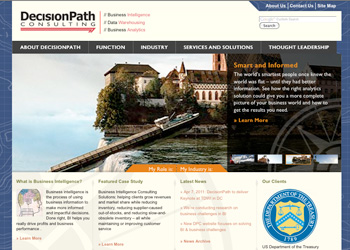
    DecisonPath, a business intelligence consultancy, called on Matrix Group for the redesign of its website, which needed to better communicate the company’s capabilities and experience. More importantly, DecisionPath’s staff wanted the website to serve as the company’s primary marketing vehicle and lead generation tool. SEO and usability were critical components of the website’s design and content.

    Matrix Group:

    • Developed a user-friendly navigation with a clear understanding of user motivations and behaviors.  Matrix Group considered all types of users for this website, from individuals looking for consulting services based on their functionality within their company to more industry focused.
    • Created a clean, updated design that positions DecisionPath as the “agency that can help its clients build its customers’ business by making their businesses’ smarter.  The new website now provides visitors with information on how business intelligence, analytics, and performance management, can be used to help solve companies’ challenges. The website also offers case studies, demonstrating the company’s expertise in utilizing business intelligence into helping clients’ find solutions to their business problems.
    • Implemented a content management system (WordPress) making it easier for DecisionPath’s marketing staff to maintain the website and ensure the information remains up to date (Previously, the entire site was entirely static HTML and required more technical knowledge to update).

    Visit the DecisionPath Consulting Website.