Matrix Group International

Tag: Gadgets

  • 2024 Gift Ideas for the Techie in Your Life

    2024 Gift Ideas for the Techie in Your Life

    The holiday season has arrived, and with it comes Matrix Group’s annual techie gift guide—packed with ideas straight from our team! Whether you’re shopping for a gadget-loving coworker, a nature enthusiast, or that one friend who’s always freezing, these staff-approved picks are fun, practical, and sure to bring a smile. Who knows? You might even find a little inspiration for your own wish list!

    Know someone who’s always glued to their phone but keeps saying they need to “disconnect”? This could be the perfect thing for them. It’s a charging box that doubles as a tool to help you unplug by gamifying phone-free time. It’s sleek, simple, and surprisingly motivating.

    Have a kiddo who’s an animal lover? Or maybe a friend who’s passionate about conservation? This gift is adorable AND educational. You get a plush animal that comes with a code to track a real-life animal in the wild. 

    Keeping track of everyone’s schedules can feel like a full-time job. This digital calendar sits on your countertop and keeps everything organized in one place. It syncs between multiple calendars AND has a chore tracker, shopping list, dinner planner and more to keep everyone on the same page. It’s a lifesaver for busy parents or anyone trying to juggle a lot of moving parts. 

    For the maker in your life, these tools are next-level. Laser cutters and resin 3D printers have become a lot more affordable lately, and the possibilities are endless—custom gifts, cool decor, functional items, you name it. If you know someone who’s crafty or loves a challenge, they’ll flip over these.

    Print your favorite photos right from your phone in seconds! This is great for adding little keepsakes to birthday cards, making memory boards, and even just sticking pictures on the fridge. A must for anyone who loves the tactile joy of a printed photo!

    If you haven’t experienced the joy of saying, “Alexa, turn off the lights,” you’re missing out. You can dim the lights, change colors, or even turn them off from bed with just your voice. It’s like living in the future—but cozier.

    Do you know someone who’s always experimenting in the kitchen—or maybe just someone who really loves ice cream? The Ninja Creami lets you whip up custom ice cream, gelato, sorbet, or even dairy-free alternatives right at home. It’s super fun to use, and the results are delicious! Joanna is obsessed. Be sure to ask her for her favorite recipes! 

    This is for the nature enthusiast in your life (or anyone who just likes the idea of spying on birds in their backyard). It’s a bird feeder with a built-in camera that snaps photos and IDs the birds for you. It’s kind of like your own personal David Attenborough moment every time you check your phone.

    For anyone who’s perpetually cold (hi, that’s me), these are such a game-changer. They’re rechargeable, which makes them way more sustainable than the disposable ones, and they’re small enough to toss in a coat pocket or bag. Great for winter hikes, soccer games, or just typing in a drafty office.

    LEGOs for grown-ups! You build tiny plants that look adorable on your desk or shelf. It’s the kind of project that’s relaxing to work on and satisfying to show off once it’s done. Also great for those with a brown thumb. 

    For the camper, hiker, or anyone who likes to be prepared, a solar charger is one of those “Why didn’t I get this sooner?” items. They’re great for keeping your phone or other devices charged when you’re off the grid or dealing with a power outage.

    What hot tech toys and gadgets do you have your eye on this holiday season—for giving or receiving? We’d love some inspiration from you, too!


  • 5 Great Gift Ideas for the Techies in Your Life

    5 Great Gift Ideas for the Techies in Your Life

    Struggling to find the perfect gift for the techies in your life? With technology continuing to evolve at a breakneck speed and the fact that techies can be so particular (we can say this because we know: we are them!), it can be tough to know what gift to give that will be a joy and delight, and not outdated.

    To give you a few great ideas, I polled my staff to see what gadgets they’re loving and what’s on their holiday wishlist. Here are the hottest tech gifts for this holiday season according to the Matrix Group staff:

    🎁 For the Coffee-Guzzling or New Parent Techie: Ember Temperature Control Mug

    Price: $119.95

    For everyone who enjoys hot beverages throughout the day, enjoying it at the right temperature has always been a minor inconvenience. It’s usually too hot when it’s first made. But if you wait too long to let it cool off, then it’s too cold. 

    With this handy gift, you can set the ideal temperature for you with a phone app and always enjoy your beverage at the right temperature! It even has a sleep functionality that will turn off and turn back on as soon as the mug detects movement of the liquid inside.

    🎁 For the Outdoorsy Techie: Bosch 12V Heated Vest Kit

    Price: $149.00

    Have a significant other that loves spending time outdoors or is someone that’s just cold all the time? This heated vest could be a game changer! With 3 different heat levels and a run time of 1, 2 or 3 hours for each level, this makes for a great gift that’s useful year round!

    🎁 For the Child Techie: Osmo Coding Family Bundle

    Price: $79.99

    One of the greatest gifts you can give your child or a friend’s child is the gift of coding. As one of the highest paid professions and a guaranteed study that can lead to a career in video games, the Osmo coding family bundle is designed for kids 5-10 that teaches coding via connecting colorful blocks and seeing the results on an Ipad. The other great part? You can learn to code as you help out!

    🎁 For the Maker Techie: Cricut Maker

    Price: $379.99

    Got a significant other with an artistic streak that could use a device to take it to the next level? The Cricut Maker will let them take all kinds of different artist patterns or designs and have a computer cut them out on hundreds of different material types! With 13 tools to cut, emboss engrave, etc., this gift will provide endless hours of creative fun and is powerful enough for those who create art on a professional level!

    🎁 For the Organized Techie: P-Touch Smartphone Label Maker

    Price: $39.99

    For those who love organization, the P-Touch Smartphone label maker provides an extremely portable and convenient solution for those who need labels on a daily basis. Simply download the P-Touch app and connect to it wirelessly to print labels using over 450 symbols and a variety of font styles. 

    What’s on your tech wish list this holiday season?

  • 2019 Top Techie Holiday Gift Ideas from Matrix Group

    2019 Top Techie Holiday Gift Ideas from Matrix Group

    Looking for the perfect gift for the techie (or not so techie) in your life? Here are some holiday gift ideas from the staff of Matrix Group.

    • The Ring Fit for Nintendo Switch. It uses a video game to get you active.
    • ShiftCam is a multi-lens case for your iPhone that allows you to take pictures like a pro, without having to carry around a bunch of extra attachments.
    •  Turn any device into a smart device with this smart plug. Works with Alexa and Google.
    • Everykey is a Bluetooth device that uses military grade security to secure your passwords and unlock your devices. Just connect to your compatible devices viaBluetooth, and Everykey unlocks your phone, laptop, tablet, and other devices when you are physically nearby and locks them back down when you walk away. And if your Everykey is lost or stolen, you can deactivate it instantly through the Everykey App, or by calling their service directly.  It also works for websites.
    •  Speaking of security, do you entire family a favor and sign up for LastPass family. Then spend Christmas morning setting up everyone’s password manager. It’s a pain to get all of your passwords loaded up, BUT once they’re in, you will save loads of time because the LastPass browser plugin will pre-populate your usernames and passwords. Even better, you can create the hardest passwords and sleep easy, knowing you don’t have to remember them AND they’re secure!
    • P4 are wearable language translation earbuds that work with the dedicated Aibuds iOS app to translate 36 languages in real time.
    • Check out the ultra modern, but retro looking keyboards and mice!
    • A levitating turntable, because why not?
    • Some Matrix Group staff swear the Roku is the best streaming device ever!
    • Williams-Sonoma has a whole collection of Star Wars themed bakeware and cookware. I want the Darth Vader instant Pot!
    • If you’ve got the cash AND the space, how about an Avengers-themed arcade machine?
    • I love these LED and NeoPixel gifts from Adafruit!
    • When my family went out of the country for Thanksgiving, my husband and I didn’t bring our laptops, but we did bring a really nice Chromebook. I can do almost everything through a browser these days!
    • How about a Cricut for the crafter in your life? This thing will cut almost anything!  Gosh, even I want one of these!

    If you buy something cool this season, please post a comment with a pic. And if you’ve got an idea, I’d love to hear it!  Happy Holidays!

  • Matrix Group’s Favorite Tech Tools for Staff Productivity

    Matrix Group’s Favorite Tech Tools for Staff Productivity

    hand with tool coming out of laptopLast week, a group of Matrix Group staff hosted a Tech Talk on our favorite tech tools. The Tech Talk was inspired by a conversation with a client who wanted to know more about Slack, one of our favorite tech tools.

    At Matrix Group, we use a lot of tech tools to do our work, stay organized, stay productive. Here are some of our favorites:

    Password Managers

    We handle hundreds of passwords for our clients. It would be downright irresponsible not to have a way to manage these passwords, so we use Secret Server from Thycotic. The rule is: the minute you get a new password, you enter the credentials into Secret Server. And if a client happened to email you the info (we ask them not to, but you know how it goes), we immediately delete every email that contains the info. With Secret Server, we have multiple access levels, a great search, and an audit trail.

    For personal passwords, we like LastPass and Dashlane. It’s work to get it set up, but once the majority of your passwords are in, the convenience of passwords auto-populating and syncing across devices is life changing.

    Speaking of passwords, we sang the praises of two-factor authentication. At the enterprise level, we use Duo and love that we get a push whenever we’re trying to log into a service or website that requires two-factor. Jaime said it best when he said, “I sleep at night knowing that even if the bad guys got my username and password to something, they still wouldn’t be able to hack my accounts because they wouldn’t have access to my second factor, which could be a code or a swipe in an app.”

    Slack

    Slack is a collaboration tool on steroids. To call it instant messaging isn’t quite right.

    • We use it for instant messaging, document sharing, group chats, group calls, and screen sharing. Maki’s IT team uses Slack for their team meetings and screen sharing with staff.
    • We have governance around when to use and when not to use.
    • We’ve integrated with some of our other tools, e.g., Google docs and Jira.
    • We have a channel for every client and functional team to promote collaboration.
    • We allow a bit of fun through emojis, funny gifs and our watercooler channel.

    Did I mention that we seriously love Slack?

    Document Management Through G Suite

    About a year ago, we migrated our file server to Google Drive and never looked back. We love having access to all of our files, from anywhere, on any device. And since our Google Drive is protected with two-factor authentication, we’re confident that our data is as secure as it can be.

    • We have team and client folders.
    • When creating a document, we don’t save to our personal drives. We saved to the proper directory in the shared drives.
    • Everything goes into Drive: contracts, proposals, project specifications, user personas, site maps — everything!

    Document collaboration has been a dream in Google docs and Google slides. On a regular basis, four of us will work on a presentation together and get so much done because we could all access the document at the same time.

    Zoom

    Zoom has fundamentally changed our meetings with clients and remote staff. Although we had Webex before, Zoom is just easier to use, the recordings are easier to download, and it integrates nicely with our new conference room.

    Zoiper

    When we moved to our new office, I asked staff if they wanted a physical phone handset. Very few people raised their hands, so we didn’t buy any. Instead, we gave staff who wanted a phone a license to Zoiper and a Bluetooth handset. This way, staff can make and take calls from their own extension from anywhere, as long as they have their laptop turned on. This means staff who are working from home, at a conference, or at a coffee shop are easily available via their extension.

    And for the folks who don’t have Zoiper? Turns out most staff members don’t really take or make business calls on their own. They are either in a meeting in a conference room (all of our conference rooms have nice speaker phones) or they are with a project manager who has a Bluetooth speakerphone. For the rare times we need to call specific staff members, we use Slack.

    Brave Web Browser

    Jaime sang the praises of Brave, a fast, lightweight and privacy-obsessed web browser. Brave blocks trackers, which means you won’t get tracked by Google Analytics, advertising networks, heat mapping trackers, email trackers. Not so great for marketers, but great for you!

    We talked about many tech tools we love, but these were the most important. How about you? What are YOUR favorite tech tools? How are they changing your work and your say?


  • 2018 Top Techie Holiday Gift Ideas from Matrix Group

    2018 Top Techie Holiday Gift Ideas from Matrix Group

     No matter what holiday you celebrate, it’s a great time to purchase some techie gifts for your family, friends, even yourself. If you’re looking for inspiration, here are some recommendations from the Matrix Group staff.

    • The Echo Show lets you watch TV and movies, hold video conferences, see the lyrics of songs, and so much more! My mom has one and she loves it!
    • The Apple Pencil for iPad is a nifty gadget for the artist in your life. 
    • Buy your favorite techie an American-made hoodie sweatshirt that Slate says is the “greatest hoodie every made.” 
    • Turing Tumble lets kids build marble-powered computers. My 8-year got one for his birthday and he and his brother love this thing. It’s got a great manga-style user manual and it’s serious fun.
    • Is it time for a standing desk? We love the sit-stand desks from PCM. Most Matrix Group staff have a standing desk or one of these. 
    • If you’re more into experiences, my family loves Escape Rooms! Perfect for a family, or a group of friends or co-workers. Pair younger kids with older kids or adults. There are Escape Rooms all over the DC area! Here’s one we like. 
    • We’re pretty serious about our coffee at Matrix Group and some staff have fallen in love with cold brew coffee. Here’s a popular model from Amazon – the Takeya 10310 Patented Deluxe Cold Brew Iced Coffee Maker 
    • Ever wish you could control the exact lighting to fit the mood? Now you can!
    • We’re intrigued by this Sous Vide Precision Cooker with Bluetooth and App- 
    • Love this running cap with stereo speakers
    • It’s cold outside but we know you still need access to your phone. How about a pair of texting gloves
    • Need to check the temperature of something on to go? Grab a classic thermapen
    • Accio Programo! Customize your very own magic wand for 2019!
    • Ever wish you could turn on your lights? Now you can with the GE Z-Wave Smart Switch that works with Alexa and SmartThings Wink!

    Happy Holidays and may your gift giving be full of blinking lights and batteries! If you’ve got a cool techie gift idea, please write a comment!

  • How a $35 Device Disrupted an Industry

    How a $35 Device Disrupted an Industry

    A few months ago, the office space committee met to discuss conference rooms at Matrix Group. We have a standing committee that is thinking about the future of work and we decided that we needed more collaborative space, complete with a screen and projector since we’re always looking at wireframes, designs, applications or code.

    It was going to cost a bunch of money to outfit four meeting spaces with screens and projectors. Yuck. Would we have the budget to do it?

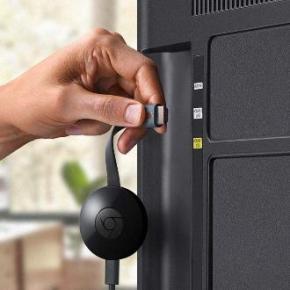
    Then one of the committee members said, “Hey, why don’t we just get big TVs and Chromecasts?” A Chromecast is $35 device from Google that lets you stream from your laptop or phone to your TV. I have one at home and we bring it when we go on vacation so that we can stream Netflix to the TV in our hotel room. Could this work in our office setting?

    We did some research. Amazon had 55″ LG TVs for $499 each. Even better, they were on Amazon Prime Now, which meant we could have them delivered within two hours. The Chromecasts were $35 from Best Buy down the street. For less than $2,700 (or the cost of one projector of decent quality), we could outfit all of our collaborative spaces with a large TV and Chromecast.

    So we did a trial run. We spent $550 on a TV and Chromecast and put it in our “war room” – the open space we use when a group of people are launching a site or troubleshooting a problem. The TV and Chromecast worked beautifully! The Chrome browser has the casting capability built-in. And when you cast your desktop, you can stream any application, including other browsers, PowerPoint, anything.

    I gave the trial my blessing and now every meeting space at Matrix Group has a TV and Chromecast. We even added a Chromecast to the projector in our large conference room to make it easier to project, but we kept the large, pull down screen. We also got a Chromecast for our reception area so it’s easier to show PowerPoints and movies in our lobby. Yay! No more wires, a friendly user interface, super reliable casting, and no special software needed. When we have guests who need to project, we just ask them to go to Chrome, cast their desktop, and then go to their browser or PowerPoint presentation; they are always amazed at how easy the process is.

    Total win for Matrix Group, big loss for the projector industry, another industry being disrupted by a small, innovative and inexpensive device.

    I’ll be talking a lot in the next few months about disruption and innovation. No matter what business you’re in, you’re in disruption or about to be disrupted. No company is exempt. So what’s your innovation strategy in the face of disruption?

  • I’ve Seen the Future and It Doesn’t Include Web Browsers

    I’ve Seen the Future and It Doesn’t Include Web Browsers

    M_and_tap_200For my birthday this year, my husband bought me an Amazon Tap. The Amazon Tap is a Bluetooth and Wi-Fi-enabled speaker that lets you use voice commands to play music, check the weather, order stuff on Amazon, look up things on Wikipedia, and on and on.

    Who knew that this little speaker would quickly become my gadget of choice? I carry my Tap with me everywhere!

    The Tap is powered by Alexa, Amazon’s voice-activated virtual assistant. I connected my Tap to my home and work Wi-Fi, my iPhone and my Alexa app. I then connected my Alexa app to my IHeartRadio app and my Amazon app. There are many more Alexa integrations to what Amazon calls Skills. And since I’m an Amazon Prime member, I have access to Prime Music.

    I mean, look at the kind of day I now have with the Tap around:

    • In the morning, I say, “Play NPR,” and Alexa starts playing the live stream from WAMU, the local NPR affiliate.
    • While I’m cooking or cleaning, I’ll say, “play 80s music,” and Alexa will say “Playing 80s on Prime Music.”
    • While getting dressed, I’ll say, “What’s the weather?” and Alexa will tell me the forecast from weather.com.
    • If I want to know about something, I’ll say, “Wikipedia Abraham Lincoln,” and Alexa will read the first paragraph about my favorite President. I can ask for more info, and Alexa will keep reading.
    • I can ask Alexa to read my Kindle books out loud.
    • And on Amazon Prime Day, I ordered a drone with just two voice commands!

    I haven’t yet tried it, but I can connect Alexa to a Domino’s account and order pizza by voice.

    I can’t do everything on my Tap, but it’s coming. And from what I read and hear, voice is the new new thing. The XFINITY voice remote already lets you search for programs by voice. We can already talk to our cars. And we endlessly give commands to Siri on our iPhones and iPads.

    Amazon allows developers to teach Alexa new skills. Apple just opened up Siri so that third parties can give Siri access to their apps.

    It won’t be long before we’ll talk to our refrigerators, stereos, ovens, and furniture, and interact with websites and apps with just voice commands.

    I’ve seen the future… er… rather, I’ve heard the future, and it sounds bright!

  • 2014 Top Techie Holiday Gift Ideas from Matrix Group

    2014 Top Techie Holiday Gift Ideas from Matrix Group

    gifts stackedIt’s that time of year again! Time to celebrate the holidays (whatever your affiliation) and do some shopping! Once again, I polled the Matrix Group staff and asked them for their favorite techie/geekie gift ideas. Here are some gifts that will wow, amaze and up your geek cred. 🙂

    • This is one I want. The Amazon Echo is like a radio, music box and Siri rolled into one. It’s always on, waiting for your commands. The “always on” part wigs out my husband a little bit because he figures it’s always listening and storing your conversations in the cloud. I figure it will be my companion when I’m getting ready in the morning, when I have nobody to talk to, and I’m in need of music, traffic and weather.
    • Maki loves his Makelangelo Drawbot, which is a little robot that lets you design and then draw images on large sheets of paper with a Sharpie pen! Maki recommends the 2.5 or 3 versions.
    • Everykey is a wristband that replaces keys and passwords. It’s sleek, secure, and can be deactivated at any time. It’s basically a Bluetooth wristband that allows immediate access to your password-protected electronics such as a smartphone, tablet, or computer, as well as physically locked items including doors, car doors, bike locks, and other controlled access devices.
    • SoloShot: This is a camera with tripod that automatically zooms in/out and follows you (when you keep a tracking chip on you). Fantastic for filming active kids, pets, athletic activities.
    • Speaking of cameras, I want a Go Pro wearable or mountable camera! I thought about getting one to wear while I do my tae kwon do, or putting one on my 4-year old to see the world from his perspective.
    • If you and your kids love Legos and you want to take your Lego experience to the next level, get the latest Lego Mindstorms – EV3. Make cars, dinosaurs and monsters that move, fight, are motion-sensitive and more! This is an awesome STEM toy you can feel good about!
    • Tetris Stackable LED Desk Lamp:  If you love Tetris the game, you’ll love this lamp, which you can configure and reconfigure to your heart’s content. The LED light turns on when the pieces are stacked together and stays off when disassembled.
    • For the coffee lover, in your life, why not give them a monthly coffee subscription for some really great Craft Coffee? This isn’t K-cup coffee (although we love K-cups around here), this is for serious coffee snobs!
    • For the neat freak with little to no time, try the Swivel Sweeper. One staff member says she spends 10 minutes with this bad boy and it does a super job! It “cleans up almost all crumbs on my hard wood floor and works for those annoying carpeted steps.”
    • Maria loves her Instant HotPot, which is 7-in-1 programmable electric pressure cooker that can also be a slow cooker, rice cooker, yogurt maker, steamer, etc. Works great, easy to clean and you can replace so many individual appliances with this one item.
    • Head Case – The Desktop Nap Pillow: Now, wherever you are, you can enjoy refreshing nap time just like you did in kindergarten. The Ostrich Pillow has head-friendly polypropylene filling to cushion your noggin and convenient hand pockets to accommodate perfect napping posture. Easy to use – insert head, pronate face toward horizontal surface. Naps are good.
    • Big Hero 6 Baymax Plush Toy: If you saw the movie Big Hero 6, you’ll understand the appeal of this. I want my own Baymax!

    Happy Holidays and may your gift giving be full of blinking lights and batteries! If you’ve got a cool techie gift idea, please write a comment!

  • 2013 Top Holiday Gift Ideas from Matrix Group

    2013 Top Holiday Gift Ideas from Matrix Group

    Technology giftsIt’s a tradition on this blog for me to poll my staff and then post our top holiday gift ideas. Remember that we’re a bunch of geeks, misfits and nerds but boy do we know how to shop! Here are our favorites:

    • If he or she doesn’t already have one, the techie in your life will LOVE a 3D printer, which will let them make their own gifts in the future! My hubby got a PrintrBot Plus, which arrived today. Alas, if you order today, you probably won’t get it until after the holidays. Uber cool.
    • Gamers will love the PS4 or the XBox One. Both are amazing game consoles for gaming you can’t get from a PC or tablet.
    • Love this next idea. The folks at DL Art Prints will create a customized poster of all your Instagram photos on canvas. Great for remembering an important event!
    • The Google Chromebook is a great laptop for the person who just needs to browse and do email. If you need an office suite, you’ll automatically get Google apps.
    • Speaking of Google, for $35, Chromecast will connect to your tablets and phones and let you watch Netflix, Hulu, HBO, etc. on your large-screen TV. No more huddling around a little screen!
    • Dianne at Matrix Group likes sriracha sauce. A lot. So she got herself a six-pack of Sriracha. You, too, can get a six-pack of Sriracha for the hot sauce fan in your life.
    • We recommend a Snap Circuit kit for the budding engineer in your life.
    • For the person who has everything, how about tickets to a show like Cirque du Soleil?
    • How about Star Trek pajamas this winter for the trekkie in your life?
    • Looking for something retro? How about some floppy disk notepads?!
    • Yes, USB sticks have been around for a while, but these Avengers USB sticks are pretty slick.
    • I bought a bunch of Star Wars molds for my annual holiday party! I’m going to make Darth Vader, stormtrooper and Boba Fett ice cubes! Next, I’ll try making Star War chocolate!
    • Maki loves the classic Moleskin notebook with graph paper. Engineers love drawing on this paper!
    • Have a kid who loves Lego AND Minecraft? This cool Minecraft Lego kit is guaranteed to be a huge hit!
    • My son loves littleBits, which lets him play with light, sound, sensing and buttons without wiring, soldering or programming.
    • The HMDX Jam Plus Portable Speakers will connect to your laptop, tablet or phone and give you great sound! And it even comes in purple!

    How about you? What are you getting the techie in your life? What are your favorite holiday gifts this season? Please share!


  • How Google Calendar and Evernote are Keeping Me Organized and Sane

    How Google Calendar and Evernote are Keeping Me Organized and Sane

    Like most busy working people and parents, I can get overwhelmed by the many people, tasks and appointments vying for my attention throughout the day. My calendar was killing me. My work calendar was fine; it was the school stuff that was out of hand. I was getting emails from the school, from my son’s room parents, and from the cubmaster about upcoming events and deadlines. My task list was even worse. I was trying to manage tasks in my email, voice mail, company IMs (instant messages), company intranet and regular mail. Something had to give and I needed a better system.

    Over the last year, I’ve been working to take back my calendar and task list. With help and nudging from my husband, Maki, here is what I’ve done.

    Google Calendar Is My Best Friend

    If you have a Gmail account, you have Google Calendar. Maki and I set up a Kato-Pineda calendar in Google calendar. We post every single family event and deadline in the Kato-Pineda calendar: playdates, birthday parties, dentist appointments, date night, dinner party at home, Maki’s parents’ trip to Japan, when my older son doesn’t have school, when the nanny is on vacation, yada, yada. We’ve shared this calendar to our entire family plus my assistant.

    Next, we got the cub scout troop to create a Google calendar. Here, we post all pack and den events (including event details and directions), monthly meetings, cub scout service opportunities, etc.

    Finally, by pure luck, the room parents for my son’s classroom had also set up a Google calendar. This calendar shows all school days off, class activities to which parents are invited, dress down days, short school days, etc.

    I use my iPhone to view a consolidated calendar that includes my work calendar and ALL of my Google calendars. My iPhone even magically brings in birthdays from Facebook and the US holidays from Google. So on any given day, I can see that: it’s John Smith’s birthday, it’s a dress down day at school, I have 3 work appointments, Maki has a ham radio meeting and there’s a cub scout pack meeting at night. Love, love, love what this consolidated calendar view has done for my sanity.

    Evernote For All Tasks and Details

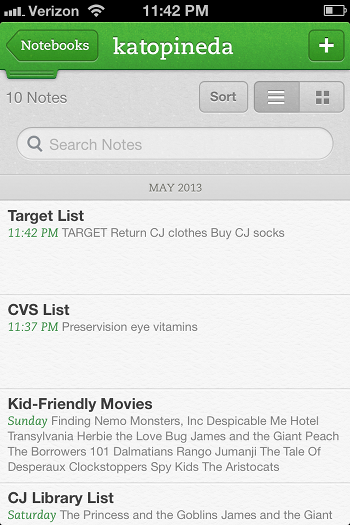
    Image of Evernote NotebookEvernote is the best note-taking, reminder app I’ve ever used.  I use Evernote by creating notebooks for the major buckets in my life: Matrix Group, Kato-Pineda and JP personal. I then create notes for to-do items, notes from a meeting, things I need to remember, etc. I then use tags to further categorize my notes.

    The Kato-Pineda notebook is where Maki and I have notes for all the thing we need to do at home and personally. We have a to do list for the house, a Target list, a Giant list, a CVS list, a list of books to check out from the library, etc. This notebook is shared between me and Maki and here’s how we use it. Say I find myself at Target. I usually have a list of things to buy but Maki might have things he needs as well. Since the Target list is a shared list, we both maintain it throughout the week. So I can go to the list and buy whatever is on the list. This way, no more going home to say “I went to Target” and Maki says “oh, shoot, I needed x, I wish I would have known you were going.”

    The Matrix Group notebook is where my new biz team manages tasks and priorities. We have notes for our proposal hot list, a JP call list, a Bryan call list, a list of potential blog posts, topics for the Matrix Missive newsletter, etc. Here’s the awesome part: since the notebook and notes are all shared, we keep these notes updated throughout the day and week without having to send email every time a list is updated. I might decide to update the list some evening and ask Bryan to make a bunch of cultivation calls the next day. If I find myself early for a meeting, I check the JP call list and make calls. It’s that easy.

    The JP personal notebook is where I store notes for gift lists, books I want to read, etc. I’ve even started a Recipes notebook where I’m posting recipes and tagging them by breakfast, lunch, dinner, dessert, chicken, pasta, etc. I even have a note for my weekly meals so I can easily remember what I made the past few weeks.

    What is perhaps the best thing about Evernote is this: I installed Evernote on my iPhone, Sony laptop, Mac laptop at home and iPad. Because Evernote is in the cloud, I have access to my notes from every device and the notes are always fully synched. Crazy how well this whole thing works.

    These systems are working for me because:

    • they are shared with the people I collaborate with (husband, assistant, new biz team)
    • they are in the cloud and therefore I have access from anywhere, on any device
    • they are inexpensive (Google calendar is free; Evernote is free but to share, you need Premium, which is $45 per year)
    • they are easy to use.

    How about you? What systems are you using to stay on top of your lists and calendar? What’s working?