Matrix Group International

Tag: Privacy

  • It’s Really Time to Use Strong, Unique Passwords (Really!)

    It’s Really Time to Use Strong, Unique Passwords (Really!)

    A silver key and a blurry reflection of the key on a dark table with a blurred background.

    I attended the Matrix Group Security and Compliance Committee meeting this month and I asked them what we’re doing this month to make our clients and Matrix Group more secure. We talked about a lot of things, including new protocols, ongoing reviews, and our yearly security assessment. One thing kept coming: our clients need to set stronger passwords.

    Most People Set Weak Passwords

    How do we know that our clients don’t have strong passwords? Because they tell us that they know they need stronger passwords. Or they share their passwords so we can access their DNS or their analytics reports. Or they set up accounts for us and they give us laughingly simple passwords. Or they say things like, “I have a spreadsheet with all of my passwords” or “I use the same password all the time.”

    Why You Need a Password Manager

    Folks, it’s past time to use strong, unique passwords on each and every single site that you have an account on. If you reuse passwords, one breach means your entire digital life is compromised. If you use versions of the same password (e.g., variations on Coffee), believe me, the bad guys know you’re doing this and they know how to crack the code on these passwords.

    So what’s the answer? It’s simple, really. Use a password manager. Here’s a great review by Cybernew of the best password managers, updated in 2022. Me, I use LastPass; my whole family uses it, including my 11-year old. I let LastPass create strong, unique passwords for me. Everything goes into LastPass, including my Amazon Prime PIN and my airline frequent flier passwords and account numbers. 

    Why I Love My Password Manager

    Here’s the beautiful part: since I have LastPass installed as a Chrome extension, LastPass populates login pages for me. On my phone, since I have LastPass installed as an app, I use Face ID to populate passwords. The upshot is that I have strong passwords AND it’s easy to log in to my various accounts.

    And you know what else? LastPass lets me know when one of my sites has been breached (so I know to change those passwords) and tells me which of my passwords are weak (also so I know to change them). Did I tell you I love LastPass?

    It is waaaaay past time to use strong, unique passwords. Do yourself a GIANT favor and get a password manager. Get it for your parents, your spouse and your kids. Help them get started. Make your digital life safer and make the Internet a safer place. Do it. Now.


  • Even Your Kids Need a Password Manager

    Even Your Kids Need a Password Manager

    boy on tablet

    I’ve blogged in the past about password managers and why I think everyone needs one. Yes, everyone. Even your children.

    Not convinced? I asked my 8 year old about his various online accounts. Turns out he’s got about a dozen accounts already, between Spanish, Math, school blog, Minecraft, Fornite, etc. How does he remember them? He doesn’t. His teacher manages the students’ passwords and he asks me for his password when he has to log in to Fortnite.

    My 14-year old has even more passwords and he was making the mistake many adults make: in order to reduce complexity, he was reusing passwords. OMG!

    So what did we do? About a year ago, we set up a LastPass family account. My husband, two boys and I each have our own logins. LastPass is on our computers and phones (no, the 8-year-old doesn’t have a phone, but he does have a computer). We have taught the boys to not reuse passwords, to always let us know when they are creating new accounts, and to have LastPass generate strong passwords or to get help from me or my husband.

    Even your kids can become victims of identity crimes. Keep them safe. Set them up with a password manager, show them how to use it, and insist that all of their passwords be in it.

    Do you have a family password manager in place already? What service are you using? 

  • GDPR: Do You Really Want to be Forgotten?

    GDPR: Do You Really Want to be Forgotten?

    Guest post by Tanya Kennedy Luminati, MatrixMaxx Product Manager

    caution cone on computerWe’re almost two months past the GDPR deadline, and we’re all still alive! (Well, mostly.) Just because the deadline has come and passed doesn’t mean the fun is over, though. As I’m sure you’ve heard, California has a new GDPR-inspired privacy law coming down the pike, and many organizations are into the real-life situations of members asking for copies of their personal data. And some are even asking to be forgotten!

    To make matters even more interesting, several of our clients have reported getting fake GDPR deletion requests via email. Yikes! FYI, from what we’ve heard, the subject is always “Data Removal Request,” and the body text is always “I hereby withdraw my consent for you to … ” Please keep your eyes out for messages like these!

    This underscores the recommendations that many of you (especially our MatrixMaxx clients) have been hearing from us since we started diving into GDPR and GDPR compliance: You shouldn’t just delete someone based on a voicemail or email. Always call and ask: “Do you really want to be forgotten?” This is a great chance to open a conversation with this individual, learn more about why they want to be forgotten, warn them of possible negative repercussions, and perhaps help your organization improve future communications. And, you know, save yourself and your organization from a potentially disastrous situation.

    Here are our recommendations for vetting requests to be “forgotten”:

    • Call and ask if the request is valid, and try to learn more about why they want to be forgotten.
    • Offer them a copy of their Personal Information. Perhaps all that they really want to know is what you know about them. This would be a combination of the info in your AMS (like MatrixMaxx) as well as any other systems in which you hold data.
    • Review the individual’s profile and warn them of potential issues that would come with being “forgotten.” For example, their meeting history will be gone… this could be important for their access to presentation slides or CEU history! Or, if they are actively on a committee, this action will effectively remove them from that committee … is this what they really want?
    • Do the needful to comply with their request, if it’s valid.

    By the way, if you’re a MatrixMaxx client, our recent 18.2 release was packed full of new features to help you manage Personal Data and Privacy for GDPR compliance. Have ideas for other enhancements that could help you in your journey? We’re here for you, and all ears!

    PLEASE NOTE:

    This is one of Matrix Group’s installments on GDPR, Privacy, and Security. We at Matrix Group are not lawyers or GDPR consults; these are simply our recommendations for how to best meet your organization’s needs and member’s needs.

  • What Do I Need to Do to Become GDPR Compliant?

    What Do I Need to Do to Become GDPR Compliant?

    Guest post by Tanya Kennedy Luminati, MatrixMaxx Product Manager
    What are the next steps once you know what GDPR is?

    Officially start your security/compliance/privacy efforts

    This is your first step: Read about GDPR on the Matrix Group blog, and start to learn more.

    Track any efforts 

    Team meetings, staff meetings, webinars, research, actions. It is widely recognized that not everyone will be ready for the May 2018 enforcement deadline, so it is critical to show a good faith effort in starting your analysis process. Documentation of your efforts is critical to proving this.

    Learn more!

    Many groups and vendors are offering free webinars on GDPR. Sign up and attend one; the more you know the better informed you’ll be.

    A variety of organizations are hosting forums on this topic. For example, if you are an ASAE member, you have access to their GDPR collaborate forum.

    Figure out your organization’s role

    There is a shared responsibility for this between the Controller and the Processor.

    • A Controller is the person or organization that actually determines the purpose and means of processing personal data that they hold.
    • A Processor is the person or organization that processes data on behalf of the controller. (Matrix Group is a processor, along with countless other 3rd party vendors/providers that are providing services and systems like hosting, CRM, AMS, CMS, email marketing, marketing automation, etc.)

    Matrix Group, as a web services and software provider, is a Processor of data. Matrix Group’s clients are Controllers of their data. (e.g., The Association of Widget Makers, The Society of Professional People, ACME company, etc. are all Controllers.)

    In other words, we here at Matrix Group must provide tools to support the processes and procedures of GDPR, but Controllers have ultimate responsibility to determine how GDPR will impact them, and then use the tools vendors/processors (like Matrix Group) provide to put processes into place to comply with GDPR.

    For example, if a user requests access to all of their data …

    • The Controller is responsible for training staff to recognize this request for what it is and to gather necessary data from all systems (AMS, CRM, CMS, marketing automation system, email marketing system, etc.)
    • Matrix Group, as a Processor, is responsible for providing tools to help with this. (e.g., Our MatrixMaxx AMS has an Individual Participation Report that aggregates most of the data that we hold on the individual, and we’ll be upgrading it soon to include even more, such as the recent login and page request history)

    Do a gap assessment: Where are you and where do you need to be?

    The key questions to ask all revolve around your data:

    • Where are we getting data from?
    • What data are we storing and where is it being stored/
    • How are we using, handling, and securing the data while we have it?
    • Where are we sending data to?

    And once you’ve analyzed your flow of data, it is time to analyze what you need to do in order to comply with these new regulations. You may need:

    • Management resources, to help establish and enforce new policies for data collecting and handling
    • Technical solutions and tools to deal with the new rules
    • Legal advice to help rewrite your privacy policy or deal with the more complex aspects of the regulations

    Reach out to your vendors and partners

    At this point, any software/system partner should be thinking about their response to new privacy and security regulations like GDPR.

    Here at Matrix Group:

    • We have obtained our SOC2 certification in security. SOC 2 is an auditing procedure that ensures we securely manage data to protect the interests of our organization and the privacy of our clients.
    • Our compliance committee meets monthly and has been discussing GDPR for many months
    • Our IT team meets weekly and GDPR has been on the agenda for months
    • The MatrixMaxx AMS team has been working on multiple upgrades to ultimately allow clients to better comply with the GDPR regulationts:
      • We already have in place several reports that would allow the association to quickly/easily share information with anyone who requests a report of their data. (Individual Participation Report, Login Report, Page Request History report)
      • We are in the planning/development stage of an Anonymization function, which will allow the association to anonymize anyone who wishes to be forgotten, without losing the core transaction history in the record
      • We are researching and planning the best way to offer Consent functionality that complies with the double-verification requirement
      • We are monitoring and discussing with our 3rd party partners, like forums and email and marketing automation

    Is there a checklist for GDPR ‘compliance’? Can we all get certified as compliant?

    The concept of GDPR compliance certification has been established in the regulations, but it has not yet been fleshed out to the point of actually going into practice. So at this point, as of March 2018, if someone tells you they are certified compliant with GDPR, that is false.  

    Looking ahead

    We are moving into a permissions-driven economy. The days are vanishing when you can get a hold of someone’s email address and then send them endless amounts of email. You are going to need to politely and persuasively ask them for their data and explain how you are going to use it. You are going to need to be thoughtful about it. And you’re going to need to respect their desire for privacy while also wanting to utilize of your services.

    As marketers of services, this can initially seem frustrating. But turn it around and think about yourself as a consumer. Haven’t you griped about the amount of email you get? Haven’t you wished your name would stop being shared with companies you don’t care about?  These regulations are coming in effect to force a worldwide respect of individual privacy and to make the cyber-world better for all us as individuals. In time, we may even view this focus on privacy and security as an implicit expectation, in the same way organizations are now expected to be think about sustainability as a key operations value. All of this is a good thing.


    PLEASE NOTE:

    This is one of Matrix Group’s installments on GDPR, Privacy, and Security. We at Matrix Group are not lawyers or GDPR consults; do not take this info as absolute. Use this information as a starting point in:

    • Gathering the documentation, processes and tools you need to assess and support your obligations under GDPR
    • Planning for a future where respect privacy and security are implicitly baked into our all our processes and systems, regardless of country


  • What is GDPR and What Does it Mean for My Organization?

    What is GDPR and What Does it Mean for My Organization?

    Guest post by Tanya Kennedy Luminati, MatrixMaxx Product Manager

    There is a new acronym taking the world by storm right now: GDPR

    If you’re in Europe, you’ve probably heard of this. If you’re here in the United States, you may not have heard it … yet. But the concepts of Privacy and Security that it champions are moving to center stage all over the globe, so it is important we all pay attention and start our process shift now.

    What is GDPR?

    The nations of the European Union (EU) take privacy very seriously, and each country previously had its own laws. The General Data Protection Regulation (GDPR) was approved by the EU Parliament in 2016 in order to unify the various data privacy laws across Europe.  The EU has a dedicated website where you can read the full GDPR details, and it is quite a long read.

    Who does GDPR apply to?

    If you hold and process any Personally identifiable information (PII) in any of your systems for anyone living in the EU, this impacts you.

    PII is any data that can be used on its own or with other information to identify a particular individual: name, phone, email, address, etc. Processing is just about anything you do with that data. Any type of marketing, for example, is considered to be processing. The GDPR states that you can’t process PII data unless you have lawful grounds to do so. The GDPR affects your systems, your processes, your data, your customers/members, your 3rd party vendors, and your partners.

    Doesn’t GDPR only apply to European-based Companies?

    No. It applies to any organization offering goods/services to EU residents. The EU refers to this concept as Increased Territorial Scope (extraterritorial applicability).

    When do these new regulations go into effect?

    GDPR actually started 2 years ago. However, enforcement doesn’t begin until May 25, 2018. So as the humans we are, everyone has waited until the last minute to grasp these new regulations with both hands.

    What are the key facets of GDPR?

    You must have grounds for the lawful holding and processing of data. These include:

    • Consent
    • Fulfilment of a contract
    • Legal obligation
    • Necessary for interests of the individual or for the greater public good

    Consent is getting a great deal of attention as marketing now requires explicit “provable consent” in order to be considered lawful under the GDPR. For example, if you haven’t explicitly asked an EU resident in your database if they’d like to hear about some of your upcoming events, you probably can’t lawfully market to this person!

    Other important facets beyond the concept of lawful processing and consent include:

    • An individual may request access to all of their personal data. This may include any information stored in your main database, including contact information, login tracking, clickthrough tracking in a 3rd party marketing system, transaction data, etc.
    • An individual may request that their personal info be removed. (a.k.a. The Right to be Forgotten), meaning that they can request that their records be deleted or anonymized in such a way that it is no longer personally identifiable. (This includes data in backups and in any 3rd parties systems that may have acquired the data from you.)
    • Data Breach Notification to certain authorities and individuals within particular timeframes.

    Are Membership Organizations (Trade Associations, Professional Societies), Not-for-Profits, and Non-Profits exempt from GDRP?

    No. They are not exempt.

    But … Wouldn’t someone joining my association as a member be implicitly giving me lawful grounds to process their data?

    Not necessarily. If they join as a member, it would probably be lawful processing to send them a confirmation of their membership, but you can’t start marketing association products and services to them without consent. This is an area where a GPPR consultant could be useful to you, if you have a lot of EU residents in your data or you actively market/appeal to persons living in the EU.

    How is GDPR going to be enforced?

    The penalties and fines, which will kick in starting May 25, 2018, are steep. There are obvious ways that EU-based organizations and foreign organizations with EU locations can be penalized. The question of how external organizations will be held to GDPR compliance is being discussed in a variety of articles and posts.

    Next up, we’ll discuss how to become GDPR compliant. Stay tuned!


    This is the first of severalMatrix installments on GDPR, Privacy, and Security. Please note: we at Matrix are not lawyers or GDPR consults; do not take this info as absolute. Use this information as a starting point in:

    • Gathering the documentation, processes and tools you need to assess and support your obligations under GDPR
    • Planning for a future where respect privacy and security are implicitly baked into our all our processes and systems, regardless of country

     

  • The One Thing You Can Do Now to Protect Your Website From Hackers – Create a Strong Password

    The One Thing You Can Do Now to Protect Your Website From Hackers – Create a Strong Password

    A couple of weeks ago, there was a lot of news about a massive brute force attack against WordPress sites to install Minero Miner, Minero is a javascript Crypto miner. The attack used information from the site, like the domain name, common logins and common passwords, to try and gain access to the site.

    Let me say this again. The attack used common logins and password to gain access. This means the attack basically used a whole lot of computers to try and guess credentials. And guess what? If a site uses “admin” and “password123” as the credentials, it was compromised in about five seconds, probably less.

    So this is my regular please to please, please use strong passwords and don’t reuse passwords. What’s a strong password? My tips are below:

    • Create a long password. Some sites recommend 6-8 characters. That’s outdated information. Make your password as long as you can. My Windows password at work is 15 characters.
    • Don’t just add numbers or replace letters with numbers. DOgFi$h123 may have been an acceptable password in the past, but no longer.
    • Don’t use a common phrase from life, a book or the movies. It’s easy to think that “DoOrDoNotThereIsNoTry” is a great password because it’s really long. But guess what? This phrase exists in dictionary attacks used by hackers. Don’t use this password.
    • You are better off stringing together words that are meaningful to you, but don’t commonly belong together. For example, I was staying at the Bellagio Hotel one time and I needed to change my password. So I looked up, saw some balls on the ceiling and came up with “99BouncingBellagioBalls)).” How Secure is My Password says it would be 15 octillion years to guess this password, which I don’t believe, but you get the point that this password is strong because it’s long, it’s got a combination of upper case, lower case, numbers and non-alphanumeric characters. And yet, most importantly, this password was easy for me to remember. I will sometimes string random English, Tagalog and French words together and add in some numbers in the middle of the password to create a strong password.
    • Use a password manager. No, Excel is not a password manager, especially if the file is called passwords.xlsx. A Word doc is not a password manager. A spiral bound notebook locked in your house is much safer than an Excel file on your laptop or share drive. Instead, use a manager like LastPass, KeePass, 1Password or Dashlane. At the company level, use an enterprise password manager like Secret Server (which Matrix Group uses as a company.) Me, I use KeePass.
    • Commit commonly used passwords to memory; let the password manager handle the rest. Me? I remember my office network password and my KeePass password. For everything else, I create long passwords or let KeePass generate them, and then I store them in KeePass.

    Want to learn more about passwords? I like these articles:

    https://lifehacker.com/how-to-create-a-strong-password-1797681069
    https://www.technologyreview.com/s/542576/youve-been-misled-about-what-makes-a-good-password/
    https://nakedsecurity.sophos.com/2016/08/18/nists-new-password-rules-what-you-need-to-know/

    Make it one of your 2018 resolutions to replace your passwords with strong ones NOW!


  • Why Your Company Needs a Password Management Policy

    Why Your Company Needs a Password Management Policy

    Password lock smallLast week, we contacted a client to coordinate a site server upgrade, which required a DNS change. The response we got was a little alarming. The client’s IT Director had left and nobody knew where the password to their DNS registry was kept. Ouch. I had lunch with a friend who said he keeps passwords in Outlook. Another friend said she has an Excel spreadsheet on her desktop. Eeek.

    Passwords are the trickiest things. These days, we need them to be long and difficult to crack, they need to be unique across systems, and they are ubiquitous because everything needs a password. We read a lot about personal password management, but what about corporate password management?

    Think your organization doesn’t have a lot of passwords? Think again. Chances are, your organization has passwords to:

    • Online financial and payroll systems
    • Payment processors
    • Social media sites
    • Sites where you purchase equipment and supplies
    • Web hosting and DNS passwords
    • and on and on and on

    Where do you keep all these usernames and passwords, how do you manage them and who has access? Is your organization at risk if someone in a key position leaves and either takes the passwords with them OR leaves you without a clue as to where the passwords are kept (or not kept)?

    Don’t panic. Here a few things you can do to get started with a company-wide password management policy.

    1. Identify the company-wide accounts that need to be accounted for.
    2. Determine who has this information and collect it.
    3. Come up with a system for storing and limiting access. The system could be as simple as 2 people have access to a notebook where all the passwords are kept and everyone in the organization knows to give their passwords to these folks.

    Here at Matrix Group, we used to use KeePass to manage our company passwords. We had multiple KeePass databases, including one for the services team, one for IT, etc. But we’ve outgrown KeePass because we need more granular access management. So we’ve implemented Secret Server, which is software that helps companies store, distribute, change and audit passwords. Some passwords are limited to myself and the Director of Administration, while some passwords are accessible to multiple staff working on a project. I like Secret Server’s audit trail and we’ve created a system whereby certain team members can grant permanent or temporary access to passwords.

    Isn’t it time for a company password management policy?

  • Is It Fair to Compare Retailers and Marketers to the NSA?

    Is It Fair to Compare Retailers and Marketers to the NSA?

    woman-holding-stop-watching-us-signOn January 17, President Obama made an important speech at the Department of Justice on NSA reform. He discussed the history of the intelligence community in the US, why it exists, how it has benefited our country, the data breach that brought to light the National Security Agency’s metadata collection program, and the reforms he’d like to make. During the speech, the President made some”broad observations” that emerged from his Administration’s review of current intelligence practices. He said:

    First, everyone who has looked at these problems, including skeptics of existing programs, recognizes that we have real enemies and threats, and that intelligence serves a vital role in confronting them.

    Second, just as ardent civil libertarians recognize the need for robust intelligence capabilities, those with responsibilities for our national security readily acknowledge the potential for abuse as intelligence capabilities advance, and more and more private information is digitized.

    Third, there was a recognition by all who participated in these reviews that the challenges to our privacy do not come from government alone. Corporations of all shapes and sizes track what you buy, store and analyze our data, and use it for commercial purposes; that’s how those targeted ads pop up on your computer or smartphone. But all of us understand that the standards for government surveillance must be higher.

    Ouch. Did the President just compare retailers and us marketers to the NSA? The Direct Marketing Association (DMA) wasn’t happy with the President’s remarks. A statement on the DMA website says, “DMA was disappointed to see the responsible use of consumer data for marketing purposes conflated with “government surveillance.”

    Was the President’s comparison valid? After all, yeah, we know that Amazon and Google  collect vast amounts of data about what we search for, the sites we visit, what we buy. Aren’t they like the NSA? Well, here are my own observations:

    • Expectation of Privacy.   I think one big difference between the NSA and the big retailers has to do with whether or not we have an expectation of privacy. If I’m on the  Amazon website, I can’t really expect Amazon to NOT know what I’m doing. On the contrary, I expect Amazon these days to know so much about me so as to make accurate recommendations and make purchasing simple and fast. With my private emails and phone calls to my clients and family, I feel I should have an expectation of privacy. It probably caught most Americans by surprise to know that their emails and calls were being collected and sifted through by the NSA.
    • What does it mean to say that “the standards for government surveillance must be higher?” All of the big retailers have explicit privacy policies that they post on their website. They tell you what data they’re collecting and what they do with it. Do we take the time to read these privacy statements and terms and conditions documents? Absolutely not. What does it even mean to hold government to a higher standard when we don’t know what they are collecting, when and how.
    • The ability to opt out. For those of us who want to be anonymous on the web, we can turn off cookies, we can use the private proxies to browse websites, or we can go into Anonymous mode when using the Chrome browser. We can cancel our Facebook accounts. While most of us don’t know how to do most of these things, they are possible and available.
    • There is at least some oversight of marketing practices on the Web. I’ve blogged in the past about Facebook’s security policies and how unhappy I am that they keep changing. I’m not nuts about how Facebook uses my Likes to promote advertisers. And I’m not nuts about how Nordstrom ads follow me everywhere.  And yet, I know that there is oversight of these marketing practices by government agencies like the FTC and industry groups. When intelligence agencies operate in the shadows, how are we to know what they’re doing and who is overseeing them?
    • But do we really know what Google is tracking? I say all of the above to defend the marketing community, but on the other hand, I think about the big data that Google is collecting, analyzing and learning. Google probably knows what I had for breakfast. Heck, Giant claims to be able to “guess” my next week’s food delivery. Are we perhaps too blasé about the data trails we leave behind every time we go online?

    Like President Obama, I don’t know all the answers. I hope we get meaningful reform, I hope we have meaningful oversight, and I know in my heart that privacy these days is a myth.


  • What’s Really Behind Those Targeted Ads on Facebook?

    What’s Really Behind Those Targeted Ads on Facebook?

    Image of person being targeted in a crowdI’m attending my high school reunion in a few weeks and I need a fabulous dress. So I’ve been spending time on various retailer sites to find the perfect outfit. Of course I visited Nordstrom.com and found some great dresses, including a stunning, little, black dress by Ralph Lauren. Imagine my surprise when I clicked over to Facebook.com and found a Nordstrom ad that featured the very dress I was looking at. I shrugged it off as coincidence; what retailer doesn’t advertise its fabulous black dresses?

    A couple of days later, I found a gorgeous, purple dress on Nordstrom.com. Again, a Nordstrom ad on Facebook featured the exact same dress. Okay, now this can’t be coincidence. Purple, really? I had read about Facebook sharing cookies with retailers but I needed more info. We Facebook users have known for a while that any information we give to the social network can be used to send us targeted advertising. For a while, I was getting ads based on my age. Then I noticed that even my posts seemed to be getting indexed; I mentioned Downtown Abbey in a post; next thing I know, I’m getting an ad for a Downton Abbey-themed trip to England. It seems that earlier this year, Facebook branched out and expanded it advertising capabilities by merging its own data with data from third parties.

    • Earlier this year, Facebook announced deals with Datalogix, Epsilon and Acxiom, consumer data companies, or companies that track consumer purchasing data from rewards cards, among other things. Facebook users are matched with data from these companies so that Facebook can present targeted ads. For example, if my Giant rewards card shows that I buy a lot of diapers, Facebook might show me ads for more diapers or other baby products.
    • Through a partnership with BlueKai, retailers can add code to their websites to set cookies that Facebook can read. The cookies tell Facebook what you were looking at on the retailer site, for example, and display targeted ads based on your previous viewing history. (Aha! I bet this is what Nordstrom is using.)
    • Last Fall, Facebook invited retailers to submit the email addresses of its customers. Facebook matched the emails against its database and then displayed ads on behalf of the retailers.

    We all know this is going to get a lot worse. Facebook already knows who our friends area, where we go, what we watch, what we eat, who we love. If you’re creeped out by all this, what can you do?

    • My friend and privacy expert Shaun Dakin recommends Abine, which lets you create disposable email addresses, phone numbers, and credit cards so that Facebook and retailers can’t match you based on your personal information.
    • Matrix Group Network Administrator Rich Frangiamore recommends Ghostery, which is a browser plug-in that tells you about all the tracking elements on web pages that you visit. Ghostery also lets you block specific scripts.
    • I like to browse in incognito mode in Chrome. When I do this, any cookies saved in my browser are deleted when I close my windows and pages I visit aren’t recorded in my browser history.

    The thing about targeted ads is this: sometimes they feel creepy and an invasion of my privacy, while other times, I am grateful for the spot-on recommendations. I guess the trick for advertisers is to find the right balance so that customers like me welcome the personalization. What do you think of all this targeted advertising?

  • Time To Get Serious About Your Passwords

    Time To Get Serious About Your Passwords

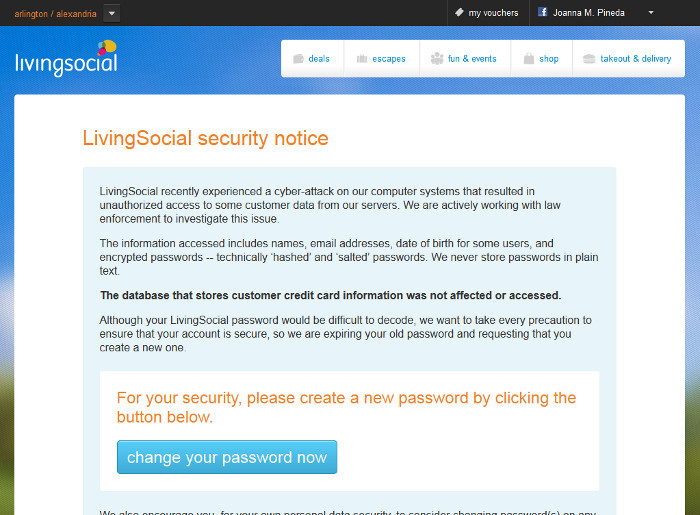
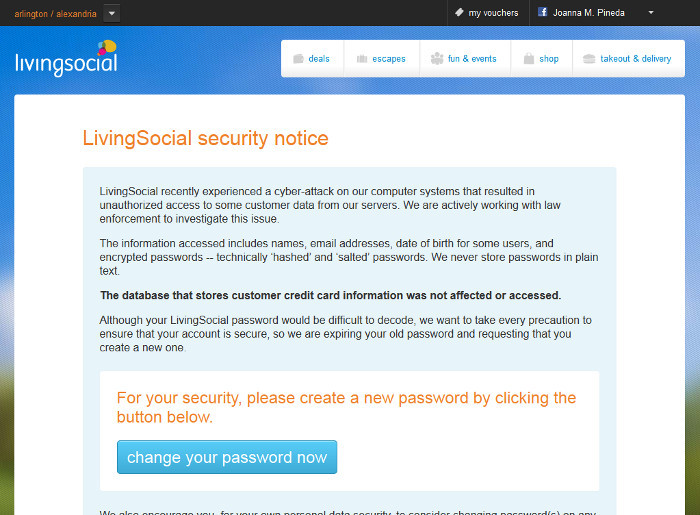
    A couple of weeks ago, the daily deal website LivingSocial reported a cyberattack that breached the accounts of some 50 million subscribers. The information breached included names, email addresses, date of birth, and encrypted passwords. Ugh. These system breaches are so common these days that we change passwords, shrug and move on. And yet most people aren’t learning the real lessons of password management.

    LivingSocial Security Notice

    I spoke at a conference recently where I asked the audience how many of them use the same passwords on multiple sites. About half the hands went up. I get it, it’s impossible to remember a different password for every site that requires one, but most people don’t realize is how one system breach makes you vulnerable to others, even if the other systems are not breached. Here’s how it works: Say you bought something from a retailer and you used the same username and password that you use on other sites. The retailer’s system is breached. You change your password and you’re done, right? Wrong. The hackers take the breached usernames and passwords and try them against major retailer and social networking sites because, let’s face it, who doesn’t have an Amazon, Google, Facebook, Twitter, Ebay, iTunes, Fidelity or Schwab account? For the person who used the same password on multiple systems, he just got ripped off across multiple platforms. Total disaster.

    Want to protect your information and assets? Here are some guidelines.

    Use one password per site. That’s right. Use a different password for Amazon, Google, iTunes, Facebook, eTrade, your child’s school website, The Washington Post, LivingSocial, Etsy, and on and on. This way, if one system is breached and the hackers manage to unencrypt your account information, they can’t use it on other sites.

    Use a secure password manager. It’s going to do you no good to have dozens of different passwords if you don’t have a good system for managing them. I have a friend who says she has an Excel file on her computer that contains her passwords. Trust me, if you computer got lost, stolen or otherwise breached, that Excel file is toast. The net admins at Matrix Group like KeePass and LastPass. I use KeePass to store all of my passwords. I have one, really strong password to my KeePass account that I have committed to memory; KeePass handles everything else. Okay, that’s not exactly true. I’m paranoid enough that the passwords to my email, laptop and work network are committed to memory, never written down and not stored in KeePass.

    Use really strong passwords. A really strong password is long, contains a combination of letters, numbers and characters, and has an element of randomness to it. I really like this article by Thomas Baekdal on the Usability of Passwords. He argues that users should create long, memorable passwords that combine words and characters. If a password is memorable, you’re more likely to remember it and you won’t write it down on a Post It note. An example would be: 99BlueBellagioBalls. This password is easy to remember but it’s long, it’s got upper and lower case letters and it’s got numbers. A more recent article by Dan Goodin (Why passwords have never been weaker — and crackers have never been stronger in) says the hacking landscape has changed dramatically because of supercomputers and password breaches that have exposed common passwords and password patterns that people use over and over again. The solution? Use an even longer, complex password: 99BlueBellagioBalls might become Blue99beLLagioBalls. This is a 19-character password that you could more easily remember than 98zefswr))*je. But then again, if you’re using a password manager, you won’t need to memorize your long passwords.

    If a system allows two-factor authentication, opt for it. Two factor authentication means you need two factors to get in. To access Facebook from a new computer, you would need your username and password AND the code that Facebook sends to your phone. Presumably, a hacker would not have access to your phone.

    Don’t use weak security questions. Personally, I’m appalled that a woman’s maiden name is still used as a security question. Since I didn’t change my last name when I got married, the whole world knows my maiden name. The lesson here is this: don’t select a security question where the answer can be easily obtained by a casual acquaintance, doing Google searches or checking out your profile on Facebook.

    I guess I could decide to live in a treehouse, go off the grid and use only cash but who am I kidding? There are myriad government and corporate systems that have information on me and those systems can be breached. The best I can do is protect my accounts with strong passwords that I manage securely. I hope you all will do the same.