Matrix Group International

Tag: Privacy

  • I’ve Seen the Future and It’s Full of Screens

    I’ve Seen the Future and It’s Full of Screens

    I had the great luck to attend xPotomac, the fabulous conference about the future of the Internet, communications and social media earlier this week. One of the presenters  was Ken Yarmosh and he gave a great talk on how the future will be full of screens. Someone predicted that in the future, cities will be more like Japan, full of mobile devices of all kinds and digital billboards everywhere. Ken talked persuasively about 5 factors that will change how we interact with screens.

    Screen pervasiveness

    We are going to have more screens in our lives, screens of all kinds. Remember when every home had just one TV? Today, many homes have multiple TVs, tablets, smartphones, etc. New screens are coming: screens in our cars; refrigerators with touch screens; screens on our coffee tables for magazines, photos and game;, screens in our conference rooms to see satellite offices; screens in our showers for watching TV. As the technology costs go down, we will have more screens.

    Screen persistence

    I love this prediction. Ken says that screen persistence will allow us to start something on one screen and continue on another. If you read books on the Kindle or Kindle app, you know that you can stop reading on your phone and pick up where you left off on your tablet. In the future, you’ll be able to start a phone call in your car, continue it on your phone when you arrive at your destination, switch seamlessly to video conferencing on the fridge when you get to your kitchen, and switch to your HD TV when you go to your living room or conference room.

    Screens that know about you

    Remember the scene in Minority Report where Tom Cruise, with a surgically transplanted eye from someone else, gets welcome to a department store by name (the other guy’s name) and encouraged to buy something? Ken says that in the future, screens of all kinds (billboards, large and small) will know who we are, our physical characteristics, our interests, our purchasing history, etc., and project a personalize ad or message. Perhaps when you turn on your TV at home, it will let you know which of you favorite shows have new episodes waiting. It’s clear that we’ll need some type of system to grant or deny access to our information by all these screens. It’s going to be a big privacy  mess but marketers will be all over the opportunities.

    Screens will know about themselves and interact with other screens

    Today, screens aren’t aware of other screens. But in the future, your iPad might automatically turn into a controller for a TV when you enter your living room. Or attendees at a conference can share content on their tablets while in the same meeting room. Related to screen persistence above, your device will pass calls and data seamless to each other. You’ll be able to start a game on one TV and then when dad comes home and wants to watch the game on that TV, your controller will let you continue your game on another TV.

    Screen interactions will change

    Today, we can type, swipe and do a little voice. In the future, we’ll be able to use voice commands to ask complicated requests of our devices. An example: “Pull up my 2015 tax return (which is presumably in the cloud somewhere) and tell me my effective tax rate back then.” You will be able to use your body to control screens (kind of like the Kinect, but more sophisticated). And touch commands like in Minority Report will become a reality.

    Project Glass from Google is an example of the new generation screen (it’s going to be a head mounted display, a pair of glasses) that will let us interact with the world in new and different ways.

    I don’t now about you but I am excited about this brave, new world that will be full of screens. Thanks, Ken, for sharing your predictions for the future! What prediction are YOU  most excited about?

  • Time To Audit Your Privacy Settings – Everywhere

    Time To Audit Your Privacy Settings – Everywhere

    I got a new iPhone last year and configured it to upload photos to Facebook. Imagine my surprise when photos of me and my kids ended up public on Facebook, even though I have my settings set to all photos as viewable by Friends Only by default. So I dutifully reviewed all of my Facebook privacy settings, updated the viewing options for all of my photo albums and went on my merry way.

    I wouldn’t call myself paranoid about privacy and security on the web, but I do watch what I post online and I take advantage of privacy options, whenever available. Make it your New Year’s resolution in 2013 to audit your privacy settings on all social networks and think about what information you’re putting out on the web, private or not. Here’s my privacy punchlist to help you out:

    Be careful when uploading photos to Facebook via your smartphone. For some reason, Facebook sometimes doesn’t honor my default option to make photos Friends Only and I have to manually change the viewer settings on some photos.

    Beware of what other people can do to your posts and photos. Last month, Mark Zuckberg’s older sister posted a photo on Facebook that friends and friends of friends could see. A friend of a friend saw the photo, assumed it was public and tweeted it. What ensued was a very public conversation between Randi Zuckerberg and the tweeter Callie Schweitzer on Twitter. The media had a field day. Check out this story on Forbes.com. Folks, if you let them, friends and friends of friends can share your posts, share your photos, tag you in photos, yada,  yada.

    Remember that Facebook apps can access your personal information. Everyone seems to love birthdays and birthday greetings on Facebook. Well guess what? Even apps can access your birthday when you give them permission to access your Facebook account. And since knowing your birthday is a key piece in identify fraud, think about not sharing your account, or not putting your exact birthday (does that violate the Facebook terms of service?).

    Know that your company email account is not private.  Your personal gmail account is one thing, but all the courts have upheld the notion that corporations own employee accounts on corporate mail servers, which means they can audit and read your company emails at any time. Most companies even have policies saying they can and will do this when needed.

    But hey, even private email accounts aren’t always private. We might be shocked by the General Petraus affair, but equally of interest is how the FBI found the emails between General Petraus and Paula Broadwell in private gmail accounts. What started out as a cyberstalking investigation ended up bringing down a CIA Director! So assume that all of your emails could be made public and that they will exist on some computer or back-up for the next generation or two.

    Everything we do is  being tracked. When I stop to think about it, I cringe at the data that government and retailers are amassing about me. I use my American Express credit card for nearly all of my purchases, I use my rewards cards at places like Giant, Harris Teeter and Barnes & Noble, my E-Z Pass tracks where I’ve traveled on the toll road, Google tracks all of my searching history, Amazon knows what I like enough to buy, and Facebook knows where I’ve been, who my friends are and what I ate last Sunday. If you want to stop some of this tracking, don’t use a credit card, don’t use rewards cards, use a Do Not Track app on your computer (like Abine), logout of Google before doing searches, and turn off cookies or delete them regularly. For me, these steps aren’t exactly practical, but I offer them as suggestions for those who do want to limit tracking.

    Ultimately, I always try to remember that anything I do online on the web and in email could be made public at any time.

    How about you? How much do you care about privacy and security? Are you doing anything about your privacy settings or changing your behavior?

    Many thanks to my friend Shaun Dakin for his help with his post. Shaun is a huge online privacy expert and advocate. Find him on Twitter @shaundakin and Facebook at Dakin Associates.

  • So What Happens If Your Laptop Is Lost or Stolen?

    So What Happens If Your Laptop Is Lost or Stolen?

    Photo of a thief running away with a purse and a laptopA couple of months ago, a NASA laptop containing personal information about employees was stolen. Apparently, this is not a rare occurrence. If you google for “stolen laptop containing personal information,” you get thousands of hits. Ugh.

    I used to lose sleep at night because so many of my staff use laptops as their primary work machine. All of my Project Managers, New Biz team members and Directors carry laptops. We even have Netbooks that staff can check out if they are headed to a meeting. The risks are obvious. Laptops contain company confidential proposals and reports. They have passwords stored in browsers to make it easier to visit websites. They store passwords so we can VPN into our intranet and check e-mail.

    While Matrix Group has an amazing track record of zero loss/zero theft of laptops and PCs (knock on wood), I still lost sleep. What would happen if a laptop were lost or stolen? Forget the cost of the machine. What would it take to recover from the loss? How quickly could credentials be changed? How much damage would we suffer if confidential information were released publicly? Would we even know about all of the passwords that would need to be changed?

    Today, all Matrix Group laptops have encrypted hard drives. Windows laptops use TrueCrypt, a free, open source tool for encrypting hard drives. Mac users take advantage of the built-in encryption capabilities through FileVault2. Yes, laptop users need to login to their machines twice: once to unencrypt the hard drive and a second time to login to the machine/network. We also use strong, long passwords so it takes a few extra seconds to type our passwords. And yes, there is a bit of lag while we wait for the hard drives to become available.

    Is encrypting the hard drives worth the effort, hassle and wait time?

    Absolutely! My encryption password is 34 characters long and contains letters, characters and numbers. While I know that any password can be cracked but it will take a really, really long time to crack my password. So, for all intents and purposes, if my laptop were to get lost or be stolen, the machine would be a nice paperweight until the hard drive is reformatted. Although I love my Sony laptop (I have a nice one with a carbon fiber body and a solid state drive), I can always get another one. It’s the data that I really care about.

    The Ponemon Institute last year reported that 329 organizations surveyed lost more than 86,000 laptops over the course of a year. The Institute further calculated each loss to be worth $49,246, which meant these 329 companies alone lost over $4 billion! (Can you even imagine how 329 companies lost 86,000 laptops? What are they doing to these things?)

    So, my question to you is: what would happen to you and your organization if your laptop were lost or stolen?

    Addendum to this blog post from December 7, 2016: In 2014, development on TrueCrypt was discontinued. When I upgraded my laptop to Windows 10, I started using device encryption from Microsoft. Here’s a great article from comparitech that answers questions about TrueCrypt and provides alternatives for encrypting your drives. Whatever you do, use something to protect your drives, especially laptop drives. Don’t just “hope” your laptop doesn’t get stolen and “hope” that the folks who steal your laptop don’t care about your data.

  • Time to Audit Your Facebook Settings Again

    Time to Audit Your Facebook Settings Again

    Like many people I know, I view my Facebook personal page (versus the Matrix Group brand page) as the place where I connect with friends, share personal updates, post photos of my family, yada, yada. While Twitter and this blog are part of my public, professional persona, Facebook is more a part of my personal life.

    Which is why I review my Faceobok account and privacy settings on a regular basis. If you haven’t done so recently, I suggest you do it now. Facebook settings change all the time and you might be surprised to discover, for example, that a bunch of albums containing your childrens’ photos are now public (which is exactly what happened to me). Here are settings that I recommend you review right now:

    How to Check Your Settings

    After logging into Facebook, click on the down arrow in the top right corner of the page, next to Home. Most of what you want to do will be under Account Settings and Privacy Settings.

    Account Settings >> Security

    Select Account Settings, then go to Privacy in the left hand navigation. I recommend editing your settings to Enable Secure Browsing when possible. This means that when you go to www.facebook.com, you’ll be redirected to https://www.facebook.com, which means traffic between your computer and the Facebook servers will be encrypted. I think this is sensible and important given how many of us post a lot of personal information to Facebook, including birthdays, names of family members, hometown, etc.

    I recommend making Login Approvals Required when logging onto Facebook from an unrecognized device. This means that you’ll have to approve a login from a new and unrecognized device via your phone. Again, I think this is sensible. If someone ever tries to access your Facebook account from a different computer or phone that you don’t recognize, you’ll know that your account may have been compromised and you can act immediately and change your password.

    Privacy Settings

    If you’re not familiar with this page, I suggest going through all of the options on this page. Here are the settings you should pay most attention to:

    Default Privacy Setting. While you can select an audience for posts and photos, some apps don’t let you select. Choosing Public, Friends or Custom will provide a default privacy setting for these types of posts and apps.

    Profile and Tagging. This is a biggie for me. I only let Friends post to my wall and only Friends can see what others post on my wall. I also have the setting turned on that allows me to review tags of me before they get posted.

    Ads, Apps and Websites.  This is another important one. Facebook says that “people who can see your info can bring it with them when they use apps.” Which is why I limit the information that can be accessed to just my Bio, Website, Links and Education. I don’t provide access to my birthday, hometown, etc.

    Instant Personalization. If you have this enabled, on Facebok partner websites, you’ll get a personalized experience based on the information in your profile + your friends’ information. I have this turned off.

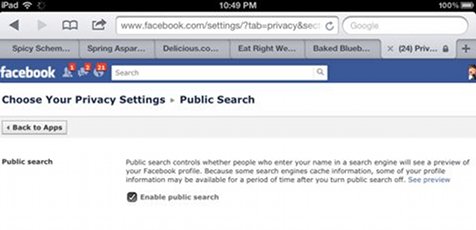
    Public Search. Although I’m fairly picky about who I will accept friend requests from, I do enable public search because I do want friends, former classmates and former co-workers from  years past to be able to find me. That is, after all, one of the charms of Facebook.

    Your Public Actions and Likes

    Know those Facebook and Google+ Like buttons that seem to be everywhere? For the most part, only people in your friend network can see your likes when they visit the page or your Facebook profile. But here’s the deal: if you like something on a third party, public site, I don’t believe you can have an expectation of privacy, so I recommend liking and commenting on third party sites with the understanding that all of this information can and will be public.

    I hope you’ll take the time to audit your security and privacy settings NOW. The Electronic Frontier Foundation did a timeline of Facebook’s eroding privacy policies over time. While Facebook has recently made changes as a result of government intervention, I still say be careful, audit your settings often, and for god’s sake, don’t post anything you wouldn’t want your mother to read on the web.

  • How a Nation Got Educated About SOPA and PIPA

    How a Nation Got Educated About SOPA and PIPA

    The PROTECT IP Act (Preventing Real Online Threats to Economic Creativity and Theft of Intellectual Property Act of 2011 or PIPA), which was introduced by Senator (D-VT)  on May 12, 2011, aims to give the US government and copyright holders additional tools to curb access to “rogue websites dedicated to infringing or counterfeit goods”, especially those registered outside the U.S. On the House side, the Stop Online Piracy Act (SOPA) was introduced by Rep. Lamar S. Smith (R-TX) on October 26, 2011. The bills had bipartisan support and were expected to sail through Congress.  But today, passage of the bills are is looking more and more unlikely as SOPA and PIPA opponents’ voices grow louder and members of Congress are flooded with calls and e-mails about the bill.

    Unless you live under a rock, you’ve no doubt read about, heard about and discussed the SOPA blackout that’s happening all over the Web. Web giant Wikipedia has gone dark to protest SOPA and PIPA, while others like Craigslist, Google, Wired, WordPress and dozens of other sites have put prominent messaging and graphics that clearly show opposition to the proposed legislation. Wired and WordPress show large portions of their home pages blacked out as if they have been censored.

    Wow. Let’s just stop and consider the reach of these Web site giants.

    Google is ranked by Alexa as the number 1 site in the US and is visited by half of ALL global Internet users daily. So at least half of us today got messaging from Google about SOPA and PIPA. If you use the search tool embedded in your browser, you missed the black censor bar over the Google logo and the simple plea to: Tell Congress: Please don’t censor the web!, but the Google logo is still blacked out in the top left corner of all pages.

    If you ignored Google’s censor logo and call to action, you probably did a search on Google and found a link to Wikipedia, which was blacked out for the day (just the English version). Alexa says Wikipedia is the 6th most popular site on the Web, so millions of us didn’t get to use Wikipedia to look up names, places and things.

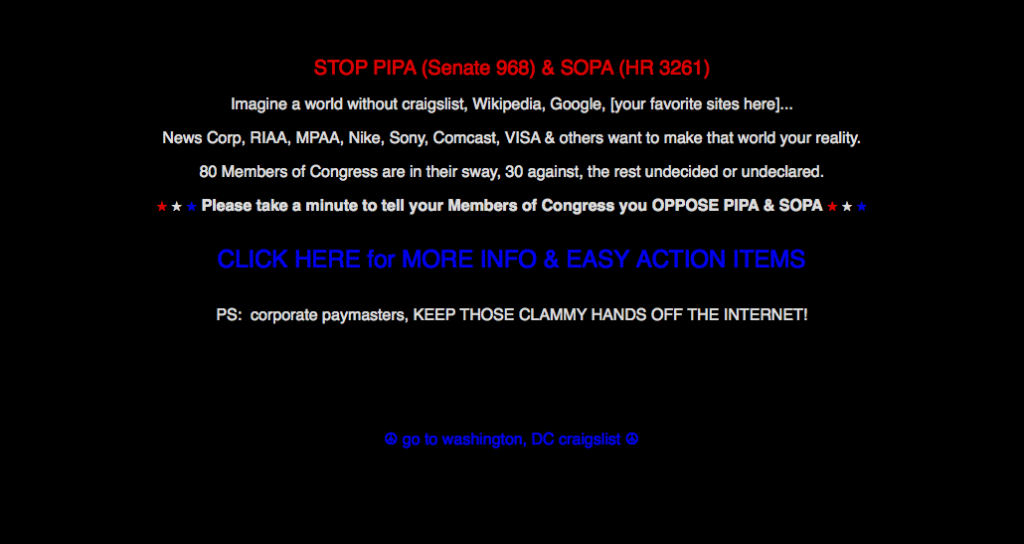
    If you were looking for a job, car or apartment today, you probably went to Craigslist, the 9th most popular site in the US. Although Craigslist did not go completely dark, an intro page urges everyone to oppose SOPA and PIPA.

    And oh yeah, even though Facebook and Twitter didn’t join the dozens of sites that participated in the SOPA blackout, the conversations on these sites were dominated by SOPA and PIPA.

    And then of course, there was the overwhelming coverage about the SOPA blackout by mainstream press, alternative press and bloggers.

    All of this means that today, January 18, I would bet that the vast majority of American got some kind of exposure to SOPA and PIPA, most of it negative. And if just a fraction of the millions of Google, Wikipedia, Craigslist, Reddit, Wired, WordPress (and on and on) users took action and contacted their representatives and Senators, today was a very busy day on Capitol Hill.

    That’s one heck of a grassroots movement. How about you? How many sites did you visit that had some mention or call to action re: SOPA and PIPA? Did you contact your representative in Congress?


  • Are You and Your Organization Vulnerable to Social Engineering?

    Are You and Your Organization Vulnerable to Social Engineering?

    A couple of years ago, I discovered strangers walking through our office unescorted.  They told our receptionist that they were looking at office space in the building; they were well dressed, the referenced the name of our landlord and they asked nicely if they could just walk around and take a look at our space.  Our receptionist, ever on the lookout for ways to be helpful, let them wander the halls.

    A couple of months ago, someone claiming to be an exhibitor at a client’s trade show called, asking for the client’s logo so they could use it in an e-mailing going out.  The person said they had the approval of the client.  My responsive Project Manager opened up a work request and got the logo sent out asap.

    In both cases, the persons making the requests were legitimate and no harm was done.  BUT, they just as easily could have been hackers or scammers and my helpful staff could have been duped into giving them information or access they were not authorized to have.  Which is why Matrix Group covers security during orientation and training for all new hires and we recently brought in a security expert to discuss social engineering.

    Social engineering is “the act of manipulating people into performing actions or divulging confidential information, rather than by breaking in or using technical cracking techniques.” Kevin Mitick, the famous computer hacker, claims that it’s “much easier to trick someone into giving a password for a system than to spend the effort to crack into the system.”  There are many social engineering techniques, including:

    • Pretexting is the act of getting people to divulge small pieces of information, which hackers use to obtain more information from the next person.  Knowing bits of information establishes legitimacy in people’s minds and makes them more willing to divulge even more information.
    • Phishing is used to fraudulently obtain private information.  Phishers typically impersonate legitimate businesses via phone or e-mail and convince victims to divulge sensitive or private information.  Think of the hundreds of e-mails you get that look like they’re from your bank; nearly all of them ask you for your account information, login information and/or SSN.
    • Baiting is a technique whereby hackers leave CDs or USB sticks containing viruses or trojans in public places, in the hopes that a curious person will pick up the items and insert them into their systems, effectively infecting them and making them vulnerable to hacker attacks.

    Social engineering is highly successful because of the natural human tendency to trust other people. In addition, most people want to be helpful.  In fact, we train our staff to be helpful because helpfulness is key to a successful business.  If you’re wondering if you or your organization are vulnerable to social engineering tactics, ask yourself these questions:

    • How easy or hard would it be for someone to gain access to your office by mentioning the name of the CEO and some key staff?
    • How difficult would it be for someone to impersonate you by providing your name, address, SSN, mother’s maiden name, spouse name, etc.  I’ll bet a lot of this information is on public Web sites and social networks.  Just look at some of your friends’ profiles on Facebook; you’ll find hometown, e-mail, birthday, the works!
    • How hard would someone have to work to impersonate someone and convince a network admin to divulge or reset a password?
    • Have you held the lobby door open for someone off the street while entering a secure building?

    Okay, now that you’re paranoid, what are you going to do about this potential threat to you and your organization?

  • It’s Time To Audit Your Facebook Privacy Settings

    It’s Time To Audit Your Facebook Privacy Settings

    I found out recently that the iPhone version of the Facebook app synchronizes with personal profiles on Facebook.  Which means (gasp!) that if a friend has your private phone numbers in his/her phone, it’s possible that those numbers are now on Facebook.  Egads!

    While I love Facebook, Twitter, instant messenger, etc., I try very hard to limit the amount of personal information that I share on those networks, including and especially my address, home phone number, information about my family, etc.  But with the social networks constantly updating their terms of use and adding new functionality to their sites and apps, it’s hard to keep up with the changes and monitor the impact on our privacy.

    Which is why I recommend an audit of your Facebook (and other social network) privacy settings on a regular basis. Here’s how:

    • Log in to Facebook and click on Account in the top right corner of any Facebook page.
    • You’ll get a dropdown of options; click on Privacy  Settings.

    Facebook Privacy  Settings Landing Page

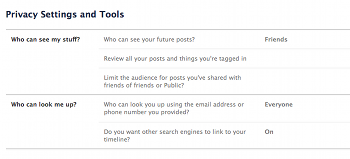
    Here’s what your Facebook Privacy Settings Landing page looks like.  Note that you can share parts of your profile with Everyone, Friends of Friends and Friends Only.  I have edited my profile so that nearly everything about my profile is visible to Friends Only.  But wait, this page only shows you a fraction of the privacy settings available to you.  To view and edit all of your privacy settings, click on Customize Settings.

    You’ll also notice two navigation items on the left for Recommended and Custom.  Click on Recommended and you’ll see that Facebook recommends that a great deal of your profile be available to everyone.  You can select these default settings with a click.  Me, I definitely opted for the Custom Settings.

    Customize Settings Page

    Here’s what the Customize Settings page looks like.  You’ll see that you can select who can see elements of your profile.  Here are my recommendations:

    • If you post photos of your family, especially your children, make Posts By Me visible to Friends Only.
    • Be sure to pay special attention to the Things I Share section.  This is the section where you can control what others are doing, including tagging you in photos and videos, checking you into Facebook Places, etc.  This allows you to NOT allow friends to check you into a bar or party, and stops them from tagging you in photos and videos and thereby making your photo visible to their friends.  Here’s a blog post about how someone nearly sabotaged a dinner party by checking all the guests into Facebook places.
    • If your Facebook network is vast, consider creating custom lists and then specifying with each post and update which list can see your updates.  For example, I have a Family list that I use to share family photos and insider updates.
    • Be sure to audit your privacy settings for existing photo albums. If you created albums before Facebook rolled out its new privacy settings, you may find that all or many of your albums are available to Everyone (I know I did!).

    As for that pesky iPhone app that uploads your personal information to Facebook, unfortunately, there’s nothing you can do about that.  Facebook did recently add a warning to the app, warning users to make sure their friends are comfortable sharing their information with others.  This is a small consolation to me; I would venture to guess that most people don’t think about the privacy ramifications of their actions and apps and will blow right past this user agreement.  What to do?  This may sound dorky, but here’s what I’ve told my friends:

    • Please don’t sync your iPhones with Facebook.
    • Don’t try to check me into Facebook places.
    • When you’re at my house, never check into Facebook Places or FourSquare so you don’t reveal my home information.
    • Please don’t upload photos and videos that are unflattering to me and my friends/guests.  (When I throw Rock Band parties at my house, videos are not allowed; we DO allow photos of us band members looking cool with our instruments.)

    How about you?  Have you audited your Facebook privacy settings recently?  Any revelations?  Any privacy disasters?  What are you doing, if anything, to maintain a semblance of privacy online?

  • What’s So Fun About FourSquare?

    What’s So Fun About FourSquare?

    In my quest to try out new social networks, I signed up for FourSquare last year.  I didn’t start using the service until a couple of months ago, when I get my new Palm Pre and I felt ready to dive into another social network.

    FourSquare is a location-based social network. The idea is that you share your location with your friends and followers by “checking into” locations.  For example, every time I go to a restaurant, I pull up the FourSquare app on my phone, let the app determine my GPS coordinates and show me possible options.  I can select one of the venues select and “check-in” or add a new venue.  When I check in, I can write a little message and share out my update on Facebook and/or Twitter.

    Last Saturday, I checked into four locations, including three restaurants and I got hilarious comments from friends about how all I did on Saturday was eat!

    Here’s what I’m enjoying about FourSquare:

    • I don’t feel compelled to check in multiple times a day, every day. My check-ins are usually to restaurants, but increasingly, I’m checking into events.  Tonight, I checked into the DCWW Content Strategy Workshop held at the Matrix Group office.  I check in only a few times a week, if at all.
    • I love the gaming aspect of FourSquare.  People who have the most check-ins at a specific get a Mayor badge.  So far, I’ve earned a Newbie badge and an Explorer badge.  I’m hoping to become Mayor of one of my favorite restaurants sometime soon!
    • It’s fun to see where my friends are and what they’re doing.
    • FourSquare is not nearly as chatty as Twitter and Facebook.
    • I have learned about so many great, local businesses through FourSquare!
    • Some enterprising retailers are rewarding frequent customers with discount coupons and other goodies.  The retailers are glad for the patronage AND the free advertising from the check-ins!

    (more…)

  • What’s All the Fuss About Facebook’s Open Graph and Privacy Policies?

    Remember when Facebook was a closed network, open only to college students? Then Facebook went mainstream and everyone could create a profile. But even back then, Facebook remained a closed network: you had to have a Facebook profile to see other profiles and connect with friends.  Facebook was closed to Google and other search engines, which meant Facebook profiles and pages never showed up on search results.

    Back in 2005, Facebook’s privacy policy clearly stated the following:

    No personal information that you submit to Facebook will be available to any user of the Web Site who does not belong to at least one of the groups specified by you in your privacy settings.

    The Evolution of Facebook’s Privacy Policies

    But then, slowly and over time, Facebook’s privacy policies changed.

    • In 2007, Facebook made your name, school name and profile photo available to the search engines unless you specifically prohibited this in your privacy settings
    • In 2009, Facebook revamped its privacy settings and gave users more control over who gets to see which aspects of their profile.  Trouble was, the default gave “everyone” access to information.
    • In April 2010, Facebook made the decision to make specific elements of all profiles public (name, hometown, school, interests and fan pages), and eliminate the ability to limit access to these fields.  If you didn’t want those elements to be public, Facebook recommended that you delete the information from your profile.
    • In April 2010, Facebook also launched the Open Graph, which shares user profiles with third party sites so that visits to those third party sites can be personalized based on a person’s Facebook interests.  On the flip side, Facebook opened up its API (application programming interface) so that third party sites can add a Facebook “Like” button to their pages; when clicked, the information would be saved back to a user’s profile.

    The Electronic Frontier Foundation has a great timeline of Facebook’s privacy policies, including links to archived versions of Facebook’s policies.

    (more…)

  • Does the Social Web Mean the End of Privacy?

    Does the Social Web Mean the End of Privacy?

    Facebook Founder Mark Zuckerberg has gotten a lot of flack lately for his pronouncement (during an interview with TechCrunch) that privacy norms have evolved over the years and privacy is essentially dead.  I watched the interview myself and think the criticism is overdone.  I think that Zuckerberg has correctly described the times and his company is taking advantage of our voyeuristic culture.  Facebook did not create this culture.  I think it started with the first reality show on MTV back in 80s. We watched the teens living together and reveled in their pranks and arguments.

    Does the social Web mean the end of privacy?  Are MySpace and Facebook to blame for all the personal revelations we spew out every day?  Or should we blame Google and Bing, which manage to index the Web and let anyone find out gobs and gobs of information about each of us?  When I Google my name (Joanna Pineda), I find lots of information that I WANT the search engines to find and index.  But I also find pages that have my address, my political contributions and address, yada, yada.  I’m not happy that Facebook changed its privacy settings and defaulted some of my information to be available to everyone, but I actually appreciate the more granular control that I now have over my posts, link and photos.

    What do you think?  Is privacy dead?  How much do you reveal on social networks?  Are you doing anything to keep out of the search engines?