Matrix Group International

Blog

  • Want More Views and Clicks In Your Emails? Make Your E-Newsletters Responsive!

    Want More Views and Clicks In Your Emails? Make Your E-Newsletters Responsive!

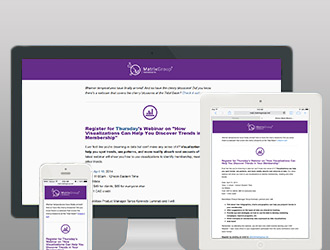
    As marketers, we’re obsessed with metrics. And since email is a primary means of Responsive Emailcommunicating with our members, customers, prospects and partners, it only makes sense that we track open rates (the number of people who actually open and read our emails) and click rates (the number of people who click on a link). Here at Matrix Group, we’ve been working with lots of clients to make their emails responsive because in most industries, more email is read on a mobile device than on a desktop email client.

    Responsive design refers to the practice of designing and implementing a website so that it “responds” to the user’s device. Looking at a website on a wide screen over broadband? You might get a full screen, 4-column layout with high resolution images. Surfing a website on your phone? You should get a slimmed down version of the site with a single column of content, text that is large enough to read without pinching, and lower resolution images.

    But what about emails? Responsive email pretty much works the same way as responsive websites. Reading an email through Outlook on your desktop? You might see a nice layout, with 2 columns, images aligned to the right and left of content, a nice header, yada, yada. Browsing the mail on your phone? That same email gets simplified. It goes to 1 column, images are center aligned, content is shorter.

    Why bother making your emails responsive?

    • Users are more likely to delete an email they cannot read easily on their phones. Source: ExactTarget
    • There is a growing segment of the population that is mobile only, that is, they access the Web and email only through mobile devices.
    • Responsive emails are more readable on a phone. Period. End of story.

    We’re tracking the results of responsive e-newsletters for our clients and so far, the statistics are promising. Clients are increasing open rates in absolute terms by 1-4%, and clickthroughs an average of 2%. A few percentage points doesn’t sound like much but when you consider that most organizations get a 20% open rate and a 2 or 3% click rate, these numbers are significant. Consider this: one Matrix Group client saw an increase of 4% overall; since they have an email list of 100,000, an extra 4,000 people are now reading their emails!

    I think it comes down to this. Your emails are getting looked at on a phone. Your customer’s decision to open and click is influenced by many factors, including subject line, who the email is from, and whether or not the email is mobile-friendly. It only makes sense to make your emails mobile-friendly. And if in doubt, do some testing and learn more about your customers’ email preferences.


  • Why Your Company Needs a Password Management Policy

    Why Your Company Needs a Password Management Policy

    Password lock smallLast week, we contacted a client to coordinate a site server upgrade, which required a DNS change. The response we got was a little alarming. The client’s IT Director had left and nobody knew where the password to their DNS registry was kept. Ouch. I had lunch with a friend who said he keeps passwords in Outlook. Another friend said she has an Excel spreadsheet on her desktop. Eeek.

    Passwords are the trickiest things. These days, we need them to be long and difficult to crack, they need to be unique across systems, and they are ubiquitous because everything needs a password. We read a lot about personal password management, but what about corporate password management?

    Think your organization doesn’t have a lot of passwords? Think again. Chances are, your organization has passwords to:

    • Online financial and payroll systems
    • Payment processors
    • Social media sites
    • Sites where you purchase equipment and supplies
    • Web hosting and DNS passwords
    • and on and on and on

    Where do you keep all these usernames and passwords, how do you manage them and who has access? Is your organization at risk if someone in a key position leaves and either takes the passwords with them OR leaves you without a clue as to where the passwords are kept (or not kept)?

    Don’t panic. Here a few things you can do to get started with a company-wide password management policy.

    1. Identify the company-wide accounts that need to be accounted for.
    2. Determine who has this information and collect it.
    3. Come up with a system for storing and limiting access. The system could be as simple as 2 people have access to a notebook where all the passwords are kept and everyone in the organization knows to give their passwords to these folks.

    Here at Matrix Group, we used to use KeePass to manage our company passwords. We had multiple KeePass databases, including one for the services team, one for IT, etc. But we’ve outgrown KeePass because we need more granular access management. So we’ve implemented Secret Server, which is software that helps companies store, distribute, change and audit passwords. Some passwords are limited to myself and the Director of Administration, while some passwords are accessible to multiple staff working on a project. I like Secret Server’s audit trail and we’ve created a system whereby certain team members can grant permanent or temporary access to passwords.

    Isn’t it time for a company password management policy?

  • Are You Legal with the Images On Your Website?

    Are You Legal with the Images On Your Website?

    Chained CameraA couple of months ago, we got a call from a client. Getty Images notified them to say that one of Getty’s images was being used on the website and they didn’t have record of the purchase. The website in question was built about 13 years ago and we had little documentation about the images used on the site. Neither my team nor the client knew where the image came from. We ended up paying the bill, which was close to $1,000 because the image was a rights managed image.

    Rights Managed (RM) refers to a licensing system usually used in photography where the customer must pay for each use or for each year. In the case of the client website above, the invoice was for multiple years of RM, which is why the bill was so high for a tiny, fairly generic image. Ouch.

    In the last decade of managing websites, Matrix Group has developed policies and procedures for using, purchasing and documenting images. Here are some of our rules:

    • Unless absolutely necessary, we don’t use Rights Managed images. It’s just too hard to keep track of the licensing and we can almost always find a non-Rights Managed equivalent.
    • All purchases of images for clients are documented in our project management system. We list the image ID, a description, the source and the price. This serves as documentation for when we invoice the client, but it’s also useful should the client ever need proof of the purchase or need to know where to purchase a version at a higher resolution (e.g., if the client wants to use an image in a printed piece).
    • We have a policy against grabbing random images from the Web, especially images.google.com. It’s too risky to grab an image and use it in a comp; if that comp gets approved and then inadvertently implemented to a live site, we’re just asking for trouble.
    • If we ever contract work to a photographer, we ask to own the images and this is explicitly laid out in our agreement. Many times, photographers will give you the right to use a photo once, e.g., in your monthly magazine or brochure. But these days, magazines get put online, brochures get put online, or companies want to use the same image across a variety of marketing materials. If you don’t have the rights to continue using an image, you will need to pay multiple times for the image. It’s not always possible to negotiate this with photographers, but we will only do business with photographers that give us ownership of images outright.
    • We ask clients if they have the rights to use or re-use the images they give us. Sometimes, client will forget that they have one-time use agreement with a photographer and simply asking the question helps set the record straight.

    Since we design websites, email newsletter and apps all day long, we need access to high quality images. I asked my team for their favorites and this is what I got:

    For paid images, we like:

    For free photos, we like:

    Of course, nothing beats images you take yourselves and that you have full rights to use everywhere. Matrix Group is in the midst of a redesign of our own website and Creative Director Alex Pineda has banned the use of stock photos.

    Anyway, don’t get caught with an invoice the way we did. Have a policy for image use, purchase and documentation. And always ask staff where they got the images for the website, brochure, presentation or email.

  • Ruzzle

    Ruzzle

    Similar to the Words With Friends, but faster!  You choose an opponent and make as many words as possible with 16 letters while your opponent does the same.

  • Tips For Keeping Your Office Open During a Snowstorm

    Tips For Keeping Your Office Open During a Snowstorm

    SnowstormLast Wednesday afternoon, with not one snowflake on the ground, schools and local jurisdictions were announcing closures in advance of Thursday’s monster snowstorm. In the past, I would gotten up early the day of the storm to make the call re: keeping the office open or following the federal government’s lead and close the office. But with all the remote technology we’ve invested in, it doesn’t make sense to close the office anymore when there’s inclement weather. While I’m sure my staff would have loved a snow day, we work so much from home these days anyway, what’s another day? Besides, our out of town clients really don’t care when the DC area shuts down, really. Here’s how we make it work:

    • Plan for work at home. If we know there’s going to be bad weather, I don’t wait until 5am the day of the storm to make the call. I tell everyone to use their best judgment and work from home is approved in advance. We talk about who’s going to be doing what, the admins make sure conference calls don’t require an attendant, people with laptops bring their machines home, etc.
    • We work hard to allow every staff member to work from home. I’ve heard some say keeping the office open and asking everyone to work from home is not fair for staff members whose jobs require them to be in the office. At Matrix Group, we’ve worked hard to make every job possible from a remote location, if not all the time, at least some of the time. For example, the admins can monitor the voice mailbox, monitor the admin email box (we ask clients to send emails to that mailbox if they want a call back), use our VOIP system to forward calls, do data entry on our intranet over the VPN, do bookkeeping over the VPN, put packets together, make calls, etc.
    • The show must go on. Our policy is “It’s business as usual, even if we’re at home.” This means calls and meetings still happen, brainstorming still occurs, and quick questions are still asked and answered. We don’t wait until we’re all back together to do work, collaborate, get questions answered.
    • We have a fiber line for our VPN. This is critical because when all staff connect to the office network, development servers or intranet (which are only available over the VPN), our old, bonded T1 lines made it painful to work. The fiber line is awesome and has made a difference even for the people who always work remotely.
    • Everyone stays on Instant Messenger (IM). We have Jabber set up and  it’s only available over the VPN for added security. All staff are required to stay on IM when they are working remotely, and we must keep our statuses updated. Going to lunch? Taking a break to shovel? We keep our statuses updated. We have some standing IM chats (911, water cooler and team chats), and we can create chat rooms on the fly when a group needs to collaborate.
    • We use Web conferencing a lot. Some staff members like to use Skype, but for client meetings or even team meetings, we use Webex.
    • Tech support is always available. We know that being able to work from home depends on being able to connect to the VPN. So IT always has a person or two available to help staff troubleshoot their connectivity issues.

    On Friday, about half the staff came in to the office, while the other half remained at home. Honestly these days, I can’t tell half the time where people are because we do a good job of staying in touch, using our calendar and IM to broadcast our statuses, and keep work going. How about your office? What’s your policy when it snows and how did your office survive last week’s storm?


  • My Life in 20 Years

    My Life in 20 Years

    Want to know the future? This site will log into your Facebook page and create a timeline for you, 20 years from now. Hysterical!

  • Distance to Mars

    Distance to Mars

    Learn about space and check out some great animations using CSS and javascript.

  • Sci Fi Currency Converter

    Sci Fi Currency Converter

    If you have you ever wondered how much money you could have if you lived in the time of Star Trek, or if you were on a planet in Star Wars, or even in another country, this website can tell you!

  • Is It Fair to Compare Retailers and Marketers to the NSA?

    Is It Fair to Compare Retailers and Marketers to the NSA?

    woman-holding-stop-watching-us-signOn January 17, President Obama made an important speech at the Department of Justice on NSA reform. He discussed the history of the intelligence community in the US, why it exists, how it has benefited our country, the data breach that brought to light the National Security Agency’s metadata collection program, and the reforms he’d like to make. During the speech, the President made some”broad observations” that emerged from his Administration’s review of current intelligence practices. He said:

    First, everyone who has looked at these problems, including skeptics of existing programs, recognizes that we have real enemies and threats, and that intelligence serves a vital role in confronting them.

    Second, just as ardent civil libertarians recognize the need for robust intelligence capabilities, those with responsibilities for our national security readily acknowledge the potential for abuse as intelligence capabilities advance, and more and more private information is digitized.

    Third, there was a recognition by all who participated in these reviews that the challenges to our privacy do not come from government alone. Corporations of all shapes and sizes track what you buy, store and analyze our data, and use it for commercial purposes; that’s how those targeted ads pop up on your computer or smartphone. But all of us understand that the standards for government surveillance must be higher.

    Ouch. Did the President just compare retailers and us marketers to the NSA? The Direct Marketing Association (DMA) wasn’t happy with the President’s remarks. A statement on the DMA website says, “DMA was disappointed to see the responsible use of consumer data for marketing purposes conflated with “government surveillance.”

    Was the President’s comparison valid? After all, yeah, we know that Amazon and Google  collect vast amounts of data about what we search for, the sites we visit, what we buy. Aren’t they like the NSA? Well, here are my own observations:

    • Expectation of Privacy.   I think one big difference between the NSA and the big retailers has to do with whether or not we have an expectation of privacy. If I’m on the  Amazon website, I can’t really expect Amazon to NOT know what I’m doing. On the contrary, I expect Amazon these days to know so much about me so as to make accurate recommendations and make purchasing simple and fast. With my private emails and phone calls to my clients and family, I feel I should have an expectation of privacy. It probably caught most Americans by surprise to know that their emails and calls were being collected and sifted through by the NSA.
    • What does it mean to say that “the standards for government surveillance must be higher?” All of the big retailers have explicit privacy policies that they post on their website. They tell you what data they’re collecting and what they do with it. Do we take the time to read these privacy statements and terms and conditions documents? Absolutely not. What does it even mean to hold government to a higher standard when we don’t know what they are collecting, when and how.
    • The ability to opt out. For those of us who want to be anonymous on the web, we can turn off cookies, we can use the private proxies to browse websites, or we can go into Anonymous mode when using the Chrome browser. We can cancel our Facebook accounts. While most of us don’t know how to do most of these things, they are possible and available.
    • There is at least some oversight of marketing practices on the Web. I’ve blogged in the past about Facebook’s security policies and how unhappy I am that they keep changing. I’m not nuts about how Facebook uses my Likes to promote advertisers. And I’m not nuts about how Nordstrom ads follow me everywhere.  And yet, I know that there is oversight of these marketing practices by government agencies like the FTC and industry groups. When intelligence agencies operate in the shadows, how are we to know what they’re doing and who is overseeing them?
    • But do we really know what Google is tracking? I say all of the above to defend the marketing community, but on the other hand, I think about the big data that Google is collecting, analyzing and learning. Google probably knows what I had for breakfast. Heck, Giant claims to be able to “guess” my next week’s food delivery. Are we perhaps too blasé about the data trails we leave behind every time we go online?

    Like President Obama, I don’t know all the answers. I hope we get meaningful reform, I hope we have meaningful oversight, and I know in my heart that privacy these days is a myth.


  • Starbucks App

    Starbucks App

    Coffee addicts beware! The Starbucks App lets you load money onto your smartphone so all you have to do is scan and go! No need for cash or card.