Matrix Group International

Tag: Social Media

  • Getting Started with Twitter Spaces

    Getting Started with Twitter Spaces

    I’m part of the Mission Matters author network and they’ve been hosting discussions about different business topics on Twitter Spaces. What is Twitter Spaces?

    Twitter Spaces are live, audio-only conversations that happen in Twitter. Twitter Spaces is a direct competitor to Clubhouse, which was the first tech firm to offer audio-only discussions back in April 2020. Here’s how it works:

    • Any individual or organization with at least 600 followers can host a Twitter Space discussion.
    • All Spaces are public, but the host can designate who can speak.
    • Individuals can be invited as speakers and attendees can be promoted to the role of speaker.
    • Hosts and speakers must use the Twitter app on their mobile phone to participate in the discussion. People who simply want to listen can do so from desktop.
    • Hosts, speakers and attendees can tweet out the Space so others can join.
    Twitter Space Screen Shot

    When I first heard of Clubhouse and then Twitter Spaces, my first reaction was, “Oh great, another network. But why audio only when video is THE thing?” But as both services got going AND as I joined more of these audio-only conversations, I realized that audio has its own power. I can see organizations hosting discussions on Twitter Spaces to:

    • Discuss a hot, trending topic.
    • Encourage deeper and ongoing conversations about specific topics.
    • Engage members and customers who may be reluctant to get on a video call (yes, you can always turn off your camera, but some people will be on video and then it gets awkward).

    So how do you get started with Twitter Spaces? This blog post is not meant to be a full-on tutorial or guide, but here are the basics:

    1. Decide which account (individual or organization) should host your Twitter Spaces.
    2. To start or schedule a Twitter Space, on the Twitter mobile app, click the + to start a new Tweet, then, in the left corner, click on the Spaces icon.
    3. Name your Space, and then start it immediately, or schedule it. Personally, I like to schedule things in advance.
    4. You can also record the conversation.
    5. Once your Space is created or scheduled, Twitter will give you a Share link. Don’t forget to add topics so people can find your Space.
    6. Invite speakers with a calendar invite. Be sure to include the Share link and remind them that they must use the Twitter mobile app to participate as a speaker.
    7. During the actual Space, remember that you can’t see anyone, so as host, you’ll probably need to call on people or otherwise assign an order of speaking.
    8. As with video calls, remind speakers to go on mute when they’re not speaking so that their backgrounds and side conversations don’t interfere with the discussion.
    9. Twitter will notify your followers that you have a Space live, but as with anything else, best to use other means to promote your Space event.

    I have participated in, and listened to, many Spaces over the past few months. I love them because I can be mobile while listening. I can be making dinner, feeding the cats, or even checking my email. I love the variety of topics. And I love how accessible these Spaces are.

    I haven’t actually hosted a Twitter Space yet, but maybe soon! How about you? Are you ready to host a Twitter Space event?

  • How Your Digital Marketing Should Change in 2020

    How Your Digital Marketing Should Change in 2020

    Your website, social media pages, videos, email newsletters, email campaigns – they’re all elements of your digital marketing toolbox. It’s the start of a new year. How should your digital marketing change in 2020? I queried my staff and here’s what we came up with:

    Experiment With a Mix of Short- and Long-Form Content

    Is short content better for social shares? Is long content better for SEO? If you’re not being intentional about the topic AND length of your posts, you should be. Here’s a great analysis of short- vs. long-from content from CopyHackers. TLDR summary: Great, long content is incredibly difficult to write, so shorter is probably better for most organizations, but you need to be intentional AND test your content with your audiences.

    Video on All Of Your Social Media Pages

    Facebook, Twitter Instagram and LinkedIn LOVE video. According to Animoto, video is consumers’ favorite type of content on social media. Facebook and LinkedIn prioritize posts with video. If you’re not posting original video (as opposed to embedding a YouTube link) on social media, what are you waiting for?

    Podcasts Are Huge and Growing in Popularity

    There’s no doubt about it: podcasts are hot! According to Podcast Insights, 51% (144 million) of the US population has listened to a podcast – up from 44% in 2018 (Infinite Dial 19), and 16 million people in the US are “avid podcast fans” (Nielsen Q1 2018). Podcasts give you the ability to reach your audiences in a new way, they allow you to share serialized content in a convenient way, and they are easier to produce than video. Could this be the year you launch a podcast?

    Expect Some Turmoil In Your Communities During This Election Year

    Nearly every association and nonprofit will say they are nonpartisan. BUT politics has infiltrated every aspect of our lives. Just in case comments and conversations about the economy, healthcare, trade, or the environment (name your topic) turn rancorous in your communities, be sure you are prepared with monitoring and policies. What will you do if an online discussion about manufacturing best practices turns into a nasty exchange about trade with China? Be prepared!

    Focus on Storytelling for Authentic Content

    I’m rewatching The West Wing and I’m struck by how effectively the show uses storytelling to frame policy positions. Storytelling is effective because stories create connections with real people and they create memories. Here’s a great post from Brandignity about the advantages of using storytelling in marketing.

    Create Personalized Prospect Cultivation Funnels

    We’ve all done this: signed up for a white paper and then gotten endless, automated follow ups from a random company. This is marketing automation gone bad. Marketing automation will only work when your emails and landing pages are thoughtful and personalized for each member, customer or prospect.

    Coordinate Your Platforms Better

    No one web page, email or social post will cause the conversions you need, whether it’s membership signup, meeting registration, publication sale or advocacy involvement. So it’s time to really deepen your awareness of all the marketing channels you own and how they work with one another. No longer can you have the meetings team sending out emails that the web and marketing teams don’t know about. An editorial calendar is a good start. Charting user journeys through your systems is another.

    How will your digital marketing evolve in 2020?

  • Top 5 Ways to Improve Your Facebook Page Reach

    Top 5 Ways to Improve Your Facebook Page Reach

    Have you noticed that the likes and interactions on your Facebook page are decreasing? If so, you’re not imagining it – organic reach on Facebook brand pages fell by 52% last year alone, and Facebook has even admitted that only about 16% of your fans see your updates. Yuck!

    Why is this happening? With an overwhelming amount of content being published to Facebook every second and a limited amount of real estate in each user’s News Feed, Facebook tries to tailor each individual’s feed to deliver what it believes to be the most relevant and interesting for that person. It’s not too surprising then to hear that Facebook prioritizes posts from the friends and family that you interact with the most, and posts from your friends that are linked with your interests. All of this to say, it’s now harder than ever for updates from brand pages to be prioritized and seen.

    In addition, Facebook is a business.  They’ve found that many brands are willing to pay to boost their posts in order to reach more people, providing Facebook with a nice little (ok, large) revenue stream.

    But what if your budget doesn’t support boosting Facebook posts? Don’t worry – it doesn’t mean that you can’t improve your reach without getting out your organization’s AmEx card. Here are five things you can do to improve your Facebook page, reach more people, and get more likes and comments, without spending a penny:

    1. Always include an image with your link posts. The best way to make sure your link shares are prioritized and seen is to include a large preview image (1200 x 630 for the best display on high-resolution devices). The Facebook algorithm demotes links with low resolution photos or links with no photo at all, meaning your fans will probably never see the shared content.
    2. Know what’s even better than images? Video! Social video generates 1200% more shares than text and images combined. Wow! When uploading videos to Facebook, make sure that it’s an original video that you upload directly to Facebook, not a YouTube embed. Facebook prioritizes posts with native video that it can auto-play and caption.
    3. @ mention people and organizations. Get people to tag themselves in your updates. Doing this gives your post more velocity because they will show up on other people’s and organizations’ timelines and feeds. Plus, people get notified when they are @ mentioned and tend to like those posts.
    4. Be original and keep a dialogue going. When sharing posts from other people or other organizations, make sure you are including an original comment. Facebook likes to display posts that have been personalized in some way by the poster, that encourage new thought and dialogue. Also be sure to respond to comments and engage your audience, because this is social media, and consistent, thoughtful responses and dialogue is what will keep them coming back for more.
    5. Encourage direct visits to your Facebook page, and ask your fans to turn on notifications. Direct visits, or visits where people went to your page directly, and not in a feed, indicate special interest and affinity. When people do this, Facebook will tend to prioritize your posts for those people. Encourage direct visits by promoting your Facebook page and specific posts on your website and in emails. Also be sure to ask your fans to turn on notifications for your posts, and even to select “show first in news feed” under the follow options on your brand page, so they never miss a post.

    Bonus tip: Always keep a pulse on the social media and search algorithm updates, but don’t let them rule you. Test, tweak, and test again to see what works best for your organization and your audience.

  • Getting Started with Facebook Live

    Getting Started with Facebook Live

    A couple of Saturdays ago, my friend, co-worker and Director of Biz Dev, Bryan Clark, was taking his first-degree TaeKwonDo black belt test. I was attending as a black belt to help with the sit ups and push ups, to cheer Bryan on since he’s my sparring and workout buddy, and to post updates to the studio’s social media pages.

    In the past, I’ve taken photos and videos and posted them to Facebook in a continuous stream during the event. As I was leaving work on Friday night, a co-worker asked me to wish Bryan good luck and please stream the test live so she could watch from Pennsylvania. Live stream? Could I do it through Facebook Live on Be Ryong’s Facebook page? I decided to give it a try.

    Over the course of the next three hours, I live streamed snippets of the test, I took photos, I shot video, I used my iPhone 6 and my DSLR camera to document the test, and I helped out with the test. I texted friends and co-workers to let them know I was live streaming the event, and I posted updates to Bryan’s Facebook page to let HIS friends know about the test and the live updates.

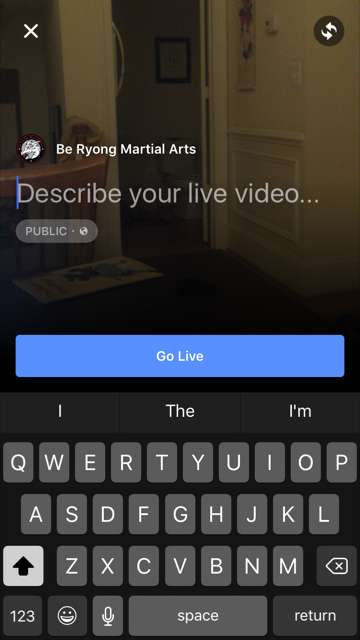
    Facebook Live is ridiculously easy to do. From your personal page or a brand page that you manage, press Publish, then select Live Video.

    You’ll be asked to enter a description. Once you’re ready, you click Go Live. Yes, it’s that easy.


    FBlive-circle_sm FBlive_2

    Things I Learned

    Here’s what I learned from using Facebook Live during the test and during a few classes since then:

    • Be sure to advertise that you’ll be streaming your event live well in advance of the event so that people know to tune in. The decision to live stream was sort of made on the fly, and I could have built up excitement and views if I had done more promoting ahead of time.
    • Make sure you have a good Internet connection. Turns out that one side of the studio had better WiFi than the other, so I stayed on the good side. When I ventured to the bad WiFi side, the video suffered.
    • Have a stand or other means for holding your phone or tablet up and steady. Because I was holding my phone and panning to get the full layout of the studio as the students moved around, the video got a little shaky at times. If I had had more time, I would have set up my phone on a stand in one part of the studio and just occasionally zoomed to get better coverage of a student or routine.
    • Your video will be live in near real time, but not instantaneously. Out of curiosity, I asked a friend to check the studio’s Facebook page while I was live streaming. We discovered the stream was about 30 seconds behind, which we thought was pretty darn great. I remember the days of needing a fiber or satellite connection, a camera, a real-time encoder, yada, yada. And here I was, live streaming with my phone!
    • If you want a copy of the video, shoot the video with your phone or camera, don’t live stream it. I didn’t realize it until later, but I ended up without a local copy of the videos I live streamed because they were uploaded directly to Facebook.
    • If you want HD video, shoot the video from a quality digital camera. The quality of the live stream is good but not HD. Some of the streams were actually fuzzy. So for the breaking part of the test, I chose not to live stream. Instead, I took HD videos and then uploaded them afterward to Facebook. The quality is better, AND I have copies to give to the students.
    • For short bursts of activity, you can choose to live stream OR shoot video and then upload. Uploading video to Facebook is so ridiculously easy, especially if videos are a couple of minutes or less. For these short videos, Facebook Live is less compelling.
    • Facebook will archive your live streams so even if your followers don’t watch in real time, they can still watch on demand.

    All in all, Facebook Live is fabulous tool for live streaming your events. Want family overseas to watch your daughter’s wedding from afar? You can live stream on Facebook. But just be sure get a quality, HD archive as well.

    If you want to see samples of Facebook Live streams from the black belt test, visit the BeRyong Facebook page. I’d love to hear about your Facebook Live adventures!

  • Social Media Gives Each Of Us Our Own Reality Show

    Social Media Gives Each Of Us Our Own Reality Show

    Remember The Truman Show, released in 1998? Truman Burbank thought he was an ordinary guy, but in reality, his whole life was one big reality show. It was a great story but a ridiculous premise.

    In 2003, MySpace was launched. All of a sudden, teenagers had a way to create personal web pages to share their profiles, photos, videos, artistic creations.

    In 2004, Facebook gave college students a way to broadcast their status so that their friends knew how to find them and know what they were up to. Over time, Facebook would open up, allow anyone to create an account, and allow us all to share status updates, photos, videos, interests, and our location.

    After a few years, critics, predicted that privacy would be the downfall of Facebook. Why would people want to share so much of their lives?

    Today, nearly 900 million people share the most intimate details of their lives on Facebook. Millions of people check-in from their current location every hour on Foursquare and other location-based networks. Over 100 million people tweet the details of their lives from Twitter: what they’re thinking, doing, eating, reading. The reality genre is the single, hottest genre on television.

    Just like Truman Burbank, social media has given each of us our very own reality show.

    Think about it. If you subscribe to a friend’s account on FriendFeed, you can see EVERYTHING she’s doing on the Web: what she’s tweeting, what she’s posting to Facebook, her blog posts, her photos on Flickr, her videos on YouTube. It’s sort of like stalking, only we encourage it and we admire those with the largest followers.

    We even title our social media reality shows. On most social networks, I’m jmpineda. I’m not a very big star. I only have 1,591 followers on Twitter, 302 connections on LinkedIn and 233 friends on Faceook. Meanwhile, a good friend has over 1,200 LinkedIn connections, over 10,000 Twitter followers, and nearly 800 Facebook friends. She’s got an amazing Klout score.

    The next time you pooh pooh the reality TV genre, ask yourself: Are you part of the craze with everything you’re posting and sharing on social media? What’s the name of YOUR social media show?

  • It’s All About Mobile and Social At The Olympics

    It’s All About Mobile and Social At The Olympics

    I love the Olympics. During the two weeks that they’re on, I’m up way too late and I spend too much time checking results during the day. I never miss opening and closing ceremonies and watching the swimmers and gymnasts just makes my day.

    Which is why I’m so happy that NBC and the IOC created mobile apps that let me watch all of the races in real-time or on demand. For the first time, I can watch events that don’t normally get any airtime (like tae kwon do) and I can get as much detail as my heart desires on specific athletes, races and sports.

    • I love, love, love NBC’s Live Extra app that lets me watch the events by sport and by day. I was able to get my son to bed with the promise that he could watch Michael Phelps the next morning on the iPad. These videos go beyond the 2 minute highlights on standard news sites. If I want to, I can watch 3 whole hours of swimming finals from each day. There are ads and wait times between races but you can see everything. Amazing. You can also watch Live Extra from your computer.
    • The NBC Olympics app on the iPad has results, news, photos and video highlights. This is where I go for results and short videos.
    • The London 2012 app is terrific. It will tell you everything going on in London this summer, where to go, and how to get there. You can coordinate meetups with friends and you even create a personal calendar. My friend Sue turned me on to this app and she hopes the city of London will keep this app long after the Olympics are over because it’s a great travel app for local and visitors alike.

    There have been all kinds of news stories about how the apps aren’t ready for prime time, NBC is delaying posting the videos, sometimes pages and videos are slow to load, yada, yada. Me, I expect there will be glitches and I’m just grateful that this year’s Olympics are so much more accessible.

    The Olympics aren’t just big on mobile devices, they’ve been HUGE on social media. Every morning, when I check my Twitter and Facebook pages, the people I follow are overwhelmingly talking about the Olympics.

    • I love this branded Twitter hashtag page for #Olympics.
    • I’m enjoying tweets from some of my favorite athletes, even some I never heard of!
    • I’m enjoying status updates from the NBC Olympics Facebook page. I’m tracking the events and results elsewhere but it’s fun to read  the comments. There are nearly 650 comments on the post about Michael Phelps winning his 19th medal!

    How about you? Are you watching the Olympics on your TV or some type of mobile device? Are you participating in the social media frenzy over the races, results and athletes?


  • Are You Suffering From Social Media Fatigue?

    Are You Suffering From Social Media Fatigue?

    Tired Woman Asleep In Front of Her KeyboardA friend asked me recently if I’m on Pinterest, the hot, new social network where users “pin” products, places and articles they like to Pinterest and explore the feeds from their friends. Confession: I’m on Pinterest and I have pinned exactly one thing as of this evening: a beautiful photo of Angkor War in Cambodia.

    BTW, I’m not on Banjo, Path, Glancee or Instagram. I’ve abandoned Amplify (which I just learned tonight is shutting down), Bebo and FoodBuzz.

    Yeah, I know, I blog about social media. I’m supposed to try out everything new, but the truth is, I’m suffering from a bit of social media fatigue. I tweet every day (most days anyway), I do a weekly YouTube interview, I blog for Matrix Group once a week, I blog occasionally as a mom, I post to Facebook personally and for Matrix Group, I try to post to my Google+ page, and I write for several other blogs. Today, there simply isn’t room in my schedule for another nifty site.

    I’m not alone. A recent study by JWT Singapore  found that “50% of young adults find it too time consuming to keep up with all their social media commitments.”

    And yet, 94% of marketers say they use Facebook in their marketing efforts, 74% use Twitter, 41% use blogs and 30% use YouTube.

    It’s clear that social media across a multitude of platforms is here to stay. So how do we, as marketers, prevent social media burnout? Here are some suggestions:

    • Create an editorial calendar that details the topics and themes you want to post about. This prevents a lot of wasted time worrying about what to blog or post about.
    • Develop a reasonable schedule. If you are on social media sites for business, it’s okay to NOT post on the weekends. And if you can’t tweet 10 times a day or update Facebook every day, scale back to a schedule you can manage and stick to.
    • Test out new platforms one at a time, at your own pace. Even though new platforms are coming online every day, you don’t need to be on every single one, unless you have the time and inclination. I like to try something new every few months; it takes that long to figure out how it works, what it’s good for, and if it will work for us or our clients.
    • Abandon platforms that aren’t working. For example, just because 200M people and businesses are tweeting doesn’t mean that you should be, too. If Twitter isn’t meeting your business needs, you’re not getting enough return, or you haven’t figured out how it can be useful in your marketing toolbox, stop using it for a while and evaluate whether your time could be better spent on another platform.
    • You don’t need to be on social media, all the time. I used to beat myself up when I missed tweeting for a day or two. Today, I realize that’s just part of the ebb and flow of my day and frankly, I don’t think my followers notice if I miss tweeting every once in a while. If I stop tweeting altogether, that’s a different story.

    How about you? Are you suffering from social media fatigue? What are you doing to combat it?


  • Time to Create a Google+ Page for Your Organization

    Time to Create a Google+ Page for Your Organization

    On Monday, Google opened up Google+ and allowed companies and brands to create corporate pages. Previously, only individuals could create Google+ profiles (believe me, we tried to create a corporate page and were thwarted by Google!).

    If you haven’t done it already, I encourage you to create a page for your organization, company, brand or initiative by going to the Google+ Create Page.

    Even if you don’t know how or what you’re going to do on this new social media platform, I think you need to be on it because:

    • Google+ has 40 million subscribers and that number is growing fast. It’s nothing compared to Facebook’s 800 million subscribers, sure, but 40 million is still a big number.
    • Google+ users tend to be early adopters. According to Target Marketing, in the first few months of the network’s presence, the users were mostly young men, a third of users were between 25 and 34 years old and 59 percent of all visitors were male. This will surely change over time.
    • Just as there isn’t one TV network or channel that dominates anymore, chances are your organization’s target audiences are on various social networks so you probably need a presence on all the major platforms.
    • Google likes to drive traffic to its web properties, like YouTube and Blogger, so having a corporate presence on Google+ will be good for search engine optimization.
    • Google likes to integrate its offerings, so there will surely be really neat tools to tie together Google+ with Google Analytics, Google search, AdWords, Google Reader, Gmail, etc. For example, there’s already a way to +1 an article in Google reader. +1 is Google’s version of the Facebook “like.” I’m especially excited about Ripples, which is an interactive graphic of the public shares of any public post on Google+ to show you how a post has rippled through the network and help you discover new and interesting people to follow.

    My dilemma right now is that I don’t know how the Matrix Group Google+ page will be the same and different from our presence on Facebook. If you’ve ever heard me speak or if you follow this blog closely, you know that I preach a layered approach to social media where each platform has a different purpose and content strategy. There is overlap to be sure, but it’s best to have a different strategy for each platform to encourage your target audiences to follow you in multiple ways.

    As your marketing team ponders this same question of market positioning for your Google+ page, be sure to create your page early to reserve the name and have a presence for the early users who will be looking for you.

    Have you created your company’s Google+ page? How will you be using it to connect with your customers, prospects or members?

  • Does Your Organization Have a Social Sharing Strategy?

    According to a study by ShareThis, the social sharing widget that you see on many websites, Facebook accounts for 38% of sharing traffic on the web. And that’s just the percent of people who click through. If you add links shared but not clicked, the number goes up to a whopping 56%. Which means that if we (the collective “we” since there are over 700 million of us now on Facebook) want to share a link with the world, we do it through Facebook.

    This totally makes sense to me. When I find something new, cool, interesting, amazing or whatever, I immediately post it to Facebook and Twitter (increasingly, Google + as well, but more on that in a future blog post).  And I rely on my network of friends, co-workers, clients and business colleagues to find out about other new, cool, interesting and amazing things.

    So I got to thinking. If social sharing is an important means by which we (again, the collective “we”) learn about new sites, we can’t and shouldn’t leave this sharing to chance. Sure, most websites now have a ShareThis widget, but is this enough? I say no. I think every organization needs a social sharing strategy that includes the following:

    • What you want people to share. Do you want visitors to share your home page? Individual articles? Donation pages?
    • How you want people to share. Do you want visitors to send an e-mail, post to their social networks, save to their social bookmarking pages, all of the above?
    • Regular review of analytics to find out what and how people are sharing links on your site. Be sure to review your usage reports, ShareThis account and other reports to find out what’s popular, how people are sharing, and learn why certaini articles or posts generate activity.
    • Design and CSS guidelines that make your site shareable. For example, if you share a link on Facebook, Facebook automatically indexes the images and allows you to cycle through the images and select one to include with the link. If your organization logo is set up as a background image in your CSS or the logo is not whole, your logo can’t be included in the link.
    • Calls to action to encourage sharing. While many of us will share our favorite links on our own, other won’t unless prompted, so I think it’s important to have calls to action to encourage sharing. It’s also a good idea to test calls to action on a regular basis to find out which calls to action work best.

    The design and front-end team at Matrix Group has developed a set of guidelines for setting up web pages so that titles are complete and the proper images are included in links. Be sure to test the shareability of your site on a regular basis and address issues with your web design or maintenance team.

    How about you?  What’s your platform of choice for sharing links?

  • Thank Goodness Someone Bought Delicious or Why I’m a Prolific Social Bookmarker

    Some of you know that I’m a prolific social bookmarker. I use a social bookmarking site called Delicious to store and organize my Web bookmarks. I don’t use the bookmarking function in my Web browser because I use too many devices every day: my Sony laptop when I’m at work, my Apple laptop when I’m at home, and my iPad and Palm Pre smartphone from everywhere. By using a social bookmarking site, I have access to all of my bookmarks from anywhere.

    But what’s even cooler about social bookmarking is that my bookmarks are public (unless I mark specific links private, which I do when they’re links to sites related to my children or my friends), which means I can easily share my bookmarks with others. For example, I use the RSS feed from my Delicious account (www.delicious.com/jmpineda) to share my bookmarks on this blog (check the bottom, right column), and I encourage my staff to access my bookmarks when they’re looking for Internet statistics or case studies.

    Finally, I love that I can create a taxonomy for my bookmarks. I’ve carefully created a list of categories that I’m interested in and whenever I bookmark a link, I associate that link with one or more categories. For example, I categorized an article on optimizing your Facebook page for search engines under the tags of Facebook and SEO. I have 148 tags and I bookmark sites nearly daily.

    So I was very happy to learn that social bookmarking of choice, Delicious, which had been bought by Yahoo! several years ago and then put on the block recently, had been purchased by the founders of YouTube. You see, I started my social bookmarking life on a platform called Magnolia. I loved Magnolia and still think the user interface is better than that of Delicious, but January 2009, Magnolia suffered a huge data loss and I nearly lost all of my bookmarks. So I switched over to Delicious and I never looked back. If Delicious had gone under (which was a possibility if no buyer were found), I could have exported my bookmarks, but it’s always hard switching platforms and getting used to a new interface.

    If you haven’t yet discovered social bookmarking, I encourage you to give it a try. Not only are my bookmarks easily accessible, I have found amazing resources by checking Delicious’ top links and exploring the bookmarks of other people. It’s fascinating when thousands of other people have bookmarked your same links and equally interesting when you’re the first person to save a bookmark.

    How about you? Are you a social bookmarker? What’s your platform of choice?