Matrix Group International

Tag: Productivity

  • AI Note-Taking Part 2: Lessons from Five Months of Testing and Refining

    AI Note-Taking Part 2: Lessons from Five Months of Testing and Refining

    After five months of testing AI note-taking tools, Matrix Group discovered that the right tool is only part of the solution. Fathom worked well but didn’t match our workflows, so we built a custom GPT that better fit our needs. Still, adoption lagged until we refined the process, simplified formatting, and gathered ongoing feedback. Real value came when AI was aligned with behavior, not just technology. This blog post explains what we learned and how others can avoid common pitfalls.


    A few months ago, we shared how Matrix Group chose Fathom as our AI-powered note-taking app after testing multiple options. It was an exciting step in our AI journey—one that promised to make note taking more accurate and efficient, ensuring that key takeaways didn’t get lost in the shuffle.

    But as we started using Fathom more regularly, we ran into some challenges. Not because the tool wasn’t working—it was!—but because it wasn’t working for us in the way we needed it to.

    When we first implemented Fathom, we were excited about how well it captured and summarized our meetings. The AI did exactly what it was designed to do—generate summaries, highlight key points, and pull out action items. 

    But as we started using it regularly, we realized that Fathom wasn’t quite working for us. Here’s where things got tricky: 

    • The way Fathom labeled action items didn’t quite align with how our team structures follow-ups. The AI was tagging both “to-dos” and “next actions,” but in a way that didn’t match our workflow, which meant our project managers had to do additional editing to make the notes truly actionable.
    • The formatting of the notes wasn’t translating well into our client extranet. This meant extra steps to clean things up before sharing them out with our clients.
    • We weren’t experiencing the time savings we expected. Instead of eliminating work, we found ourselves reworking AI-generated notes to fit our processes.

    These issues didn’t mean Fathom was a bad tool—just that it wasn’t the perfect fit for how we work. So, we started exploring ways to tailor AI-generated meeting notes more precisely to our needs.

    We asked the big question: What if we wrote a custom GPT for note taking?

    Since we already used custom GPTs for other tasks and workflows, we were confident that a custom GPT could help us process meeting transcripts and generate notes formatted exactly how we wanted. And, it did! 

    We created a custom GPT that would take transcripts from Zoom, Teams and Google Meet and generate meeting notes that:

    • Listed the meeting attendees, grouped by organization
    • Organized the notes by topic; the notes were appropriately detailed (Fathom sometimes summarized discussions too much)
    • Listed the To Do items at the top and bottom of the notes
    • Used limited formatting so the notes could be sent through our company intranet

    This new custom notetaker was amazing. We rolled it out to the project managers and cheered when they said this notetaker was better than Fathom.

    A few weeks later, we discovered a problem: No one was using our new custom notetaker

    Why? The process required extra steps—logging into Zoom, downloading the transcript, uploading it to our custom GPT, and retrieving the notes. It was an extra layer of work that most people weren’t willing to take on.

    To make adoption easier, we assigned a team member to handle the AI note-taking process for everyone. The idea was simple: instead of expecting project managers to run the process, we’d do it for them and distribute the notes.

    Yet when we followed up, we realized something surprising: PMs still weren’t using the notes.

    Why?

    • The formatting was still too complex for our extranet.
    • The AI was summarizing too aggressively, stripping out details that were important for context.
    • Even with automation, there was no real buy-in.

    It took five months of testing, tweaking, and getting feedback before we finally got the process right. We adjusted our custom GPT to balance summaries with key details, stripped out unnecessary markup, and made sure the process was as seamless as possible.

    But the biggest lesson? Tools alone don’t change behavior.

    For AI adoption to stick, there needs to be:

    • Ongoing feedback: We had to regularly check in to see what was working and what wasn’t.
    • Follow-through: Just setting up a tool isn’t enough. We had to make sure people were actually using it.
    • Authority to drive change: Someone with authority over the process needs to champion the change.
    • Iteration: Refinement takes time. Expect to make several changes along the way.

    After months of refining, our AI note-taking process finally works the way we need it to. We’re getting the right level of detail, in the right format, and without creating extra work.

    But if there’s one thing we’ve learned, it’s this: AI tools (or any technology for that matter!) are never “set it and forget it.” They require tuning, testing, and continuous feedback to actually deliver value.

    We’d love to hear from you. Have you experimented with AI for note-taking? What worked and what didn’t? Let’s compare notes!

  • Work 5.0 and the Future of Work at Matrix Group

    Work 5.0 and the Future of Work at Matrix Group

    Matrix Group has entered Work 5.0: a new chapter of mostly remote work, supported by flexible coworking spaces and intentional in-person gatherings. After closing our Crystal City office, we’re embracing a model that reflects how our team truly works today: digital-first, collaborative, and location-flexible. This blog post explores why we made the change and how it’s shaping the future of work at Matrix Group.


    On Monday, March 31st, Matrix Group said goodbye to our office on the 3rd floor of 2611 South Clark Street in Crystal City. We moved into this space in July 2019, a mere nine months before the pandemic began. This new office was light-filled, full of collaborative spaces, decorated with purple splashes and Star Wars toys, and full of the latest tech. We got rid of our 15’ x 10 server room and moved everything to the cloud. The Zoom-enabled conference room made meetings a dream for remote staff because of the two cameras: one showed the room, while the other zoomed in on whoever was speaking.

    Then March 2020 came, the world changed forever, and so did Matrix Group. We went all remote and never looked back. Even as the pandemic waned, I joked that I would never see my COO again since she lives in Herndon and previously, her commute into Crystal City was a bear. I hired staff who live outside the DMV, and still other staff moved away for family or love, or both.

    For over five years, the office stayed largely unused. Sure, a handful of staff came to the office every day, and Matrix Group was able to host some amazing events on our floor. We hosted two events each for Association Women Technology Champions and Association Latinos, and we held some amazing Matrix Group parties.

    When our lease was up for renewal, I made the decision to not renew our lease. It was hard to say goodbye to such a gorgeous space, sad to part ways with a terrific landlord, and difficult to wrap my brain around the answer to the question, “where is your office located?” And, if I’m being honest with myself, it was hard to say goodbye to a physical representation of my company.

    But with turbulent times ahead for the US economy in general, and the association and nonprofit industry in particular, we decided to give up our space. We haven’t entirely gone remote. We now have two offices in a co-working space in the same building.

    So what does work life look like at Matrix Group these days? In many ways, it hasn’t changed since we gave up the office two weeks ago. BUT, I want us to think about when and how we gather in an intentional way. We’re calling this Work 5.0 because this is the fifth office configuration in the company’s history. Here’s a snapshot of our work history:

    Work 1.0 – shared office space in Georgetown, then sub-lease in Alexandria, VA

    Work 2.0 – full floor, took over existing space, in Alexandria, VA

    Work 3.0 – full floor, office space designed for us, in Arlington, VA

    Work 4.0 – was supposed to be the office at 2611 South Clark Street with some staff fully remote and some staff hybrid, but we moved to all remote work during the pandemic 

    Work 5.0 – intentional, mostly remote work, with opportunities to gather 

    It’s been interesting to see how our physical space defined the staffing of the company, as well as how we gathered. When we went all remote, meetings and staffing changed completely. 

    Today, with our new relationship with the Regus co-working company, my entire staff has the ability to work at any Regus office around the world. And while Maki and Dave like to go to the Crystal City office every day, Tanya and Janna really like the Regus office in Old Town. And during my next family trip to somewhere in the world, I could (if I needed to!) rent an office for an hour to take a meeting or record a podcast. And of course, we have a jillion ways to meet and gather online, via Zoom, Google Meet, and Slack. We even have a virtual meeting room named Hoth, in honor of a previous conference that was always too cold, that is open all day long for impromptu meetings.

    We’re still working on the details, but I think Work 5.0 is going to usher in a new period of creativity and collaboration for us! 

    In case anyone is wondering, as of April 1, 2025 Matrix Group’s address has changed to: 

    2611 South Clark Street (no change)
    Suite 600 (new suite number!)
    Arlington, VA 22202 (no change)

    I won’t invite you to drop by because chances are, I won’t be there, and neither will Maki or Dave, who are there only about half-time. BUT, I do invite you to hit me up for in person coffee, in person lunch, or a virtual coffee.

    How about you? How is your organization navigating RTO (return to office) mandates? What configuration of remote, hybrid or in person has your organization landed on? Please share! 

  • How Creating a Custom GPT Can Help Automate Tedious Tasks and Save Time 

    How Creating a Custom GPT Can Help Automate Tedious Tasks and Save Time 

    I’m always on the lookout for ways to make life easier for myself and my clients. Recently, as I was using Chat GPT to summarize the transcript of my monthly MatrixMaxx AMS Q&A session, I realized that the process I use every time was the same. I could probably create a custom GPT to both make the process faster and also have the results be more consistent from month to month. And let me tell you—it’s been a game-changer. Hours of time saved, times 12 months a year, means a huge windfall of time for me to do more meaningful product work!

    This awesomeness didn’t happen overnight, though, so let me walk you through the process and share some key insights I picked up along the way.

    Custom GPTs are a no-code feature of ChatGPT, available to all paid accounts of ChatGPT, that lets users customize the chatbot according to the specific way they use it, instead of having to give full instructions everytime they engage in a chat. 

    Creating your own GPT allows you to enter all the instructions once and save it. You also do not need to be as familiar with prompt engineering techniques. You give the instructions in plain text, adding additional needs as you fine-tune the GPT and the builder produces the instruction prompt. It also allows you to enter sample documents to match tone and formatting.

    There are additional benefits of making your own GPT that I didn’t use in this case, but are good to know about, like using the knowledge settings of the GPT Builder. You can upload specialized knowledge like reports or other documentation that the GPT should pull from first, before going to the rest of the Large Language Model (LLM). This works like a personal library that you can query against. You can also add an API connection to an external database for even more knowledge to be included. 

    A note about your data: ChatGPT offers multiple levels of accounts.  Some of these will take any data you enter and add it to its LLM for future learning. The higher levels do not take your data and add it to the LLM, which is important if you are working with proprietary data. 

    At the time of writing this, the Free, and Plus account do add your data to the LLM. The Team, Enterprise, and API accounts do not. I use a Team account and I can share any GPTs I create with the other members of my team.

    Let’s walk through the nuts-and-bolts of how I created my GPT.

    • To start, I went to the “My GPTs” section in ChatGPT. I then clicked to “Create a GPT.”
    • The GPT builder will come up on the Create view and look something like this:
    • Start with the basic overview of what you want this GPT to do. You don’t need all the details at this point. You can add details and further instructions as you go. 
    • In my case, I started with:

    “This GPT is a Customer Success Manager specializing in web software, assisting users in summarizing and formatting transcripts from Q&A sessions. Summaries include main topics that were covered along with timestamps that each section stated.”

    • The builder will then ask you to name the GPT.
    • Next, it will suggest an image for your GPT.  You can either give instructions for it to create a different image, or you can upload your own. 
    • It will then ask a series of questions like “what should be emphasized or avoided?” But at any time you can start to give your own instructions. 
    • I copy and pasted previous summaries and told it to use them as examples. That added tone guidance to the GPT instructions. 
    • I even added specific formatting instructions like “include the starting timestamp immediately after the main topic areas” and “make the main topics formatted as <h2> with the details bulleted underneath.”
    • Finally, I gave it the instruction to always correct “matrix max” to “MatrixMaxx” as that is something the transcript always gets wrong. 

    At this point, you can go ahead and start using your custom GPT by engaging with the chat on the right. In my case, all I would need to do is paste the transcript into the chat.  But, if you want to get more granular, you can click on the Configure tab at the top.  For my GPT, it looks like this:

    You can see this is a more direct place to edit your GPT’s instructions. You can also see how it has distilled all the plain language instructions I gave it into one set of GPT instructions.  The instruction for my GPT now says:

    “This GPT is a Customer Success Manager specializing in web software, assisting users in summarizing and formatting transcripts from Q&A sessions. It emphasizes the clarity of the topics covered, ensuring users can easily identify each major topic. Summaries include clear timestamps placed immediately after each topic title, allowing users to navigate to key areas efficiently. The summaries follow the format where each topic title is formatted as an H2 header, and detailed descriptions of key points are provided in the body as bullet points. Timestamps are still placed immediately after each topic title. The GPT focuses on condensing key points, enhancing clarity, and organizing information in an accessible format. The length of detail matches a well-rounded but concise example format, as illustrated by the given session example. The GPT balances brevity and thoroughness, ensuring users receive concise but complete summaries. It provides suggestions on format and structure for better readability, while remaining professional and helpful in tone. When additional details are missing or unclear, it fills in the gaps without overstepping user intent, asking clarifying questions only when necessary. It can handle long transcripts and extract the most valuable insights efficiently. Additionally, when the phrase ‘matrix max’ appears in a summary, the GPT automatically corrects it to ‘MatrixMaxx’ to ensure consistency and accuracy in branding.”

    I can easily fine-tune things from here, or add additional instructions here or through the plain language builder on the create tab. 

    My custom GPT exceeded my expectations. Now, not only do I not need to create the same prompt every month, but the results are much more consistent. Giving it the extra formatting instructions also saves time to get the summaries out of ChatGPT and onto our Support Center. 

    This is going to allow our team to amass our own prompt library without manually retyping specific prompts. We can create multiple GPTs that provide different specific outputs based on our prompts. Creating your own GPTs also lifts the burden of prompt engineering by building the prompt for you based on your plain language instructions. 

    And, if you think creating your own GPT is cool, checkout the GPTs available in the store that have been created by others. You can find these under the “Explore GPTs” section if you have a paid ChatGPT account. You will find GPTs by names you recognize, like WIX and Canva, and also by many other users who have found interesting uses for GPTs. 

    If you find a task that you do repeatedly that you think a Large Language Model like ChatGPT could help with, check out making your own GPT. 

  • How Matrix Group Chose an AI Note Taker App

    How Matrix Group Chose an AI Note Taker App

    It’s rare to be in a Zoom or Teams meeting these days that doesn’t have an AI note taker in the room. Sometimes, there are dueling note takers. Well here at Matrix Group, we have standardized on Fathom. For now. Here’s how we made the decision:

    Note Taking is Hard

    My Directors, Project Managers and I are in a LOT of meetings. And for every meeting, someone is tasked with taking notes. We take note taking very seriously at Matrix Group. I like to say that “she who takes notes, writes history.” And it’s true. If there’s ever a question about a discussion or a decision, we go back to the notes. Yes, today, we can go back to the recording, but that’s time-consuming and we don’t always keep the video or audio recording of a meeting.

    Note taking is so important that we train our managers on how to take effective notes. We cover things like: how to format your notes, when to document the details and when it’s okay to summarize, how to capture all of the next steps.

    The problem is, note taking is hard. You need to be a fast typist and you need to be accurate. After each meeting, you need to clean up your notes, send them out, and then parse the notes into tasks for team members. If a Project Manager is in back to back meetings, it could be a day or two before the notes go out. We decided there had to be a better way.

    Putting AI Note Takers to the Test

    Over a couple of months, anyone who was interested in trialing AI note takers took part in a test. We researched a bunch of note taking apps, assigned them to people, and told them to try them out. We asked them to:

    • Check the accuracy of the time stamps
    • Check the accuracy of the transcript
    • Check the accuracy of the notes
    • Explore the types of note formats available, e.g., summary, detailed, etc.
    • Check for the ease of turning on and off

    We tested a bunch of apps, including Fireflies, Otter, Tactiq, ChatGPT, and Fathom.

    We Chose Fathom

    After a lot of testing, we chose Fathom for the following reasons:

    • We carefully reviewed the Terms of Use and were satisfied that client confidential data that might get discussed during a meeting would not go toward training a public LLM (large language model).
    • The free version gave us all the functionality we needed.
    • The notes are terrific, especially the summaries of meetings that wind around and come back to topics.
    • The transcript is accurate.
    • Fathom largely ignores the irrelevant chitchat at the start of each meeting.
    • We liked the flexibility that Fathom offered. We could have Fathom always join, join only when requested, start and stop recordings, and connect to our calendar.

    Yes, we chose Fathom BUT we are constantly testing out different tools. There are new AI note taking tools that pop up every day and while we’re not going to jump at the slightest chance, we are monitoring the landscape. If a better tool comes along, we will make the switch.

    Our experience with Fathom by and large has been terrific. Project Managers report being able to get the notes out to clients much faster. Aside from one weird day when a set of notes, instead of talking about a website redesign, discussed the Three Little Pigs. Who knows? Maybe Fathom was reading some fairy tales over lunch one day. The next meeting was fine.

    In the next blog post, I’ll talk about HOW we are being intentional with our use of Fathom, training Fathom AND training ourselves to work better with our AI note taking tool.

    How about you? Is your organization using an AI note taking tool? What has been your experience? Why did you pick that tool?

  • 6 Tips for Successful AMS Onboarding for New Staff

    6 Tips for Successful AMS Onboarding for New Staff

    When welcoming a new staff member into your organization, the onboarding process plays a pivotal role in shaping their future at your association. It’s not just about acquainting them with the organization, their colleagues, or the physical workspace; it’s also crucial to empower them with the tools and knowledge they need to thrive. And your Association Management System (AMS) is one of the most powerful tools you have!

    Your AMS is the lifeblood of your operations, streamlining processes, managing member data, and facilitating communication. Ensuring that new staff members are well-versed in the system is not just about helping them perform their immediate tasks; it’s about equipping them to contribute meaningfully to the broader goals and strategies of your association.

    Let’s dive into the steps that will pave the way for your new staff member’s success and ensure they are using your Association Management System to its maximum potential.

    1. Start Them Off with a Good Introduction

    Schedule time to have a training session that includes real examples of tasks they will be performing in the system.  This can be with an in-house expert or with your AMS provider. 

    1. Document and Record Training Sessions

    Anytime your AMS provider provides you with a training session, ask for a recording of that session.  Keep them someplace where new staff can watch so they can also get the benefits of that training.  Just remember to ask for the recording before the session starts so it is properly recorded. 

    1. Take Advantage of Existing Resources

    Does your AMS provider offer a Support Center or other help resources?  If so, they likely offer articles or videos specifically to help a new employee get started.  These introductions can help orient a new staff person to help them feel more comfortable with the system.

    1. Assign a Mentor or Buddy

    Assign an experienced staff member as a mentor or buddy to the newcomer. This mentorship can facilitate a smoother transition by offering guidance, answering questions, and sharing practical insights about using the AMS. A mentor can help the new staff member navigate the way your organization uses the system. 

    1. Hands-On Practice and Simulations

    Implement hands-on practice sessions and simulations to reinforce the theoretical knowledge gained during training. Encourage the new staff member to explore the AMS in a controlled environment, enabling them to experiment with different features without the fear of making mistakes in the live system.

    1. Regular Check-ins and Feedback Sessions

    Instead of a single training session where the newcomer is expected to learn everything at once,  schedule multiple sessions that are spaced out with at least two weeks between each.  This allows the staff who is learning to use the system in real-world scenarios and then have built-in time to ask any questions that come up while using the system. 

    A well-structured onboarding process is instrumental in setting the stage for a new staff member’s success with your AMS. By combining comprehensive training, mentorship, and ongoing support, associations can ensure that their team members are proficient in using the AMS to contribute effectively to the association’s goals. Investing time and resources in the onboarding process not only benefits the individual staff member but enhances the overall efficiency and effectiveness of the association.

    Looking to increase membership, increase revenue, become more high-performing, and stay relevant? MatrixMaxx, a full-featured CRM hand-crafted for associations and nonprofits, is on a mission to help organizations better manage data and understand membership trends to achieve all of their goals. Become the association you were meant to be through MatrixMaxx! Schedule a demo today.

  • Ready to Declutter Your Digital Life?

    Ready to Declutter Your Digital Life?

    It’s a new year and with a new year comes new year’s resolutions. Many of us resolve to tidy up our closets and garages. This past holiday season, I decided to declutter my digital life. Here’s what I ended up doing:

    Cleared my Email

    I have unlimited storage in Gmail, which is a good thing and a bad thing. To be honest, I had a lot of unread emails, mostly promotional and social emails, but still. All that unread email was weighing on me and stressing me out. I spent two weeks clearing out my email. I’m down to a (more) manageable list of unread emails and overall number of emails. I still have a ways to go but I can see the light at the end of the tunnel. I even deleted about 1,700 drafts of emails; God only knows why they were still in there.

    I Unsubscribed From a Zillion Newsletters

    I have no idea how I get on so many lists. I hesitate to press Spam on most of the messages I receive because most are legit businesses and many are newsletters I subscribed to a while back. But I hadn’t read a Chronicle of Philanthropy or Entrepreneur.com newsletter in ages, so I unsubscribed. Who knows if my unsubscribes will make a difference; maybe for a bit?

    I Emptied My Downloads Folder

    The Downloads folder on my laptop was huge! Every time I download an attachment or an image, it would go into Downloads. Often, I needed the files for something quick and then never again. But those files stayed in Downloads. I realized I had old project files, and I don’t want those on my laptop; I want those files on our company intranet and nowhere else!

    I still need to clear folders in Drive, delete photos in iPhoto on my phone and Mac, yada, yada. But the decluttering I did over the holidays has already lifted my spirits. Turns out digital clutter is just as distracting and annoying as physical clutter, maybe even more so because it’s often hidden and there’s so much of it!

    How about you? Where do you have clutter? What are you doing about it? 

  • Navigating Your Responsibilities as a Leader During COVID-19 Crisis

    Navigating Your Responsibilities as a Leader During COVID-19 Crisis

    CEO Joanna Pineda on video conferenceThere’s no question that this COVID-19 pandemic is proving to be a test of leadership. As a CEO of Matrix Group, I have responsibilities to my employees, my clients, my clients’ customers, my employees’ families, and certainly our own family.

    Many of you know that I’m a member of Vistage, which is the world’s largest executive coaching organization. My group of 16 CEOs (run by trained coach Peter Schwartz) has been meeting regularly to help us navigate this crisis. As Pete says, “CEOs bring the weather,” meaning we can bring sunshine and energy to any situation, or we can dampen spirits and projects with our attitude and energy level.

    So what’s working for me and my family?

    Work From Home Extended to All Staff

    My leadership team decided early to send everyone home. It’s been three weeks and I’m hoping that this decision will keep everyone healthy. Of course, it helps that last year, when we moved to our new office, CTO Maki Kato proclaimed that we would no longer have a server room. So the remaining on-premise services went into the cloud or moved to a SaaS (software as a service) platform. Even our office admin can work from home because our phone system allows her to answer and route calls from home, and our accounting system is in the cloud.

    Asynchronous Work

    Expecting staff to work the same hours is just not realistic these days. Many of us are home with kids, so I made the decision to allow asynchronous work. Since we have good task management systems and good oversight, our productivity has not gone down. While it’s exhausting for parents to work and school/oversee their kids, at least they can relax knowing that it’s okay to say “I’ll be offline for a couple of hours because little Johnny is having a meltdown and we are going outside for a couple of hours.”

    More Frequent Staff and Family Meetings

    I do a daily huddle with my husband and kids, a daily huddle with my biz dev team, a weekly huddle with my Directors, and a weekly huddle with all staff. These check-ins are more frequent than they used to be, but they’re allowing me to keep tabs on how folks are doing emotionally and physically, and determine who might need extra support. We start every meeting with a Matrix Group fundamental and ask if anyone would like to check in and tell us how they’re feeling. Note that we start with feelings, not tasks.

    Business as Usual, When Possible

    To the extent possible, we are working as if it’s business as usual. We are blessed and grateful that our work has been largely unaffected. Our clients need us to continue work on their websites, database and mobile apps; update their websites, keep communications flowing to their members, and provide back-up for sick staff. So while we’re working, we try to block out the terrible things happening outside our homes, because we can and because we must.

    One of my DEVs said that he sometimes almost forgets we’re in lockdown until the Instacart delivery guy comes around and he’s wearing a mask. I hope that by keeping our spirits up AND staying home, we are doing our part to stay healthy and not spread this sickness.

    Sharing Zoom, Making More Calls

    I’ve always been a telephone gal. I like to connect with people via phone. These days, I’m making more phone calls, to people I rarely call, or haven’t called in decades. It lightens my heart. I’ve also allowed my staff to use our Zoom accounts to organize Zoom meetups for their own families, friends and clubs. Janna is doing a virtual knitting group meetup every week. And last night, I think there was a meeting of werewolves.

    I don’t have time for a new hobby, extra baking, puzzles, or a TV marathon. But I do have time for some phone or Zoom calls, and my Duolingo streak (I’m learning Italian and practicing my French) continues!

    Preparing for the Worst

    My friend Heinan Landa wisely told me that I need to prepare for the time when people I know start getting sick or even start dying. How will I support a family member? A sick employee? The sick parent of an employee? How do we keep working going so that the company stays productive? How do I do this with compassion and understanding? I don’t have the answers but I’m working on it.

    What are YOU doing to help your company and family weather this storm? Please share. And be well.


  • Matrix Group’s Favorite Tech Tools for Staff Productivity

    Matrix Group’s Favorite Tech Tools for Staff Productivity

    hand with tool coming out of laptopLast week, a group of Matrix Group staff hosted a Tech Talk on our favorite tech tools. The Tech Talk was inspired by a conversation with a client who wanted to know more about Slack, one of our favorite tech tools.

    At Matrix Group, we use a lot of tech tools to do our work, stay organized, stay productive. Here are some of our favorites:

    Password Managers

    We handle hundreds of passwords for our clients. It would be downright irresponsible not to have a way to manage these passwords, so we use Secret Server from Thycotic. The rule is: the minute you get a new password, you enter the credentials into Secret Server. And if a client happened to email you the info (we ask them not to, but you know how it goes), we immediately delete every email that contains the info. With Secret Server, we have multiple access levels, a great search, and an audit trail.

    For personal passwords, we like LastPass and Dashlane. It’s work to get it set up, but once the majority of your passwords are in, the convenience of passwords auto-populating and syncing across devices is life changing.

    Speaking of passwords, we sang the praises of two-factor authentication. At the enterprise level, we use Duo and love that we get a push whenever we’re trying to log into a service or website that requires two-factor. Jaime said it best when he said, “I sleep at night knowing that even if the bad guys got my username and password to something, they still wouldn’t be able to hack my accounts because they wouldn’t have access to my second factor, which could be a code or a swipe in an app.”

    Slack

    Slack is a collaboration tool on steroids. To call it instant messaging isn’t quite right.

    • We use it for instant messaging, document sharing, group chats, group calls, and screen sharing. Maki’s IT team uses Slack for their team meetings and screen sharing with staff.
    • We have governance around when to use and when not to use.
    • We’ve integrated with some of our other tools, e.g., Google docs and Jira.
    • We have a channel for every client and functional team to promote collaboration.
    • We allow a bit of fun through emojis, funny gifs and our watercooler channel.

    Did I mention that we seriously love Slack?

    Document Management Through G Suite

    About a year ago, we migrated our file server to Google Drive and never looked back. We love having access to all of our files, from anywhere, on any device. And since our Google Drive is protected with two-factor authentication, we’re confident that our data is as secure as it can be.

    • We have team and client folders.
    • When creating a document, we don’t save to our personal drives. We saved to the proper directory in the shared drives.
    • Everything goes into Drive: contracts, proposals, project specifications, user personas, site maps — everything!

    Document collaboration has been a dream in Google docs and Google slides. On a regular basis, four of us will work on a presentation together and get so much done because we could all access the document at the same time.

    Zoom

    Zoom has fundamentally changed our meetings with clients and remote staff. Although we had Webex before, Zoom is just easier to use, the recordings are easier to download, and it integrates nicely with our new conference room.

    Zoiper

    When we moved to our new office, I asked staff if they wanted a physical phone handset. Very few people raised their hands, so we didn’t buy any. Instead, we gave staff who wanted a phone a license to Zoiper and a Bluetooth handset. This way, staff can make and take calls from their own extension from anywhere, as long as they have their laptop turned on. This means staff who are working from home, at a conference, or at a coffee shop are easily available via their extension.

    And for the folks who don’t have Zoiper? Turns out most staff members don’t really take or make business calls on their own. They are either in a meeting in a conference room (all of our conference rooms have nice speaker phones) or they are with a project manager who has a Bluetooth speakerphone. For the rare times we need to call specific staff members, we use Slack.

    Brave Web Browser

    Jaime sang the praises of Brave, a fast, lightweight and privacy-obsessed web browser. Brave blocks trackers, which means you won’t get tracked by Google Analytics, advertising networks, heat mapping trackers, email trackers. Not so great for marketers, but great for you!

    We talked about many tech tools we love, but these were the most important. How about you? What are YOUR favorite tech tools? How are they changing your work and your say?


  • How We’re Using Agile and SCRUM to Manage our Office Move

    How We’re Using Agile and SCRUM to Manage our Office Move

    SCRUM board for Matrix Group MoveMatrix Group is moving! We’ve been in this office for ten years and it’s time. Our needs have changed, and my creative team (yes, even developers are creative types, in my opinion) needs a change of scenery.

    As with all moves, there are about a million tasks that need to be done. So how are we managing all of these tasks, while still doing work for our clients?

    Ten years ago, we set up a SCRUM board for the weekend of the move. This time around, we’re using weekly sprints and a SCRUM board for the entire process. Here’s how we’re managing the work:

    • We have a Move Team that meets twice a week to see how we’re doing against the mammoth task list and timeline that we established a couple of months ago.
    • The timeline, tasks and decisions are stored in a Google doc. The tasks are grouped by week, so in essence, we’re doing one week sprints.
    • Maria is in charge of managing the Google doc, marking things done, adding details, and documenting decisions. I guess you could say she’s the SCRUM Master. Even though she’s remote, she knows everything happening as part of this move.
    • I’m the Project Owner because I’m the one who ultimately decided that we needed to move. And I make the high level decisions about what we’re moving, what the new office will look like, timing and budget.
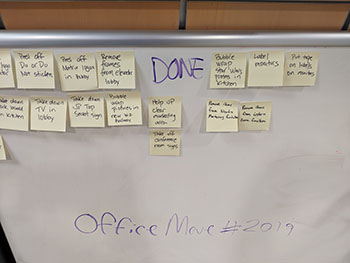
    • To get the zillion tasks done, we set up a SCRUM Board in our lobby. Starting Monday, the Move Team has been writing down tasks that need to be done and sticking them on a TO DO board.
    • Staff have been grabbing tasks and doing them. Some tasks take 15 minutes, some longer. Once a task is done, the post-it is moved to the DONE board.
    • Move Team members add tasks to the TO DO board as they come up. The list of TO DO items will likely grow as we get closer to the move.

    The SCRUM Board works because:

    • Everyone can help, according to their availability and schedule.
    • We have a visual on the amount of work to be done.
    • The move becomes a shared responsibility, not just a task for the admin team or the Move Team.

    It’s only been a couple of days but already, the results have been amazing.

    During the actual move weekend, we’ll have music and food so that the task of setting up the new office isn’t a drag, but rather a party and a celebration!

  • How to Make Your First Day Back at Work Productive After a Vacation or Leave of Absence

    How to Make Your First Day Back at Work Productive After a Vacation or Leave of Absence

    I used to dread my first day back in the office after vacation. After being away for a week or two (or more when I had my sons), I did not look forward to coming back and being buried in emails and getting caught by surprise by someone who needed my urgent attention.

    But not anymore. Not since Matrix Group started creating “while you were out” documents for anyone out of the office for more than a couple of days.

    Here’s how we do it:

    • We review who’s going to be out during managers meeting on Fridays.
    • If someone is going to be out for more than a couple of days, we create a shared Google doc called “While x was out, week of January 19, 2018.”
    • We put someone in charge of making sure the document is populated.
    • We ask specific team members to put in their notes about what happened during the week. We put in notes about anything and everything that the person on vacation would have been part of, or heard, had she been in the office.

    The update is ready the day before the person comes back from vacation or leave. An email goes out, telling the vacationer to “read this update first.”

    What do we cover in the “while you were out” document?

    • The update will vary, based on the person and role. For example, project managers get a summary of everything that happened on all of their client accounts. A Director gets a summary for the entire company. A developer gets a summary of what happened on his accounts and projects.
    • Beyond specific clients and projects, we also report on what was discussed during meetings. This is really important. If we discuss a project that’s been stalled and come up with a solution, it’s so helpful for the vacationing staffer to know how we got a project unstuck. If we don’t report on it in the brief, that knowledge may never get passed on to the manager or developer.
    • We also report on the social stuff that happens at the office, things like happy hours, birthdays, who got pranked, movies people are raving out, puppy visits to the office, who got engaged, and visits to the climbing gym. God forbid you be the person who didn’t know that Alex got married or that Roger got a new puppy!

    Why go to all this effort?

    • People coming back from any type of leave don’t have to spend all day reading their emails in order to know what happened while they were out. In fact, we often do not cc: the person on vacation so they don’t come back to hundreds of emails to process.
    • Returning staff can immediately be back in the swing of things.
    • People feel like they can get away without missing important events or milestones.

    It takes a whole team to write these documents, but they are so worth the time and effort.

    What do you do to make the transition back to work easier on your team members?