Matrix Group International

Blog

  • Why Your Organization Needs a Mobile App Strategy

    Why Your Organization Needs a Mobile App Strategy

    Man holding smartphoneStarting early this year, I have been urging clients to consider a mobile app. Not just a responsive website, which should be a given these days, but native iOS and Android apps.

    Why?

    The reasons have been building up over the past couple of years, but I became convinced because of several things.

    • Earlier this year, Comscore reported that the percentage of mobile-only Internet users in the US is 11.3% of Internet users. Even more significant, mobile-only users now exceed desktop-only users, who now represent only 10.6% of Internet users, down from 19.1% in March 2014. This mobile-only population is used to interacting with the world on a smaller screen and usually with no keyboard.
    • Here’s the statistic from analytics firm Flurry that really surprised me. When people use their phones or tablets, 90% of the time spent represents interactions with apps, NOT a browser. BTW, 17% of time spent is on Facebook (big surprise, right?) and 32% is spent on games.

    These stats support a presentation made by a couple of interns at Matrix Group this summer. These two college-aged women confirmed that they almost NEVER interact with a browser. Instead, they rely on apps.

    And while Gen-X me still gets on my computer at home in the evenings and weekends for everything from email to working on proposals or looking for recipes, my millennial employees tell me they pretty much don’t crack open a laptop outside of work unless they are working. For casual interactions, they rely ONLY on their phones.

    I have to admit that in many cases, native apps are better designed and more focused. I dislike the weather.com website because it’s too cluttered and confusing, but I adore their app. It’s also super easy to just find the app on a phone and click it, versus pulling up a browser, typing a URL and waiting for the site to load. I have a feeling I’m not alone in thinking this, and this is why so many prefer apps to browsers.

    So with 2016 around the corner, I ask you all: What’s your organizations’ mobile app strategy? What audience(s) could you better reach with an app (or two or three)?

  • Data-Driven Decision-Making Through Analytics

    Data-Driven Decision-Making Through Analytics

    Data-Driven Decision-Making Through Analytics | www.TheMatriXFiles.netA couple of weeks ago, I had the pleasure of moderating a discussion with Tim Martin and Jessica Katz of the Carnegie Endowment for International Peace. Tim is Digital Director and Jessica is Web Manager & Developer at Carnegie.

    Carnegie has a well-developed analytics program, the organization respects data, and Tim and Jessica are committed to using analytics to guide their work. Some highlights from the webinar:

    You’ve Got to Understand Your Goals. Tim and Jessica are adamant that you must first understand what your organization is trying to achieve and what constitutes success before embarking on an analytics initiative. For Carnegie, it’s all about getting people to read their publications: op-eds, commentary, analysis, etc. Carnegie isn’t trying to get people to join, donate or register, it’s all about reading the articles so in their analytics, they look at what drives people to the site, where they are coming from, what they are reading, how far down the page they’re scrolling, etc.

    Most Visitors Go Direct to Content. Carnegie refers to their visitors as converted or unconverted. Converted visitors have signed up for something, they have provided an email, they have opted in to receive something. It turns out that for converted visitors, they don’t come to the website to surf randomly. Converted visitors rely on email and social media to direct their surfing and, what’s more, they go direct to content. Yep, they pretty much bypass the home page. Even the search engines drive visitors directly to articles and NOT the home page.

    The Home Page is for the Unconverted. So who goes to the home page? The unconverted or the persons who want to know more about Carnegie, what it does, and what it represents. For this audience, the goals are to: educate them about Carnegie and get them to convert. But here’s the really big thing: by reducing the call to action, they vastly simplified the home page and created an elegant and bold home page that consists of about a half dozen stories with dramatic imagery. The home page is no longer the newsy page it used to be and that frankly looked like sister and competitor organizations. The bold home page invites exploration and conversion.

    Optimize What’s Important. Since article pages are what the site is all about, Tim and Jessica are constantly looking for ways to optimize their article pages. Here’s a sample article page about Ukraine. Everything from the summary at the top, to the Comment and Share button, are researched and optimized. Every detail is intentional.

    Go Beyond Yay! Traffic! Most organizations are content to look at their analytics, see that their traffic is growing, and never go beyond that. Tim and Jessica recommend mining GA to find out where people are coming from, what they searched for, etc. Jessica recalls doing a deep dive into a spike in traffic that resulted from a mention in a Polish newspaper. Careful cultivation of the newspaper and other organizations in Eastern Europe have resulted in a new digital series and healthy traffic growth from that part of the world.

    Start with Event Tracking. Tim and Jessica closed the webinar by talking about how it’s taken time for the organization to get where they are today. It’s taken careful setup of the custom variable and reports and thoughtful cultivation of Carnegie experts and senior leadership. If your organization is just starting out, they recommend setting up Event Tracking, which is a method available in the Google Analytics (GA) tracking code (we recommend Tag Manager) that you can use to record user interactions with website elements. For example, you can track PDF downloads, clicks on related articles, clicks on the Print button, scrolls down lengthy pages, etc.

    Check out the Carnegie Endowment website to see the fruits of all this intentional and well-researched design and development.

    How about you? How are you using analytics to guide your decision-making? What do YOU wish you could track? What’s working? Please share!

  • Top 5 Ways to Keep Your Website Secure

    Top 5 Ways to Keep Your Website Secure

    I just came back from the annual convention of the Sheet Metal and Air Conditioning Contractors’ National Association (SMACNA) in beautiful Colorado Springs, Colorado. SMACNA asked me to talk about digital threats to businesses.

    Red target overlaying hacker logo A big threat is clearly the potential for a company’s website to be hacked. Even if a website doesn’t contain any private or confidential information, hacking can lead to defacement, loss of reputation, lost revenue, lost leads, and lost staff time. What can you do to keep your website secure? My IT team tell you there are thousand and one things to do, but here are some easy things to check on.

    Keep Your CMS Software Updated

    I’ve mentioned it before, and I’ll mention it again. These days, software vendors issue releases and patches on a regular basis. Not upgrading your CMS because you don’t have budget or because you don’t “need” the new functionality in the new version is a mistake. Most of these upgrades contain important patches to security vulnerabilities.

    Audit Admin Accounts Regularly

    When a staff person or volunteer leader leaves, organizations often fail to disable accounts in content management systems. But these accounts could be a possible attack vector, especially if the person left on bad terms or the password is weak.

    Require Strong Passwords

    Most systems these days do not allow short or weak passwords, but it’s still common for us to find client passwords that are short, weak or obvious. Even if the CMS allows a password like “password” or ABCadmin,” educate your staff about what a strong password looks like and explain the consequences of a website breach.

    Invest in a Web Application Firewall

    Most of us are familiar IP firewalls, which inspect and filter out traffic based on IP addresses. A web application firewall (WAF) inspects incoming HTTP requests, checks to make sure the destination URL is not being spoofed, checks for SQL injection and cross-site scripting attacks, disallows certain types of requests, and much more. WAFs often add to your monthly hosting fee and can result in false positives (which show up as errors when accessing a web page) but we think the costs and inconveniences are well worth it.

    Disable Services Yon Don’t Need

    This last recommendation often requires the cooperation of your hosting company. For example, if you never FTP into your server, turn off FTP. If you don’t allow uploads from WWW through the CMS, disable uploads. And never allow uploaded files to be executed from directories that accept uploaded files.

    At Matrix Group, we think of security in layers. We put in place layer upon layer of security so that even if one layer is breached, other layers help protect services and data.

  • Never Attend a Meeting Without a Notebook

    Never Attend a Meeting Without a Notebook

    Never Attend a Meeting Without a Notebook | TheMatriXFiles.com
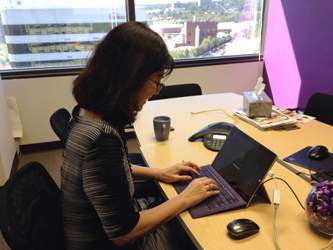
    Joanna is never far from her new Surface with the purple keyboard!

    During orientation, new staff at Matrix Group are told to ALWAYS bring a notebook to meetings. If you prefer, you can bring a laptop or tablet. Why?

    It’s simple, really. When you’re in a meeting, you’re having a discussion and creating to-do items. If you’re not taking notes, how will you remember the details of the discussion and the next steps?

    I take notes at every meeting on my laptop, in email or Word. I take detailed notes about the discussion, the decision we made, the to-do items. I take notes in real time so that when I get back to the office, I can forward the notes to project team members and they can execute immediately. I bring a paper notebook to every business lunch because I almost always end up with to-do items, and I want to remember them all.

    I’m always amazed when I see people NOT taking notes at a meeting. As far as I’m concerned, if I’m taking notes, I’m writing history and if there’s ever any doubt about what happened during a meeting, I have the upper hand. It’s also a sign of respect to the person I’m meeting with. When I take notes, I’m saying, “I respect your time. I’m documenting our discussions so I will know how to follow up.” And no, unless you’re one of those amazing memory guys, I don’t believe anyone can hold all the information from a meeting in their heads, for any length of time anyway.

    Do yourself a favor and bring a paper or digital notebook to EVERY meeting, from now on, forever.

  • The Role of the C-Suite in Technology

    The Role of the C-Suite in Technology

    The Role of the C-Suite in Technology Planning and Implementation | www.thematrixfiles.netI had the honor of moderating a panel at this week’s annual conference of the American Society of Association Executives in Detroit, MI. The panel was titled, “The Role of the C-Suite in Technology” and featured 3 CEOs and 2 CIOs.

    Each panelist described his/her organization: mission, staff size, revenue, most important programs and key technologies. Every organization had a diverse mix of technologies that included an AMS (association management software), CMS (content management system), accounting, and sometimes LMS (learning management system).

    The key takeaways from the session?

    • The C-Suite has a key role to play in technology. Panelists reported more success with projects when CEOs are involved at the beginning, when they provide clarity about the focus of the organization and the technology initiatives that will support hat focus, and when they help secure adequate resources to make projects happen.
    • Establish criteria for CEO involvement. The panelists all agreed that CEOs should be involved in all technology projects and they shouldn’t get into the weeds. Instead, CEOs should be involved when the project is over x budget and when it affects a large or prominent segment of the organization.
    • Tie technology to your strategic plan. One CEO reported that technology represents 10% of her total budget so it’s imperative to tie technology to the mission of the organization and demonstrate impact to the membership and the profession.
    • Establish measures of success. Gone are the days of spending money on technology because you had to. These days, associations must report on the impact so it’s important to establish measures at the beginning of each project. Talk to your vendor about reports that will help you measure impact.
    • Establish relationships with key vendors. One CEO says he checks in regularly with his top vendors to see how his team is doing, get trend information, and get recommendations for the future. Another CEO said it just plain makes life easier when you can pick up the phone to get clarity or resolve a problem.

    Many thanks to Barry Pilson, my co-moderator from TESOL International Association. The fantastic panelists were:

    If you’d like a copy of the slides, you can find them here.


  • Why Limit Communications During the RFP Process?

    Why Limit Communications During the RFP Process?

    Why Limit Communications During the RFP Process? | www.theMatriXFiles.netLast week, we received an RFP (Request For Proposal) for a new content management system (CMS) and Associaton Management System (AMS).  The RFP was great. The work was totally in our wheelhouse, the association is a segment we go after, and there were some exciting elements to the work.

    But some parts of the RFP were confusing. So we called and asked for a meeting or requirements gathering call. We were told to submit questions via email, that the organization was not open to a meeting or call.

    “Why?” we asked.  The answer: “in the interest of creating a level playing field, we are only accepting emails.”

    We get this a lot and we almost always decline to respond to those RFPs. It’s not arrogance. On the contrary, we believe that we can’t truly understand the goals and requirements of an organization from a piece of paper. Written requirements also never articulate the non-technical requirements of a project, like the need to make a diverse and quarreling committee happy. We also find that a great meeting can unearth hidden requirements or deprecate others. Plus, you can’t underestimate the importance of chemistry and culture fit between two organizations and you can’t ever really explore that via paper.

    So clients and prospects, why refuse a meeting? Won’t an hour or two of deep, engaged conversation be ultimately worth your time? If one vendor stands out because they asked great questions, took the time to get to know your organization, developed a deeper understanding of your needs and ultimately submitted a better proposal, how is that a bad thing?


  • Applying Information Architecture and Design Principles to Life

    Applying Information Architecture and Design Principles to Life

    NetworksI opened up a mailing from our 401(k) provider and was overwhelmed by the tiny type and the options available as investment funds. Ugh. I decided to call my financial planner instead.

    I was driving around in a parking garage and as usual, I fretted that once parked, I would never be able to find my car again.

    At a conference last December, I felt really stupid because I couldn’t seem to find my way around the property. It took me five minutes of doubling back before I finally found the registration desk.

    Sometimes, I just want to scream and say, “Don’t you guys ever think about your customers? Did you think to test of any this stuff?”

    Whether you design parking garages, plan hotel spaces, design print mailings or build websites, I believe the same wayfinding principles apply.

    The Power of 7. All the research shows that when presented with options, most people can’t process more than 7 pieces of data. When designing websites, for example, we try to limit navigation options so people don’t get lost.

    Multiple Ways to Wayfind. I was in a parking garage in Alexandria today and was happy to note that the garage used numbers, good signage AND color coding to help me figure out where I actually parked, which was B1, yellow. One of my favorite garages in Bethesda has 4 doors to the garage from the elevator lobbies. Each door has a symbol (train, sailboat, etc.) The last time I parked there, it was easy to remember level B4, train door because I have a 4-year old who like trains. 🙂

    Make Your Groupings and Sorting Recognizable. When I go to a department store, I like it when I can find all the jeans in one place. I don’t want to have to go to the designer section, the urban chic section, the hip mom section, yada, yada. If it makes sense to group your content or objects multiple ways, allow for navigating different ways. One client has a print directory of members that you can navigate by chapter, type of work and company name. Online, you can sort by all these fields and more. Nice. Remember that an alpha sort is not always the best way to organize information.

    Legibility Matters. I appreciate websites with large navigation and fonts. I love print brochures and web pages that are easy on the eyes because the font is larger, there are lots of sub-heads, and images tell some of the story. I like road signs that aren’t tiny or obscured by shrubbery.

    Test With Real Users. Give customers a chance to tell you about your product and you’ll get valuable information. I sometimes walk around a building and think, “Really? Did you ask anyone if they could find anything?” Give your users real tasks, ask them to perform the tasks and give you feedback on what worked, what didn’t work and what wasn’t clear. You’d be amazed at what you learn.

    Okay, so enough ranting. I’m an Information Architect at heart and I wish more people thought about information architecture and user-centered design when designing… well, anything.

  • The 3 Kinds of Fun and Why Fun #3 is the Most Fulfilling

    The 3 Kinds of Fun and Why Fun #3 is the Most Fulfilling

    ice climbingI was looking at photos from my friend Mark’s ice climbing trip. The pictures were gorgeous but the hikes looked pretty harrowing. I said to Mark, “Um, was it fun?” Mark’s response was, “Fun #3.”

    What is Fun #3, you say? Here are Mark’s definitions of fun:

    Fun #1: Fun now, fun later. Examples: Trips to Hawaii, afternoons at the lake, ice skating on a beautiful pond.
    Fun #2: Fun now, not fun later. Examples: do I really need to give you examples? Think college nights out when you just had too much of anything.
    Fun #3: Not fun now, fun later. Examples: The giant data center move that the net admins just completed over the weekend. The huge integration project that involved six partners. The sparring class where I got the s**t kicked out of me. Completing a fancy mobile app for a client and submitting it to the Apple store. Finally launching a troubled website redesign.

    There’s no question that Fun #1 is fun. But when I reflect on my life and my accomplishments, it’s the Fun #3 projects and experiences that shaped me and that have given me the most satisfaction. Because in the end, it’s not the easy projects that we are most proud of, it’s the projects that we had to wrestle to completion, where we didn’t have all of the answers from the get go, and where we had surprises along the way.

    So the next time you’re in the middle of a tough project, remind yourself that it’s Fun #3. The satisfaction will come later, but it will come.

  • It’s Time To Make Your Website Mobile-Friendly… Really

    It’s Time To Make Your Website Mobile-Friendly… Really

    responsive_design_smallI was in a meeting with a client this week about their plans to redesign their website. He wondered if the organization should invest in responsive design. Wha?
    “Hold on,” I said. “I don’t think going mobile-friendly is optional these days.” But, he argued, responsive design adds to the project budget and his site doesn’t currently get much mobile traffic.
    It’s true. Responsive design can increase the total cost of a redesign by 5-20% of the total cost. BUT:
    • Last week, Google rolled out its mobile-friendly update, which significantly boosts the ranking of mobile-friendly pages on mobile search. And as I blogged last month, every organization should care about search, which means caring how Google ranks your website.
    • You can be losing customers. 27% of consumers will leave a site if it is not mobile-optimized (ExactTarget, 2014 Mobile Behavior Report).
    • Your mobile traffic will increase. Across ALL of our clients, mobile traffic increased dramatically within six months after a website goes mobile. Basically, if you build it, they will come… promise.
    • Our clients that have made their email templates responsive have seen an increase in their open rates. This doesn’t surprise us since mobile accounts for more than half of email opens (Litmus).

    So, what are you waiting for? If your website isn’t responsive, it’s time and it’s not optional.

  • Catholic Health Association Centennial Site

    Catholic Health Association Centennial Site

    CHA Centennial SiteRepresenting more than 600 hospitals and 1,400 long-term care and other health facilities in all 50 states, the Catholic Health Association of the United States (CHA) represents the largest group of nonprofit health care providers in the nation.

    This year, the association is celebrating its 100th anniversary. In honor of this milestone, CHA launched a centennial campaign.

    As part of the campaign, CHA wanted to create a special anniversary microsite that showcases its rich history; highlights individuals of the industry and invites members, partners and other visitors to join the celebration.

    Matrix Group partnered with CHA to create a special microsite. The website features:

    • An interactive timeline: The site’s main showpiece is the timeline, which uses photography from the association’s archive, bringing CHA’s rich history to life.  The timeline dates back to the early 1900s, giving visitors a sense of how the association has evolved over the century. As visitors scroll through the timeline, the background images change to illustrate Catholic health care in each decade.
    • A video portrait series: The videos profile individuals who work in Catholic health care, truly capturing the voice and compassion of the ministry. Members are encouraged to submit video profiles through the website and promote the campaign on social media.
    • 100 days of prayer campaign:  The annual campaign continues through the World Day of the Sick on Feb. 11, 2015. Visitors can submit prayer intentions and sign up to receive weekly prayers. On World Day of the Sick at 1:00 p.m. the participants will participate in one minute of prayer for the sick and those who care for them.

    Visit the CHA Centennial Site now.