Matrix Group International

Category: Blog

  • 2019 Top Techie Holiday Gift Ideas from Matrix Group

    2019 Top Techie Holiday Gift Ideas from Matrix Group

    Looking for the perfect gift for the techie (or not so techie) in your life? Here are some holiday gift ideas from the staff of Matrix Group.

    • The Ring Fit for Nintendo Switch. It uses a video game to get you active.
    • ShiftCam is a multi-lens case for your iPhone that allows you to take pictures like a pro, without having to carry around a bunch of extra attachments.
    •  Turn any device into a smart device with this smart plug. Works with Alexa and Google.
    • Everykey is a Bluetooth device that uses military grade security to secure your passwords and unlock your devices. Just connect to your compatible devices viaBluetooth, and Everykey unlocks your phone, laptop, tablet, and other devices when you are physically nearby and locks them back down when you walk away. And if your Everykey is lost or stolen, you can deactivate it instantly through the Everykey App, or by calling their service directly.  It also works for websites.
    •  Speaking of security, do you entire family a favor and sign up for LastPass family. Then spend Christmas morning setting up everyone’s password manager. It’s a pain to get all of your passwords loaded up, BUT once they’re in, you will save loads of time because the LastPass browser plugin will pre-populate your usernames and passwords. Even better, you can create the hardest passwords and sleep easy, knowing you don’t have to remember them AND they’re secure!
    • P4 are wearable language translation earbuds that work with the dedicated Aibuds iOS app to translate 36 languages in real time.
    • Check out the ultra modern, but retro looking keyboards and mice!
    • A levitating turntable, because why not?
    • Some Matrix Group staff swear the Roku is the best streaming device ever!
    • Williams-Sonoma has a whole collection of Star Wars themed bakeware and cookware. I want the Darth Vader instant Pot!
    • If you’ve got the cash AND the space, how about an Avengers-themed arcade machine?
    • I love these LED and NeoPixel gifts from Adafruit!
    • When my family went out of the country for Thanksgiving, my husband and I didn’t bring our laptops, but we did bring a really nice Chromebook. I can do almost everything through a browser these days!
    • How about a Cricut for the crafter in your life? This thing will cut almost anything!  Gosh, even I want one of these!

    If you buy something cool this season, please post a comment with a pic. And if you’ve got an idea, I’d love to hear it!  Happy Holidays!

  • Matrix Group’s Favorite Tech Tools for Staff Productivity

    Matrix Group’s Favorite Tech Tools for Staff Productivity

    hand with tool coming out of laptopLast week, a group of Matrix Group staff hosted a Tech Talk on our favorite tech tools. The Tech Talk was inspired by a conversation with a client who wanted to know more about Slack, one of our favorite tech tools.

    At Matrix Group, we use a lot of tech tools to do our work, stay organized, stay productive. Here are some of our favorites:

    Password Managers

    We handle hundreds of passwords for our clients. It would be downright irresponsible not to have a way to manage these passwords, so we use Secret Server from Thycotic. The rule is: the minute you get a new password, you enter the credentials into Secret Server. And if a client happened to email you the info (we ask them not to, but you know how it goes), we immediately delete every email that contains the info. With Secret Server, we have multiple access levels, a great search, and an audit trail.

    For personal passwords, we like LastPass and Dashlane. It’s work to get it set up, but once the majority of your passwords are in, the convenience of passwords auto-populating and syncing across devices is life changing.

    Speaking of passwords, we sang the praises of two-factor authentication. At the enterprise level, we use Duo and love that we get a push whenever we’re trying to log into a service or website that requires two-factor. Jaime said it best when he said, “I sleep at night knowing that even if the bad guys got my username and password to something, they still wouldn’t be able to hack my accounts because they wouldn’t have access to my second factor, which could be a code or a swipe in an app.”

    Slack

    Slack is a collaboration tool on steroids. To call it instant messaging isn’t quite right.

    • We use it for instant messaging, document sharing, group chats, group calls, and screen sharing. Maki’s IT team uses Slack for their team meetings and screen sharing with staff.
    • We have governance around when to use and when not to use.
    • We’ve integrated with some of our other tools, e.g., Google docs and Jira.
    • We have a channel for every client and functional team to promote collaboration.
    • We allow a bit of fun through emojis, funny gifs and our watercooler channel.

    Did I mention that we seriously love Slack?

    Document Management Through G Suite

    About a year ago, we migrated our file server to Google Drive and never looked back. We love having access to all of our files, from anywhere, on any device. And since our Google Drive is protected with two-factor authentication, we’re confident that our data is as secure as it can be.

    • We have team and client folders.
    • When creating a document, we don’t save to our personal drives. We saved to the proper directory in the shared drives.
    • Everything goes into Drive: contracts, proposals, project specifications, user personas, site maps — everything!

    Document collaboration has been a dream in Google docs and Google slides. On a regular basis, four of us will work on a presentation together and get so much done because we could all access the document at the same time.

    Zoom

    Zoom has fundamentally changed our meetings with clients and remote staff. Although we had Webex before, Zoom is just easier to use, the recordings are easier to download, and it integrates nicely with our new conference room.

    Zoiper

    When we moved to our new office, I asked staff if they wanted a physical phone handset. Very few people raised their hands, so we didn’t buy any. Instead, we gave staff who wanted a phone a license to Zoiper and a Bluetooth handset. This way, staff can make and take calls from their own extension from anywhere, as long as they have their laptop turned on. This means staff who are working from home, at a conference, or at a coffee shop are easily available via their extension.

    And for the folks who don’t have Zoiper? Turns out most staff members don’t really take or make business calls on their own. They are either in a meeting in a conference room (all of our conference rooms have nice speaker phones) or they are with a project manager who has a Bluetooth speakerphone. For the rare times we need to call specific staff members, we use Slack.

    Brave Web Browser

    Jaime sang the praises of Brave, a fast, lightweight and privacy-obsessed web browser. Brave blocks trackers, which means you won’t get tracked by Google Analytics, advertising networks, heat mapping trackers, email trackers. Not so great for marketers, but great for you!

    We talked about many tech tools we love, but these were the most important. How about you? What are YOUR favorite tech tools? How are they changing your work and your say?


  • 7 Reasons to Rebrand Your Organization

    7 Reasons to Rebrand Your Organization

    A brand is not a logo. A brand is not an identity. A brand is not a product. A brand is a person’s gut feeling about a product, service or organization. — Marty Neumeier, Author and speaker on all things brand

    I recently did a webinar on branding and rebranding with good friend Jane Barwis, CEO of BRG Communications. We decided to do the webinar because many of our clients are rebranding or thinking about rebranding.

    Before we go into when it’s time to rebrand, let me tell you that rebranding will not fix your organization, increase event registrations, or increase membership. Rebranding could be part of a larger initiative to address organizational challenges, but rebranding on its own will not fix your problems.

    So when IS it time to rebrand? Jane and I think it’s time rebrand or seriously consider a rebrand when any of these apply:

    • Acquisition and/or merger – You’ve merged with another organization, you’ve been bought, or you’ve bought another organization, and together, you want to create a larger, differentiated identity.
    • Industry/profession has evolved – Perhaps your field has undergone some major changes, and you want to demonstrate that your organization has changed with the times and continues to be highly relevant.
    • Audience has expanded or changed, or you want to reach a new audience – Some of our clients now want to communicate directly with the public, or students, or customers of their members. Or maybe they now want to reach Capitol Hill. Targeting new audiences often requires a redo of your core messages and overall brand identity.
    • Products and services have changed – If your organization offerings have changed significantly, you may need to show a new brand to explain the why behind the new offerings, to tie them all together.
    • Need to distance from a negative image – Some organizations rebrand to start over and make a clean break from a scandal, a large misstep, or bad leadership.
    • Need to differentiate from competition – If the competition is fierce and you’re all looking about the same, a rebrand can help you distance yourself from the pack. A rebranding effort will force you to hone in on your (new) core mission, values and benefits, allowing you to more clearly communicate why you are different and better.
    • Geography change (state to national, domestic to international – Going from a smaller to a larger audience often means transitioning from a local or hyperlocal image and mesaging to a broader one. It’s a tricky transition, for sure!

    Do any of these criteria apply to your organization? If so, then you may be ready for a rebrand.

    In my next blog post, I’ll take about when it’s NOT time to rebrand and what you can do if your brand doesn’t need to change but your identity is looking a bit dated!

    What brand challenges is YOUR organization facing?

  • Don’t Reuse Passwords Already!

    Don’t Reuse Passwords Already!

    A couple of weeks ago, we had a security alert at the office. A client had called to say that a member reported a breach of the association’s website. Employees at a member company had each received an email with an attachment containing their username and password. A quick check showed that the information in the attachment matched the credentials on the association’s website.

    Yikes! Did we have a breach on our hands?

    Turns out, we didn’t. After some research, we discovered that some employees who had received the email did not have accounts on the association’s website, so that could not have been the source of the information.

    So what the heck happened? Or what the heck do we think happened?

    The client (and Matrix Group) thinks that the credentials are from the 2016 LinkedIn hack where nearly 120 million accounts were compromised. Why do we think this? Because some staffers verified the credentials as being those they use on their LinkedIn accounts.

    Wait, how could the credentials be on the client website AND LinkedIn?

    Ah yes, you guessed it. Staffers were using the SAME credentials on both websites. In fact, staffers were (still are) probably using the SAME credentials on multiple websites.

    So, for those who are not convinced, let me repeat the advice I’ve been giving for years now: Use strong passwords. Don’t reuse passwords. Just don’t do it.

    When you reuse passwords, you compromise all of the accounts using that passwords when one site is breached. And with the rise of automated attacks, it’s just too darn easy for the bad guys to steal unprotected, unencrypted passwords and try them out on zillions of sites around the world.

    So let me repeat this advice and add one more element: Use strong passwords. Don’t reuse passwords. Use a password manager to manage all this craziness.

    Please share this blog post with your loved ones. Be safe out there!

  • It’s Not Easy Being Green: Our Quest to Have a Sustainable Office Move

    It’s Not Easy Being Green: Our Quest to Have a Sustainable Office Move

    office items for free on tableYou may have already heard the news. Matrix Group is moving. Just down the street. After 10 years, to keep the creative juices flowing, we’re giving ourselves a change of scenery and a change in office format.

    We’re moving to a smaller space but we’re not really losing space. Here’s why: we’re moving to a suite that has access to a fantastic kitchen, library, lounge and two state of the art conference rooms. We never would have been able to afford these amenities on our own, so we’re pretty excited.

    All of this means that we need less furniture and we need it configured differently from what we have now. We have this beautiful system furniture that we bought 10 years ago. It’s paid for, fully depreciated, made in America, in great shape, and really good looking. I should be able to reuse it, right? Wrong.

    Everyone we spoke with said we should buy new furniture. Why? Because it will be too much money to take down, inventory and reassemble the old stuff. Because the new space is different. Because our system is no longer being made, so if we need parts, we’ll be out of luck. Because. Because. Because.

    Can we sell the furniture? Not really. Even though there are used furniture companies around, our consultant strongly discouraged us from trying to sell our furniture because it’s no longer being made. “It has to just go to landfill,” we were told. “You will be happier with new furniture and it will cost about the same amount.” Really?

    The staff and I decided to take a stand, try to save some money and prevent our furniture from going into landfill. Here’s what we’re doing:

    • We tried out a zillion plans but we finally came up with a plan that uses all existing parts in new and different ways. We love the new plan. You’ll have to come see.
    • We’re working with a local school to donate our excess furniture because public schools are always in need of supplies. I love the idea that some teachers will be able to reuse our beautiful desks and bookcases.
    • We’re also giving away our excess office supplies because once we went through our cabinets, we had dozens of empty binders, boxes of new folders, and reams of legal size paper we’ll never use.
    • We’re giving away desks, frames and kitchenware to staff and eventually to Goodwill. Our large conference room has been a bazaar for the past few weeks; if it’s on the table, anyone can take it.
    • We had dozens of awards (statues and frames) that we just can’t bring with us. We just won’t have the room and some are quite old. Believe it or not, there are places that will take used awards, strip out the labels and reuse them. Imagine this: some drama student is going to get an award previously used for a web design award. Makes me chuckle.
    • We’re giving away a bunch of stuff through a Buy Nothing group on Facebook. What’s a Buy Nothing group? It’s a group on Facebook where all the members agree to ask for what they need and give away their excess. No money is ever exchanged. I love, love, love the Del Ray/Alexandria Buy Nothing group. I’m giving away chairs, office decorations, the works.

    It would be much easier to pay our furniture consultants to haul away the old stuff and install new furniture. We also could have just tossed all of our old things. But heck, our landfills are full and China won’t take our recycling. If we don’t even try to reuse, reduce, recycle, they’re just empty words.

    In the end, we will save money; we estimate that we’ll be saving half of the cost of buying new by contracting with our consultant to move and reinstall. We will, however, have expended significant staff time to sell and donate our things, but we think it’s been time well spent. Not to mention all the happy people who are getting beautiful, inexpensive or free things from Matrix Group. Rajani (my VP) says it’s good karma to give away all this stuff for nothing or next to nothing.

    We’ll post pictures and videos after the move. In the meantime, if you need a desk, call me. Fast.

  • How We’re Using Agile and SCRUM to Manage our Office Move

    How We’re Using Agile and SCRUM to Manage our Office Move

    SCRUM board for Matrix Group MoveMatrix Group is moving! We’ve been in this office for ten years and it’s time. Our needs have changed, and my creative team (yes, even developers are creative types, in my opinion) needs a change of scenery.

    As with all moves, there are about a million tasks that need to be done. So how are we managing all of these tasks, while still doing work for our clients?

    Ten years ago, we set up a SCRUM board for the weekend of the move. This time around, we’re using weekly sprints and a SCRUM board for the entire process. Here’s how we’re managing the work:

    • We have a Move Team that meets twice a week to see how we’re doing against the mammoth task list and timeline that we established a couple of months ago.
    • The timeline, tasks and decisions are stored in a Google doc. The tasks are grouped by week, so in essence, we’re doing one week sprints.
    • Maria is in charge of managing the Google doc, marking things done, adding details, and documenting decisions. I guess you could say she’s the SCRUM Master. Even though she’s remote, she knows everything happening as part of this move.
    • I’m the Project Owner because I’m the one who ultimately decided that we needed to move. And I make the high level decisions about what we’re moving, what the new office will look like, timing and budget.
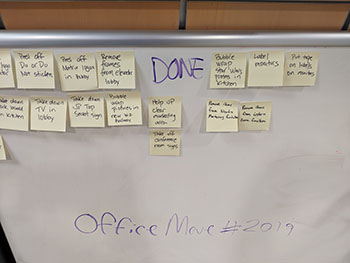
    • To get the zillion tasks done, we set up a SCRUM Board in our lobby. Starting Monday, the Move Team has been writing down tasks that need to be done and sticking them on a TO DO board.
    • Staff have been grabbing tasks and doing them. Some tasks take 15 minutes, some longer. Once a task is done, the post-it is moved to the DONE board.
    • Move Team members add tasks to the TO DO board as they come up. The list of TO DO items will likely grow as we get closer to the move.

    The SCRUM Board works because:

    • Everyone can help, according to their availability and schedule.
    • We have a visual on the amount of work to be done.
    • The move becomes a shared responsibility, not just a task for the admin team or the Move Team.

    It’s only been a couple of days but already, the results have been amazing.

    During the actual move weekend, we’ll have music and food so that the task of setting up the new office isn’t a drag, but rather a party and a celebration!

  • Amazing Member Journeys Start with Member Interviews

    Amazing Member Journeys Start with Member Interviews

    Working with some new clients, I’ve been hearing this a lot: My website navigation sucks. Members can’t find information. They call us a lot in frustration.

    So how do we solve this problem? It almost always starts with member interviews.

    Why? Because if it’s members who are struggling with some aspect of your digital presence (website, AMS, LMS, community, mobile app, you name it), it’s important to get their perspective on what’s not working, what they expect, and what they need.

    Some clients balk at the idea of interviewing members, worrying that it will take too long, be a bother to their members, cost too much money. Most clients, however, welcome these interviews as a way to get honest feedback about their digital initiatives. Here’s what we’ve learned when it comes to conducting member interviews:

    Recruit a cross-section of members

    One client gave us all new members to interview so the perspectives we got were skewed. Ideally, we want new vs. long tenured members, current vs. former members, young professional vs. mature, new to the profession vs. longtime in the industry, satisfied vs. pissed off, senior vs. entry level.

    Do the interviews in person or over the phone, one on one.

    Having multiple people during the interview changes the dynamic, especially if the client is listening in and the member knows the client is listening.

    Connect members with their feedback

    Allow members to remain anonymous but do ask if it’s okay to connect their name with their feedback so the organization can follow up.

    Keep the interviews short

    It’s important to keep the interviews brief, no more than 20 minutes so that members know you are being respectful of their time.

    Develop questions ahead of time

    and make sure they are designed to give you insight into the members’ pain points. If findability of information is the issue, ask about labeling, ask how they find information, ask if and how they use the search, ask about a recent hunt that didn’t prove fruitful.

    Allow for  free wheeling conversation

    Do allow time for the conversation to stray a bit so that you can get unsolicited feedback about member needs, joys and frustrations. Sometimes you get lucky and you get real gems of insight because you allowed the conversation to wander. A simple, “is there anything else you wish the website did?” or “Is there anything else you wish x organization knew?” can elicit some great insights.

    Thank you goes a long way

    While I don’t think a thank you gift is necessary, a thank you or some type of follow up is a must. Even if it’s just a thank you email and then later on, an update on the project.

    I hope you’ll include member interviews in your next digital project! You’ll be glad you did!

  • Your Member Journeys ARE Your Brand

    Your Member Journeys ARE Your Brand

    brand design on laptopI conduct a lot of branding and user experience workshops. And my design team works on a lot of corporate identity kits; we redevelop logos, templates, print collateral, email templates, yada, yada.

    While logo, font, and color are certainly important aspects of a brand, we believe that the user experience is the largest driver of the brand experience.

    Why? Because an organization can have the most beautiful logo and color palette in the world, but if the user experience is crappy, the brand will be crappy.

    And to us, the user experience is ALL the ways in which people can interact with the brand. What do you stand for and HOW do you make that known? What are your signature benefits and HOW do you deliver them? Why do people and companies join and HOW do they join? HOW do you answer the phone? HOW quickly and completely do you respond to emails? HOW easy is it to find information on the website and make a purchase? HOW does the brand respond to adversity?

    Of course, strong brands must have a strong visual identity. That’s where beautiful websites, social media pages, videos, meeting microsites and publications come in. These brand representations must be backed up by strong and consistent member journeys.

    If you have members and customers complaining about your store or membership join form, know that these experiences are hurting your brand. Resolve to fix them. Fast.

  • Don’t Redesign Your Website, Redesign Your Member Journeys

    Don’t Redesign Your Website, Redesign Your Member Journeys

    Imapping user flows on paper read a lot of Website Redesign RFPs (request for proposal). They almost always focus on the need for better navigation, a great search, a content management system (CMS) with lots of functionality, a better mobile experience, yada, yada.

    Here’s the problem with these RFPs: they almost always focus exclusively on the website and CMS. What’s wrong with that?

    Well, when we meet with prospects and clients and ask them about their target audiences, goals and most important member journeys, they almost always describe journeys that cross systems. They describe flows through websites, especially membership databases, CRMs, learning management systems, online communities, and other properties.

    In other words, organizations want it to be easy and intuitive to join, renew, register for an event, purchase a publication, access the library, search for content across their myriad properties, etc.. But when they issue RFPs to improve just the website and make statements like, “the membership join form is part of the AMS, that’s not in scope,” they are missing the point. The flows from email to CMS to AMS, for example, are some of the most important journeys a member can make through an organization’s digital properties. Issuing an RFP then for just the website is incomplete and almost guaranteed to fail. You might end up with a beautiful website, but your join flow might still be broken and awful.

    I get it. Communications is usually in charge of the website, IT is in charge of the database, education is in charge of training, marketing is in charge of promotions, yada, yada. It’s really hard to get various departments talking to one another, let alone optimizing user flows together. But they must talk and work together to craft intentional and amazing member journeys. 

  • The Best Way to Develop an Elevator Speech for Your Organization

    The Best Way to Develop an Elevator Speech for Your Organization

    people holding speech bubblesI conduct a lot of branding and strategy workshops. My Creative Director Alex and I conduct them and we cover a lot of ground. We ask about the history of the organization, what they stand for, their signature benefits, why individuals and organizations join and why they remain, and so much more!

    My favorite part of the workshop comes when we ask clients how they describe their organizations to:

    • Their mom
    • Their neighbor at a BBQ
    • A 12th grader
    • A 5th grader
    • A legislator

    The discussions usually begin with talk of mission, vision, and values. We dissect a lot of industry jargon and we unravel a lot of acronyms.

    Inevitably, the best descriptions come when staff and members tell us how they describe their organizations to 5th graders. There’s something about stripping away the acronyms and the jargon that usually produces a succinct and compelling elevator speech.

    Some of my favorites from over the years:

    • A trade association: We help our members make money and stay out of trouble.
    • A union in the construction trades: We make the buildings in our city beautiful.
    • A company that manages a database of government RFPs: We help the federal government get the highest quality work, for the least amount of money.
    • A professional society in engineering: Our members make the world’s waterways safe for commerce and travel.

    The next time you’re struggling with a way to describe your organization, try talking to a 5th grader. Then capture the language that resonates best with said 5th grader, make it graceful, write it down, and train your staff and members to use that language.

    What’s the Matrix Group elevator speech? We help associations and nonprofits create amazing member journeys. We do it through web, mobile and social.

    What do you think of our elevator speech? What’s YOUR elevator speech? Please share!