Matrix Group International

Category: Hosting and Security

  • Learning Resources for PowerShell

    Learning Resources for PowerShell

    Maki Kato, Matrix Group CTO at ComputerOn Friday, I’ll be speaking at the Perl and Raku Conference in the Cloud. My topic? PowerShell for Perl Experts. Yep, this is a techie topic for advanced developers.

    PowerShell is Microsoft’s automation scripting language and shell. PowerShell allows the automation of just about any aspect of Windows Server and Microsoft’s enterprise software, including Azure. I’d been wanting to learn PowerShell for some time now, and this spring, I finally dedicated some time to this project. What have I learned?

    • PowerShell is a programming language but it’s also a shell, which means it’s a bit quirky.
    • Microsoft has put a lot of effort into making the automation story compelling.
    • If you want to automate Microsoft stuff, PowerShell is absolutely worth learning.
    • There were more resources for new administrators than programmers.

    If you want to get started with PowerShell, here are my favorite resources:

    Learning sites:

    Slack channel

    Book:

    Links to links:

    Microsoft Documentation:

    Modules repo:

    Static Code checker:

    Cheatsheet:

    Have you learned PowerShell? If so, what resources did you find to be the most valuable? 

  • Don’t Reuse Passwords Already!

    Don’t Reuse Passwords Already!

    A couple of weeks ago, we had a security alert at the office. A client had called to say that a member reported a breach of the association’s website. Employees at a member company had each received an email with an attachment containing their username and password. A quick check showed that the information in the attachment matched the credentials on the association’s website.

    Yikes! Did we have a breach on our hands?

    Turns out, we didn’t. After some research, we discovered that some employees who had received the email did not have accounts on the association’s website, so that could not have been the source of the information.

    So what the heck happened? Or what the heck do we think happened?

    The client (and Matrix Group) thinks that the credentials are from the 2016 LinkedIn hack where nearly 120 million accounts were compromised. Why do we think this? Because some staffers verified the credentials as being those they use on their LinkedIn accounts.

    Wait, how could the credentials be on the client website AND LinkedIn?

    Ah yes, you guessed it. Staffers were using the SAME credentials on both websites. In fact, staffers were (still are) probably using the SAME credentials on multiple websites.

    So, for those who are not convinced, let me repeat the advice I’ve been giving for years now: Use strong passwords. Don’t reuse passwords. Just don’t do it.

    When you reuse passwords, you compromise all of the accounts using that passwords when one site is breached. And with the rise of automated attacks, it’s just too darn easy for the bad guys to steal unprotected, unencrypted passwords and try them out on zillions of sites around the world.

    So let me repeat this advice and add one more element: Use strong passwords. Don’t reuse passwords. Use a password manager to manage all this craziness.

    Please share this blog post with your loved ones. Be safe out there!

  • Even Your Kids Need a Password Manager

    Even Your Kids Need a Password Manager

    boy on tablet

    I’ve blogged in the past about password managers and why I think everyone needs one. Yes, everyone. Even your children.

    Not convinced? I asked my 8 year old about his various online accounts. Turns out he’s got about a dozen accounts already, between Spanish, Math, school blog, Minecraft, Fornite, etc. How does he remember them? He doesn’t. His teacher manages the students’ passwords and he asks me for his password when he has to log in to Fortnite.

    My 14-year old has even more passwords and he was making the mistake many adults make: in order to reduce complexity, he was reusing passwords. OMG!

    So what did we do? About a year ago, we set up a LastPass family account. My husband, two boys and I each have our own logins. LastPass is on our computers and phones (no, the 8-year-old doesn’t have a phone, but he does have a computer). We have taught the boys to not reuse passwords, to always let us know when they are creating new accounts, and to have LastPass generate strong passwords or to get help from me or my husband.

    Even your kids can become victims of identity crimes. Keep them safe. Set them up with a password manager, show them how to use it, and insist that all of their passwords be in it.

    Do you have a family password manager in place already? What service are you using? 

  • The One Thing You Can Do Now to Protect Your Website From Hackers – Create a Strong Password

    The One Thing You Can Do Now to Protect Your Website From Hackers – Create a Strong Password

    A couple of weeks ago, there was a lot of news about a massive brute force attack against WordPress sites to install Minero Miner, Minero is a javascript Crypto miner. The attack used information from the site, like the domain name, common logins and common passwords, to try and gain access to the site.

    Let me say this again. The attack used common logins and password to gain access. This means the attack basically used a whole lot of computers to try and guess credentials. And guess what? If a site uses “admin” and “password123” as the credentials, it was compromised in about five seconds, probably less.

    So this is my regular please to please, please use strong passwords and don’t reuse passwords. What’s a strong password? My tips are below:

    • Create a long password. Some sites recommend 6-8 characters. That’s outdated information. Make your password as long as you can. My Windows password at work is 15 characters.
    • Don’t just add numbers or replace letters with numbers. DOgFi$h123 may have been an acceptable password in the past, but no longer.
    • Don’t use a common phrase from life, a book or the movies. It’s easy to think that “DoOrDoNotThereIsNoTry” is a great password because it’s really long. But guess what? This phrase exists in dictionary attacks used by hackers. Don’t use this password.
    • You are better off stringing together words that are meaningful to you, but don’t commonly belong together. For example, I was staying at the Bellagio Hotel one time and I needed to change my password. So I looked up, saw some balls on the ceiling and came up with “99BouncingBellagioBalls)).” How Secure is My Password says it would be 15 octillion years to guess this password, which I don’t believe, but you get the point that this password is strong because it’s long, it’s got a combination of upper case, lower case, numbers and non-alphanumeric characters. And yet, most importantly, this password was easy for me to remember. I will sometimes string random English, Tagalog and French words together and add in some numbers in the middle of the password to create a strong password.
    • Use a password manager. No, Excel is not a password manager, especially if the file is called passwords.xlsx. A Word doc is not a password manager. A spiral bound notebook locked in your house is much safer than an Excel file on your laptop or share drive. Instead, use a manager like LastPass, KeePass, 1Password or Dashlane. At the company level, use an enterprise password manager like Secret Server (which Matrix Group uses as a company.) Me, I use KeePass.
    • Commit commonly used passwords to memory; let the password manager handle the rest. Me? I remember my office network password and my KeePass password. For everything else, I create long passwords or let KeePass generate them, and then I store them in KeePass.

    Want to learn more about passwords? I like these articles:

    https://lifehacker.com/how-to-create-a-strong-password-1797681069
    https://www.technologyreview.com/s/542576/youve-been-misled-about-what-makes-a-good-password/
    https://nakedsecurity.sophos.com/2016/08/18/nists-new-password-rules-what-you-need-to-know/

    Make it one of your 2018 resolutions to replace your passwords with strong ones NOW!


  • Top 5 Ways to Keep Your Website Secure

    Top 5 Ways to Keep Your Website Secure

    I just came back from the annual convention of the Sheet Metal and Air Conditioning Contractors’ National Association (SMACNA) in beautiful Colorado Springs, Colorado. SMACNA asked me to talk about digital threats to businesses.

    Red target overlaying hacker logo A big threat is clearly the potential for a company’s website to be hacked. Even if a website doesn’t contain any private or confidential information, hacking can lead to defacement, loss of reputation, lost revenue, lost leads, and lost staff time. What can you do to keep your website secure? My IT team tell you there are thousand and one things to do, but here are some easy things to check on.

    Keep Your CMS Software Updated

    I’ve mentioned it before, and I’ll mention it again. These days, software vendors issue releases and patches on a regular basis. Not upgrading your CMS because you don’t have budget or because you don’t “need” the new functionality in the new version is a mistake. Most of these upgrades contain important patches to security vulnerabilities.

    Audit Admin Accounts Regularly

    When a staff person or volunteer leader leaves, organizations often fail to disable accounts in content management systems. But these accounts could be a possible attack vector, especially if the person left on bad terms or the password is weak.

    Require Strong Passwords

    Most systems these days do not allow short or weak passwords, but it’s still common for us to find client passwords that are short, weak or obvious. Even if the CMS allows a password like “password” or ABCadmin,” educate your staff about what a strong password looks like and explain the consequences of a website breach.

    Invest in a Web Application Firewall

    Most of us are familiar IP firewalls, which inspect and filter out traffic based on IP addresses. A web application firewall (WAF) inspects incoming HTTP requests, checks to make sure the destination URL is not being spoofed, checks for SQL injection and cross-site scripting attacks, disallows certain types of requests, and much more. WAFs often add to your monthly hosting fee and can result in false positives (which show up as errors when accessing a web page) but we think the costs and inconveniences are well worth it.

    Disable Services Yon Don’t Need

    This last recommendation often requires the cooperation of your hosting company. For example, if you never FTP into your server, turn off FTP. If you don’t allow uploads from WWW through the CMS, disable uploads. And never allow uploaded files to be executed from directories that accept uploaded files.

    At Matrix Group, we think of security in layers. We put in place layer upon layer of security so that even if one layer is breached, other layers help protect services and data.

  • Don’t Be Victimized by These Social Engineering Scams

    Don’t Be Victimized by These Social Engineering Scams

    Phishing conceptA couple of weeks ago, a client called in a panic to ask if their website had been hacked. Here’s the scenario: one of the administrative assistants had received an email from a senior VP, asking for a copy of their membership database. The email looked legit so she exported a member list and emailed it to the VP. Or she thought she did. Turns out the senior VP’s email had been spoofed. She had actually emailed the member list to an outside email; the email only appeared to have come from the VP.

    Eeek. How did this happen? Did the website get hacked? We did a scan of the server, checked the logs, and rechecked the intrusion detection service logs. No breach. So how did this happen? Turns out that the association publishes a full staff list and it would have been easy for anyone to find the email addresses of a senior VP and an admin. It’s not hard to create an email address and “hide” the email by displaying the “pretty name” in the email header. BTW, turns out a number of our clients are getting these types of emails.

    Here’s another scenario that will scare you. Several clients have reported that their exhibitors are receiving calls from people posing as the association staff exhibitor contact. The caller goes on to ask if the exhibitor has booked a hotel room. If the exhibitor says no, the caller asks for a credit card and bam, the credit card has now been breached.

    Eeek and double eeek. These types of attacks are called social engineering attacks. Wikipedia defines “social engineering. in the context of information security, refers to psychological manipulation of people into performing actions or divulging confidential information. The attacks described above are not technical threats, they are human threats and they are on the rise.

    So how do you protect your organization? I could spend days talking about social engineering, but here are my top tips:

    • Talk to your staff about social engineering: what it is, the dangers, what it looks like.
    • Train your staff to be suspicious. One IT Director I spoke with said, “I’ve trained my staff to be paranoid. If they get a request that looks fishy, they need to confirm the request by voice. And they are told that senior staff NEVER ask for exports and reports from the database via email.”
    • Train your staff to never divulge passwords, account numbers or other confidential information over the phone or email unless they can verify the request in person or via voice.
    • If a social engineering attack occurs, don’t sweep it under the rug and pretend it didn’t happen. Talk about it, train on it, discuss it.
    • Talk to your IT vendors about training for your staff.
    • Keep reading and educating yourself and your staff about social engineering.

    How about you? Has your organization been victimized by a social engineering hack? What are YOU doing to protect yourself and your organization?

  • Why Your Company Needs a Password Management Policy

    Why Your Company Needs a Password Management Policy

    Password lock smallLast week, we contacted a client to coordinate a site server upgrade, which required a DNS change. The response we got was a little alarming. The client’s IT Director had left and nobody knew where the password to their DNS registry was kept. Ouch. I had lunch with a friend who said he keeps passwords in Outlook. Another friend said she has an Excel spreadsheet on her desktop. Eeek.

    Passwords are the trickiest things. These days, we need them to be long and difficult to crack, they need to be unique across systems, and they are ubiquitous because everything needs a password. We read a lot about personal password management, but what about corporate password management?

    Think your organization doesn’t have a lot of passwords? Think again. Chances are, your organization has passwords to:

    • Online financial and payroll systems
    • Payment processors
    • Social media sites
    • Sites where you purchase equipment and supplies
    • Web hosting and DNS passwords
    • and on and on and on

    Where do you keep all these usernames and passwords, how do you manage them and who has access? Is your organization at risk if someone in a key position leaves and either takes the passwords with them OR leaves you without a clue as to where the passwords are kept (or not kept)?

    Don’t panic. Here a few things you can do to get started with a company-wide password management policy.

    1. Identify the company-wide accounts that need to be accounted for.
    2. Determine who has this information and collect it.
    3. Come up with a system for storing and limiting access. The system could be as simple as 2 people have access to a notebook where all the passwords are kept and everyone in the organization knows to give their passwords to these folks.

    Here at Matrix Group, we used to use KeePass to manage our company passwords. We had multiple KeePass databases, including one for the services team, one for IT, etc. But we’ve outgrown KeePass because we need more granular access management. So we’ve implemented Secret Server, which is software that helps companies store, distribute, change and audit passwords. Some passwords are limited to myself and the Director of Administration, while some passwords are accessible to multiple staff working on a project. I like Secret Server’s audit trail and we’ve created a system whereby certain team members can grant permanent or temporary access to passwords.

    Isn’t it time for a company password management policy?

  • Is It Fair to Compare Retailers and Marketers to the NSA?

    Is It Fair to Compare Retailers and Marketers to the NSA?

    woman-holding-stop-watching-us-signOn January 17, President Obama made an important speech at the Department of Justice on NSA reform. He discussed the history of the intelligence community in the US, why it exists, how it has benefited our country, the data breach that brought to light the National Security Agency’s metadata collection program, and the reforms he’d like to make. During the speech, the President made some”broad observations” that emerged from his Administration’s review of current intelligence practices. He said:

    First, everyone who has looked at these problems, including skeptics of existing programs, recognizes that we have real enemies and threats, and that intelligence serves a vital role in confronting them.

    Second, just as ardent civil libertarians recognize the need for robust intelligence capabilities, those with responsibilities for our national security readily acknowledge the potential for abuse as intelligence capabilities advance, and more and more private information is digitized.

    Third, there was a recognition by all who participated in these reviews that the challenges to our privacy do not come from government alone. Corporations of all shapes and sizes track what you buy, store and analyze our data, and use it for commercial purposes; that’s how those targeted ads pop up on your computer or smartphone. But all of us understand that the standards for government surveillance must be higher.

    Ouch. Did the President just compare retailers and us marketers to the NSA? The Direct Marketing Association (DMA) wasn’t happy with the President’s remarks. A statement on the DMA website says, “DMA was disappointed to see the responsible use of consumer data for marketing purposes conflated with “government surveillance.”

    Was the President’s comparison valid? After all, yeah, we know that Amazon and Google  collect vast amounts of data about what we search for, the sites we visit, what we buy. Aren’t they like the NSA? Well, here are my own observations:

    • Expectation of Privacy.   I think one big difference between the NSA and the big retailers has to do with whether or not we have an expectation of privacy. If I’m on the  Amazon website, I can’t really expect Amazon to NOT know what I’m doing. On the contrary, I expect Amazon these days to know so much about me so as to make accurate recommendations and make purchasing simple and fast. With my private emails and phone calls to my clients and family, I feel I should have an expectation of privacy. It probably caught most Americans by surprise to know that their emails and calls were being collected and sifted through by the NSA.
    • What does it mean to say that “the standards for government surveillance must be higher?” All of the big retailers have explicit privacy policies that they post on their website. They tell you what data they’re collecting and what they do with it. Do we take the time to read these privacy statements and terms and conditions documents? Absolutely not. What does it even mean to hold government to a higher standard when we don’t know what they are collecting, when and how.
    • The ability to opt out. For those of us who want to be anonymous on the web, we can turn off cookies, we can use the private proxies to browse websites, or we can go into Anonymous mode when using the Chrome browser. We can cancel our Facebook accounts. While most of us don’t know how to do most of these things, they are possible and available.
    • There is at least some oversight of marketing practices on the Web. I’ve blogged in the past about Facebook’s security policies and how unhappy I am that they keep changing. I’m not nuts about how Facebook uses my Likes to promote advertisers. And I’m not nuts about how Nordstrom ads follow me everywhere.  And yet, I know that there is oversight of these marketing practices by government agencies like the FTC and industry groups. When intelligence agencies operate in the shadows, how are we to know what they’re doing and who is overseeing them?
    • But do we really know what Google is tracking? I say all of the above to defend the marketing community, but on the other hand, I think about the big data that Google is collecting, analyzing and learning. Google probably knows what I had for breakfast. Heck, Giant claims to be able to “guess” my next week’s food delivery. Are we perhaps too blasé about the data trails we leave behind every time we go online?

    Like President Obama, I don’t know all the answers. I hope we get meaningful reform, I hope we have meaningful oversight, and I know in my heart that privacy these days is a myth.


  • Time To Get Serious About Your Passwords

    Time To Get Serious About Your Passwords

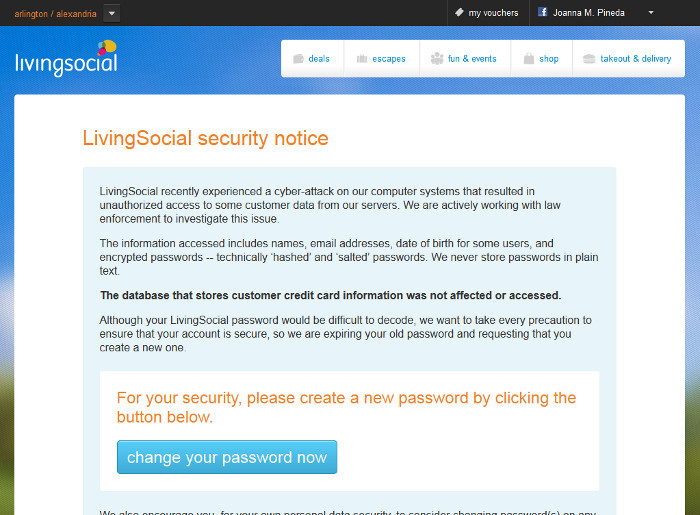
    A couple of weeks ago, the daily deal website LivingSocial reported a cyberattack that breached the accounts of some 50 million subscribers. The information breached included names, email addresses, date of birth, and encrypted passwords. Ugh. These system breaches are so common these days that we change passwords, shrug and move on. And yet most people aren’t learning the real lessons of password management.

    LivingSocial Security Notice

    I spoke at a conference recently where I asked the audience how many of them use the same passwords on multiple sites. About half the hands went up. I get it, it’s impossible to remember a different password for every site that requires one, but most people don’t realize is how one system breach makes you vulnerable to others, even if the other systems are not breached. Here’s how it works: Say you bought something from a retailer and you used the same username and password that you use on other sites. The retailer’s system is breached. You change your password and you’re done, right? Wrong. The hackers take the breached usernames and passwords and try them against major retailer and social networking sites because, let’s face it, who doesn’t have an Amazon, Google, Facebook, Twitter, Ebay, iTunes, Fidelity or Schwab account? For the person who used the same password on multiple systems, he just got ripped off across multiple platforms. Total disaster.

    Want to protect your information and assets? Here are some guidelines.

    Use one password per site. That’s right. Use a different password for Amazon, Google, iTunes, Facebook, eTrade, your child’s school website, The Washington Post, LivingSocial, Etsy, and on and on. This way, if one system is breached and the hackers manage to unencrypt your account information, they can’t use it on other sites.

    Use a secure password manager. It’s going to do you no good to have dozens of different passwords if you don’t have a good system for managing them. I have a friend who says she has an Excel file on her computer that contains her passwords. Trust me, if you computer got lost, stolen or otherwise breached, that Excel file is toast. The net admins at Matrix Group like KeePass and LastPass. I use KeePass to store all of my passwords. I have one, really strong password to my KeePass account that I have committed to memory; KeePass handles everything else. Okay, that’s not exactly true. I’m paranoid enough that the passwords to my email, laptop and work network are committed to memory, never written down and not stored in KeePass.

    Use really strong passwords. A really strong password is long, contains a combination of letters, numbers and characters, and has an element of randomness to it. I really like this article by Thomas Baekdal on the Usability of Passwords. He argues that users should create long, memorable passwords that combine words and characters. If a password is memorable, you’re more likely to remember it and you won’t write it down on a Post It note. An example would be: 99BlueBellagioBalls. This password is easy to remember but it’s long, it’s got upper and lower case letters and it’s got numbers. A more recent article by Dan Goodin (Why passwords have never been weaker — and crackers have never been stronger in) says the hacking landscape has changed dramatically because of supercomputers and password breaches that have exposed common passwords and password patterns that people use over and over again. The solution? Use an even longer, complex password: 99BlueBellagioBalls might become Blue99beLLagioBalls. This is a 19-character password that you could more easily remember than 98zefswr))*je. But then again, if you’re using a password manager, you won’t need to memorize your long passwords.

    If a system allows two-factor authentication, opt for it. Two factor authentication means you need two factors to get in. To access Facebook from a new computer, you would need your username and password AND the code that Facebook sends to your phone. Presumably, a hacker would not have access to your phone.

    Don’t use weak security questions. Personally, I’m appalled that a woman’s maiden name is still used as a security question. Since I didn’t change my last name when I got married, the whole world knows my maiden name. The lesson here is this: don’t select a security question where the answer can be easily obtained by a casual acquaintance, doing Google searches or checking out your profile on Facebook.

    I guess I could decide to live in a treehouse, go off the grid and use only cash but who am I kidding? There are myriad government and corporate systems that have information on me and those systems can be breached. The best I can do is protect my accounts with strong passwords that I manage securely. I hope you all will do the same.


  • Time To Audit Your Privacy Settings – Everywhere

    Time To Audit Your Privacy Settings – Everywhere

    I got a new iPhone last year and configured it to upload photos to Facebook. Imagine my surprise when photos of me and my kids ended up public on Facebook, even though I have my settings set to all photos as viewable by Friends Only by default. So I dutifully reviewed all of my Facebook privacy settings, updated the viewing options for all of my photo albums and went on my merry way.

    I wouldn’t call myself paranoid about privacy and security on the web, but I do watch what I post online and I take advantage of privacy options, whenever available. Make it your New Year’s resolution in 2013 to audit your privacy settings on all social networks and think about what information you’re putting out on the web, private or not. Here’s my privacy punchlist to help you out:

    Be careful when uploading photos to Facebook via your smartphone. For some reason, Facebook sometimes doesn’t honor my default option to make photos Friends Only and I have to manually change the viewer settings on some photos.

    Beware of what other people can do to your posts and photos. Last month, Mark Zuckberg’s older sister posted a photo on Facebook that friends and friends of friends could see. A friend of a friend saw the photo, assumed it was public and tweeted it. What ensued was a very public conversation between Randi Zuckerberg and the tweeter Callie Schweitzer on Twitter. The media had a field day. Check out this story on Forbes.com. Folks, if you let them, friends and friends of friends can share your posts, share your photos, tag you in photos, yada,  yada.

    Remember that Facebook apps can access your personal information. Everyone seems to love birthdays and birthday greetings on Facebook. Well guess what? Even apps can access your birthday when you give them permission to access your Facebook account. And since knowing your birthday is a key piece in identify fraud, think about not sharing your account, or not putting your exact birthday (does that violate the Facebook terms of service?).

    Know that your company email account is not private.  Your personal gmail account is one thing, but all the courts have upheld the notion that corporations own employee accounts on corporate mail servers, which means they can audit and read your company emails at any time. Most companies even have policies saying they can and will do this when needed.

    But hey, even private email accounts aren’t always private. We might be shocked by the General Petraus affair, but equally of interest is how the FBI found the emails between General Petraus and Paula Broadwell in private gmail accounts. What started out as a cyberstalking investigation ended up bringing down a CIA Director! So assume that all of your emails could be made public and that they will exist on some computer or back-up for the next generation or two.

    Everything we do is  being tracked. When I stop to think about it, I cringe at the data that government and retailers are amassing about me. I use my American Express credit card for nearly all of my purchases, I use my rewards cards at places like Giant, Harris Teeter and Barnes & Noble, my E-Z Pass tracks where I’ve traveled on the toll road, Google tracks all of my searching history, Amazon knows what I like enough to buy, and Facebook knows where I’ve been, who my friends are and what I ate last Sunday. If you want to stop some of this tracking, don’t use a credit card, don’t use rewards cards, use a Do Not Track app on your computer (like Abine), logout of Google before doing searches, and turn off cookies or delete them regularly. For me, these steps aren’t exactly practical, but I offer them as suggestions for those who do want to limit tracking.

    Ultimately, I always try to remember that anything I do online on the web and in email could be made public at any time.

    How about you? How much do you care about privacy and security? Are you doing anything about your privacy settings or changing your behavior?

    Many thanks to my friend Shaun Dakin for his help with his post. Shaun is a huge online privacy expert and advocate. Find him on Twitter @shaundakin and Facebook at Dakin Associates.