Matrix Group International

Author: Joanna Pineda

  • I Became a Mayor on Foursquare and all I Got Was a Lousy Crown

    I Became a Mayor on Foursquare and all I Got Was a Lousy Crown

    I did it! I finally became a Mayor on Foursquare! Foursquare is a location-based social network that lets users “check in” to a place they’re visiting, tell friends where they are, and track the history of where they’ve been and who they’ve been there with. Typically, users check in from restaurants, clubs, bars, museums and other places of entertainment.  But I’ve also seen people check in from their local grocery store, a hospital, a gas station.

    Foursquare crowns you Mayor of a location when you’ve checked in from that location more than anyone else. So I decided to make it a personal quest to become Mayor of Rustico, a restaurant in Alexandria that I enjoy and visit fairly regularly. So for the past couple of months, I scheduled all of my lunch meetings at Rustico, and even took my family there a couple of times. About ten days ago, I finally unseated the current Mayor to become Mayor. Woo hoo!

    But here’s the rub: aside from getting a congratulations message from Foursquare and a crown in my profile, being Mayor gave me nothing. I told my waitress when I became Mayor and she looked at me like I was nuts. Ditto the manager. Where other venues offer Mayors something special, I didn’t even get a thank you for promoting the resturant to my Foursquare and Twitter followers for the past few months.  Many establishments, especially restaurants now offer “specials” to Mayors and people who check in xx number of times; it’s a great way to encourage people to come, to foster loyalty and spread the word about your company. When a friend called to invite my family to dinner at Rustico, he asked if being Mayor made it easier to get a reservation and I just snorted. Ha! I wish! Not even a free soda!

    So I began to wonder if the folks at Rustico are even aware of Foursquare, Foursquare specials, and Mayors! I visited the Rustico website; no familiar links to Twitter, Facebook, YouTube, etc. I did manage to find Rustico on Twitter, but the page is not customized, there’s not even a description! Their Facebook page has 3 fans and no status updates. Okay, so it’s looking like Rustico hasn’t yet developed a solid social networking plan.

    I don’t believe every business should be on the Web and every social networking platform; it’s just not realistic, practical or even necessary. What I do believe, however, is that every business should have a listening strategy so that they can know if and when their business is being mentioned or discussed in a significant way on specific platforms. Does Rustico even know that hundreds of people are “checking in” to Rustico on Foursquare and Facebook places each week? Gosh, it takes just minutes to set up Google Alerts and Twitter searches.

    Imagine this: you set-up a Google alert so you’re notified when your business is mentioned on the Web. You notice lots of mentions on a specific social network. You check it out, learn more, maybe invest in ads or specials. Foursquare, for example, has a primer for businesses on how to use Foursquare to encourage more business.

    As for me, I recently lost the title of Mayor of Rustico but I’m not upset. I’m gunning for Mayor of another restaurant that I KNOW offers specials to its Mayors.

    How about you? Are you on Foursquare? Have you managed to become Mayor? Did you get anything special for it?


  • Turning Facebook Fans into Funds

    Turning Facebook Fans into Funds

    Last year, Matrix Group decided not to send out printed holiday cards.  Instead, we sent an e-card and donated the money we would have spent on printing and mailing and donated it to several local charities.  This year, we’re doing something similar, but with a social media twist.

    We’re taking the money we’re saving by not mailing printed cards to our entire list and once again donating it to charity. This year, however, we’re trying to increase the amount that we give away.  For every new Facebook fan who “likes” our fan page (the deadline is December 14), we’re adding $10 to the charity pot.

    Next, we’re asking our entire network of clients, partners, vendors and supporters to tell us how to give away the money.  I polled the staff and asked for recommendations for charities they thought were worthy of a gift.  We came up with the following organizations:

    In our Facebook page, we set up a Poll that allows fans to vote for their favorite charity from the list above. So far, we’ve gained over 100 new Facebook fans and nearly two hundred people have voted.

    I like this year’s holiday campaign because we’re able to increase the amount of our donation this year, we gain new fans, and we are able to showcase effective and well managed charities in the DC area. It’s also been fun to promote this holiday campaign to our house e-mail list, on our social media pages, and to our network of friends and supporters.

    Here’s how you can help:

    • “Like” our Facebook fan page at http://www.facebook.com/MatrixGroup
    • Vote in our poll
    • Spread the word about the campaign to your network of colleagues, friends and family

    We’ve got a goal of $5,000.  Help us support some terrific charities this holiday season!

    P.S. In case you’re wondering, we decided to still mail printed cards to our key client contacts because we were worried about some clients and partners not receiving the e-card because of a firewall or anti-spam software. In the end, we liked the idea of clients receiving something tangible from us and the ability to sign and personalize cards.  But instead of mailing nearly 1,000 cards, we’re mailing fewer than 200 cards.

  • 2011 Top Holiday Gifts Ideas from Matrix Group

    2011 Top Holiday Gifts Ideas from Matrix Group

    I have a Christmas app on my iPad. When I checked it today, it reminded me that there are 23 days until Christmas Eve. Yikes! Even though I did a bunch of shopping on Black Friday, I still have a lot of buying to do! As always, I polled my staff and asked for their top gift ideas of the season. Here’s what I got back:

    • Everyone who doesn’t have an Apple iPad wants one. At least a couple of staff members want an Android tablet.
    • A bunch of staff want the new Amazon Kindle, while a few are getting or giving the Nook Color e-reader.
    • The gamers in the office are getting the Kinect for Xbox 360 and/or the Playstation Move. Both devices take gaming to the next level because your body becomes the controller. Watch out, Wii!
    • For the PS3 gamers who get the Move, we like Sports Champions and R.U.S.E.
    • The L5 Universal Remote turns your iPhone or iPod Touch into a universal remote. Very slick.
    • The Roku Player lets you stream Netflix to your TV, for a lot less money than an Apple TV, PS3 or TiVo.
    • The Parrot AR. Drone Quadricopter powered by your iPhone, iPod Touch or iPad is ridiculously cool. There’s even a live camera feed from the quadricopter to your Apple device so you can see the view from above.
    • Is it possible to have a cool vacuum? Yes if it’s a Dyson. I want the hand vac but it’s always out of stock!
    • The Flip UltraHD video camera can record high def video and surround sound with the press of a button and automatically convert your video to be YouTube compatible.
    • The Logitech Google TV lets you stream videos from various providers and run Android apps.
    • We like this USB car charger for when your devices run out of power and you need to charge them on the fly.
    • You’ll love this Spy Net secret mission video watch. Very James Bond.
    • I recently got a Panasonic Lumix G2 DSLR camera. Love the touch screen, the smaller form factor and of course, the gorgeous photos I’m now taking.
    • If you’ve got a Lego lover in the family, the Lego set of the Death Star from Star Wars will make them happy. It’s got over 3,800 pieces so someone will be busy for a while!
    • If you want a non-techie gift idea, the David Sheldrick Wildlife Trust lets you adopt orphaned animals and receive e-mail updates throughout the year. Kids will love this one!

    If you want more ideas for geek gifts, visit Ars Technica’s holiday wish list of gizmos, gadgets and gear.

    How about you? What are your top gifts ideas this season? What is on your Santa list?

  • How to Increase Likes and Interactions on Your Facebook Page

    How to Increase Likes and Interactions on Your Facebook Page

    Each week, as the main administrator for the Matrix Group Facebook fan page, I get a weekly report from Facebook that details the change in number of fans (people who have “liked” our page), as well as the number of views and interactions.

    Getting lots of fans and interactions is the holy grail of Facebook marketing. The more people “like” your page, “like” your posts, click through to your offers, comment and otherwise interact with your page, the more likely they are to become loyal fans and customers.

    So how do you increase likes and interactions on your Facebook page? Here are my top tips, based on the experiences of the Matrix Group marketing team.

    • Give your Facebook updates an authentic voice. What most people love about Facebook is the fact that they’re reading their friends’ thoughts and comments in near real-time.  And these comments are not written in corporate-speak; they read and sound the way people talk, like they’re having a conversation with you.  Your company’s Facebook posts should probably not be too casual, but they should sound less like a press release, and more like a comment from a friend or colleague.
    • Don’t just RSS your news items or blog posts. I’ve said this before but if all you’re doing is republishing headlines from your website or blog, you’re not giving people an incentive to follow you on on Facebook because the information is the same.
    • Don’t automatically post your Twitter updates to your Facebook page. Why?  Because you’re probably chattier on Twitter than you are on Facebook and chatty people and companies dominate Facebook streams, so fans are more likely to right-click and press Hide.  Besides, on Twitter, all you get is 140 characters; you get more words on Facebook, why not use them?
    • Make your posts stand out by adding photos and videos. You know the old saying, “a picture is worth a thousand words.”  It’s definitely true on Facebook and it’ s not surprising.  Most people scan their Facebook streams and a photo or video will catch people’s attention much more than a plain text status update.
    • Ask for feedback. I’m always amazed that the simple act of soliciting feedback often results in feedback.  Funny how that works.  Heck you don’t even need to ask for serious feedback.  Ask your fans what color to paint your office walls; or ask them to comment on your holiday menu.
    • Spark a debate. If you’re comfortable doing so, posting about topics that generate a little heat are great for interactions.  But always keep the language appropriate.
    • Use Facebook apps to add interactive features to your Facebook page. For example, you could create a custom tab, sponsor a contest, or host a game.
    • Offer exclusive benefits to your followers. Last holiday season, Snapfish offered a daily discount on its Facebook page that generated lots of interest, clicks and comments. I know because I could see the activity and I certainly checked the Snapfish Facebook page regularly for deals!
    • Test, test, test. My marketing team is always playing around on our Facebook page to see what time of day is best for posting, the types of messages that generate interactions and ultimately sales, and how to wordsmith updates to generate the highest number of interactions.

    Here are some good resources on Facebook marketing and interactions:

    • Zimply Zesty has 7 ways to increase interactions.
    • A study by Vitrue found that morning posts are more effective, users are more active at the top of the hour and weekdays are busiest.
    • Smart Passive Income has some great how-to videos on how to create and customize your Facebook page.

    How about you? What tactics have you used to increase interactions on your Facebook page?  Please share your stories!

  • Creating an Integrated, Layered User Experience Across Your Social Media Pages

    Creating an Integrated, Layered User Experience Across Your Social Media Pages

    I was researching an organization last week and visited their website, blog and social media pages. The website was nicely designed, easy to navigate, and had good information.  The blog was terrific and I quickly subscribed to the RSS feed.  When I got to the organization’s social media pages, I was sorely disappointed.  Their Twitter and Facebook pages had nothing but headlines from the blog. Clearly, all they did was take the blog RSS feed and use it to populate their social media pages.

    So did I decide to “follow” the organization on Twitter and “like” them on Facebook?  Absolutely not. Since I had already subscribed to the blog RSS feed, I didn’t feel compelled to follow them on Twitter and Facebook.  Why add clutter to my social media streams with information I can already get elsewhere?

    I know it’s tempting to set-up pages on Twitter, Facebook, LinkedIn, and other social media platforms and populate them with posts from your blog or press room.  We’re all busy and most communications and marketing departments are stretched thin.  But posting the same information across platforms isn’t doing your organization any good. Why?

    • By posting headlines that meet the least common denominator across platforms (probably Twitter, with its 140 character limit), you miss out on functionality offered by the other platforms.  For example, Facebook lets you post longer updates, upload photos and videos, include links, host discussions, etc.
    • You don’t give your target audiences a reason to follow or fan you across platforms.  Just imagine this.  If you post complementary but different content across platforms, your clients, prospects and supporters might just follow you on multiple platforms, giving your company an incredible voice with those individuals.
    • If you’re posting headlines from your news room, you’re not offering people the authentic, personal voice we’ve come to expect on the social media pages.

    Here’s what we do at Matrix Group:

    • Our website showcases our products, services, clients, portfolio, news and webinars.
    • This blog, which is authored by me, Joanna, the CEO, features my thoughts and commentary on social media, marketing, communications, strategy, customer service, trends and gadgets.  This blog DOES feature website launches at the bottom of each page.
    • Our Twitter page showcases our work and clients, but the majority of the tweets are about industry news, trends, how-to articles, and case studies.  Twitter will tell you who we are and what we’re reading.  We’re pretty chatty on Twitter; we post updates multiple times a day.
    • Our Facebook page also showcases our work and clients, but we also post photos and updates about happenings in the company, including trainings, parties, fun events, etc.  Facebook will tell you a lot about who we are as a company and our culture.  For example, our staff pumpkin carving contest was featured on our Facebook page.  We’re less chatty on Facebook, just updating a few times a week.
    • Our Flickr page is home to our photo library of company events, while our Facebook page has the “best of” photos.
    • Our YouTube channel is a work in progress and will soon feature short interviews with senior staff about their areas of expertise, including branding, the user experience, software development and security.

    As you can see, our various pages are all designed to showcase our expertise, clients and work but the user experience on each platform has been carefully crafted to take advantage of that platform’s capabilities.  And while the website is clearly a marketing channel for the company, we’re not very sales-y on our social media pages, focusing instead on posting useful and interesting links.

    How about you?  How are you creating an integrated use experience across your company’s social media pages?  What’s working for you?

  • Panasonic Lumix G2 camera

    Panasonic Lumix G2 camera

    I finally got a digital SLR. It’s smaller than a traditional SLR and takes great photos and videos!

  • Are You and Your Organization Vulnerable to Social Engineering?

    Are You and Your Organization Vulnerable to Social Engineering?

    A couple of years ago, I discovered strangers walking through our office unescorted.  They told our receptionist that they were looking at office space in the building; they were well dressed, the referenced the name of our landlord and they asked nicely if they could just walk around and take a look at our space.  Our receptionist, ever on the lookout for ways to be helpful, let them wander the halls.

    A couple of months ago, someone claiming to be an exhibitor at a client’s trade show called, asking for the client’s logo so they could use it in an e-mailing going out.  The person said they had the approval of the client.  My responsive Project Manager opened up a work request and got the logo sent out asap.

    In both cases, the persons making the requests were legitimate and no harm was done.  BUT, they just as easily could have been hackers or scammers and my helpful staff could have been duped into giving them information or access they were not authorized to have.  Which is why Matrix Group covers security during orientation and training for all new hires and we recently brought in a security expert to discuss social engineering.

    Social engineering is “the act of manipulating people into performing actions or divulging confidential information, rather than by breaking in or using technical cracking techniques.” Kevin Mitick, the famous computer hacker, claims that it’s “much easier to trick someone into giving a password for a system than to spend the effort to crack into the system.”  There are many social engineering techniques, including:

    • Pretexting is the act of getting people to divulge small pieces of information, which hackers use to obtain more information from the next person.  Knowing bits of information establishes legitimacy in people’s minds and makes them more willing to divulge even more information.
    • Phishing is used to fraudulently obtain private information.  Phishers typically impersonate legitimate businesses via phone or e-mail and convince victims to divulge sensitive or private information.  Think of the hundreds of e-mails you get that look like they’re from your bank; nearly all of them ask you for your account information, login information and/or SSN.
    • Baiting is a technique whereby hackers leave CDs or USB sticks containing viruses or trojans in public places, in the hopes that a curious person will pick up the items and insert them into their systems, effectively infecting them and making them vulnerable to hacker attacks.

    Social engineering is highly successful because of the natural human tendency to trust other people. In addition, most people want to be helpful.  In fact, we train our staff to be helpful because helpfulness is key to a successful business.  If you’re wondering if you or your organization are vulnerable to social engineering tactics, ask yourself these questions:

    • How easy or hard would it be for someone to gain access to your office by mentioning the name of the CEO and some key staff?
    • How difficult would it be for someone to impersonate you by providing your name, address, SSN, mother’s maiden name, spouse name, etc.  I’ll bet a lot of this information is on public Web sites and social networks.  Just look at some of your friends’ profiles on Facebook; you’ll find hometown, e-mail, birthday, the works!
    • How hard would someone have to work to impersonate someone and convince a network admin to divulge or reset a password?
    • Have you held the lobby door open for someone off the street while entering a secure building?

    Okay, now that you’re paranoid, what are you going to do about this potential threat to you and your organization?

  • It’s Time To Audit Your Facebook Privacy Settings

    It’s Time To Audit Your Facebook Privacy Settings

    I found out recently that the iPhone version of the Facebook app synchronizes with personal profiles on Facebook.  Which means (gasp!) that if a friend has your private phone numbers in his/her phone, it’s possible that those numbers are now on Facebook.  Egads!

    While I love Facebook, Twitter, instant messenger, etc., I try very hard to limit the amount of personal information that I share on those networks, including and especially my address, home phone number, information about my family, etc.  But with the social networks constantly updating their terms of use and adding new functionality to their sites and apps, it’s hard to keep up with the changes and monitor the impact on our privacy.

    Which is why I recommend an audit of your Facebook (and other social network) privacy settings on a regular basis. Here’s how:

    • Log in to Facebook and click on Account in the top right corner of any Facebook page.
    • You’ll get a dropdown of options; click on Privacy  Settings.

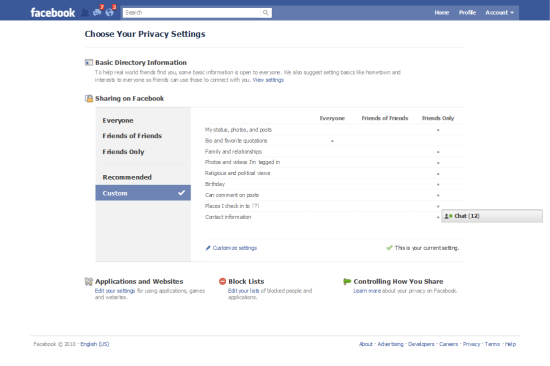
    Facebook Privacy  Settings Landing Page

    Here’s what your Facebook Privacy Settings Landing page looks like.  Note that you can share parts of your profile with Everyone, Friends of Friends and Friends Only.  I have edited my profile so that nearly everything about my profile is visible to Friends Only.  But wait, this page only shows you a fraction of the privacy settings available to you.  To view and edit all of your privacy settings, click on Customize Settings.

    You’ll also notice two navigation items on the left for Recommended and Custom.  Click on Recommended and you’ll see that Facebook recommends that a great deal of your profile be available to everyone.  You can select these default settings with a click.  Me, I definitely opted for the Custom Settings.

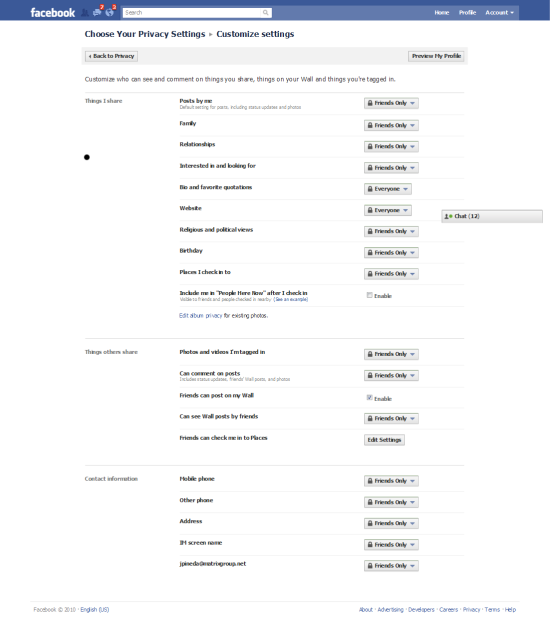
    Customize Settings Page

    Here’s what the Customize Settings page looks like.  You’ll see that you can select who can see elements of your profile.  Here are my recommendations:

    • If you post photos of your family, especially your children, make Posts By Me visible to Friends Only.
    • Be sure to pay special attention to the Things I Share section.  This is the section where you can control what others are doing, including tagging you in photos and videos, checking you into Facebook Places, etc.  This allows you to NOT allow friends to check you into a bar or party, and stops them from tagging you in photos and videos and thereby making your photo visible to their friends.  Here’s a blog post about how someone nearly sabotaged a dinner party by checking all the guests into Facebook places.
    • If your Facebook network is vast, consider creating custom lists and then specifying with each post and update which list can see your updates.  For example, I have a Family list that I use to share family photos and insider updates.
    • Be sure to audit your privacy settings for existing photo albums. If you created albums before Facebook rolled out its new privacy settings, you may find that all or many of your albums are available to Everyone (I know I did!).

    As for that pesky iPhone app that uploads your personal information to Facebook, unfortunately, there’s nothing you can do about that.  Facebook did recently add a warning to the app, warning users to make sure their friends are comfortable sharing their information with others.  This is a small consolation to me; I would venture to guess that most people don’t think about the privacy ramifications of their actions and apps and will blow right past this user agreement.  What to do?  This may sound dorky, but here’s what I’ve told my friends:

    • Please don’t sync your iPhones with Facebook.
    • Don’t try to check me into Facebook places.
    • When you’re at my house, never check into Facebook Places or FourSquare so you don’t reveal my home information.
    • Please don’t upload photos and videos that are unflattering to me and my friends/guests.  (When I throw Rock Band parties at my house, videos are not allowed; we DO allow photos of us band members looking cool with our instruments.)

    How about you?  Have you audited your Facebook privacy settings recently?  Any revelations?  Any privacy disasters?  What are you doing, if anything, to maintain a semblance of privacy online?

  • Beer and Cream Cheese Agile Methodology Revisited

    Beer and Cream Cheese Agile Methodology Revisited

    Just over a year ago, I blogged about how the MatrixMaxx team was using an agile software methodology we’ve dubbed “beer and cream cheese.”

    MatrixMaxx is Matrix Group’s Web-based association management software (AMS) that is used by dozens of trade associations and professional societies to manage their membership applications and renewals, meeting registrations, committee rosters, tradeshows, sponsorships, foundation fundraising, e-mail lists, and publication sales.

    Beer and cream cheese is the software development methodology we came up with after exploring several agile methodologies, including SCRUM.  While there are many flavors of agile development methods, most are characterized by:

    • Breaking big projects into smaller tasks that can be accomplished in hours or days, never weeks or months.
    • New versions of the software are released in short timeframes, called timeboxes or sprints.  Sprints can last 1 day to 30 days.
    • The goal of each sprint is to produce a working product that the client can use immediately, rather than having to wait months or years for a release, bug fix or new functionality.
    • Each team has a customer representative who represents the client perspective and makes him/herself available to team members.  In the case of SCRUM, there are 3 roles: the ScrumMaster (who serves as the project manager); the Product Owner (who represents the stakeholders/lients); the Team (the staff who do the development work).

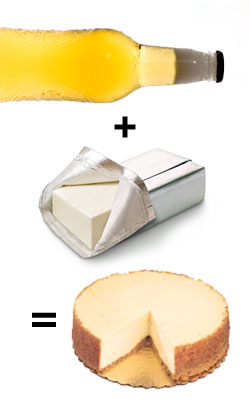
    We call our methodology beer and cream cheese because about 18 months ago, Tanya, the MatrixMaxx Director, posted to one of the SCRUM message boards, asking if anyone had experience with having the same person be the ScrumMaster AND the Product Owner.  One ScrumMaster sarcastically remarked, “You CAN do it, but that would be like combining beer and cream cheese.”

    Fast forward one year.  The MatrixMaxx team is still using beer and cream cheese, but our process has changed, and for the better.

    • Where Tanya used to play the role of Product Owner and ScrumMaster, she is now the Product Owner.  Geoff is our Brewmaster.  As a result, Tanya can focus on the product road map and client requirements.
    • Our sprints are now 15 days long.  Major product releases are quarterly, but we put out small enhancements, especially custom enhancements for clients, twice a month.  Clients love this!
    • Although we still primarily use our intranet to manage tasks and requirements, there is a whiteboard in the MatrixMaxx team area that lists tasks that have been designated for the next release/sprint.
    • We’re doing a better job of tracking projects and elements that tend to go over budget.

    We plan to refine our beer and cream cheese process even more over the next year by:

    • Going back to shorter, daily check-ins, which have turned into lengthy discussions about tasks and requirements.  We realize that the entire team does NOT need to be part of all in-depth discussions.
    • Giving each team member one long item and one short item per day to encourage maximum productivity from all team members and help us manage the backlog of small items.
    • Making a renewed commitment to identifying and analyzing tasks that tend to make us fall behind or go over budget.

    BTW, we still hold beer and cream cheese parties where staff bring in baked goods made with beer and cream cheese.  My favorite this year was the dark chocolate cupcakes made with beer and topped with cream cheese frosting. Yum!

    How about you?  What software development methodology does your company use?  Are you an agile shop?  What’s working for you?  And how did you select the methodology that you are using?

  • Why Having a Baby Will Be Good For My Business

    Why Having a Baby Will Be Good For My Business

    I’m having a baby tomorrow (maybe sooner, we’ll see) and then I’ll be home with baby Marcus John.  For a few weeks at least, I’ll be dealing with lack of sleep, no set routine, and hundreds of diaper changes.  The big questions that always pop up when speaking with family, friends, staff, clients and vendors are:  How much time are you taking off and how will your office survive without you?

    The answer to the first question (how much time are you taking off?) is not clear cut.  When you’re a small business owner, you can’t exactly just disappear for a few months. When you’re the owner, the business is your baby, it’s part of your life and your identity.  That said, I’m giving myself the flexibility to work as much or as little as I want, come in when I feel I need to, and decide when I’m ready to come back to the office full-time.

    The answer to the second question (how will the office survive without you?) is “Just fine, thank you very much.”  In fact, just like the last time I was out with my first son, I expect the office to thrive. Here’s what I’ve done to prepare myself and the office for my absence:

    What Is It That Only I Do, or Can Do, At the Office?

    When I first announced to my management team that I was going to have a baby, the questions I asked of myself, the Directors and Project Managers was: “What is it that I do, that only I can do, that you rely on me to do?”  Then we got to work documenting the list and figuring out a plan for getting those tasks done in my absence.

    For example, I review the monthly billing reports after the Project Managers (PMs) have reviewed them to double check that we are properly marking work as billable or unbillable.  Over a period of a couple of weeks, I went over dozens of reports with the PMs, discussed why I question certain items and provided suggestions for how to handle ambiguous items and make sure clients are never surprised by their invoices.  The Director of Client Services will also now review invoices in my absence.

    Documenting What’s in JP’s Brain

    When you’ve been in the Web business for as long as I have (since 1994 but please don’t try to calculate my age!) and when you’re responsible for landing a lot of the company’s business, you just accumulate a lot of knowledge about clients, process, and projects. Even though I use our intranet religiously to document all of my communications with clients and prospects, there’s just a lot of knowledge that I carry around in my brain.

    So over the past few months, I worked with my team to document the strategies, best practices, and potential land mines I’ve encountered while working on myriad projects. I paid special attention to the project components that I tend to spearhead, including Goals and Personas, Content Strategy, Integration with a Back Office CRM (customer relationship management system) or AMS (association management system), CMS (content management system) reviews, and Social Media.  These are now called PM Guides and they live in our wiki. All staff are encouraged to modify them as needed.  The guides are reviewed before the start of each project, and the PMs are loving the sample agendas and notes for running meetings. (more…)