Matrix Group International

Author: Joanna Pineda

  • What’s So Fun About FourSquare?

    What’s So Fun About FourSquare?

    In my quest to try out new social networks, I signed up for FourSquare last year.  I didn’t start using the service until a couple of months ago, when I get my new Palm Pre and I felt ready to dive into another social network.

    FourSquare is a location-based social network. The idea is that you share your location with your friends and followers by “checking into” locations.  For example, every time I go to a restaurant, I pull up the FourSquare app on my phone, let the app determine my GPS coordinates and show me possible options.  I can select one of the venues select and “check-in” or add a new venue.  When I check in, I can write a little message and share out my update on Facebook and/or Twitter.

    Last Saturday, I checked into four locations, including three restaurants and I got hilarious comments from friends about how all I did on Saturday was eat!

    Here’s what I’m enjoying about FourSquare:

    • I don’t feel compelled to check in multiple times a day, every day. My check-ins are usually to restaurants, but increasingly, I’m checking into events.  Tonight, I checked into the DCWW Content Strategy Workshop held at the Matrix Group office.  I check in only a few times a week, if at all.
    • I love the gaming aspect of FourSquare.  People who have the most check-ins at a specific get a Mayor badge.  So far, I’ve earned a Newbie badge and an Explorer badge.  I’m hoping to become Mayor of one of my favorite restaurants sometime soon!
    • It’s fun to see where my friends are and what they’re doing.
    • FourSquare is not nearly as chatty as Twitter and Facebook.
    • I have learned about so many great, local businesses through FourSquare!
    • Some enterprising retailers are rewarding frequent customers with discount coupons and other goodies.  The retailers are glad for the patronage AND the free advertising from the check-ins!

    (more…)

  • Moving the Matrix Group Underground to the Foreground

    Moving the Matrix Group Underground to the Foreground

    With all the hiring we’re doing right now, my team decided that we better revisit all of our orientation guides. Orientations work like this at Matrix Group:  we ask staff members from all teams to help with the orientation; we give them an outline and they do the session.  Spreading the orientation schedule around means we cover more in a short period of time and new staff get introduced to all teams in a more meaningful way.

    When we started reviewing our existing guides, we found that the majority of them were too sparse. If you were lucky enough to do orientation with an earnest old-timer, you got lucky; otherwise, lots of things were missed.

    So a bunch of sat down, revisited topics, and came up with 2-4 page guides for each topic.  Each topic has a sub-topic and talking points + specific things to cover.  The guides are working out very, very well.

    One new thing we decided to create is a “Matrix Underground” guide, or the things you should know but nobody every tells you. We realized that it’s things on this guide that tend to trip people up or leave people bewildered.  For example, there are expressions that we expect people to know, acronyms,  and Joanna-isms that a person could take years to figure out.

    Most things on the guide are funny, but some are dead serious.  Some examples:

    • Sumner is the part-timer on the MatrixMaxx team who works in the afternoons (recent hires said they spent six months trying to figure out who the heck Sumner is).
    • When Joanna says “can you do me a favor?” or “I need something from you,” it means “she needs something done NOW, not tomorrow, not next week, now.”
    • When someone says “the cheese has moved,” it refers to the book “Who Moved My Cheese?” that we read as a company several years ago and it means “dude, the situation has changed, let’s move along and get over it.”
    • (more…)

  • What’s Behind Those Long URLs? Tracking Codes, Of Course!

    What’s Behind Those Long URLs? Tracking Codes, Of Course!

    Every day around 3pm, I get my afternoon update of The Washington Post via e-mail.  Each update contains a summary of about a dozen stories and links to the full story on the Post Web site.  Every time I get an update from Facebook about a message from a friend or a comment on one of my updates, I get a URL to click on.

    Have you ever noticed how long these Web addresses are?  Ever wonder why these URL are so long?

    The answer is simple: tracking codes. Tracking codes are strings of text added to the end of a URL that let you track the source of a click.  For example, if your organization has an e-mail newsletter and you want to know how many people click on the links in your e-mails, you add tracking codes to the URLs.  Your usage tracking software will almost always treat the URLs with the tracking codes as unique from the same URLs without the tracking codes.  So, when looking at your usage reports, you can look at usage overall to specific pages and then figure out how much of the traffic came from the e-mail newsletter.

    If you usage Google Analytics for usage tracking, Google has a terrific URL builder that create properly formatted tracking codes to track the source of clicks, specific campaigns, even the duration of your campaign.  Here’s an example of how it works:

    Let’s take the URL to my recent blog post on magazine subscriptions on the iPad.  The URL looks like this if I navigate directly to it:
    http://www.thematrixfiles.net/blog/am-i-really-going-to-pay-4-99-for-one-issue-of-time-magazine/

    When my marketing team promotes this blog post e-mails, Twitter, Facebook, etc., we use the Google URL builder to add tracking codes.  Here’s a sample URL:
    http://www.thematrixfiles.net/blog/am-i-really-going-to-pay-4-99-for-one-issue-of-time-magazine/?utm_source=Twitter&utm_medium=SM&utm_campaign=ceoblog
    (more…)

  • Am I Really Going to Pay $4.99 for One Issue of Time Magazine?

    Am I Really Going to Pay $4.99 for One Issue of Time Magazine?

    I blogged last week about how excited I am that some of my favorite magazines are now available on the iPad.  Last week, I discovered that TIME Magazine has a free iPad app.  Turns out, the app is free, but issues are not.  Each issue is $4.99.  $4.99!  When a print subscription is $20 through Amazon!

    A recent article in Ad Age Daily tries to explain why we should expect to pay more for online subscriptions on the iPad.  According to Ad Age, we should expect to pay $4.99 for an issue of TIME, Popular Science, Maxim, Popular Photography, Sound and Vision, Transworld Skateboarding and Islands because publishers are suffering, there are fewer tablet PC owners, and magazines are still burdened by their huge editorial costs.

    But here’s the rub: I purchased an issue of TIME for $4.99 and discovered that the content was the same as my print issue!  C’mon, TIME.  I pay about $0.50 for a print issue, but you want me to pay $4.99 for the same thing!  If you’re going to charge me a whole lot more, I expect a different experience and additional content I can’t get elsewhere.

    This reminds me of publishers that put up PDF versions of their print publications and post them to the Web site.  It’s easy to do and gets the job done.  Problem is, the Web is a different medium from print.  Have you ever tried to read a PDF of a print magazine?  Try going from page 2 to page 36 on a Web browser.  Try reading a two-column page that scrolls up and down past two screens on a monitor.    And now companies are putting out software that will take print files and convert them to iPad apps!  Once again, ignoring the usability and user experience capabilities of the device and merely re-purposing content.  How does this create value?
    (more…)

  • Are You Ready to Ditch Your Paper Subscriptions?

    Are You Ready to Ditch Your Paper Subscriptions?

    More and more of my clients are making the decision to eliminate their print magazines and newsletters. They’re choosing digital versions of their publications over print to eliminate printing and mailing costs, achieve immediate delivery, and occasionally, create personalized versions based on customer preferences.

    All of this makes sense to me.  I get most of my information via e-mail these days, and I’m subscribed to dozens of newsletters via e-mail and RSS.  And in an effort to minimize the “piles” at home, I have canceled all but a few paper subscriptions.

    But I got to thinking:  Am I ready to ditch ALL of my paper subscriptions? Am I ready to cancel my print subscriptions to my favorite magazines, namely TIME, Smithsonian and Stanford magazines?

    Here’s my concern about all digital publications:  it’s easy to ignore an e-mail newsletter as just another e-mail in the hundreds I get every day.  Consider this:  when my copy of TIME magazine arrives on Saturday, it ends up in my “to read” pile. This pile gets shuffled around from dining room table to coffee table to bedroom side table.  Each issue sticks around until I read or skim it, then toss.  But here’s what happens with some of my e-mail subscriptions:  if I have the time, I read them on the spot.  If I don’t have the time, I may leave them in my inbox or move them to a “read” folder for later reading.  Trouble is, with the flood of e-mail that I get, I rarely get to my e-mail read pile. And sometimes, in an attempt to gain back control of my inbox, I delete a huge group of e-mail newsletters and start over.

    Ugh, so much for the future of publishing.  What is the balance that content organizations should try to achieve between print and digital?  And if digital is your only future, how do you ensure delivery and readership? I have some thoughts:
    (more…)

  • What’s All the Fuss About Facebook’s Open Graph and Privacy Policies?

    Remember when Facebook was a closed network, open only to college students? Then Facebook went mainstream and everyone could create a profile. But even back then, Facebook remained a closed network: you had to have a Facebook profile to see other profiles and connect with friends.  Facebook was closed to Google and other search engines, which meant Facebook profiles and pages never showed up on search results.

    Back in 2005, Facebook’s privacy policy clearly stated the following:

    No personal information that you submit to Facebook will be available to any user of the Web Site who does not belong to at least one of the groups specified by you in your privacy settings.

    The Evolution of Facebook’s Privacy Policies

    But then, slowly and over time, Facebook’s privacy policies changed.

    • In 2007, Facebook made your name, school name and profile photo available to the search engines unless you specifically prohibited this in your privacy settings
    • In 2009, Facebook revamped its privacy settings and gave users more control over who gets to see which aspects of their profile.  Trouble was, the default gave “everyone” access to information.
    • In April 2010, Facebook made the decision to make specific elements of all profiles public (name, hometown, school, interests and fan pages), and eliminate the ability to limit access to these fields.  If you didn’t want those elements to be public, Facebook recommended that you delete the information from your profile.
    • In April 2010, Facebook also launched the Open Graph, which shares user profiles with third party sites so that visits to those third party sites can be personalized based on a person’s Facebook interests.  On the flip side, Facebook opened up its API (application programming interface) so that third party sites can add a Facebook “Like” button to their pages; when clicked, the information would be saved back to a user’s profile.

    The Electronic Frontier Foundation has a great timeline of Facebook’s privacy policies, including links to archived versions of Facebook’s policies.

    (more…)

  • The iPad vs. the Kindle – An E-Reader Face-Off

    There are more and more iPads are popping up at the office.  Three of us have kids who are addicted to Godfinger.  Me?  I love surfing on the couch and playing games like Rush Hour and TanZen.  Despite the popularity of the iPad at work, I’ve been reading a lot of critical articles and blog posts about the iPad, esp. as a reading device.

    So I decided it was time for a face-off between the iPad and the Kindle. I invited my friend Eileen to come over to the house with her Kindle.  Eileen would represent the Kindle while my 5 year-old would represent the iPad.  Here’s the face-off video where I play host and ask the co-stars to compare the iPad vs. the Kindle in terms of:  e-bookstore experience, screen size and display, resolution, page turning and search.  See for yourself and be the judge.  Who do you think won this face-off?

    This homemade video brings home the point that with the Web and social sharing sites, everyone’s a critic, a moviemaker, or a citizen journalist. Despite a legion of tech writers reviewing the iPad, I felt compelled to create my own iPad review.  And now I’ll reach out to my network of friends, clients, colleagues and followers on Facebook, Twitter, blog and e-mail to share my video, get their feedback and try to influence their thinking about these devices.

    How about you?  Are you publishing your own content to social networking and sharing sites?  What’s your take on the iPad and have you decided to get one?

  • A Great Web Site, Like a Great Event, is a Collaboration Between Client and Vendor

    A Great Web Site, Like a Great Event, is a Collaboration Between Client and Vendor

    Matrix Group Open HouseLast night, Matrix Group hosted an Open House to welcome clients, partners, vendors and friends to our new office in Crystal City (okay, new as of August last year).  We used the occasion to finish decorating the office and brought in Design Cuisine (Design), a leading catering company in the DC area, to orchestrate the event.

    The Open House was wonderful!  The office looked great, the food and drink were outstanding (loved the beef satay and blueberry mojitos!), turnout was great, and by all accounts, guests enjoyed themselves thoroughly.  The Open House made me realize that hosting an event, much like putting up a Web site, should be a collaboration between client and vendor.  When both parties do their part, the result is almost always success. Here’s what I’ve learned:

    • Clients should take the lead when it comes to goals and direction. When Matrix Group is designing a Web site, we ask lots of questions and try to find out what their goals are and what a successful project looks like.  In the same way, Seana Hale from Design Cuisine wanted to know all about Matrix Group, how we interact with clients, and how the Open House would support our client and partner relationships.
    • Clients should define the overall design aesthetic and values. When Matrix Group designers are working on a design project, we don’t try to change the character and image of an organization.  Instead, we strive to understand the client’s brand, represent it well via design and multimedia and enhance it through our work.  Design Cuisine understood that we wanted a nice event that showed off our creativity and our work, was modestly priced, and played up our brand color of purple without overdoing it.
    • Let the experts take the lead but be prepared to give timely feedback.  Once we’re armed with good background information, our UX (user experience team) creates navigation, wireframes and designs.  It’s great when the client trusts our judgment, takes design direction AND lets us know if we’re on the wrong track by giving us specific and timely feedback.  We also love it when clients let us brainstorm and come up with out of the box ideas, knowing that most won’t fly but the creativity that comes out is good for the project.

    (more…)

  • iPad

    iPad

    A bunch of us at Matrix Group now have iPads. We love this device. It’s different from the iPhone, PC and game console. Love the apps, touch screen and games.

  • “Become a Fan” Has Been Replaced with “Like” on Facebook Fan Pages

    “Become a Fan” Has Been Replaced with “Like” on Facebook Fan Pages

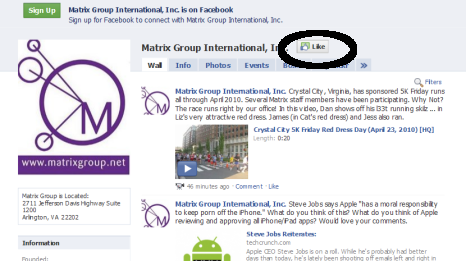
    In late March, Facebook announced that “Become a Fan” would be replaced by “Like” on Facebook fan pages.  The change rolled out in early April and today, the ubiquitous Facebook “Like” button is on all Facebook fan pages, next to the company/organization/page name.

    Image of Matrix Group Page on Facebook

    Facebook’s Rationale for the Change to “Like”

    Facebook says it changed “Become a Fan” to “Like” to offer businesses a more light-weight and standard way to connect with people, things and topics in which you are interested.

    In addition, changing to “Like” aligns with Facebook’s overall strategy of populating the Web with “Like” buttons so that Web surfers can announce their like of pages anywhere around the Web and have these “likes” posted to their personal Facebook pages.  (More on this in a future blog post.)

    It seems Facebook wants to corner the “Like” market.

    For the Most Part, Facebook Pages are NOT Changing

    Aside from changing the language in the button from “Become a Fan” to “Like,” the Facebook pages aren’t really changing.

    • Status updates on Facebook pages will still appear on fan (er liker) profiles.
    • Facebook page owners can still call people who like their pages “fans.”
    • When a Facebook subscriber “likes” a page, it will show up in their Profile under Info –> Pages.

    What IS Changing About Facebook Pages

    • Facebook now allows you to customize the order in which Pages appear on your profile. You can even move some Pages behind a “See all” link, so that you can still connect to Pages without displaying all of them prominently on your profile.
    • Instead of seeing a random selection of fans + a link to See All, there are now two boxes:  “xx Friends Like This” tells you how many of YOUR friends also “like” a page while “xx People Like This” tells you the total number of likers or fans.

    (more…)