Matrix Group International

Author: Joanna Pineda

  • Amazing New Website for AACRAO

    Lorem ipsum dolor sit amet, consectetur adipiscing elit. Proin iaculis dolor eget lacus interdum maximus. Mauris dignissim dictum pulvinar. Nullam in luctus magna. Nam eu metus aliquet tellus rutrum gravida. Mauris posuere qua   m non ante pellentesque, at viverra ligula scelerisque.

  • Don’t Pile on the Tech Debt by Developing in an Old Platform

    Don’t Pile on the Tech Debt by Developing in an Old Platform

    I blogged recently about the dreaded tech debt. I blogged about how to identify it and describe it. We all know that tech debt sucks!

    But what do we do about the tech debt we’ve got and how do we prevent it from happening in the future?

    My number one piece of advice is to STOP piling on the tech debt by continuing to develop in your old software or platform. Think you’re not doing it? Here are some examples:

    1. You have an old version of your content management system. You don’t have budget to upgrade to the latest version, but you really need new functionality that won’t cost very much to implement, so you go ahead and approve the work. Why this is bad: When it comes time to upgrade your CMS, this new functionality will likely need to be redeveloped, thereby adding to the upgrade cost.
    2. You have an old version of your membership database and it’s not in your budget to upgrade this year. You need to bring a new Learning Management System ( LMS) online and you want to implement single sign-on between the membership database and the LMS, so you approve the project to integrate with the old membership database. Why this is bad: You’re probably not using the latest SSO protocols, and you’ll need to upgrade the SSO when you upgrade your membership database.

    I know that in the real world, we can’t keep everything upgraded. But we should be upgrading and maintaining our mission-critical systems since they are the most dynamic and most used.

    Make 2020 the year you burn down that tech debt!

  • The Road Ahead for Virtual and Hybrid Meetings in 2021

    The Road Ahead for Virtual and Hybrid Meetings in 2021

    Woman taking virtual classLast week, I had the pleasure of attending the Techsy Talk Global Conference. One of the best sessions was called “The Road Ahead: Industry Landscape for 2021” by Howard Givner of the Event Leadership Institute.

    Howard provided an overview of the meetings and conference landscape, covering the latest news related to vaccines, state COVID regulations, and meeting statistics and predictions.

    What’s the road ahead for live events? If you plan to have live events in 2021, Howard says:

    • Be prepared for uncertainty.
    • You will have a lot of last-minute registrations.
    • You will have a lot of no-shows.
    • Be prepared for short notice pivots to virtual because of state-mandated shutdowns.
    • You need to calculate your attendees’ psychological comfort level with risk
    • What will the economics be for a venue that could house 1,000 people pre-COVID, but can only house 10 people post-COVID? Does this even make sense?
    • There is always a risk that your event could become a super-spreader event.
    • At the end of the meeting, if nobody is sick, can you truly say that you held a safe event? What if you had attendees who were asymptomatic and spread the virus to your other attendees?

    In light of all this, Howard recommends “Reverse Hybrid Planning.” In the past, conference planners treated the in person event as the base experience, and virtual was the add-on. But today, Howard thinks we should consider the virtual event as the base experience, and the in person event as the add-on experience. Why?

    • Because meetings and conferences aren’t expected to go back to their pre-pandemic attendee levels for another 3-5 years, and that’s assuming the vaccines are effective AND people agree to get them
    • Because employers are going to look hard at the ROI of conferences and training. Most employers today are probably thinking, “if I can train 4 people for the price of one, or spend a lot less money training one, I’m going to choose that option.”
    • Because virtual events have opened conferences and training to a whole world of people who previously couldn’t get on a plane or be away from home for a multitude of reasons.

    As for us here at Matrix Group and BeSpeake, so far, clients are planning on being virtual through April 2021. Most are hoping that in person events will start to come back starting in May. And most are thinking they will need to plan for a hybrid experience starting in 2021.

    How about you? What’s your event planning strategy for 2021?

  • Are you Team Live or Team Pre-Recorded During Virtual Meetings?

    Are you Team Live or Team Pre-Recorded During Virtual Meetings?

    on air sign with microphoneI’m attending and speaking during the techsytalk GLOBAL conference this week. Liz King Caruso, the organizer, ran a poll on the first day and asked attendees if they were on Team Live or Team Pre-Recorded. Turns out 100% of the attendees voted Team Live. And yet…

    I attended a couple of conferences last week where meeting planners and vendors were extolling the virtues of pre-recorded: you can have more sophisticated graphics, you eliminate the chance of speakers’ Internet connections going down, you can edit away mistakes by speakers, speakers don’t need to be available the specific days of your conference, yada, yada.

    So why did 100% of Liz’ attendees (at least during that session on Day One) vote for Team Live?

    Eight months into this pandemic and I think meeting attendees’ expectations have shifted. They are looking for live and authentic gatherings, even if they aren’t perfect.

    • Live gives attendees a reason to attend your meeting on specific dates and times.
    • Live gives attendees a chance to interact with speakers beyond chat.
    • Live allows attendees to set aside x days and hours for your meeting and concentrate their involvement.
    • Live creates energy.

    Don’t get me wrong. Live isn’t necessarily easier or harder. It’s just different. And if you offer live sessions, you need to plan for live. You need backup upon backup. You need staff to support live. You need a vendor that knows, understands, and embraces live.

    Does your entire conference need to be live? Absolutely not. But I do think that these days, any successful conference needs live elements. Live can take on many forms: live discussions, live speakers, live video meetings, live networking.

    Go Team Live!


  • What Makes a Successful Virtual Meeting? Lessons Learned from the Battlefield

    What Makes a Successful Virtual Meeting? Lessons Learned from the Battlefield

    light bulb with thought bubblesSince July of this year, we’ve had the honor of hosting 9 virtual meetings. It’s been a season of learning because the meetings landscape keeps changing and attendee expectations have shifted dramatically since the pandemic began. Here are some of the things we’ve learned:

    Good communication is key! Even though it feels like we’ve been living in this virtual world forever, we’re all still relatively new to this virtual conference experience. Talk to your participants early and often about what to expect, how to engage, where to go, how to use the platform, reminders about specific highlights and features, rules of engagement, etc. Also make sure you’re giving your participants reminders and direction throughout the event, just like you would in person with staff in the hallways.

    You can’t do enough training for your presenters. KiKi L’Italien and I talked about this a lot during our recent webinar. Even the most seasoned speakers, moderators, and facilitators are on a steep learning curve in this brave new world. Even if they’ve been speaking at many virtual conferences, platforms and technologies differ. Make sure you set them up for success by giving them thorough training on every aspect of the event they’ll be involved in. 

    Your participants need to log in early, for so many reasons. Yes, they’ll have a better experience if they’re well acquainted with the platform before the event begins, but more than anything they need to make sure their tech is set. Many platforms require a modern, updated browser, but some attendees don’t even realize that their browser is out of date. By logging in early, your attendees will identify login, browser and firewall issues that they can address well before your first day.

    Provide lots of attendee, exhibitor and presenter support! Ask anyone who’s put on a virtual event and they’ll tell you this: it’s way more work than you’d ever imagine, and you need all hands on deck. What if you have a small staff to begin with? Make sure you select a vendor, like BeSpeake, that offers full meeting support – conference manager, live tech support, broadcast manager, training, etc. –  and is a true partner. It will make all the difference. 

    You need to be flexible! Tweaks will need to be made to your program, your sessions, your schedule, and on and on. The beauty of the virtual space over the physical space is that you can make adjustments relatively quick and easily. For example, after day 1 of a recent virtual event, our client realized they needed to add Posters to their navigation because attendees were not finding their Poster Gallery in the Program. Another client found that attendees were not turning on their cameras in breakout rooms. During our Day On debrief, we talked about all this and made changes to the navigation and session descriptions that evening. 

    No matter how prepared you are, something will go sideways. A speaker or moderator’s internet will go out right before they’re supposed to go live, your keynote speaker’s neighbor’s dog will spot a squirrel right outside her window in the middle of the live presentation, and so on. No event, in-person or live, will ever go perfectly smoothly, but you can think ahead and come up with a “plan b” for most major scenarios. Be ready for it; embrace it. 

    Have you hosted a virtual event yet? What were your biggest lessons learned? What would you do differently, and what would you keep the same? We’d love to hear your battle stories! 

    Want to create a custom built virtual conference or tradeshow experience that is just as transformative as your in-person events? Contact us today to schedule a private demonstration of the BeSpeake virtual meeting platform

  • Revisiting the Attendee Experience During a Virtual Meeting

    Revisiting the Attendee Experience During a Virtual Meeting

    Talking on video callA couple of years ago, I posted this: An Executive Director’s Guide to Getting the Most Out of Your Next Conference. I quoted my friend and client Carol Neuvelt, Executive Director of NAEM, who tells her staff and members to make sure they do this during a conference:

    1) Learn something
    2) Participate in the conversation
    3) Make a friend

    During this pandemic, when all meetings and conferences are going virtual, how are we designing the experience so that attendees can still do all three?

    Learning something. Check. Organizations are doing a great job here. The content quality is way up. My clients are experimenting with live and pre-recorded sessions. And they’re sourcing speakers from around the globe, speakers who perhaps were never able to participate because of the time and distance.

    Participate in the conversation. I think this has been a mixed bag. Most organizations allow comments during presentations, which has been fun and engaging, BUT these conversations can be distracting. And there’s often no way to have a conversation about a session AFTER the session, about a random topic, or with random people.

    Make a friend. This has been the hardest goal to meet during virtual meetings. I’m thinking about the bus rides to events during ASAE Annual; I inevitably sat next to someone amazing and I’d make a new friend. I’m also thinking about people I sat next to during sessions or during lunch; how I miss those chance encounters!

    Most virtual meetings I’ve attended have been missing this “make a friend” piece and no wonder. Most sessions are in webinar mode, which means only the speaker is on video. And even if you do attend a Zoom where everyone is on video, it’s hard to have a conversation when there are more than 20 people on the call.

    The “make a friend” part is something we’re trying to solve for with our virtual meeting platform, BeSpeake. We’re using 1-2-1 video meetings to encourage connection and sharing. If you want more info, reach out.

    What I want to know is this: how are YOU encouraging your attendees to connect and make friends during your virtual meetings?

  • Should Virtual Conference Sessions Be Live or Pre-Recorded?

    Should Virtual Conference Sessions Be Live or Pre-Recorded?

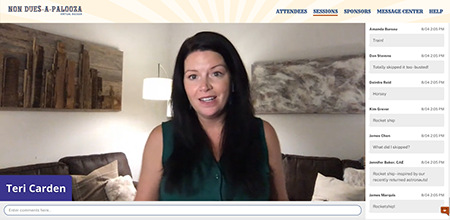
    Non Dues-a-Palooza Virtual Bazaar LiveI’m attending a lot of conferences these days. I’m also helping clients plan and execute a lot of conferences. All of them online, of course.

    One of the biggest questions being asked by meeting planners is: Should my educational sessions be live or pre-recorded? Live streamed at a certain time or available on demand?

    Pre-recorded has some obvious benefits:

    • Your speakers won’t have technology issues
    • You can control the start and end times
    • You can up the production value of your sessions with extra editing, graphics, transitions, etc.

    I recently had the pleasure of working with Teri Carden on Non Dues-a-Palooza, a conference dedicated to helping associations increase their non dues revenue through partnerships and great ideas. Teri had 10 case studies, and 6 pitches by sponsor companies. The case studies were going to be pre-recorded so Teri wondered how she could add a live element to the conference so that the case studies didn’t feel like just another set of zoom webinars. Should the 2-minute pitches by demo companies be live or pre-recorded? Should her welcome be pre-recorded?

    After much discussion, Teri decided on a mixed format: she would be live but the case studies and 2-minute demo pitches would be pre-recorded. In addition, the demos would be live as well.

    Live can be nerve-wracking. You never know what can happen: someone’s Internet drops, the speaker mutes herself accidentally, your schedule falls apart because someone ran long. BUT, live has benefits as well:

    • Your presenters can answer questions in real-time
    • Your presenters can lengthen or shorten remarks as needed
    • Perhaps most importantly, your attendees feel like they are experiencing something happening real-time, that they need to be online at a specific time and place in order to be part of something.

    I’m speaking at the ASAE Annual Conference this week. Speaking is perhaps a weird verb because my session was pre-recorded. Instead, I will be available via chat to respond to attendee comments. There’s a part of me that wants people to listen to my session, not just try to keep up with the stream of comments. If I had my druthers, I would have pre-recorded my session but been live, on video, for the Q&A. But yes, that’s different, more complicated technology to make that happen. So I will be presenting on Wednesday AND responding to questions and comments.

    Personally, if a conference is made up entirely of pre-recorded videos, I think some attendees will lose interest. The motivation to participate NOW will dissipate because sessions are pre-recorded and will inevitably be available on demand, in which case it doesn’t really matter when you watch the videos.

    How about you? How is your organization navigation live vs. pre-recorded? What has worked? What have you learned?

  • Why New Member Onboarding is So Critical to the Member Journey

    Why New Member Onboarding is So Critical to the Member Journey

    Welcome Aboard Life preserver Imagine this. A person (or company) has made the decision to join your organization. What happens afterward? Does she get a giant welcome packet that she won’t read? Does the packet contain current or outdated information? Does he get nothing for a few weeks while you process the application and add him to lists? Does he immediately begin to get all the newsletters and promotions for the various products and services you offer?

    Last week, I did a webinar with the wonderful Jonathan Cooper from the National Association of Episcopal Schools (NAES), a longtime Matrix Group client. Just over a year ago, NAES replaced its paper welcome packet to a digital onboarding campaign for new staff at member AND non-member Episcopal schools.

    NAES used its existing membership database, MatrixMaxx (from Matrix Group, yep, my company), and MailChimp to welcome new staff with carefully crafted messages over a 90-day period that introduce the association, the staff, the Biennial conference, key publications, the staff, consulting services, the daily meditation, and so on. The emails are NOT all about selling. They are meant to welcome new staff and show them how NAES can help them in their jobs.

    What kind of results is NAES getting on this onboarding campaign?

    The emails are getting amazing opens and clicks. One email gets close to a 90% open rate! Yes, the list is small, but they never previously got this rate of opens on other emails.

    NAES members regularly email back after receiving an automated email. The key here is that the emails are really well-written, they are warm, and they sound authentic.

    NAES is seeing increased use of their library and increased registration at featured meetings. For example, a webinar designed for new Rectors usually get 7 or 8 attendees. This past year, this webinar had 19 attendees!

    Marketing automation is extending the reach of this small-staff association. To me, well-crafted automation actually ends up being more high-touch because members get more frequent, relevant, customized communications. There’s simply no way that NAES could send out this level of communications if the messages were manually crafted and sent out.

    AssociationsNow did a nice write-up of the webinar. You can read it here.

    What happens in the first 30-90 days of a member’s journey with your organization matters. Really matters. Because it’s during those first few days, weeks, and months that your new member decides to engage with you in a meaningful way. They made the decision to join. Now it’s up to you to help them make the decision to stay.

  • How Much Should I Charge for My Virtual Conference?

    How Much Should I Charge for My Virtual Conference?

    Man making online purchase with credit cardAs the world of work continues to transition from physical to virtual, the same is happening to conferences, trade shows, and meetings. There are platforms to choose, new or different program formats to consider, and on and on. But the biggest question on everyone’s mind is: how much should I charge for my virtual conference?

    As with most questions like this, the answer is: it depends. It depends on your industry, the type of experience you’re planning to provide, your attendee demographics, your sponsorship model, etc. But take solace in this: our clients, partners, and friends are finding that attendees don’t expect virtual conferences to be free. People understand that a lot goes into event planning and preparation, and that there are costs associated with any type of event, no matter the format.

    Here are some things to consider when deciding what to charge for your virtual event:

    Consider your industry. How badly have your members, attendees, sponsors, and exhibitors been impacted by the pandemic? Are budgets being slashed? Will attendees be paying out of pocket? If your members are really hurting (and whose members are not?), consider reducing your registration fees to show compassion to members and encourage attendance. Many clients are reducing fees to maintain member engagement and demonstrate that they are being responsive.

    Consider your key demographics. Younger generations are more accustomed to meeting and connecting virtually, more likely be more optimistic about what they’ll gain from a virtual conference, and maybe willing to pay for it. Younger members are also more likely to value your educational programming because they need it to advance their careers. Older attendees may be less comfortable with an online format, and more likely to be skeptical of the value of the meeting because they come for the networking. On the other hand, older members are going to be more senior, and have more access to training funds. In all cases, study your attendee demographics, call up some members, and get some feedback from the field.

    Are you offering CEUs? Many organizations offer attendees the chance to earn Continuing Education Units (CEUs) when they attend sessions. One professional society we know is not lowering fees BUT because the conference will be online and recorded, attendees will have greater opportunities to earn CEs, thereby raising the value of the meeting.

    What level of experience will you provide? Let’s face it. Your attendees expect a highly produced event when they attend in person. Their expectations don’t change because the event is online. They still expect a great user experience, sessions with high production value, and a mix of education and entertainment. Your attendees will be less excited about paying for what feels like watching YouTube videos, sitting through more Zoom meetings with mediocre graphics, and no opportunities for networking. If you’re going to charge top dollar, give your attendees a top dollar experience.

    What’s your sponsorship model? Since there’s more opportunity for sponsors to get prominent face time in front of attendees – think YouTube style ads at the beginning of sessions, banner ads, virtual tradeshows, etc. – they may be willing to purchase richer sponsorship packages, which can subsidize attendee’s conference fees. Alternatively, you may have a harder time getting sponsor and exhibitor buy-in because virtual conferences are untested, or your virtual meeting offers few opportunities for truly showcasing their companies and products.

    It’s really hard to come back from free. Some of our clients are opting to change their conferences to free events. I get it. Members are hurting and it feels wrong to charge money for benefits. BUT a conference that doesn’t generate revenue becomes a giant expense, and members may come to expect that all future events will be free. Yuck.

    While there’s no magic formula, you’ll need to take all of these factors — and more — into consideration. We’re hearing that most attendees are very open to registration fees that are 50-75% of normal registration fees. Will that work for every event and every association? Of course not, but it’s a good starting point. And like I often say, when in doubt: ask! Your members know you’re charting new territory daily, so don’t be afraid to send out a poll to see what their thresholds may be. Good luck and please do share your experiences!

    Looking for a custom tailored virtual meeting platform that can take your virtual conference to the next level, providing your attendees and exhibitors with a comprehensive, hand crafted experience? We’d love to show you a demo of BeSpeake, our new Virtual Meeting Platform. Let’s get it scheduled!