Matrix Group International

Blog

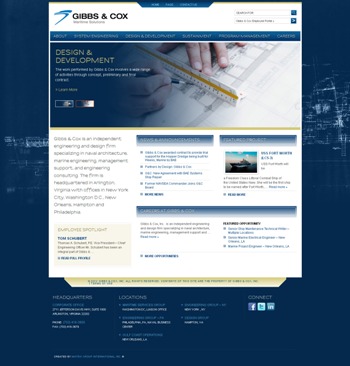
  • Gibbs & Cox Website Redesign

    Gibbs & Cox Website Redesign

    Gibbs & Cox is an independent engineering and design firm specializing in naval architecture and marine engineering.  The firm also provides project management support and consulting engineering services.

    Gibbs & Cox wanted to redesign their website to showcase their proven track record of excellence and reinforce their position as the leading maritime solutions firm in the nation. Gibbs & Cox also wanted the website to attract top talent by promoting their exciting new work, and featuring career opportunites and current employees.

    To help Gibbs & Cox reach their goals, Matrix Group:

    • Created a design that combines a maritime theme with imagery and elements of naval marine engineering and architecture.
    • Used our user focused approach to create a topical navigation. This allows users to navigate the site based on their specific needs.
    • Implemented a site-wide content management system. Matrix Group implemented WordPress, a popular system used by many companies today. Today, Gibbs and Cox staff can easily keep all sections of the site up to date.

    Visit the Gibbs & Cox Website.

  • Boston Globe

    Boston Globe

    Great example of a responsive site. Check it out on your computer, iPad and smartphone. Very cool!

  • When The Going Gets Tough, We Set Up a War Room

    I have a nice corner office at Matrix Group, but I haven’t seen it in a while. Why? Well, it’s been a busy couple of months at the company and I’m spending most of my days in the War Room.

    We don’t really have a War Room like the White House. At Matrix Group, any room where a bunch of staff are working together on a project can be called a war room. Some people call it the Peace Room, while others call it a huddle. Whatever we call it, in the last year, we’ve discovered the joys and benefits of working collaboratively, in the same space. Here’s how it happened.

    About a year ago, we had a small team that had six months to get a lot of work done. Their manager asked if he could sequester the team in one of the small conference rooms so they could collaborate, discuss issues immediately, look at each other’s code, and have the front-end developer immediately address prototyping and styling needs. The answer was, of course, yes. The result? The team got the project done and they did a great job. They reported being super-productive because they had easy access to each other, they were largely uninterrupted by the rest of the company, and they had snacks.

    Six months ago, another team was crashing on three deadlines. I suggested that they set up their own war room and I was told it was too hard to lug computers and monitors into the small conference room.  My response: why don’t we outfit the room with a bunch of monitors and keyboards? Then teams can come in with their laptops or desktops, have benefit of multiple monitors (which is how everyone works around here), and have an immediate war room. So we did and it worked. Staff are loving having the ability to work together collaboratively, as needed.

    Even my new biz team requests huddles several times a week. During these huddles, four of us sit in a big room, discuss a topic, get work done, discuss some more and get more work done. We’re not talking the entire time and we’re not really meeting; we’re just working in the same room and occasionally looking up and getting instant access to each other.

    I recently did a Matrix Minute YouTube interview with a team that set up a war room for a week to finish up a project.

    If you think your team might benefit from a war room, here are my tips for doing it successfully:

    • Make sure the right people are in the war room. For example, we find it helpful to always have a front-end developer in the room because they can handle so many tasks and can address the CSS issues that sometimes block developers.
    • Establish a deadline and a set of goals so the team has a clear idea of what they need to get done, broken down by day and week.
    • Free up people’s schedules so they can spend time in the war room uninterrupted; it’s too distracting if people have to get up and leave all the time to sit in meetings or take calls.
    • Keep the team well nourished with snacks. Don’t forget healthy alternatives!
    • Make sure the collaborative space is big enough and well-lit so that the team doesn’t feel like they’re in grim, cramped quarters.
    • Set up the room with good technology (monitors, good chairs, etc.) so that staff doesn’t feel like they’re giving up the benefits of their own space.
    • If you’re the manager, you should probably be in the war room as well. At the very least, spend part of your day in the war room or check in regularly.

    How about you? How does your organization handle crazy deadlines? Have you ever set up a war room? With what results?

  • Skylanders

    Skylanders

    Great for young and old alike, this game uses figurines that you place on a portal to put into action. You can play on the Wii, on the iPad and online! If you have kids, this is a must have!

  • Google’s Project Glass

    Google’s Project Glass

    Google’s Project Glass envisions a world where our glasses gives us weather and temp, lets us reply to e-mail, video conference, and take pictures.

  • Just Say No to Adding More PDFs to Your Website

    We build a lot of websites at Matrix Group and most of them are loaded with PDF files. Clients post PDF files of their newsletters, their legislative updates, their magazines, their white papers, and on and on. While it’s easy to create a PDF from Word, InDesign, Quark or Illustrator, and yes, PDFs look pretty, I think organizations should post fewer PDFs and convert more of their content to html. Here’s why:

    PDF Files Are Not Search-Engine Friendly

    • The user experience when reading a PDF on a monitor or mobile device can be miserable. So many PDFs are formatted with columns, but since screens aren’t necessarily the same size as a printed page, readers often have to scroll up and down to read the same page or reduce the overall size of the PDF, which makes reading the PDF much harder.
    • If you post your entire newsletter or magazine as one PDF file only, you can’t post individual articles to other parts of the site and you can’t tag them by category. Imagine this: a visitor types “green energy” into your site search and she gets back your organization’s legislative position on green energy, several news items, articles from past issues of your magazine, and articles from past issues of your newsletter. If you post your entire newsletter as a PDF, your site search will pull up the issue, but visitors will have to navigate the entire issue to find the specific article.
    • PDF files often don’t contain proper titles needed by search engines. For example, most people just use a PDF creator to create PDFs, never bothering to populate the file’s properties, including Title, Author, Subject and Keywords. Remember that Google first looks at the file’s title and properties to try and figure out what a page is about. If there isn’t a helpful filename or document title, Google scans the document’s content and tries to guess what the page is about, often incorrectly.
    • PDF files don’t contain the markup that provide helpful information to search engines. For example, html files usually contain title tags, body tags and headline tags. The text in your H1 tag provides search engines with the most important topic covered in the the page. PDFs do not contain H tags, again leaving the search engines to guess the topic or most important content in the document.
    • You can’t add mobile styling to PDF files. These days, we use mobile stylesheets and responsive design to make pages behave appropriately for different size screens. A legislative alert on a phone might turn into a single column of text, with no left or right rails; this makes the text readable on a small device without a lot of pinching and zooming. But a PDF stays fixed, which means a person on a phone has to zoom in and out to read your alert; not a great user experience.

    When Should You Use PDF Files?

    • If you want to post an exact replica of the original document. For example, if your organization sent a letter to the White House, you may want to post the text of the letter as html to the site and have a linked PDF of the original letter.
    • If the document needs exact styling. I often see organizations post information in html about a conference and allow visitors to download the beautifully designed brochure as a PDF.
    • If you want to make the full-text of the reference document available. Some of my clients issue lengthy, detailed research reports. To me, it makes sense that they post executive summaries in html but post the entire report as a PDF because most people will want to download or print the full-text of the report.

    Ways to Make Your PDFs More Search-Engine Friendly

    If your site does have PDF files, follow these tips to make the files more findable by search engines.

    • Create PDF files from original electronic files or OCR a scanned document. This way, the text of the document is available to the search engines.
    • Fill out the file’s properties.
    • Rename the file to something meaningful to search engines. If web pages need friendy URLs, PDF files need meaningful and friendly titles as well.

    Want to learn more?

    • Duff Johnson talks about why PDFs are problematic for search engines.
      Joel Geraci has great tips for making your PDF files more search-engine friendly.
    • Mark Aaaron Murnahan talks about how the heading tags improve search engine placement.
    • Galen DeYoung has 11 tips for optimizing PDFs for search engines.
  • Realtor.com iPad app

    Realtor.com iPad app

    The Realtor.com iPad app is a great way to look for homes for sale, check out comps and explore neighborhoods. The virtual tours are great!

  • HOP the movie

    HOP the movie

    Kids and grown-ups will enjoy this movie about an Easter Bunny who wants to pursue his dream to become a rockstar drummer.

  • The iPad Scales Websites So They All Display at the Same Resolution and Look Great

    The iPad Scales Websites So They All Display at the Same Resolution and Look Great

    I love my iPads (I have an iPad1, iPad 2 and my 3 is on the way). I think most iPad owners feel the same way. I’ve owned an iPad for nearly two years but it wasn’t until recently that I realized just why websites look so good on this device. The iPad automatically scales pages up and down so that they display at the full resolution of the iPad. Let me explain.

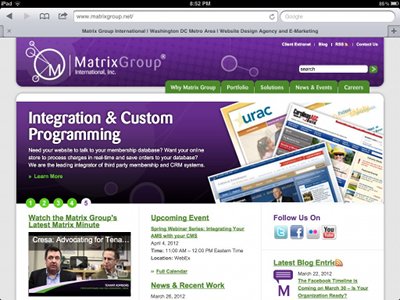
    As Web designers, we’re used to thinking in terms of pixels. At Matrix Group, we normally design sites for a 1024 pixel width resolution. This means that on a 1024 resolution monitor, the website fills the screen. On a widescreen or higher resolution monitor, the website is centered and there is space to the right and left of the page. Check out the Matrix Group website on my widescreen monitor.

    In fact, most websites look like this on my widescreen monitor at home and laptop at work. But on an iPad, most sites look like this:

    This is the Matrix Group home page on an iPad in portrait mode.


    This is the Matrix Group home page on an iPad in landscape mode.

    What I love about scaling is that I’m making the most of the real estate on the tablet and most sites are fairly readable, without a lot of pinching and zooming.  I’m told that there are ways to prevent this automatic scaling on an iPad but I don’t really see why a web designer would do so.

    Next week, after I get a chance to play with my iPad 3, I’ll blog about how the new version supports high resolution images and how we web designers can start creating images that fit the type and resolution of the device. Very cool stuff!


  • Dwell Magazine

    Dwell Magazine

    Love the inspirational design, photos, furniture and gadgets. Web design is very much inspired by architecture and interior design and this is one of my faves.