
Matrix Group International

Tag: Marketing

  • What REALLY Matters for Search Engine Optimization (SEO)

    What REALLY Matters for Search Engine Optimization (SEO)

    I do a lot of SEO consulting for clients. Clients want to know: how to optimize their websites for Google, how to drive more organic traffic to their sites, and what keywords they should focus on for optimization.

    At Matrix Group, we spend a lot of time on the mechanics of our client sites so that search engines can easily find them and index content.

    But here’s the single, most important question I ask clients to ask themselves when developing their content and SEO strategy:

    What are people typing into Google where YOU and YOUR SITE are the answer?

    Because most people want to go direct to content AND because Google is so darn effective, a huge chunk of your members, customers and potential customers simply type a natural language query into Google. They will type questions like:

    When is the ABC conference?
    What do I need to do to become a ….?
    What is the best training for (fill in the blank) professionals?
    How many credits do I need to become a ….?
    How much does it cost to…?

    If you don’t know what your members and customers are typing into Google, find out by:

    • Looking at the incoming organic search terms driving traffic to your site. Most of this information is blocked by Google, but it’s worth looking to see what’s available in your Google Analytics and Google Webmaster Tools.
    • Looking at the search terms and phrases people type on your site search. If you aren’t logging this, start now and look at the report monthly.
    • Asking your customers what they typed into Google recently where they either expected to find a link on your site or expected a resource related to your profession or industry.
    • Going to https://trends.google.com and researching the top queries related to your business.

    Once you have a collection of these valuable search queries, make sure you have content (and lots of it) that matches those queries. Heck, you should be writing blog posts, news items and FAQs that perfectly match your most important queries.

    Yes, your website should also be mobile-friendly, be well structured, have clean CSS, have permalinks, have alt tags, yada, yada. But all of these technical requirements mean nothing if you don’t have the content your target audiences are looking for. Give it to them and make it easy for Google to match your content with your customers.

  • Tips for Increasing Email Deliverability

    Tips for Increasing Email Deliverability

    Guest post by Leah Monica, Director of Marketing

    Sending EmailsWe all constantly hear about email marketing best practices to help increase our open and click rates – subject lines, concise copy, clear calls-to-actions – but what good are those best practices if our emails aren’t even reaching your contacts’ inboxes?

    Why do your emails sometimes get blocked? Here’s a quick rundown on some things that can affect email delivery:

    Email delivery is best for personal emails sent from one person to another person. Not surprising, right? From there, delivery rates start to go down when you send to larger groups of people, specifically when you’re sending to 20+ individuals per email, or when you use any type of list or bulk email platform.

    On top of that, there are also a variety of filters that catch or reject mail, for a variety of reasons. Sometimes it’s because people are marking your email as spam (more on that another time!), but sometimes corporate filters simply decide that too much mail has come from one particular group/IP and they cut it off for fear of spam or malicious intent. For example, if you sent a message to 100 people at one of your member companies, 20 of them may get it while 80 do not.

    So what can you do? Here are some immediate solutions that may help:

    • Ask your members to ask their IT groups to whitelist your organization, either by domain (including anything from any of your subdomains) or by IP address.
    • Remind your members to not mark your messages as spam or junk, but to simply unsubscribe or contact you if they want help getting off some of your lists.
    • Watch the amount of email you are sending out. Don’t make them want to press the ‘junk’ button. Also be careful not to make your subject lines sound spammy.
    • Beware of attachment sizes! Some corporate groups block emails with attachments as small as 5MB.

    One of our biggest tips is to have someone on staff look at your email delivery reports each week, and follow up on a few email addresses that are marked as hard or soft bounces. i.e., call that person or the primary contact of that organization, and confirm people/email addresses. This is also a good time to ask if they can whitelist you! A couple of our clients systematically do this, and they report it is a good way to chat with the members casually, in addition to keeping their database clean. Wins all around!


  • Does Your Website Need Web Push Notifications?

    Does Your Website Need Web Push Notifications?

    alert bell on desktop computerLet’s face it. As marketers, we’re always wondering how to reach more people, get more opens and clicks, drive traffic, and get more conversions.

    Mobile apps have been terrific at generating visits and conversions because of their ability to send push notifications to users. We’ve all gotten used to the notifications on our phone, as well as the numbers next to apps that tell us we’ve got announcements to read.

    What if you don’t have a mobile app? You can now use web push notifications to send reminders and announcements! How does it work?

    • Websites that have web push notifications ask you for permission to send you notifications when you visit the site. You can either accept or block notifications.
    • If you accept notifications, you’ll get little messages that pop-up in your browser when a new article, video or product has been posted AND notification has been enabled for that update.
    • You’ll get the notifications no matter what website you’re currently visiting at the time the notification goes out.

    To see web push notifications in action, visit www.fmi.org or my blog at TheMatrixFiles.net. If this is the first time you’ve visited the site, you’ll see a red bell icon in the bottom right corner. If you click it, you’ll be given the option to subscribe to browser notifications. It’s that easy!

    If you subscribe to notifications on my blog, you’ll get a reminder whenever we publish a new post, regardless of what site you’re surfing at the time. It’s remarkably effective and yet surprisingly not annoying. If you use Google Calendar, you can enable notifications via your browser so that Google can send you reminders about upcoming meetings.

    I see more websites employing web push notifications for these reasons:

    • They represent another way to get people to convert and give you permission to send them updates.
    • Web push notifications are easy to opt in to because they don’t require an email or contact information, just a click.
    • Subscribing and unsubscribing is very easy.
    • The notifications services can give you good analytics about number of subscribers, delivery and clicks.
    Here’s the bad news about web push notifications: they are not currently supported in IE or iOS. They are supported in Chrome, Safari and Firefox, so a good percentage of the web is covered. Apple has announced the web push notification support is in development and the same thing is likely happening at Microsoft with IE and Edge.

    Adding web push notifications to your site is inexpensive and easy to do. Contact my team if you want more info. I hope you’ll consider this valuable tool for reaching your target audiences.
  • Top 5 Ways to Improve Your Facebook Page Reach

    Top 5 Ways to Improve Your Facebook Page Reach

    Have you noticed that the likes and interactions on your Facebook page are decreasing? If so, you’re not imagining it – organic reach on Facebook brand pages fell by 52% last year alone, and Facebook has even admitted that only about 16% of your fans see your updates. Yuck!

    Why is this happening? With an overwhelming amount of content being published to Facebook every second and a limited amount of real estate in each user’s News Feed, Facebook tries to tailor each individual’s feed to deliver what it believes to be the most relevant and interesting for that person. It’s not too surprising then to hear that Facebook prioritizes posts from the friends and family that you interact with the most, and posts from your friends that are linked with your interests. All of this to say, it’s now harder than ever for updates from brand pages to be prioritized and seen.

    In addition, Facebook is a business.  They’ve found that many brands are willing to pay to boost their posts in order to reach more people, providing Facebook with a nice little (ok, large) revenue stream.

    But what if your budget doesn’t support boosting Facebook posts? Don’t worry – it doesn’t mean that you can’t improve your reach without getting out your organization’s AmEx card. Here are five things you can do to improve your Facebook page, reach more people, and get more likes and comments, without spending a penny:

    1. Always include an image with your link posts. The best way to make sure your link shares are prioritized and seen is to include a large preview image (1200 x 630 for the best display on high-resolution devices). The Facebook algorithm demotes links with low resolution photos or links with no photo at all, meaning your fans will probably never see the shared content.
    2. Know what’s even better than images? Video! Social video generates 1200% more shares than text and images combined. Wow! When uploading videos to Facebook, make sure that it’s an original video that you upload directly to Facebook, not a YouTube embed. Facebook prioritizes posts with native video that it can auto-play and caption.
    3. @ mention people and organizations. Get people to tag themselves in your updates. Doing this gives your post more velocity because they will show up on other people’s and organizations’ timelines and feeds. Plus, people get notified when they are @ mentioned and tend to like those posts.
    4. Be original and keep a dialogue going. When sharing posts from other people or other organizations, make sure you are including an original comment. Facebook likes to display posts that have been personalized in some way by the poster, that encourage new thought and dialogue. Also be sure to respond to comments and engage your audience, because this is social media, and consistent, thoughtful responses and dialogue is what will keep them coming back for more.
    5. Encourage direct visits to your Facebook page, and ask your fans to turn on notifications. Direct visits, or visits where people went to your page directly, and not in a feed, indicate special interest and affinity. When people do this, Facebook will tend to prioritize your posts for those people. Encourage direct visits by promoting your Facebook page and specific posts on your website and in emails. Also be sure to ask your fans to turn on notifications for your posts, and even to select “show first in news feed” under the follow options on your brand page, so they never miss a post.

    Bonus tip: Always keep a pulse on the social media and search algorithm updates, but don’t let them rule you. Test, tweak, and test again to see what works best for your organization and your audience.

  • Members Want Curation and Insight from Their Associations – Part One

    Members Want Curation and Insight from Their Associations – Part One

    One of the best parts of my job is conducting user interviews. Nearly every Matrix Group project starts with a User Persona exercise where we interview staff to glean their most important target audiences. Then a team of Matrix Group staff interview people in each group. Whenever I can, I help conduct these interviews because I like doing them and I learn so much about what members and non-members want, their pain points, their challenges, and what ultimately motivates them to act.

    Over the past year, across industries and professions, across trade association and professional societies, here’s what people have told us:

    • Surfing to find out what’s new is dead. It doesn’t happen anymore. Any web surfing is done to meet a specific need.
    • People are overwhelmed with data and information. When they Google, they get too many results. They find their association home pages too cluttered.
    • Members wants their associations to keep them up to date on important trends and give them insight into the future.
    • Members want fewer emails, shorter emails, less cluttered web pages.

    Over and over again, we heard, “Our association needs to tell us what we should be paying attention to. I don’t want the same news I can get elsewhere. Tell me the 5 or 6 most important things I should be doing, reading, attending.”

    Even if Matrix didn’t do interviews for you this past year, I bet your members would say much the same things. And if your members are hungry for curation and insight, what are YOU going to do about it?

  • Getting Started with Facebook Live

    Getting Started with Facebook Live

    A couple of Saturdays ago, my friend, co-worker and Director of Biz Dev, Bryan Clark, was taking his first-degree TaeKwonDo black belt test. I was attending as a black belt to help with the sit ups and push ups, to cheer Bryan on since he’s my sparring and workout buddy, and to post updates to the studio’s social media pages.

    In the past, I’ve taken photos and videos and posted them to Facebook in a continuous stream during the event. As I was leaving work on Friday night, a co-worker asked me to wish Bryan good luck and please stream the test live so she could watch from Pennsylvania. Live stream? Could I do it through Facebook Live on Be Ryong’s Facebook page? I decided to give it a try.

    Over the course of the next three hours, I live streamed snippets of the test, I took photos, I shot video, I used my iPhone 6 and my DSLR camera to document the test, and I helped out with the test. I texted friends and co-workers to let them know I was live streaming the event, and I posted updates to Bryan’s Facebook page to let HIS friends know about the test and the live updates.

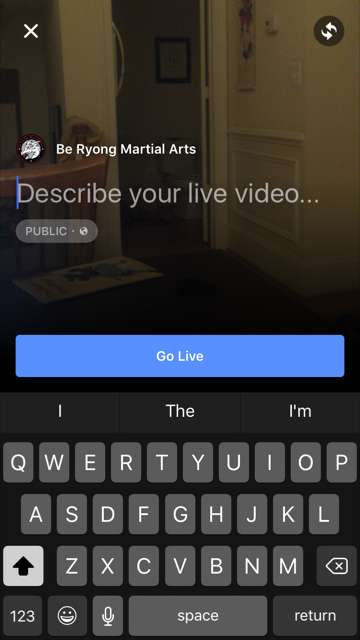
    Facebook Live is ridiculously easy to do. From your personal page or a brand page that you manage, press Publish, then select Live Video.

    You’ll be asked to enter a description. Once you’re ready, you click Go Live. Yes, it’s that easy.


    FBlive-circle_sm FBlive_2

    Things I Learned

    Here’s what I learned from using Facebook Live during the test and during a few classes since then:

    • Be sure to advertise that you’ll be streaming your event live well in advance of the event so that people know to tune in. The decision to live stream was sort of made on the fly, and I could have built up excitement and views if I had done more promoting ahead of time.
    • Make sure you have a good Internet connection. Turns out that one side of the studio had better WiFi than the other, so I stayed on the good side. When I ventured to the bad WiFi side, the video suffered.
    • Have a stand or other means for holding your phone or tablet up and steady. Because I was holding my phone and panning to get the full layout of the studio as the students moved around, the video got a little shaky at times. If I had had more time, I would have set up my phone on a stand in one part of the studio and just occasionally zoomed to get better coverage of a student or routine.
    • Your video will be live in near real time, but not instantaneously. Out of curiosity, I asked a friend to check the studio’s Facebook page while I was live streaming. We discovered the stream was about 30 seconds behind, which we thought was pretty darn great. I remember the days of needing a fiber or satellite connection, a camera, a real-time encoder, yada, yada. And here I was, live streaming with my phone!
    • If you want a copy of the video, shoot the video with your phone or camera, don’t live stream it. I didn’t realize it until later, but I ended up without a local copy of the videos I live streamed because they were uploaded directly to Facebook.
    • If you want HD video, shoot the video from a quality digital camera. The quality of the live stream is good but not HD. Some of the streams were actually fuzzy. So for the breaking part of the test, I chose not to live stream. Instead, I took HD videos and then uploaded them afterward to Facebook. The quality is better, AND I have copies to give to the students.
    • For short bursts of activity, you can choose to live stream OR shoot video and then upload. Uploading video to Facebook is so ridiculously easy, especially if videos are a couple of minutes or less. For these short videos, Facebook Live is less compelling.
    • Facebook will archive your live streams so even if your followers don’t watch in real time, they can still watch on demand.

    All in all, Facebook Live is fabulous tool for live streaming your events. Want family overseas to watch your daughter’s wedding from afar? You can live stream on Facebook. But just be sure get a quality, HD archive as well.

    If you want to see samples of Facebook Live streams from the black belt test, visit the BeRyong Facebook page. I’d love to hear about your Facebook Live adventures!

  • Using UTM Codes for Better Google Analytics Reporting

    Using UTM Codes for Better Google Analytics Reporting

    It’s no secret that we’ve been seriously geeking out about everything Google Analytics here at Matrix Group. We’ve been endlessly exploring, experimenting and testing and have been blown away by the amount of invaluable data we’ve been able to collect for our clients, down to the granular who/what/when/where/how/why. We’ve said it before, and we’ll keeping saying it until we’re blue in the face: you simply can’t afford to ignore your analytics reporting!

    Want to start digging deeper but not sure where to start? You’re not alone! Our clients frequently ask us for one or two simple things they can do to get started, and our No. 1 answer is: start with UTM codes.

    UTM codes are code snippets that you can attach to custom URLs that track a source, medium, and campaign name. This information gets passed to Google Analytics and identifies where your traffic is coming from and what campaigns are driving the traffic. Invaluable data!

    Here are a few of our top tips for using UTM codes:

    • Create a spreadsheet to track codes and campaigns. Having everything planned out and stored in one place will not only help you visualize your whole campaign, but it will also ensure more accurate reporting, especially if you have multiple staff members working on one campaign.
    • Keep your tags consistent. UTM codes are case sensitive, so make sure you stick to the same permutations of upper and lower case!
    • Use dashes, not spaces, to separate words. While a UTM URL builder will allow you to use spaces, it makes the URL look a lot less clean. Example: “CEO blog post” will become CEO%20blog%20post. Instead, try CEO-blog-post. Doesn’t that look better?
    • Use a URL Builder to create links. These tools are very easy to use and will save you time and heartburn over building the URLs yourself.
    • Use a URL shortener, where appropriate. When you use UTM codes, the URLs can get quite lengthy and ugly. Use URL shorteners to make the links more visually appealing. There are tons of easy-to-use URL shortener tools out there (we like goo.gl), so make use of them!
    • Never send out a link to your site without a UTM code in place!

    Looking for other Google Analytics tips and tricks? Check out CEO Joanna Pineda’s recent blog posts on Google Analytics. There’s some great info there! If you want a little more hands-on guidance and assistance, don’t hesitate to give us a call. We’d love to help you in any way we can. 

    Have any other tips for getting started with Google Analytics? What are your favorite reports and hacks? 

  • The Great Banana Bread Experiment: Are People Really Reading Your Emails?

    The Great Banana Bread Experiment: Are People Really Reading Your Emails?

    bread_500pxA couple of weeks ago, I sent out an important message to my entire staff about IT support. We had recently put in some technologies to make it easier for staff to request IT support during business and non-business hours, and some of our procedures had changed. The subject line began with PLEASE READ, and it came directly from me, Joanna Pineda, CEO and the person who signs everyone’s paycheck.

    The email was longish so I decided to do a test. At the very bottom of the email, I wrote:

    “BTW, if you read all the way down to this message, send me an email with the words “banana bread” in the subject line. I’ll bring in banana bread for you next week and for God’s sake, don’t give this away on Slack or any other method. Curious to see how many people will read this message. Cheers.”

    So how many people sent me a banana bread email? Out of 40 people, seven people sent me emails. Seven – that’s it!

    To be fair, the IT team already knew the procedures. And I had discussed the procedures with a few staff before sending the emails.

    kate_bread_smDuring staff meeting last week, I asked everyone if they had: read but not responded, skimmed and not read my banana bread message, or if they didn’t read the message at all. I gave everyone amnesty if they told me the truth. I got these responses:

    • I already know the policies
    • I skimmed the part about the policies to make sure I knew what I needed to know
    • Too long, didn’t read
    • I don’t like banana bread
    • I didn’t see the email

    I conducted a similar experiment a couple of months back when I sent an email to my son’s Cub Scout pack, of which I’m the committee chair. The email contained information about the next pack meeting, an upcoming camping trip… Yada, yada – if you’re a Scout parent, you understand me. At the bottom, I said:

    “Okay, thanks for reading this far. If you got this far, email me and put the word “magnet” in the subject line and I’ll give you a Friends of Scouting magnet at the next meeting.”

    Out of 60 people on the list, three responded. Two said they’d take a magnet and one said, “Magnet – but I don’t need a magnet. What fun!”

    I know this wasn’t a scientific test, and the emails weren’t life or death, but I think these experiments are pretty illustrative of what really happens when we send out emails. We look at our open and click rates and pray that those who opened actually read the message. Are they actually reading your message in its entirety? God, most likely not.

    What are the takeaways here? For starters:

    • Keep your emails short(er)
    • Don’t bury important calls to action at the bottom of your message
    • Test your campaigns

    If you’ve read all the way to the bottom of this blog post, submit a comment on this post using the word SWAG, and I’ll send a Matrix Group pen to the first 25 people. And if you decide to bury an Easter Egg in your next email newsletter, please write the results of your experiment in the comments as well or send me an email.

  • Why Every Organization Should Care About Search Engine Optimization (SEO)

    Why Every Organization Should Care About Search Engine Optimization (SEO)

    Internet search conceptEvery once in a while, a client or prospect will tell me their organization doesn’t care about search engine optimization (SEO). Why? I get these reasons:
    • The organization targets a very specific, very niche set of audiences.
    • The organization has a defined universe and they are largely known to the association and vice versa.
    • The organization doesn’t have e-commerce on the website so they don’t need to reach out a wide audience to make sales.
    Even if all of this is true, I say that EVERY organization should care about SEO because:
    • A huge number of people use Google (or another search engine of choice) to access a known website. We know this because when Google used to make search terms available, it was shocking to see that so many people type specific URLs into Google. Evidently, there are people who just always start with search without even realizing it.
    • Your target audiences may know your organization very well, but they may not know your URL off the top of their heads. So what they do? They Google for it. Again, looking at search terms tells us a whole lot of traffic comes from Google, from people who know the specific organization they seek.
    • Many, many people rely on Google to search a website because the internal site search sucks. During many user interviews, members tell us they use Google to find what they are looking for on a specific site because the site search wasn’t effective.
    • If your organization is a trade association, you may “know” all of your member companies, but new member company staff may not who are you and what your organization does.
    • No matter how good your marketing and how often you mail or email, the vast majority of your customers do not know everything your organization has to offer. For example, Suzie Smith attends your annual conference ever year but she doesn’t know that you also publish a certain publication on a specific topic, so what does she do? She Googles for it!
    If your website isn’t search-engine friendly because you think SEO doesn’t matter, I hope you’ll think again. Even people who know your organization still rely on Google to find your site and search your site. If Google can’t find your site and can’t index the content properly, you may be losing out on traffic from the very people you think are going directly to your site.
  • Pick Up the Phone! Why Your Marketing Plan Needs a Personal Touch

    Pick Up the Phone! Why Your Marketing Plan Needs a Personal Touch

    Phone in handI am a big fan of phone calls. I spend most of day in meetings and on the phone. Why? Because I can’t land new deals or big deals via email, just doesn’t happen. When we launch websites, I try to call the client contact and the CEO within a few weeks to say thank you. On the weekends, I call my friends, I don’t just post Facebook updates. Recently, I’ve noticed a bias against phone calls. During a roundtable discussion with a group of association executives about meetings and tradeshows, I asked how many make phone calls to past attendees or must-have attendees. Only 1 association had an active phone initiative. Why not make phone calls? I got these reasons: it’s too hard to do, it’s too expensive, it’s too time-consuming.

    I’m grateful to Michael Lanham of Learning Forward for sharing a recent study featured in The NonProfit Times. Here’s an excerpt:

    “During the 2014 International Fundraising Congress (IFC), Geoffrey W. Peters, chairman of CDR Fundraising Group, shared the findings of his organization with a test it undertook. Of 6,225 total donors, 1/3 got no acknowledgement, just ongoing mail; 1/3 got a thank you note; 1/3 got a phone call. Here are the astonishing results from the test:

    • Thank-you calls increase subsequent giving. The subsequent gift rate for donors who received a call was 47 percent higher than those who received no thank-you response and 22 percent higher than those who received a thank-you note.
    • The thank-you call increased the average size of the subsequent gifts. The average gift from donors who called was 8.3 percent higher than those who received no acknowledgment and 3.5 percent higher than those who received the note.
    • The donors who received the phone call generated an additional $8,661 in gross revenue at a 2.4:1 return on investment (ROI).”
    With results like this, isn’t it worth exploring how we can integrate phone calls into our membership recruiting, new member onboarding, fundraising, meeting campaigns, and exhibitor recruiting? Here are some ideas:
    • Make phone calls to new members to say thank you for joining, to explain the membership path, and give them concrete ways to become involved right away.
    • Make phone calls to past attendees of meetings to say thanks for attending in the past and here’s why you should come this year.
    • Make phone calls to people who donate their time and money to your foundation or cause.
    • Make phone calls to random members throughout the year to ask them how your organization can do better.
    When I was a fundraiser many years ago for the San Francisco Education Fund, my boss used to say, “Joanna, people don’t give money to causes. They give money to people.” Most of my trade association and professional society clients tell me that people join and stay because of the people, the networking opportunities, and the access to people in the industry. So I say let’s put the people back in our marketing and make some phone calls!