Matrix Group International

Category: Budgeting and Planning

  • The Role of the C-Suite in Technology

    The Role of the C-Suite in Technology

    The Role of the C-Suite in Technology Planning and Implementation | www.thematrixfiles.netI had the honor of moderating a panel at this week’s annual conference of the American Society of Association Executives in Detroit, MI. The panel was titled, “The Role of the C-Suite in Technology” and featured 3 CEOs and 2 CIOs.

    Each panelist described his/her organization: mission, staff size, revenue, most important programs and key technologies. Every organization had a diverse mix of technologies that included an AMS (association management software), CMS (content management system), accounting, and sometimes LMS (learning management system).

    The key takeaways from the session?

    • The C-Suite has a key role to play in technology. Panelists reported more success with projects when CEOs are involved at the beginning, when they provide clarity about the focus of the organization and the technology initiatives that will support hat focus, and when they help secure adequate resources to make projects happen.
    • Establish criteria for CEO involvement. The panelists all agreed that CEOs should be involved in all technology projects and they shouldn’t get into the weeds. Instead, CEOs should be involved when the project is over x budget and when it affects a large or prominent segment of the organization.
    • Tie technology to your strategic plan. One CEO reported that technology represents 10% of her total budget so it’s imperative to tie technology to the mission of the organization and demonstrate impact to the membership and the profession.
    • Establish measures of success. Gone are the days of spending money on technology because you had to. These days, associations must report on the impact so it’s important to establish measures at the beginning of each project. Talk to your vendor about reports that will help you measure impact.
    • Establish relationships with key vendors. One CEO says he checks in regularly with his top vendors to see how his team is doing, get trend information, and get recommendations for the future. Another CEO said it just plain makes life easier when you can pick up the phone to get clarity or resolve a problem.

    Many thanks to Barry Pilson, my co-moderator from TESOL International Association. The fantastic panelists were:

    If you’d like a copy of the slides, you can find them here.


  • Why Limit Communications During the RFP Process?

    Why Limit Communications During the RFP Process?

    Why Limit Communications During the RFP Process? | www.theMatriXFiles.netLast week, we received an RFP (Request For Proposal) for a new content management system (CMS) and Associaton Management System (AMS).  The RFP was great. The work was totally in our wheelhouse, the association is a segment we go after, and there were some exciting elements to the work.

    But some parts of the RFP were confusing. So we called and asked for a meeting or requirements gathering call. We were told to submit questions via email, that the organization was not open to a meeting or call.

    “Why?” we asked.  The answer: “in the interest of creating a level playing field, we are only accepting emails.”

    We get this a lot and we almost always decline to respond to those RFPs. It’s not arrogance. On the contrary, we believe that we can’t truly understand the goals and requirements of an organization from a piece of paper. Written requirements also never articulate the non-technical requirements of a project, like the need to make a diverse and quarreling committee happy. We also find that a great meeting can unearth hidden requirements or deprecate others. Plus, you can’t underestimate the importance of chemistry and culture fit between two organizations and you can’t ever really explore that via paper.

    So clients and prospects, why refuse a meeting? Won’t an hour or two of deep, engaged conversation be ultimately worth your time? If one vendor stands out because they asked great questions, took the time to get to know your organization, developed a deeper understanding of your needs and ultimately submitted a better proposal, how is that a bad thing?


  • Pick Up the Phone! Why Your Marketing Plan Needs a Personal Touch

    Pick Up the Phone! Why Your Marketing Plan Needs a Personal Touch

    Phone in handI am a big fan of phone calls. I spend most of day in meetings and on the phone. Why? Because I can’t land new deals or big deals via email, just doesn’t happen. When we launch websites, I try to call the client contact and the CEO within a few weeks to say thank you. On the weekends, I call my friends, I don’t just post Facebook updates. Recently, I’ve noticed a bias against phone calls. During a roundtable discussion with a group of association executives about meetings and tradeshows, I asked how many make phone calls to past attendees or must-have attendees. Only 1 association had an active phone initiative. Why not make phone calls? I got these reasons: it’s too hard to do, it’s too expensive, it’s too time-consuming.

    I’m grateful to Michael Lanham of Learning Forward for sharing a recent study featured in The NonProfit Times. Here’s an excerpt:

    “During the 2014 International Fundraising Congress (IFC), Geoffrey W. Peters, chairman of CDR Fundraising Group, shared the findings of his organization with a test it undertook. Of 6,225 total donors, 1/3 got no acknowledgement, just ongoing mail; 1/3 got a thank you note; 1/3 got a phone call. Here are the astonishing results from the test:

    • Thank-you calls increase subsequent giving. The subsequent gift rate for donors who received a call was 47 percent higher than those who received no thank-you response and 22 percent higher than those who received a thank-you note.
    • The thank-you call increased the average size of the subsequent gifts. The average gift from donors who called was 8.3 percent higher than those who received no acknowledgment and 3.5 percent higher than those who received the note.
    • The donors who received the phone call generated an additional $8,661 in gross revenue at a 2.4:1 return on investment (ROI).”
    With results like this, isn’t it worth exploring how we can integrate phone calls into our membership recruiting, new member onboarding, fundraising, meeting campaigns, and exhibitor recruiting? Here are some ideas:
    • Make phone calls to new members to say thank you for joining, to explain the membership path, and give them concrete ways to become involved right away.
    • Make phone calls to past attendees of meetings to say thanks for attending in the past and here’s why you should come this year.
    • Make phone calls to people who donate their time and money to your foundation or cause.
    • Make phone calls to random members throughout the year to ask them how your organization can do better.
    When I was a fundraiser many years ago for the San Francisco Education Fund, my boss used to say, “Joanna, people don’t give money to causes. They give money to people.” Most of my trade association and professional society clients tell me that people join and stay because of the people, the networking opportunities, and the access to people in the industry. So I say let’s put the people back in our marketing and make some phone calls!
  • What’s In Store for Associations and the Web in 2015?

    What’s In Store for Associations and the Web in 2015?

    web_trendsI have the honor of helping a number of association clients plan their web budgets for the next year or two or three. When preparing a web budget, my team and I do research, look at what other organizations are doing, talk to the innovators in the space, and brainstorm with our clients. So what’s in store for associations in 2015?

    Next Generation Responsive Website

    Associations that don’t already have a responsive website need to get one. And fast. Clients that already have a responsive website should be looking closely at their analytics and interviewing members to find out the information and services they most need when visiting the association’s website on a tablet or smartphone. This data will help you prioritize some content over others, change the order of calls to action on a mobile view, make some items disappear, or bring other content to the forefront. You don’t have to collapse your entire menu and you don’t need to just tile the elements in a straight line.

    What’s more, the next generation responsive website doesn’t just resize webages, it serves up different media files based on screen size and bandwidth. For example, on a phone over 4G, a responsive website will display lower resolution images. The same website on a retina screen iPad over broadband will serve up higher resolution images and HD video.

    More Apps

    Since phones and tablets are selling at a much faster rate then desktop computers, it only makes sense that apps be a part of your mobile strategy. Meeting and convention apps that connect attendees, help them explore content, and feature exhibitors are a no-brainer. Apps that introduce your industry to a wider audience are great. Technical apps that replace a desktop program might make sense, unless it devalues a high-priced, high value product. Finally, news apps that aggregate content across your websites and social media pages will help keep members abreast of all the news in your space.

    Integrated Analytics

    Most organizations rely on multiple platforms for their communications. The problem is that each platform has its own set of reports and analytics. Your website may be running Google Analytics. Your CMS has its own internal usage reporting. Your blast email platform reports on views and clicks. Your LMS (learning management system) has yet another set of reports. In 2015, I recommend that organization integrate the reporting across their systems. For example, most trade associations know what people are doing on their websites and their newsletter open/click rate. But what if they could also know what percentage of primary contacts are logging in to their members’ only site and opening their weekly newsletter? Integrated reporting that ties demographics and activity data will provide valuable, actionable data.

    Continued Rise of Video

    I know I sound like a broken record, but video needs to be part of every organization’s 2015 strategy. Pages with video encourage more visits, and longer visits. Google increasingly includes YouTube videos in search results. Video can be used to brand an organization, explain what an organization does, showcase success stories, tech people how to use applications, and give members and customers a voice.

    Storytelling

    Finally, in 2015, associations need to make their case to members, legislators, the media and the public via authentic storytelling. The formal, stilted language of the press releases of yore is not nearly as effective as writing that sounds like you’re having a conversation with someone you know and trust. Unless you’re The New York Times or The Wall Street Journal, your content needs to be succinct, fresh and user-friendly.

    My team and I will be on the lookout for evidence of these trends around the web and certainly amongst our clients and report on them as we learn and adapt to these trends. How about you? What will YOUR focus be in 2015?

  • Why Should You Hire an Agency to Redesign Your Website?

    Why Should You Hire an Agency to Redesign Your Website?

    matrixgroup292Every once in a while, I hear from a prospect who says his organization is considering redesigning their site and they’d like to do the design and CMS implementation on their own. They either want to use in-house resources or they intend to use an off the shelf template for design and styling.

    Sure, this can seem really cost-effective, but is it really the best solution? On the flip side, does it pay to pay an agency to handle your redesign?

    When you hire a great agency, you’re getting the best thinking from strategists, designers, front-end developers, developers, SEO managers, and content experts. There’s no way that a WordPress theme you purchase for $49 can give you all that. And most organizations’ can’t afford to have all those resources on staff because they’re pricey and they don’t need them full-time for an ongoing period of time. For the cost of one really great staff person or half a person, you get the combined talents of 5-7 talented professionals for a concentrated period of time.

    What’s more, a great agency gives you the benefit of this great team of people working together to give you great results. When Matrix Group designers are working on comps for a client, there’s always an internal review to discuss compliance with the specs, implementation pros and cons, impact on SEO, and usability.

    Finally, a great agency goes beyond the templates and the programming. They help you develop the powerful content that will ultimately bring search engines and real visitors to your site. Off the shelf templates and themes never do this for you.

    I have a good friend with whom I share a fabulous hairdresser. Eileen always needles me that I argue too much with Crystal. She says, “you want your clients to take your good advice about web design coz you’re the expert, right? You should do the same with Crystal.” Touché!

  • 2015 Top Resolutions for Managing Your Website Better

    2015 Top Resolutions for Managing Your Website Better

    resolutionsI was in the car yesterday and a radio talk show host was already talking about failed New Year resolutions! C’mon, it’s not even the middle of January! Surely we have a few more weeks (and months!) of trying to change behavior before throwing in the towel on failed resolutions.

    Me, I’m resolving to stretch more and eat less sugar. As for my company website and blog, here are my top resolutions. Don’t know if these resolutions will be easier or harder to live up to, but they’re equally important if you’re a marketer.

    1. Update your website more often and according to a schedule. We all get busy and somehow, website updates take a back seat to other things. I have clients who would never NOT publish their monthly magazine, but they routinely get “too busy” to update their website. But your website is arguably more valuable as an information resource to your members, customers and prospects, has a wider reach, accessible to search engines and available 24/7/365 to the whole world (but you already know all this!). Get posting!
    2. If you don’t already have one, create an editorial calendar that maps out topics by platform and week/month. For example, in December, my design team usually blogs about trends for the coming year. Even though we don’t know in January what trends we’ll be blogging about in December, we know that we’ll have at least a couple of posts on the topic. So that topic goes into the calendar and we assign appropriate staff.
    3. Add video to your toolbox. Video continues to rock the web. Pages with video get more views and visitors will spend more time on your site, etc., etc. So what’s stopping you? You don’t need a gigantic budget (although budget always helps!). Create screencast that shows people how to navigate your members-only site or interview senior staff and members about challenges facing your organization, industry or profession. Video adds authenticity to your website more deeply than text and images.
    4. Take your analytics to the next level. I was talking to a client yesterday about a much anticipated microsite they had just launched. He was happily reporting on the usage that the new site was generating, including referrals from their blast email. If you’re not already doing it, you should be checking your usage reports regularly and this data should be guiding your marketing decisions. This year, resolve to integrate your analytics with your CRM so that you know *who* is visiting your website. What percentage of your traffic is coming from members? Primary contacts? New members? What are members interested in doing on?
    5. Get serious about mobile. If your website isn’t responsive, if you’re not thinking about a mobile app, and/or if you’re not looking at your mobile traffic, 2015 is the time to get serious about mobile. Making your website mobile-friendly will generate an explosion of mobile traffic — promise! While you’re at it, make sure your emails are responsive as well since more email is read on a phone than a desktop these days.

    Well there you have it— my top 5 resolutions. Stuff you already know. So just do it.

    What are your resolutions?

  • Thinking About the Future in the Age of Surprise

    Thinking About the Future in the Age of Surprise

    Figure holding multiple directionsI had the pleasure of speaking at the International Foundation of Employee Benefit Plans (IFEBP) last week during their Benefit Communication and Technology Institute in San Jose, CA. My topics? Getting Started with Video and Website Best Practices. But that’s not the topic of this blog post.

    The closing session made a real impression on me. Terry Grim, a partner at the Foresight Alliance, talked about the art and science of predicting the future and boy was she terrific.

    Terry started off by saying that many things that seem to catch us by surprise were actually predicted, including 9/11, the rise of drones, extreme weather. And yet, despite our technological advances, it’s still very hard to predict THE future. Why? Terry says:

    • Forecasting errors are most caused by forecasters’ assumptions, which turned out not to be accurate.
    • We tend to think of the future as one thing but there is a range of possible futures.
    • The expected future is actually unlikely to happen because while we can usually forecast probable and preferred futures, we tend to be less good at forecasting plausible alternatives.
    • Even when we do predict a chance or shift, we are often lousy at predicting or anticipating the ramifications of said change or shift.

    Ultimately, good forecasts must allow us to make better, more informed decisions. So how do we do this? Terry says:

    • We need to think about the range of possible and plausible futures. We should ask ourselves, “If current trends continue or don’t continue, what will happen?”
    • When looking at plausible futures, we must look wider and factor in social, economic, environmental, regulatory, social, political and technological forces that will/could/might shape the future. Most of us have a lens through which we’re comfortable looking at the future. Good forecasting means looking at the world through different lenses, hence the importance of having a diversity of backgrounds and experiences on your team.
    • We must look at 2nd and 3rd order ramifications of changes. We must take a longer view of the impact of plausible futures.
    • We must look deeper and ask ourselves, “What do we not know? What do we think we know that might be incorrect?”

    Terry called this time The Age of Surprise because there are so many forces of changes pressing on us at once: technological, medical, political, economic. She called on all of us to question our assumptions, look wider, deeper and longer to understand the future, and use more comprehensive data to make decisions.

    As someone who has been “surprised” many times this year by turns in the market and marketplace in which Matrix Group operates, I’m thinking hard about possible and plausible futures, and hoping to bring better data and forecasts to our strategic planning.


  • Are You Legal with the Images On Your Website?

    Are You Legal with the Images On Your Website?

    Chained CameraA couple of months ago, we got a call from a client. Getty Images notified them to say that one of Getty’s images was being used on the website and they didn’t have record of the purchase. The website in question was built about 13 years ago and we had little documentation about the images used on the site. Neither my team nor the client knew where the image came from. We ended up paying the bill, which was close to $1,000 because the image was a rights managed image.

    Rights Managed (RM) refers to a licensing system usually used in photography where the customer must pay for each use or for each year. In the case of the client website above, the invoice was for multiple years of RM, which is why the bill was so high for a tiny, fairly generic image. Ouch.

    In the last decade of managing websites, Matrix Group has developed policies and procedures for using, purchasing and documenting images. Here are some of our rules:

    • Unless absolutely necessary, we don’t use Rights Managed images. It’s just too hard to keep track of the licensing and we can almost always find a non-Rights Managed equivalent.
    • All purchases of images for clients are documented in our project management system. We list the image ID, a description, the source and the price. This serves as documentation for when we invoice the client, but it’s also useful should the client ever need proof of the purchase or need to know where to purchase a version at a higher resolution (e.g., if the client wants to use an image in a printed piece).
    • We have a policy against grabbing random images from the Web, especially images.google.com. It’s too risky to grab an image and use it in a comp; if that comp gets approved and then inadvertently implemented to a live site, we’re just asking for trouble.
    • If we ever contract work to a photographer, we ask to own the images and this is explicitly laid out in our agreement. Many times, photographers will give you the right to use a photo once, e.g., in your monthly magazine or brochure. But these days, magazines get put online, brochures get put online, or companies want to use the same image across a variety of marketing materials. If you don’t have the rights to continue using an image, you will need to pay multiple times for the image. It’s not always possible to negotiate this with photographers, but we will only do business with photographers that give us ownership of images outright.
    • We ask clients if they have the rights to use or re-use the images they give us. Sometimes, client will forget that they have one-time use agreement with a photographer and simply asking the question helps set the record straight.

    Since we design websites, email newsletter and apps all day long, we need access to high quality images. I asked my team for their favorites and this is what I got:

    For paid images, we like:

    For free photos, we like:

    Of course, nothing beats images you take yourselves and that you have full rights to use everywhere. Matrix Group is in the midst of a redesign of our own website and Creative Director Alex Pineda has banned the use of stock photos.

    Anyway, don’t get caught with an invoice the way we did. Have a policy for image use, purchase and documentation. And always ask staff where they got the images for the website, brochure, presentation or email.

  • How Google Calendar and Evernote are Keeping Me Organized and Sane

    How Google Calendar and Evernote are Keeping Me Organized and Sane

    Like most busy working people and parents, I can get overwhelmed by the many people, tasks and appointments vying for my attention throughout the day. My calendar was killing me. My work calendar was fine; it was the school stuff that was out of hand. I was getting emails from the school, from my son’s room parents, and from the cubmaster about upcoming events and deadlines. My task list was even worse. I was trying to manage tasks in my email, voice mail, company IMs (instant messages), company intranet and regular mail. Something had to give and I needed a better system.

    Over the last year, I’ve been working to take back my calendar and task list. With help and nudging from my husband, Maki, here is what I’ve done.

    Google Calendar Is My Best Friend

    If you have a Gmail account, you have Google Calendar. Maki and I set up a Kato-Pineda calendar in Google calendar. We post every single family event and deadline in the Kato-Pineda calendar: playdates, birthday parties, dentist appointments, date night, dinner party at home, Maki’s parents’ trip to Japan, when my older son doesn’t have school, when the nanny is on vacation, yada, yada. We’ve shared this calendar to our entire family plus my assistant.

    Next, we got the cub scout troop to create a Google calendar. Here, we post all pack and den events (including event details and directions), monthly meetings, cub scout service opportunities, etc.

    Finally, by pure luck, the room parents for my son’s classroom had also set up a Google calendar. This calendar shows all school days off, class activities to which parents are invited, dress down days, short school days, etc.

    I use my iPhone to view a consolidated calendar that includes my work calendar and ALL of my Google calendars. My iPhone even magically brings in birthdays from Facebook and the US holidays from Google. So on any given day, I can see that: it’s John Smith’s birthday, it’s a dress down day at school, I have 3 work appointments, Maki has a ham radio meeting and there’s a cub scout pack meeting at night. Love, love, love what this consolidated calendar view has done for my sanity.

    Evernote For All Tasks and Details

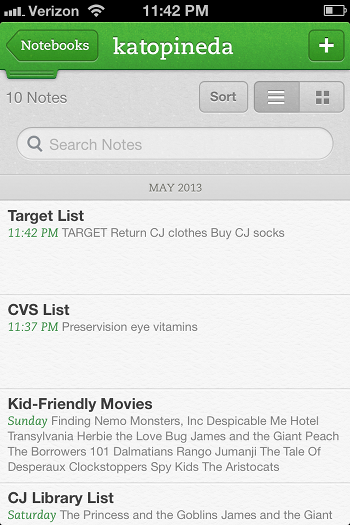
    Image of Evernote NotebookEvernote is the best note-taking, reminder app I’ve ever used.  I use Evernote by creating notebooks for the major buckets in my life: Matrix Group, Kato-Pineda and JP personal. I then create notes for to-do items, notes from a meeting, things I need to remember, etc. I then use tags to further categorize my notes.

    The Kato-Pineda notebook is where Maki and I have notes for all the thing we need to do at home and personally. We have a to do list for the house, a Target list, a Giant list, a CVS list, a list of books to check out from the library, etc. This notebook is shared between me and Maki and here’s how we use it. Say I find myself at Target. I usually have a list of things to buy but Maki might have things he needs as well. Since the Target list is a shared list, we both maintain it throughout the week. So I can go to the list and buy whatever is on the list. This way, no more going home to say “I went to Target” and Maki says “oh, shoot, I needed x, I wish I would have known you were going.”

    The Matrix Group notebook is where my new biz team manages tasks and priorities. We have notes for our proposal hot list, a JP call list, a Bryan call list, a list of potential blog posts, topics for the Matrix Missive newsletter, etc. Here’s the awesome part: since the notebook and notes are all shared, we keep these notes updated throughout the day and week without having to send email every time a list is updated. I might decide to update the list some evening and ask Bryan to make a bunch of cultivation calls the next day. If I find myself early for a meeting, I check the JP call list and make calls. It’s that easy.

    The JP personal notebook is where I store notes for gift lists, books I want to read, etc. I’ve even started a Recipes notebook where I’m posting recipes and tagging them by breakfast, lunch, dinner, dessert, chicken, pasta, etc. I even have a note for my weekly meals so I can easily remember what I made the past few weeks.

    What is perhaps the best thing about Evernote is this: I installed Evernote on my iPhone, Sony laptop, Mac laptop at home and iPad. Because Evernote is in the cloud, I have access to my notes from every device and the notes are always fully synched. Crazy how well this whole thing works.

    These systems are working for me because:

    • they are shared with the people I collaborate with (husband, assistant, new biz team)
    • they are in the cloud and therefore I have access from anywhere, on any device
    • they are inexpensive (Google calendar is free; Evernote is free but to share, you need Premium, which is $45 per year)
    • they are easy to use.

    How about you? What systems are you using to stay on top of your lists and calendar? What’s working?