Matrix Group International

Author: Joanna Pineda

  • Thinking About the Future in the Age of Surprise

    Thinking About the Future in the Age of Surprise

    Figure holding multiple directionsI had the pleasure of speaking at the International Foundation of Employee Benefit Plans (IFEBP) last week during their Benefit Communication and Technology Institute in San Jose, CA. My topics? Getting Started with Video and Website Best Practices. But that’s not the topic of this blog post.

    The closing session made a real impression on me. Terry Grim, a partner at the Foresight Alliance, talked about the art and science of predicting the future and boy was she terrific.

    Terry started off by saying that many things that seem to catch us by surprise were actually predicted, including 9/11, the rise of drones, extreme weather. And yet, despite our technological advances, it’s still very hard to predict THE future. Why? Terry says:

    • Forecasting errors are most caused by forecasters’ assumptions, which turned out not to be accurate.
    • We tend to think of the future as one thing but there is a range of possible futures.
    • The expected future is actually unlikely to happen because while we can usually forecast probable and preferred futures, we tend to be less good at forecasting plausible alternatives.
    • Even when we do predict a chance or shift, we are often lousy at predicting or anticipating the ramifications of said change or shift.

    Ultimately, good forecasts must allow us to make better, more informed decisions. So how do we do this? Terry says:

    • We need to think about the range of possible and plausible futures. We should ask ourselves, “If current trends continue or don’t continue, what will happen?”
    • When looking at plausible futures, we must look wider and factor in social, economic, environmental, regulatory, social, political and technological forces that will/could/might shape the future. Most of us have a lens through which we’re comfortable looking at the future. Good forecasting means looking at the world through different lenses, hence the importance of having a diversity of backgrounds and experiences on your team.
    • We must look at 2nd and 3rd order ramifications of changes. We must take a longer view of the impact of plausible futures.
    • We must look deeper and ask ourselves, “What do we not know? What do we think we know that might be incorrect?”

    Terry called this time The Age of Surprise because there are so many forces of changes pressing on us at once: technological, medical, political, economic. She called on all of us to question our assumptions, look wider, deeper and longer to understand the future, and use more comprehensive data to make decisions.

    As someone who has been “surprised” many times this year by turns in the market and marketplace in which Matrix Group operates, I’m thinking hard about possible and plausible futures, and hoping to bring better data and forecasts to our strategic planning.


  • 24 Hours of Happy

    24 Hours of Happy

    Who doesn’t love Pharrell Williams’s latest song, “Happy”? The world’s first 24-hour video, this is taking music videos to a whole new level.

  • Paperless App

    Paperless App

    A great checklist app can be a real life saver in today‘s busy world. Paperless is one of the best we’ve found!

  • Heads Up! App

    Heads Up! App

    Guess the “card” on your head from your friends’ clues before the timer runs out. Great for road trips and parties!

  • Why It’s Important to Keep Your CMS Upgraded

    Why It’s Important to Keep Your CMS Upgraded

    Time to upgradeMost of us are accustomed to the idea that we have to keep the content of our websites updated on a regular basis. If we don’t add fresh content regularly, people and search engines won’t feel compelled to come as often. But few of us think about updating the backend systems that power our websites.

    Any modern website these days is powered by some type of content management system (CMS). At Matrix Group, we like platforms like Sitefinity and WordPress. Every single proposal to clients includes a line item for CMS upgrades. Clients sometimes push back and say, “But Joanna, I just paid good money to implement x CMS and it’s working exactly the way we want it to. Why do we need to upgrade?” Here’s what I counter with:

    • You get access to new features. CMS companies stay in business by continually making their products better. With a CMS, no single customer pays all the freight for enhancements. With each upgrade, you get new features and functionality that perhaps you were waiting for or never imagined possible. For example, a recent Sitefinity upgrade included the ability to create sub-folders for uploads, thereby making it easier to manage images, files, etc. A small but super valuable enhancement!
    • Upgrades often include bug fixes and security patches. None of us would think of NOT upgrading Windows on a regular basis to protect our systems against hackers and crashes. Why would you you treat your website any differently, especially given its public-facing nature?
    • Staying on the upgrade path makes future upgrades easier. This sounds like a not so compelling reason to upgrade but the truth is, if you know you’re sticking with a particular system, it’s best to stay relatively current. Otherwise, a future upgrade could be nearly impossible or ridiculously expensive. Why? Most companies will write scripts that let you upgrade from the previous 1 or 2 versions. If you get to be 6 or 10 versions behind, there’s no simple way to jump versions because the database or programming are so different.

    When you do upgrade, do take the time to familiarize yourself with the new version’s new features, bug fixes and changes. Ask your vendor how you can take advantage of new functionality so that the upgrade becomes even more of an investment in the future. And talk to your vendor about making sure that your site is configured and customized to be upgrade-friendly. I’ve seen websites that couldn’t be upgraded without a lot of money because they had been customized in a way that made upgrades hard or expensive or both. And if your vendor isn’t talking to you about upgrades, be sure to ask why.

    Happy upgrading!

  • Sleep Cycle Alarm Clock App

    Sleep Cycle Alarm Clock App

    This app uses the accelerometer in your iPhone to sense your movement and wake you up when you are in your lightest sleep phase within a 30 minute window. It also gives you great stats on how well you slept.

  • MapMyRun App

    MapMyRun App

    Training for a race this summer? The MapMyRun app uses your GPS and records your workout details, including duration, distance, pace, calories burned, route traveled, etc. on an interactive map. Training made easy!

  • Looking Back on 15 Years in Business

    Looking Back on 15 Years in Business

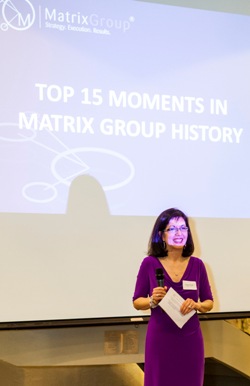
    JP giving speechA couple weeks ago, I got to host a big party to celebrate Matrix Group’s 15th anniversary. A couple hundred staff, clients, former staff, friends and partners showed up and enjoyed great music, awesome food, a chance to say hello to their favorite Matrix Group staff, and even hear my Top 15 Moments in Matrix history (you had to be there!).

    At the party, a client asked me what it’s like to run a 15-year old company and what has changed in the past few years?

    On the one hand, many things have not changed. Matrix Group is still a web design and development company. We still very much help our clients define their goals, develop a web strategy for achieving those goals, implement the strategy, and then measure the success of the initiatives against the goals. We still work primarily with associations and non-profits. Recruiting is still a challenge because I’m picky as heck about who gets to work here. I still like to get involved in projects and I still make trouble wherever I go. 🙂

    So what’s changed?

    • Matrix Group now has a content division. We used to rely on clients for 100% of the content and content strategy. But we found that launches were held up for lack of content and clients struggled with how best to present their content on the web. So a few years ago, we launched an e-marketing division that provides web writing training, copy writing, and copy editing services.
    • Social media. Big surprise, right? We use social media in a big way to promote the company and generate leads. Most of the original content we generate gets posted to social media platforms. We offer social media services. We recruit through social media.
    • Mobile has changed everything. It’s almost a cliché but mobile is in everything we do. Every website we redesign is responsive, our email templates are now responsive, we create mobile apps, and we help our clients develop and implement their mobile strategies.
    • We used to have our own content management system and now we implement third party systems. Gosh, fifteen years ago, there were no good, full-featured AND affordable CMS platforms. Today, there are so many good systems, so many years ago, we ditched development of our own system and focused on implementing best of breed systems.
    • Integration is now a HUGE part of our business. It used to be that when we created a website, integration with a member database was a maybe. Today, it’s not uncommon for us to embark on a project where there are a half dozen systems that need to be integrated so that there is single sign-on, unified navigation and taxonomy, seamless look and feel, and comprehensive search.
    • I’m not involved in most projects. I used to be the number one project manager, then I managed project managers, and now I have a Director of Operations who manages the PMs and day-to-day operations. I still review and approve strategy and information architecture deliverables, I sometimes sit in on design presentations and I consult on large integration projects. But for the most part, I manage the office, I bring in business, and I manage relationships. Of course, on the rare occasion that a project goes south, I get involved to make sure the project gets back on track. I’m called the Chief Groveling Officer for a reason.
    • We have different types of toys in the office. In our Old Town offices, we had dogs, the staff played a lot of pool, and we had little toys everywhere. In our Crystal City office today, we can’t have dogs (sniff!), the staff play more pinball than pool, we have Razor scooters for getting around, and there are LOTS of Nerf gun battles.
    • Communication is harder. I joke that I used to be able to call a staff meeting, explain a few things and the entire staff would be on the same page. Today, with a bigger staff, remote staff, people in and out all day, staff meetings where there are inevitable absences and a lot more distractions, I have to make sure important announcements are sent via email and IM, posted to the intranet, discussed at staff and team meetings, and reinforced by managers.

    Ultimately, what drives me is the knowledge that I’m making a difference in the lives of my staff, and as a company and we’re helping our clients change the world. We have modified our services and changed our processes to better meet the needs of our clients. The more things change, the more things stay the same.

    Last thing: thanks to all of our clients, friends, staff, and supporters for making the last 15 years unforgettable, and many thanks to those who came out to celebrate with us. We had so much fun! You can check out the photos from the party on our Facebook page or on Flickr.

  • Just Say No! to Stock Photography

    Just Say No! to Stock Photography

    Sample stock image of people meeting
    Here’s an example of an image that is clearly a stock image. Do these people look real to you?

    Whenever I meet with clients about their websites, the conversation inevitably turns to the topic of stock photos. Most companies are photo challenged, so they ask us to help them find good stock imagery. My answer? Just say NO! to stock photography, especially of people!

    I feel hypocritical even writing this blog post because this blog is full of stock images. Heck, I’ve even blogged about Matrix Group’s favorite stock image websites.

    So when and why do I encourage my team and my clients to say NO! to stock photos?

    • When the web page is about a place or an idea, then I think it’s okay to use stock images. You can use a stock image of New Orleans, or use a stock image to convey an idea, like food safety or computer security. Of course it’s preferable to use your own images, but you almost need to be a pro to develop photos of concepts or ideas.
    • But when the page or website is about your organization and what you do for your customers and members, it’s best to use images of your own staff and customers. Otherwise, it’s like bringing a fake boyfriend to a wedding; the relationship isn’t real! (I know I’m going to get in trouble for this analogy.)
    • When you are talking about what you and your employees do and stand for, the pages just ring false when you use stock images.
    • When talking about your customers, who they are, and why they matter, the pages lack credibility because you are using other people’s customers! And God forbid the image you chose winds up on a competitor site!

    “But Joanna,” you say, “it’s hard to get good images of real people, my staff, my customers, my partners.” Yes, I totally agree, but I absolutely believe the effort is worth it. Here are some tips for developing a stock-free mindset.

    • When you can, hire a professional. We recently hired a pro to take photos of the staff and office. We wanted a collection of photos to use on our website, our proposals, and social media. We compiled a list of the shots we wanted (head shots of senior staff, meetings, lunch, etc.) and we made sure we owned the images outright so that we can use multiple times on different platforms.
    • For the times you can’t hire a pro, invest in a good DSLR camera. There are really great DSLR cameras for under $1,000. I absolutely love my Lumix camera, which I purchased about three years ago for $899. This camera made our Creative Director wonder if I had recently taken a photography class because my photos looked worlds better once I started taking photos with  my Lumix.
    • Have your camera with you at all times and take lots of pictures. I believe that if you take enough photos, you’ll take at least a few good ones. Moreover, a good designer can take an okay photo and make it better through cropping and touching up.
    • Learn the principles of taking good photos by taking a class, reading the manual and reading blogs. Even a few tips can help you take much better photos. For example, I learned a long time ago to get close and to frame my photos so that people aren’t smack in the center of the image. Here’s a great list of photography blogs.

    Matrix Group is in the midst of a website redesign. (It’s amazing how painful it is to design a website for your own company.) Creative Director Alex Pineda said, “there will be NO stock images on this site.” So the team has gone about making it so. The images will not be perfect, but in a sense, that’s the beauty of using real people: you can tell they’re real precisely because they are not perfectly dressed, made up and staged.

    I hope I’ve inspired you to take the NO stock photos pledge, at least on company pages where you should really be showcasing your staff, customers and partners.

  • Want More Views and Clicks In Your Emails? Make Your E-Newsletters Responsive!

    Want More Views and Clicks In Your Emails? Make Your E-Newsletters Responsive!

    As marketers, we’re obsessed with metrics. And since email is a primary means of Responsive Emailcommunicating with our members, customers, prospects and partners, it only makes sense that we track open rates (the number of people who actually open and read our emails) and click rates (the number of people who click on a link). Here at Matrix Group, we’ve been working with lots of clients to make their emails responsive because in most industries, more email is read on a mobile device than on a desktop email client.

    Responsive design refers to the practice of designing and implementing a website so that it “responds” to the user’s device. Looking at a website on a wide screen over broadband? You might get a full screen, 4-column layout with high resolution images. Surfing a website on your phone? You should get a slimmed down version of the site with a single column of content, text that is large enough to read without pinching, and lower resolution images.

    But what about emails? Responsive email pretty much works the same way as responsive websites. Reading an email through Outlook on your desktop? You might see a nice layout, with 2 columns, images aligned to the right and left of content, a nice header, yada, yada. Browsing the mail on your phone? That same email gets simplified. It goes to 1 column, images are center aligned, content is shorter.

    Why bother making your emails responsive?

    • Users are more likely to delete an email they cannot read easily on their phones. Source: ExactTarget
    • There is a growing segment of the population that is mobile only, that is, they access the Web and email only through mobile devices.
    • Responsive emails are more readable on a phone. Period. End of story.

    We’re tracking the results of responsive e-newsletters for our clients and so far, the statistics are promising. Clients are increasing open rates in absolute terms by 1-4%, and clickthroughs an average of 2%. A few percentage points doesn’t sound like much but when you consider that most organizations get a 20% open rate and a 2 or 3% click rate, these numbers are significant. Consider this: one Matrix Group client saw an increase of 4% overall; since they have an email list of 100,000, an extra 4,000 people are now reading their emails!

    I think it comes down to this. Your emails are getting looked at on a phone. Your customer’s decision to open and click is influenced by many factors, including subject line, who the email is from, and whether or not the email is mobile-friendly. It only makes sense to make your emails mobile-friendly. And if in doubt, do some testing and learn more about your customers’ email preferences.