Matrix Group International

Tag: Web Design

  • AOPL Web site Redesign and MatrixMaxx Implementation

    AOPL Web site Redesign and MatrixMaxx Implementation

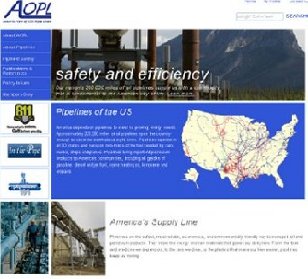
    Matrix Group collaborated with Association of Oil Pipelines (AOPL) for a Web site redesign and a MatrixMaxx Implementation.

    Our work included:

    • A fresh, and engaging Web site design, promoting AOPL as the expert in fuel transportation, and an environmentally aware organization.
    • Implementation of a Content Management System (CMS), allowing staff to make Web site updates with no programming background.
    • A color-coded, interactive map, where visitors can scroll over each state to see the location and the type of major pipelines in the US.
    • Web site integration with MatrixMaxx, Association Management System (AMS). A comprehensive web-based solution, allowing AOPL to seamlessly link their Web site to their membership databases.
    • Hosting and Maintenance

    Visit the Association of Oil Pipelines

  • Matrix Group Tenth Anniversary Microsite

    Matrix Group Tenth Anniversary Microsite

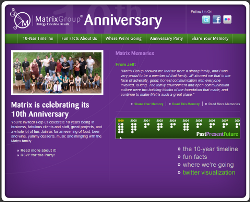
    Matrix Group staff created a Tenth Anniversary Microsite that incorporates fun designs and invites site visitors to actively contribute and participate by:

    • Including favorite Matrix stories from the last ten years in the Share Your Memory section
    • Scrolling through an interactive 10-Year Timeline, filled with important dates, facts and photos from Matrix Group’s very first purple wall, to our new office in Crystal City
    • Learning Fun Facts about Matrix, by scrolling through what Joanna refers to as our “tribute to information design.”  Did you know Matrix has collectively accumulated 381 toys and speaks over 10 different languages?
    • Participate in the Twitter visualization we created, which dynamically pulls tweets from the company, Matrix staff, people we’re following, and our favorite topics
    • The site also includes a “Where We’re Going” letter written by Joanna that reminds us where the company has been, and Joanna’s vision for Matrix for the future.
  • Celebrating 10 Years With a Microsite

    Celebrating 10 Years With a Microsite

    Matrix Group 10t hAnniversaryWe did it! We launched a microsite for the Matrix Group 10th anniversary! It took us several months and a whole lot of research, but we did it. Why create a site for the occasion?

    10 years feels like a real milestone to us, especially to me. Like I say in my “Where We’re Going” letter, when I started the company, I wasn’t thinking about balance sheets or Web standards. I just wanted to help companies with their Web sites. And when my Advisory Board Chair asked me about my five-year plan (during year one), I just laughed; I was so focused on surviving the first year, five years felt like a lifetime.  So it felt right to create a microsite that lets all of us at the company see where we’ve been and think about the future. (more…)

  • Your Web Site Is Done, Now Who Owns The Design Files?

    Your Web Site Is Done, Now Who Owns The Design Files?

    locked CDA client whose Web site we recently implemented asked us to make changes to their Web site.  What is normally a routine request turned into a major affair.  The problem?  The design firm that had created their original designs had gone out of business.  The contract specified that the design firm owned the design and the all source files.  So when the company went out of business, gone went the files. Ugh.

    I attended a wedding recently where the couple had hired a much sought after photographer.  I asked him if he gave clients their digital files and he said yes.  He said that he believed in charging clients a fair price and then letting them own all the original images.  Yes, he makes more money if clients order photos or a photo book, but if they don’t, he’s been fairly compensated and he’s happy. (more…)

  • My Favorite Twitter Visualization Sites

    My Favorite Twitter Visualization Sites

    Twitter logoI love Twitter.  Yes,  it’s information overload and there’s a lot of noise, but I love the commentary and the interesting links.  I also appreciate the updates from friends and family.  More recently, I am loving the Twitter visualization sites that are popping up everywhere.

    So, what the heck is a Twitter visualization?  If you’re on Twitter, you know that there are millions of individual posts, replies, and discussions every day.  Figuring that people out there would want to do things with this flowing data, Twitter publishes an API (application programming interface) that lets developers have real-time access to tweets and some user information.  The result is hundreds (thousands?) of sites that let you search, map and analyze tweets, relationships between users, and topics.  Here are some of my favorite Twitter visualization sites.

    • Twistori is my favorite.    Click on the words love, hate, think, believe, feel, wish and see a real-time stream of posts that contain these words in the tweet.
    • WeFeelFine is a visualization of not just tweets, but blog posts and images as well.  Explore Murmurs and see a flood of tweets with the words “I feel” in them.
    • Twittervision shows tweets from around the world, overlaid on a world map so you know where the tweet are coming from.  Twittervision is even available in 3D.
    • Having an event?  PepsicoZeitgeist shows real-time tweets about Internet Week in New York City.  I especially love the top words from IWNY tweets.
    • TweetStats lets you enter your Twitter username and see a bunch of statistics about your tweets, including when you tweet, average daily tweets, who you tend to retweet, etc..  Did you know all this about yourself?
    • Twitter Friends Network Browser lets you see your Twitter network and click and drag to do fun things.
    • Hashtags shows you the top hash tags on Twitter right now.
    • MyTweetMap lets you see tweets from the people you are following, overlaid on a map.
    • Dipity let you explore tweets in a timeline format but the site has since gone dark. Here’s a blog post that explores what happened to Dipity.

    What’s fascinating to me is how Web designers and developers have found countless ways to transform the universe of Twitter data in new and different ways.  Each site introduces me to new people to follow and gives me insight on new topics.

    How about you?  What are your favorite Twitter visualization sites?

  • Web Conventions We Can Do Away With – The Fold and Not Linking to Outside Sites

    Web Conventions We Can Do Away With – The Fold and Not Linking to Outside Sites

    I was in a Web design review meeting the other day and the client remarked that he wanted to make sure “all the important content was above the fold.”  My initial reaction was to agree but one of the Matrix Group Front-End developers challenged this notion.  The fold, he told me, no longer exists and is a myth that limits our design horizons.  The fold is gone?  What other Web conventions can we/should we do away with?

    In Blasting the Myth of the Fold, Milissa Tarquini argues that the myth that users “won’t scroll to see anything below the fold – is doing everyone a great disservice, most of all our users.” Moreover, the fold doesn’t even exist anymore because monitor sizes and  screen resolutions are all over the map these days.  When we refer to the fold, are we referring to the top portion of the page on my little Sony VAIO, or the 21-inch monitor on a programmer’s desk?  And btw, what about people who work on multiple monitors and never maximize their browsers?

    I resisted the notion that the fold is gone, but I am finally a convert. That’s it.  The fold is gone.  This does not mean that Information Architects and Web Designers should go nuts and create sites that scroll forever, but I believe we can reasonably expect that users will experience our sites differently and that all of them are okay with scrolling.
    (more…)

  • What Is a Taxonomy and Why Does Your Site Need One?

    What Is a Taxonomy and Why Does Your Site Need One?

    TaxonomyIf Matrix Group is creating a new Web site for you or updating an existing one, our project plan is almost sure to include development or review of your taxonomy. Taxonomy? Doesn’t that have to do with biology and how we classify organisms? (you know, kingdom –> phylum –> class?)  Sort of.

    Taxonomy today refers to more than the classification of organisms. Wikipedia calls taxonomy “the practice and science of classification.”  A taxonomy can help you organize an unstructured collection of information.  On most Web sites, information can be organized by:

    • Topic – these tend to be the topics, issues and special interest of your readers, members, customers, visitors.  For example, a trade association in the auto industry might have topics related to safety, marketing, supply chain, quality.
    • Type – these tend to refer to the content collections on a Web site.  For example, a think tank might have news, policy briefs, commentary, testimony and podcasts.

    Why do I think every site needs a taxonomy? And how do you use a taxonomy?

    • Different people navigate according to their needs and interests. On any given day, a journalist might want to see all of your company’s press releases, regardless of topic; on another day, the same journalist might want to know everything your organization has to offer in the area of food safety.  So let same journalist navigate by both content topic and type!
    • Tagging content by taxonomy allows you to relate content by topic and type. So, a news item on climate change would have a sidebar containing other news items related to climate change, recent publications and meetings about climate change, and recent news items (regardless of topic).
    • A taxonomy allows you to connect people with their interests.  Let your visitors sign up for news by their interest areas, let them personalize their Web experience on your site, and compare the interests of your members with the content you have online.

    (more…)

  • What is a Tag Cloud?  And How Do Tags Connect People?

    What is a Tag Cloud? And How Do Tags Connect People?

    Word CloudHave you visited a Web site recently that had a list of topics and some topics were in a larger font or in a different color? That’s called a tag cloud and I love them. But what exactly are they?

    Wikipedia says that a tag cloud is a visual depiction of the tags (topics) on a Web site. The tags are usually listed alphabetically and font size or color is used to show the relative importance of a tag.

    But first, let’s talk about tags.  The choice is tags is incredibly important on a Web site or blog.  Your tags should represent what’s important to you and your target audiences.  Personally, I think you should limit your tag universe to a couple of dozen topics so that you can focus your content and visitors can easily grasp what your site is about.

    So once you’ve got your tags, you’ve got to tag every piece of content.  Yes, it’s extra work but it will pay off.  With tagging, you can display related content and of course, you can have a tag cloud!

    Take this blog.  You’ll see from the tag cloud on the right that the tags with the most number of posts are: marketing, social networking, blog, leadership, Google and Twitter.  It’s great for me to see the topics I post about most frequently and I can easily see if I need to post on other topics so as not to bore my readers. (more…)

  • Discover Policing

    Discover Policing

    The International Association of Chiefs of Police (IACP) is the world’s oldest and largest nonprofit membership organization of police executives, consisting of operating chief executives of international, federal, state and local agencies of all sizes.  As part of a national recruitment effort, IACP and the Bureau of Justice Assistance tasked Matrix Group International with creating a new “Discover Policing” Web site to help attract more recruits to this exciting field.


    The Web site is designed to overcome stereotypes about careers in law enforcement, demonstrate the skills and experiences available, and create excitement about the profession.  Through a striking design, a CMS that lets IACP staff update the site without knowing any html skills, pages that have been optimized for search engine indexing and viral options (send to a friend, social bookmarking), the new Web site is already generating rave reviews among law enforcement agencies, parents, counselors and potential recruits.