

Matrix Group International

Blog

  • It’s Time To Audit Your Facebook Privacy Settings

    It’s Time To Audit Your Facebook Privacy Settings

    I found out recently that the iPhone version of the Facebook app synchronizes with personal profiles on Facebook.  Which means (gasp!) that if a friend has your private phone numbers in his/her phone, it’s possible that those numbers are now on Facebook.  Egads!

    While I love Facebook, Twitter, instant messenger, etc., I try very hard to limit the amount of personal information that I share on those networks, including and especially my address, home phone number, information about my family, etc.  But with the social networks constantly updating their terms of use and adding new functionality to their sites and apps, it’s hard to keep up with the changes and monitor the impact on our privacy.

    Which is why I recommend an audit of your Facebook (and other social network) privacy settings on a regular basis. Here’s how:

    • Log in to Facebook and click on Account in the top right corner of any Facebook page.
    • You’ll get a dropdown of options; click on Privacy  Settings.

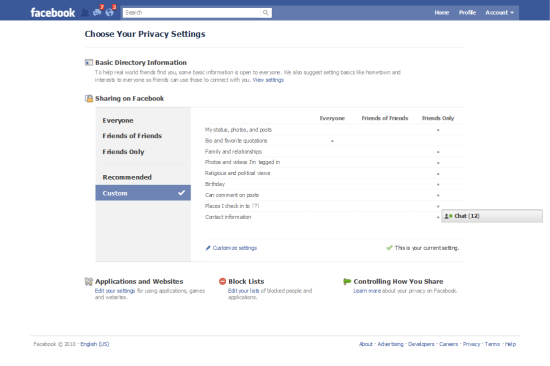
    Facebook Privacy  Settings Landing Page

    Here’s what your Facebook Privacy Settings Landing page looks like.  Note that you can share parts of your profile with Everyone, Friends of Friends and Friends Only.  I have edited my profile so that nearly everything about my profile is visible to Friends Only.  But wait, this page only shows you a fraction of the privacy settings available to you.  To view and edit all of your privacy settings, click on Customize Settings.

    You’ll also notice two navigation items on the left for Recommended and Custom.  Click on Recommended and you’ll see that Facebook recommends that a great deal of your profile be available to everyone.  You can select these default settings with a click.  Me, I definitely opted for the Custom Settings.
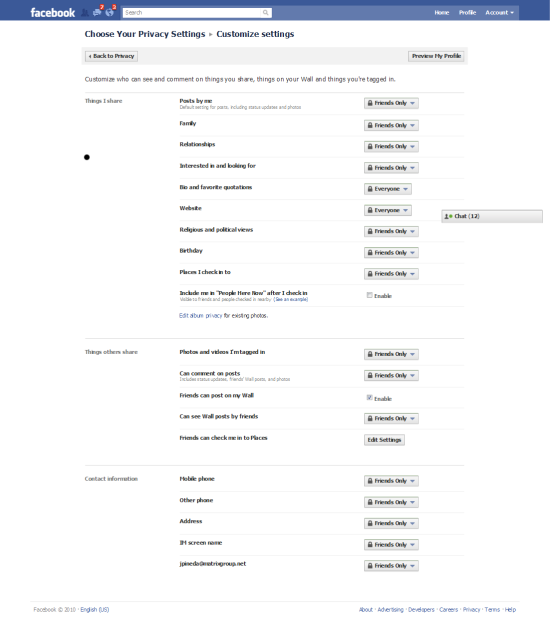
    Customize Settings Page

    Here’s what the Customize Settings page looks like.  You’ll see that you can select who can see elements of your profile.  Here are my recommendations:

    • If you post photos of your family, especially your children, make Posts By Me visible to Friends Only.
    • Be sure to pay special attention to the Things I Share section.  This is the section where you can control what others are doing, including tagging you in photos and videos, checking you into Facebook Places, etc.  This allows you to NOT allow friends to check you into a bar or party, and stops them from tagging you in photos and videos and thereby making your photo visible to their friends.  Here’s a blog post about how someone nearly sabotaged a dinner party by checking all the guests into Facebook places.
    • If your Facebook network is vast, consider creating custom lists and then specifying with each post and update which list can see your updates.  For example, I have a Family list that I use to share family photos and insider updates.
    • Be sure to audit your privacy settings for existing photo albums. If you created albums before Facebook rolled out its new privacy settings, you may find that all or many of your albums are available to Everyone (I know I did!).
    As for that pesky iPhone app that uploads your personal information to Facebook, unfortunately, there’s nothing you can do about that.  Facebook did recently add a warning to the app, warning users to make sure their friends are comfortable sharing their information with others.  This is a small consolation to me; I would venture to guess that most people don’t think about the privacy ramifications of their actions and apps and will blow right past this user agreement.  What to do?  This may sound dorky, but here’s what I’ve told my friends:

    • Please don’t sync your iPhones with Facebook.
    • Don’t try to check me into Facebook places.
    • When you’re at my house, never check into Facebook Places or FourSquare so you don’t reveal my home information.
    • Please don’t upload photos and videos that are unflattering to me and my friends/guests.  (When I throw Rock Band parties at my house, videos are not allowed; we DO allow photos of us band members looking cool with our instruments.)

    How about you?  Have you audited your Facebook privacy settings recently?  Any revelations?  Any privacy disasters?  What are you doing, if anything, to maintain a semblance of privacy online?

  • Beer and Cream Cheese Agile Methodology Revisited

    Beer and Cream Cheese Agile Methodology Revisited

    Just over a year ago, I blogged about how the MatrixMaxx team was using an agile software methodology we’ve dubbed “beer and cream cheese.”

    MatrixMaxx is Matrix Group’s Web-based association management software (AMS) that is used by dozens of trade associations and professional societies to manage their membership applications and renewals, meeting registrations, committee rosters, tradeshows, sponsorships, foundation fundraising, e-mail lists, and publication sales.

    Beer and cream cheese is the software development methodology we came up with after exploring several agile methodologies, including SCRUM.  While there are many flavors of agile development methods, most are characterized by:

    • Breaking big projects into smaller tasks that can be accomplished in hours or days, never weeks or months.
    • New versions of the software are released in short timeframes, called timeboxes or sprints.  Sprints can last 1 day to 30 days.
    • The goal of each sprint is to produce a working product that the client can use immediately, rather than having to wait months or years for a release, bug fix or new functionality.
    • Each team has a customer representative who represents the client perspective and makes him/herself available to team members.  In the case of SCRUM, there are 3 roles: the ScrumMaster (who serves as the project manager); the Product Owner (who represents the stakeholders/lients); the Team (the staff who do the development work).

    We call our methodology beer and cream cheese because about 18 months ago, Tanya, the MatrixMaxx Director, posted to one of the SCRUM message boards, asking if anyone had experience with having the same person be the ScrumMaster AND the Product Owner.  One ScrumMaster sarcastically remarked, “You CAN do it, but that would be like combining beer and cream cheese.”

    Fast forward one year.  The MatrixMaxx team is still using beer and cream cheese, but our process has changed, and for the better.

    • Where Tanya used to play the role of Product Owner and ScrumMaster, she is now the Product Owner.  Geoff is our Brewmaster.  As a result, Tanya can focus on the product road map and client requirements.
    • Our sprints are now 15 days long.  Major product releases are quarterly, but we put out small enhancements, especially custom enhancements for clients, twice a month.  Clients love this!
    • Although we still primarily use our intranet to manage tasks and requirements, there is a whiteboard in the MatrixMaxx team area that lists tasks that have been designated for the next release/sprint.
    • We’re doing a better job of tracking projects and elements that tend to go over budget.

    We plan to refine our beer and cream cheese process even more over the next year by:

    • Going back to shorter, daily check-ins, which have turned into lengthy discussions about tasks and requirements.  We realize that the entire team does NOT need to be part of all in-depth discussions.
    • Giving each team member one long item and one short item per day to encourage maximum productivity from all team members and help us manage the backlog of small items.
    • Making a renewed commitment to identifying and analyzing tasks that tend to make us fall behind or go over budget.

    BTW, we still hold beer and cream cheese parties where staff bring in baked goods made with beer and cream cheese.  My favorite this year was the dark chocolate cupcakes made with beer and topped with cream cheese frosting. Yum!

    How about you?  What software development methodology does your company use?  Are you an agile shop?  What’s working for you?  And how did you select the methodology that you are using?

  • Why Having a Baby Will Be Good For My Business

    Why Having a Baby Will Be Good For My Business

    I’m having a baby tomorrow (maybe sooner, we’ll see) and then I’ll be home with baby Marcus John.  For a few weeks at least, I’ll be dealing with lack of sleep, no set routine, and hundreds of diaper changes.  The big questions that always pop up when speaking with family, friends, staff, clients and vendors are:  How much time are you taking off and how will your office survive without you?

    The answer to the first question (how much time are you taking off?) is not clear cut.  When you’re a small business owner, you can’t exactly just disappear for a few months. When you’re the owner, the business is your baby, it’s part of your life and your identity.  That said, I’m giving myself the flexibility to work as much or as little as I want, come in when I feel I need to, and decide when I’m ready to come back to the office full-time.

    The answer to the second question (how will the office survive without you?) is “Just fine, thank you very much.”  In fact, just like the last time I was out with my first son, I expect the office to thrive. Here’s what I’ve done to prepare myself and the office for my absence:

    What Is It That Only I Do, or Can Do, At the Office?

    When I first announced to my management team that I was going to have a baby, the questions I asked of myself, the Directors and Project Managers was: “What is it that I do, that only I can do, that you rely on me to do?”  Then we got to work documenting the list and figuring out a plan for getting those tasks done in my absence.

    For example, I review the monthly billing reports after the Project Managers (PMs) have reviewed them to double check that we are properly marking work as billable or unbillable.  Over a period of a couple of weeks, I went over dozens of reports with the PMs, discussed why I question certain items and provided suggestions for how to handle ambiguous items and make sure clients are never surprised by their invoices.  The Director of Client Services will also now review invoices in my absence.

    Documenting What’s in JP’s Brain

    When you’ve been in the Web business for as long as I have (since 1994 but please don’t try to calculate my age!) and when you’re responsible for landing a lot of the company’s business, you just accumulate a lot of knowledge about clients, process, and projects. Even though I use our intranet religiously to document all of my communications with clients and prospects, there’s just a lot of knowledge that I carry around in my brain.

    So over the past few months, I worked with my team to document the strategies, best practices, and potential land mines I’ve encountered while working on myriad projects. I paid special attention to the project components that I tend to spearhead, including Goals and Personas, Content Strategy, Integration with a Back Office CRM (customer relationship management system) or AMS (association management system), CMS (content management system) reviews, and Social Media.  These are now called PM Guides and they live in our wiki. All staff are encouraged to modify them as needed.  The guides are reviewed before the start of each project, and the PMs are loving the sample agendas and notes for running meetings. (more…)

  • Although I Love my iPad, I’m Not Buying E-Books

    Although I Love my iPad, I’m Not Buying E-Books

    On September 1, Sony announced 3 new E-Readers priced between $149.99 and $299.99.  Last month, Amazon announced new versions of its WiFi and 3G Kindles; these devices are less expensive, lighter, more responsive and prettier than previous models.

    And then of course, there’s the iPad, my beloved iPad. On my iPad, I have the Apple iBooks, Amazon Kindle and Barnes & Noble Nook apps. I have purchased and enjoyed books on all 3 apps. And I have downloaded and enjoyed dozens of free books that are out of copyright.

    While I love, love, love the idea of having hundreds of books on one device, having lots of great things to read on a trip, and combining books, music, photos, videos and games on one device, I have stopped buying books on my iPad.

    Why?

    Well, it turns out that I’m a social reader. I like buying books, reading them, and then passing them on. I just love the idea of sharing a great story or author. My copy of Three Cups of Tea by Greg Mortenson was shared with a half dozen people before it came back to me. Same with The Graveyard Book by Neil Gaman, only it never came back (which is just fine by me!) I have also been the happy and lucky recipient of many, many books from my brother Alex and friend Steve, who have introduced me to so many great authors and series. My sister and her daughter have given my son dozens of wonderful children’s books, which I have gladly passed on to other moms when my son outgrew them.

    You can’t share e-books the same way that you can share printed books. Yes, I can share e-books with up to 5 devices connected to my Mac at home, but I can’t authorize random computers all the time just to share a book! Moreover, when my Kindle-toting friend Eileen recommends a book to me, not only can she not share the book with my physically, she can’t share it digitally because we have incompatible devices!

    Wouldn’t it be great if I could relinquish my rights to an e-book and pass it along to a friend, in a universal format they could download to their device of choice? Until that happens, I’ve put the breaks on buying a whole of e-books. I’ll break my rule the next time we have to travel to Asia, of course, but in the meantime, expect to still see me browsing at a local bookstore or buying lots of printed books on Amazon.

    How about you? Have you switched to buying e-books exclusively? Has this new habit changed your sharing habits? Or are you holding out and still buying printed books?

  • What Happens When Your Facebook Page or Blog Gets More Traffic Than Your Web Site?

    What Happens When Your Facebook Page or Blog Gets More Traffic Than Your Web Site?

    Every week, I check out the usage reports for the Matrix Group Web site and blog. I also look closely at the analytics reports from Facebook for our Facebook fan page.  In the last year, traffic on this blog has overtaken the traffic on the public Web site.  And as we increase the number of fans on our Facebook page, our interactions have grown steadily as well.

    A recent article in Ad Age explores how some of the top consumer brands have Facebook pages with a fan base and interactions that far outstrip that of their official Web sites. Starbucks has 12.9M fans; Coke has nearly 11M fans; Oreo has 8.9M fans.  Of the companies in the article, only Starbucks has steadily increasing Web traffic.

    All of this got me thinking:  What happens when an organization’s blog, Facebook, Twitter or other social media page gets more traffic than the official Web site? Is this the ultimate goal for marketers?  Is traffic on a social media site worth as much as traffic on a company Web site?  Does this increased traffic ultimately lead to more customers and sales?

    I have clients who worry about redirecting traffic to social media pages, for fear of losing control over the conversations, not owning the Web property, or that the interactions are not quite official enough.  Others hold their social media stats in the highest regard.  Most of us  wonder what it really means when somebody chooses to “like” our fan pages.

    How to make sense of all this?  Here are some thoughts:

    • If your Facebook page is getting increased traffic and interactions, while traffic on your regular Web site is on the decline, ask yourself, “What is it about my Facebook page that’s working?  What’s making people “like” us, click through to articles and comment?  What are the lessons for content and opportunities for interaction on our official Web site?”
    • Your goal should be to have your Web site, Facebook page, Twitter page, blog, e-mail campaigns, microsites, etc., all be part of an integrated strategy where each Web property is complementing the others and encouraging cross traffic.
    • Ultimately, the goal should be conversions, whether that means more sales, more subscribers, more members or more donations.  Your goals should never be about traffic on specific platforms; that’s just a tactic.
    • You need a way to track the effectiveness of followers, likes, clicks and fans across the different platforms.  Use tracking codes, cookies and marketing codes to determine which platforms are really helping your business to thrive.
    • (more…)

  • National Day of Action on 8/25th: CitizenEffect, Social Media Club, and More to Help the Gulf

    National Day of Action on 8/25th: CitizenEffect, Social Media Club, and More to Help the Gulf

    Guest blog post by Jill Foster

    Since joining CitizenEffect’s Gulf fact-finding mission trip last month (also called the #CitizenGulf project), it’s been a non-stop learning curve on my end, plus tough emotional processing.

    The social media factor and the #CitizenGulf fact-finding trip

    CitizenEffect, a nonprofit that helps anyone online be a citizen philanthropist, formed the social media team seven weeks ago to personally visit the Gulf, meet with fishing families impacted by the oil spill, and figure out ways to help them. Local nonprofits in Louisiana met with us too, clarifying perspective and the needs of parishes there. We published content (audio, video, photo essays, written commentary) via CNN’s iReports, Twitter, Posterous, Live Earth’s blog, and more. It was difficult to see such hardship up close. But what helped get beyond the heavy emotional response was a decision made by CitizenEffect after the trip:

    A CitizenGulf National Day of Action on August 25th (and you)

    You, your friends, and communities can be involved. What’s the goal on 8/25th? To help create a more sustainable future for Gulf fishing families by investing in education. All funds raised on the National Day of Action (less processing fees) will go to the project’s charity partner, Catholic Charities of New Orleans, who will then administer an area children’s educational program.

    What’s also exciting is how organizations – online and offline – are offering their support

    Social Media Club chapters across the country are organizing meetups to occur on 08/25th — which you can attend (or you can certainly form your own meetup too). In the spirit of Louisiana and many Gulf communities, we suggest that meetups include great music (stereo or live!,) like blues, jazz, or Zydeco. Gulf Coast Benefit, which had fantastic success with a national Gulf awareness and fundraising campaign in early July, is a lead supporter of the CitizenGulf project as well. Enthusiastic partnerships both offline and online in the social space have been incredible. (more…)

  • Will Facebook Survive? And Does It Really Matter?

    Will Facebook Survive? And Does It Really Matter?

    Last week, I had the pleasure of being a speaker at the Benefits Communications Conference of the International Foundation of Employee Benefit Funds. During the closing session, one of the attendees asked me which social networks I thought were going to survive into the future. The dialogue went something like this:

    Me (Joanna): I can’t predict the future, but I think Facebook and YouTube will stick around for a while.  Not sure about the smaller networks, especially those without solid revenue models.
    Participant: But I’ve heard that the younger audiences are leaving Facebook now that their parents are signing up.
    Me: Yes, I’ve read that as well, but Facebook has really tipped in terms of popularity, all the research shows that the older audiences don’t leave a social network once their friends have joined and they’ve made a commitment to the site, and Facebook as a platform for all kinds of third-party applications is really compelling.

    But then I got to thinking.  Does it really matter if Facebook survives?  Does it really matter which of the social networks survives?

    If you’re hesitating about investing in a social media strategy because you’re wondering which of the platforms will survive, I think you’re worried about the wrong issue.  Here’s why:

    • Social media isn’t just a fad. Social networks have fundamentally changed how we communicate, connect and market.  Social networks have “tipped;” there is now a critical mass of people on social networks.  You can’t ignore the numbers.
    • In the end, it doesn’t matter which social network survives because there are now so many mainstream and niche social networks, it’s almost pointless to worry about which ones will make it.  Remember when we thought no other search engine could threaten Yahoo!’s primacy?
    • Your social media strategy probably needs to include having a presence on multiple networks, depending on where your target audiences are AND to ensure good coverage and reach for your marketing messages.

    Here’s what I think IS important:
    (more…)

  • Blogging Best Practices – Part Two

    Blogging Best Practices – Part Two

    This week, I’m doing part two of a blog post I started last week on Blogging Best Practices. This post is inspired by a webinar that I conducted with my friend, blogger and activist Shaun Dakin, Director of Business Development at Infield Communications.  Here are additional take-aways from the webinar.

    • How Long Should Your Posts Be? We suggest that each post be no more than 4-6 paragraphs.  If your posts are too long, your followers may decide to read them at a later time and not come back.  But you want enough length to be able to cover a topic with enough substance.
    • Create Visual Interest. Although followers follow blogs for their content, we believe that your posts will have more impact if they have photos, videos, event basic html formatting.  If nothing else, use formatting to make your content skimmable.
    • Align Posts With Your Keyword/SEO Strategy. While I’m a firm believer that you can’t force keywords into headlines, do try to make your titles and opening paragraphs keyword rich.
    • Create Compelling Introductions. Think about it.  You make a decision about whether or not to open an e-mail or click on an article in your RSS reader based on the title and opening paragraph.  So make your blog post introductions compelling to encourage clicks.

    (more…)

  • Blogging Best Practices – Part One

    Blogging Best Practices – Part One

    A couple of months ago, I had the pleasure of conducting a webinar on Blogging Best Practices with my friend, blogger and activist Shaun Dakin, Director of Business Development at Infield Communications.  Shaun and I are passionate bloggers and we each had a lot to say about what we think it takes to be a good blogger and have a successful and well-read blog!  Here are some of the take-aways from the webinar:

    • What Are Your Goals? The most important thing is to align your blog’s goals with your organization’s goals. Are you trying to engage your target audiences?  Influence?  Foster specific actions?  Your goals should be measurable so that, at the end of the day, you know if your blog is a success.
    • Who Should Blog? Shaun and I believe that anyone can blog, but for most organizations, you need people who have a 20,000 foot view of the industry or issues, enjoys writing (or is paired with someone who enjoys writing and is a good writer to boot), and is committed to pumping out content on a regular basis.
    • What Should You Blog About? This is the $64,000 question!  Ultimately, you need a mission statement for your blog that guides your content strategy.  We grouped blog posts into the categories.  In practice, most blogs employ a variety of blog post types to keep readers engaged.
      • Hot items/News – These posts tend to cover what’s new in the industry, breaking news, etc.
      • Strategy/Commentary – These posts try to provide a perspective on specific issues and usually aim to persuade readers to take a certain point of view.
      • Trends – These posts report on market trends, trending topics, research and statistics.
      • How-To Guides – These posts are often a combination of text and video and aim to provide users with a practical guide to doing something specific.

    (more…)

  • My GPS Is Making Me Stupid!

    My GPS Is Making Me Stupid!

    I had an early meeting in Hyattsville this morning.  I was armed with my Garmin GPS and printed directions from Google Maps — I still got lost. I had to call my husband for extra navigational assistance.  He was incredulous on the phone: “Don’t you have Jane (the GPS) with you?  Did you follow the directions from Google?”  Yes and yes, but I was still lost.

    How is this even possible?  For the last nearly 20 years (how did I get so old?), I have been in sales in the DC area.  I feel like I have driven to most corners of the region.  I know this region and I do not get lost!!!  How on earth did I get lost this morning?  And how did I get lost when I had so many tools at my disposal?

    I have a hunch that all of these digital assistants are making me stupid. How and why?

    Well, long before cell phones, GPS systems and Google/Mapquest maps, I would get directions the old fashioned way.  I would call the prospect or client and get detailed directions. Mr. client would ask me where I was coming from and he would give me directions that included navigational clues like:” go 4 lights then turn right; if you see the Giant, you’ve gone to far; or go about 3 miles and then get on 95 on your right.”  I would also get really helpful suggestions, like “don’t go through the City at that time of day, take the Beltway.”  I would heed these directions and almost never get lost.  And if I did get lost, I would find a gas station and ask the always-friendly attendant for help. Oh yeah, I also used to carry around maps with me, but I tossed those when I got my GPS; silly me!
    (more…)