Matrix Group International

Category: Strategy and Branding

  • What Makes a Successful Virtual Meeting? Lessons Learned from the Battlefield

    What Makes a Successful Virtual Meeting? Lessons Learned from the Battlefield

    light bulb with thought bubblesSince July of this year, we’ve had the honor of hosting 9 virtual meetings. It’s been a season of learning because the meetings landscape keeps changing and attendee expectations have shifted dramatically since the pandemic began. Here are some of the things we’ve learned:

    Good communication is key! Even though it feels like we’ve been living in this virtual world forever, we’re all still relatively new to this virtual conference experience. Talk to your participants early and often about what to expect, how to engage, where to go, how to use the platform, reminders about specific highlights and features, rules of engagement, etc. Also make sure you’re giving your participants reminders and direction throughout the event, just like you would in person with staff in the hallways.

    You can’t do enough training for your presenters. KiKi L’Italien and I talked about this a lot during our recent webinar. Even the most seasoned speakers, moderators, and facilitators are on a steep learning curve in this brave new world. Even if they’ve been speaking at many virtual conferences, platforms and technologies differ. Make sure you set them up for success by giving them thorough training on every aspect of the event they’ll be involved in. 

    Your participants need to log in early, for so many reasons. Yes, they’ll have a better experience if they’re well acquainted with the platform before the event begins, but more than anything they need to make sure their tech is set. Many platforms require a modern, updated browser, but some attendees don’t even realize that their browser is out of date. By logging in early, your attendees will identify login, browser and firewall issues that they can address well before your first day.

    Provide lots of attendee, exhibitor and presenter support! Ask anyone who’s put on a virtual event and they’ll tell you this: it’s way more work than you’d ever imagine, and you need all hands on deck. What if you have a small staff to begin with? Make sure you select a vendor, like BeSpeake, that offers full meeting support – conference manager, live tech support, broadcast manager, training, etc. –  and is a true partner. It will make all the difference. 

    You need to be flexible! Tweaks will need to be made to your program, your sessions, your schedule, and on and on. The beauty of the virtual space over the physical space is that you can make adjustments relatively quick and easily. For example, after day 1 of a recent virtual event, our client realized they needed to add Posters to their navigation because attendees were not finding their Poster Gallery in the Program. Another client found that attendees were not turning on their cameras in breakout rooms. During our Day On debrief, we talked about all this and made changes to the navigation and session descriptions that evening. 

    No matter how prepared you are, something will go sideways. A speaker or moderator’s internet will go out right before they’re supposed to go live, your keynote speaker’s neighbor’s dog will spot a squirrel right outside her window in the middle of the live presentation, and so on. No event, in-person or live, will ever go perfectly smoothly, but you can think ahead and come up with a “plan b” for most major scenarios. Be ready for it; embrace it. 

    Have you hosted a virtual event yet? What were your biggest lessons learned? What would you do differently, and what would you keep the same? We’d love to hear your battle stories! 

    Want to create a custom built virtual conference or tradeshow experience that is just as transformative as your in-person events? Contact us today to schedule a private demonstration of the BeSpeake virtual meeting platform

  • Revisiting the Attendee Experience During a Virtual Meeting

    Revisiting the Attendee Experience During a Virtual Meeting

    Talking on video callA couple of years ago, I posted this: An Executive Director’s Guide to Getting the Most Out of Your Next Conference. I quoted my friend and client Carol Neuvelt, Executive Director of NAEM, who tells her staff and members to make sure they do this during a conference:

    1) Learn something
    2) Participate in the conversation
    3) Make a friend

    During this pandemic, when all meetings and conferences are going virtual, how are we designing the experience so that attendees can still do all three?

    Learning something. Check. Organizations are doing a great job here. The content quality is way up. My clients are experimenting with live and pre-recorded sessions. And they’re sourcing speakers from around the globe, speakers who perhaps were never able to participate because of the time and distance.

    Participate in the conversation. I think this has been a mixed bag. Most organizations allow comments during presentations, which has been fun and engaging, BUT these conversations can be distracting. And there’s often no way to have a conversation about a session AFTER the session, about a random topic, or with random people.

    Make a friend. This has been the hardest goal to meet during virtual meetings. I’m thinking about the bus rides to events during ASAE Annual; I inevitably sat next to someone amazing and I’d make a new friend. I’m also thinking about people I sat next to during sessions or during lunch; how I miss those chance encounters!

    Most virtual meetings I’ve attended have been missing this “make a friend” piece and no wonder. Most sessions are in webinar mode, which means only the speaker is on video. And even if you do attend a Zoom where everyone is on video, it’s hard to have a conversation when there are more than 20 people on the call.

    The “make a friend” part is something we’re trying to solve for with our virtual meeting platform, BeSpeake. We’re using 1-2-1 video meetings to encourage connection and sharing. If you want more info, reach out.

    What I want to know is this: how are YOU encouraging your attendees to connect and make friends during your virtual meetings?

  • What Your Virtual Sponsors and Exhibitors Want Most

    What Your Virtual Sponsors and Exhibitors Want Most

    Many organizations are wrestling with how they can pull off a successful virtual meeting, especially with regard to their sponsors and exhibitors. How do you provide real value for them in the virtual environment? How do you convince them that it’s worth the time and investment? Heck, will they even want to consider it?

    Good news! Whether virtual or in-person, sponsors and exhibitors want and need the same thing: access to your members, their target market. We don’t have to tell you that life looks different, but regardless, business is still moving forward, and your sponsors and exhibitors still need facetime with your members.

    Generally speaking, your sponsors and exhibitors want one (or more) of three things from your event:

    1. Leads
    2. Brand awareness
    3. Content leadership

    So how do you know what they want most, and how do you provide avenues for fulfilling those needs? Ask! Have strategic conversations with your sponsors and exhibitors to learn more about what they want. Start by asking your largest sponsors and exhibitors, but talk to everyone, even if it’s just an email:

    • What value do your exhibitors and sponsors get and expect from your in-person conference and tradeshow?
    • Have their sponsorship and marketing goals or objectives changed recently, as a result of the pandemic?
    • Have they participated in a virtual event or meeting recently? What was their experience? Good? Bad? Indifferent?
    • If they can still meet their goals, are they willing to support YOUR event?

    Before you enter into these conversations, make sure you brainstorm with your team and have a list of things you’re thinking of offering to your sponsors and exhibitors. During the conversation, be sure to listen, be open-minded, and take feedback. Then, design sponsor and exhibitors opportunities, and your event, with their needs in mind.

    The world has changed, but your sponsors and exhibitors continue to be invaluable partners for your organization. Give them what they need, and they’ll partner with you for life, no matter the venue.


  • Should Virtual Conference Sessions Be Live or Pre-Recorded?

    Should Virtual Conference Sessions Be Live or Pre-Recorded?

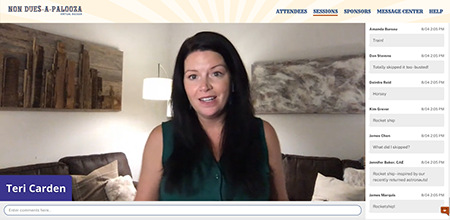
    Non Dues-a-Palooza Virtual Bazaar LiveI’m attending a lot of conferences these days. I’m also helping clients plan and execute a lot of conferences. All of them online, of course.

    One of the biggest questions being asked by meeting planners is: Should my educational sessions be live or pre-recorded? Live streamed at a certain time or available on demand?

    Pre-recorded has some obvious benefits:

    • Your speakers won’t have technology issues
    • You can control the start and end times
    • You can up the production value of your sessions with extra editing, graphics, transitions, etc.

    I recently had the pleasure of working with Teri Carden on Non Dues-a-Palooza, a conference dedicated to helping associations increase their non dues revenue through partnerships and great ideas. Teri had 10 case studies, and 6 pitches by sponsor companies. The case studies were going to be pre-recorded so Teri wondered how she could add a live element to the conference so that the case studies didn’t feel like just another set of zoom webinars. Should the 2-minute pitches by demo companies be live or pre-recorded? Should her welcome be pre-recorded?

    After much discussion, Teri decided on a mixed format: she would be live but the case studies and 2-minute demo pitches would be pre-recorded. In addition, the demos would be live as well.

    Live can be nerve-wracking. You never know what can happen: someone’s Internet drops, the speaker mutes herself accidentally, your schedule falls apart because someone ran long. BUT, live has benefits as well:

    • Your presenters can answer questions in real-time
    • Your presenters can lengthen or shorten remarks as needed
    • Perhaps most importantly, your attendees feel like they are experiencing something happening real-time, that they need to be online at a specific time and place in order to be part of something.

    I’m speaking at the ASAE Annual Conference this week. Speaking is perhaps a weird verb because my session was pre-recorded. Instead, I will be available via chat to respond to attendee comments. There’s a part of me that wants people to listen to my session, not just try to keep up with the stream of comments. If I had my druthers, I would have pre-recorded my session but been live, on video, for the Q&A. But yes, that’s different, more complicated technology to make that happen. So I will be presenting on Wednesday AND responding to questions and comments.

    Personally, if a conference is made up entirely of pre-recorded videos, I think some attendees will lose interest. The motivation to participate NOW will dissipate because sessions are pre-recorded and will inevitably be available on demand, in which case it doesn’t really matter when you watch the videos.

    How about you? How is your organization navigation live vs. pre-recorded? What has worked? What have you learned?

  • How Much Should I Charge for My Virtual Conference?

    How Much Should I Charge for My Virtual Conference?

    Man making online purchase with credit cardAs the world of work continues to transition from physical to virtual, the same is happening to conferences, trade shows, and meetings. There are platforms to choose, new or different program formats to consider, and on and on. But the biggest question on everyone’s mind is: how much should I charge for my virtual conference?

    As with most questions like this, the answer is: it depends. It depends on your industry, the type of experience you’re planning to provide, your attendee demographics, your sponsorship model, etc. But take solace in this: our clients, partners, and friends are finding that attendees don’t expect virtual conferences to be free. People understand that a lot goes into event planning and preparation, and that there are costs associated with any type of event, no matter the format.

    Here are some things to consider when deciding what to charge for your virtual event:

    Consider your industry. How badly have your members, attendees, sponsors, and exhibitors been impacted by the pandemic? Are budgets being slashed? Will attendees be paying out of pocket? If your members are really hurting (and whose members are not?), consider reducing your registration fees to show compassion to members and encourage attendance. Many clients are reducing fees to maintain member engagement and demonstrate that they are being responsive.

    Consider your key demographics. Younger generations are more accustomed to meeting and connecting virtually, more likely be more optimistic about what they’ll gain from a virtual conference, and maybe willing to pay for it. Younger members are also more likely to value your educational programming because they need it to advance their careers. Older attendees may be less comfortable with an online format, and more likely to be skeptical of the value of the meeting because they come for the networking. On the other hand, older members are going to be more senior, and have more access to training funds. In all cases, study your attendee demographics, call up some members, and get some feedback from the field.

    Are you offering CEUs? Many organizations offer attendees the chance to earn Continuing Education Units (CEUs) when they attend sessions. One professional society we know is not lowering fees BUT because the conference will be online and recorded, attendees will have greater opportunities to earn CEs, thereby raising the value of the meeting.

    What level of experience will you provide? Let’s face it. Your attendees expect a highly produced event when they attend in person. Their expectations don’t change because the event is online. They still expect a great user experience, sessions with high production value, and a mix of education and entertainment. Your attendees will be less excited about paying for what feels like watching YouTube videos, sitting through more Zoom meetings with mediocre graphics, and no opportunities for networking. If you’re going to charge top dollar, give your attendees a top dollar experience.

    What’s your sponsorship model? Since there’s more opportunity for sponsors to get prominent face time in front of attendees – think YouTube style ads at the beginning of sessions, banner ads, virtual tradeshows, etc. – they may be willing to purchase richer sponsorship packages, which can subsidize attendee’s conference fees. Alternatively, you may have a harder time getting sponsor and exhibitor buy-in because virtual conferences are untested, or your virtual meeting offers few opportunities for truly showcasing their companies and products.

    It’s really hard to come back from free. Some of our clients are opting to change their conferences to free events. I get it. Members are hurting and it feels wrong to charge money for benefits. BUT a conference that doesn’t generate revenue becomes a giant expense, and members may come to expect that all future events will be free. Yuck.

    While there’s no magic formula, you’ll need to take all of these factors — and more — into consideration. We’re hearing that most attendees are very open to registration fees that are 50-75% of normal registration fees. Will that work for every event and every association? Of course not, but it’s a good starting point. And like I often say, when in doubt: ask! Your members know you’re charting new territory daily, so don’t be afraid to send out a poll to see what their thresholds may be. Good luck and please do share your experiences!

    Looking for a custom tailored virtual meeting platform that can take your virtual conference to the next level, providing your attendees and exhibitors with a comprehensive, hand crafted experience? We’d love to show you a demo of BeSpeake, our new Virtual Meeting Platform. Let’s get it scheduled!

  • How To Turn Your Webinars into Interactive, Virtual Meetings

    How To Turn Your Webinars into Interactive, Virtual Meetings

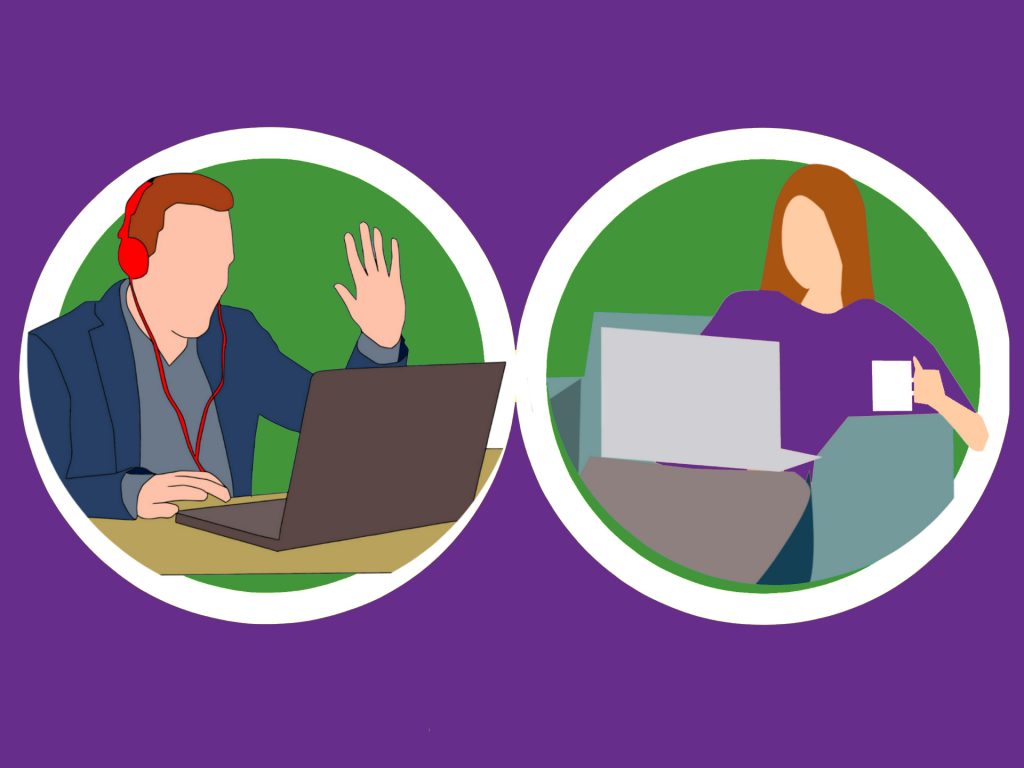
    virtual meeting man and womanOver the past couple of weeks, client after client has cancelled meetings, tradeshows and conferences. They’re scrambling to find out if they can reschedule events or create an online experience worth good money for.

    For most of our association clients, their meetings are either in person events or live/on demand webinars. Since most organizations already know how to put on a webinar, here are our tips for making them more interactive, more engaging, and worth paying for (many of our clients don’t charge for their webinars).

    Deepen the Learning

    It’s hard to impart a whole lot of learning in a 45- or 60-minute webinar. But you can pack more learning in if you ask more of your attendees. Send them articles to read and videos to watch ahead of time. Let them know that the webinar will be advanced and your presenters will expect some level of knowledge. This way, your speakers can present at a higher level and impart more knowledge.

    Add Interactions

    I’m not always a fan of real-time comments during a presentation. They’re distracting to attendees and presenters. But you can add interactivity by weaving in polls and Q&A into your webinars. These interactions make the online event more interesting, more fun, and often provide insight into the audience’s demographics and needs.

    Create A Micro-Community

    You can further the learning by encouraging conversations with your speakers and attendees. Ask attendees if it’s okay to share their names with other attendees. Create a limited-time Facebook discussion around the presentation. Host a Twitter chat around the topic. Create a blog, populate it with content related to the webinar and ask for comments.

    If you incorporate some of these ideas into your webinars, your attendees will get more than the hour’s worth of content, and hopefully, they’ll come away with a deeper sense of connection with the content and your organization. Good luck and please do share your experiences!


    Looking for a custom tailored virtual meeting platform that can take your virtual conference to the next level, providing your attendees and exhibitors with a comprehensive, hand crafted experience? We’d love to show you a demo of BeSpeake, our new Virtual Meeting Platform. Let’s get it scheduled!


  • Top 5 Web Design Trends for 2020

    Top 5 Web Design Trends for 2020

    Guest post by Alex Pineda, Matrix Group Creative Director

    New year, new possibilities, especially in web design. With technology advancing at an unprecedented rate, design possibilities seem limitless in the coming year. What do I think we’ll see, design-wise? Here are my predictions for the top 5 web design trends in 2020:

    Progressive Web Applications (PWAs)

    A progressive web application combines the best of both web and mobile apps – think of it as a website built using web technologies (i.e., HTML, CSS, etc.) but acts and feels like an app.  Since PWAs are a technically a website, there is no need to go through digital distribution systems like the Apple App Store of Google Play, making it simple to deploy and disseminate.

    The major advantages of PWAs are (per Wikipedia):

    • Progressive — Works for every user, regardless of browser choice, using progressive enhancement principles.
    • Responsive — Fits any form factor: desktop, mobile, tablet, or forms yet to emerge.
    • Faster after initial loading – After the initial loading has finished, the same content and page elements do not have to be re-downloaded each time.
      • Ordinary websites often already made use of the browser cache to avoid re-downloading the same data redundantly. But on progressive web applications, the same elements do not need to be re-rendered again.
    • Connectivity independentService workers allow offline uses, or on low quality networks.
    • App-like — Feels like an app to the user with app-style interactions and navigation.
    • Fresh — Always up-to-date due to the service worker update process.

    The term “Progressive Web app” was first coined in 2015, and by 2019, there are an increasing number of companies that use PWAs as the means to distribute their services and content, including Twitter, Pinterest, Trivago, Tinder, etc.  As the barriers to entry decrease for creating PWAs, we can only expect more companies to release their own.

    Design for Accessibility

    In the past year, there has been a great deal more care being given to designing experiences that are accessible to as many users as possible.  Microsoft has been a champion of this movement, coining the term “Inclusive Design”, using this definition:

    “Inclusive Design is a methodology, born out of digital environments, that enables and draws on the full range of human diversity. Most importantly, this means including and learning from people with a range of perspectives.”

    To design accessible experiences, keep these things in mind:

    1. Think carefully about your audience – consider who is being included, and who is being excluded.
    2. Ensure your interface provides a comparable experience for all so people can accomplish tasks in a way that suits their needs without undermining the quality of the content.
    3. There are basic principles to follow that enable the best user experiences for the greatest number of people.

    Light vs. Dark Mode

    The ability to switch between dark and light modes has long been available on the MacOS, and with Windows 10, for PC users as well.  I personally tend to use dark mode as it’s easier on the eyes over long periods, and I switch to dark mode on my iPad out of consideration for my sleeping wife.  This ability to switch between modes also applies to your web browser, on Chrome or Safari, and yet this mode didn’t affect the overall style of the actual website.  There is a way on Google Chrome to forcibly turn any website into dark mode, but increasingly, that will no longer be necessary.

    Developers are now working with toolkits and standards, on both Safari and Chrome, that enable your browser to detect which mode (light vs. dark) you are using on your OS, and switch the color scheme on the website to react accordingly.  It will be the responsibility of the website creators to decide if they want to enable this on their site, and how best to adopt a style that works for both. There are a number of guides and tips out there on how design for dark mode, that can help designers and developers take advantage of this new ability, and let users decide for themselves what they prefer.

    Oversized Type & Big Elements

    Websites, particularly for top brands, are favoring large prominent elements – from oversized typography to full screen images, usually a combination of both.  Huge elements like this make a bold brand statement, catch the user’s attention, and help them understand what the site is all about.

    In order to make this approach work, a minimalist approach is necessary.  Reducing the content to a single image (or video) + a short title makes for a clearer message, and an uncluttered experience.  Less is more, but make a big statement!

    Illustration as the Brand Personality

    Rather than relying on stock imagery or a generic photo, brands are using tailored illustrations to convey their brand personalities.  My favorite example of the use of these illustrations comes in the form of the 404 Not Found pages such as:

    The key to using illustration successfully relies on their uniqueness and consistency.  If you have the budget, hire an artist whose work you think matches well with your brand vision – dribbble and other artist portfolio sites are a good way to find them.  If you don’t have the time or budget to commission an artist, there are a plethora of vector art libraries on sites like istock or gettyimages, just find collection that has a good number of illustrations to serve your needs.

    Which design trends are you most excited about in 2020? 


  • How Your Digital Marketing Should Change in 2020

    How Your Digital Marketing Should Change in 2020

    Your website, social media pages, videos, email newsletters, email campaigns – they’re all elements of your digital marketing toolbox. It’s the start of a new year. How should your digital marketing change in 2020? I queried my staff and here’s what we came up with:

    Experiment With a Mix of Short- and Long-Form Content

    Is short content better for social shares? Is long content better for SEO? If you’re not being intentional about the topic AND length of your posts, you should be. Here’s a great analysis of short- vs. long-from content from CopyHackers. TLDR summary: Great, long content is incredibly difficult to write, so shorter is probably better for most organizations, but you need to be intentional AND test your content with your audiences.

    Video on All Of Your Social Media Pages

    Facebook, Twitter Instagram and LinkedIn LOVE video. According to Animoto, video is consumers’ favorite type of content on social media. Facebook and LinkedIn prioritize posts with video. If you’re not posting original video (as opposed to embedding a YouTube link) on social media, what are you waiting for?

    Podcasts Are Huge and Growing in Popularity

    There’s no doubt about it: podcasts are hot! According to Podcast Insights, 51% (144 million) of the US population has listened to a podcast – up from 44% in 2018 (Infinite Dial 19), and 16 million people in the US are “avid podcast fans” (Nielsen Q1 2018). Podcasts give you the ability to reach your audiences in a new way, they allow you to share serialized content in a convenient way, and they are easier to produce than video. Could this be the year you launch a podcast?

    Expect Some Turmoil In Your Communities During This Election Year

    Nearly every association and nonprofit will say they are nonpartisan. BUT politics has infiltrated every aspect of our lives. Just in case comments and conversations about the economy, healthcare, trade, or the environment (name your topic) turn rancorous in your communities, be sure you are prepared with monitoring and policies. What will you do if an online discussion about manufacturing best practices turns into a nasty exchange about trade with China? Be prepared!

    Focus on Storytelling for Authentic Content

    I’m rewatching The West Wing and I’m struck by how effectively the show uses storytelling to frame policy positions. Storytelling is effective because stories create connections with real people and they create memories. Here’s a great post from Brandignity about the advantages of using storytelling in marketing.

    Create Personalized Prospect Cultivation Funnels

    We’ve all done this: signed up for a white paper and then gotten endless, automated follow ups from a random company. This is marketing automation gone bad. Marketing automation will only work when your emails and landing pages are thoughtful and personalized for each member, customer or prospect.

    Coordinate Your Platforms Better

    No one web page, email or social post will cause the conversions you need, whether it’s membership signup, meeting registration, publication sale or advocacy involvement. So it’s time to really deepen your awareness of all the marketing channels you own and how they work with one another. No longer can you have the meetings team sending out emails that the web and marketing teams don’t know about. An editorial calendar is a good start. Charting user journeys through your systems is another.

    How will your digital marketing evolve in 2020?

  • Leadership Lessons From Star Wars

    Leadership Lessons From Star Wars

    Joanna in her Jedi hoodie and Maki in a Supreme Leader sweatshirt at the Star Wars Episode IX opening night.

    It’s no secret that I’m a huge Star Wars fan. Yeah, sure, maybe there was an episode (or two) that wasn’t as great, but by and large, I’ve loved everything about the franchise. I’ve also read a lot about how George Lucas was highly influenced by Joseph Campbell’s mythical framework during the making of Episode IV: A New Hope. Star Wars is not science fiction. It’s space drama and space mythology.

    Last night, I got to watch Star Wars Episode IX: The Rise of Skywalker. Prior to opening night, I rewatched a bunch of the older movies and wondered if there are life lessons for me, as CEO of Matrix Group. Here’s what I came up with:

    No Culture Lasts Forever, Unattended

    Culture must be nurtured and renewed on a regular basis. During the life of the Star Wars franchise, we’ve seen republics and empires rise and fall. I’ve been thinking a lot about how my company, Matrix Group is now 20 years old. About every five years, we have to undergo a shift (in technology, structure, process, you name it) in order to keep the company feeling fresh, youthful and invigorated. Sometimes, this process has been painful. Other times, it’s been just what we needed. After 20 years, I now try to direct this process and make it as intentional as possible so that our culture never feels stale, lumbering or forced.

    Not Everyone Needs to be a Jedi

    The Jedis might be the rock stars, but everyone plays a role in making a galaxy great. While watching The Last Jedi this week, I thought about how Luke Skywalker was the guy who gave the Resistance hope and was responsible for some amazing theatrics, but every woman and man in the Resistance, down to the janitor and the plane mechanic had an important role to play. Knowing this, I try to be grateful to everyone in my company because while the senior consultants and designers get the high praise for their strategies and designs, lots of people work to get a website or mobile app launched, including the guy who ordered pizza during a Thursday night launch.

    Laughter Gets You Through a Lot of Stuff

    Sometimes, laughter and some campy jokes are what will get you through a project. There’s a scene in The Last Jedi where Luke and Leia reunite after Luke’s long absence. Luke looks like he’s goign to apologize for going missing or for whatever the heck he did to create Kyle Ren. Leia says, “I know what you’re going to say: You’ve changed your hair.” It’s so wonderfully campy and so Star Wars. There are times during long strategy meetings, extended launches, or problem-solving meetings where we’re all strung out and what we really need is a good laugh. Which is why we booked a whole theater to see The Rise of Skywalker. December is usually a busy time for us, with lots of launches and people out because of the holidays. But you know, you gotta come together, laugh at some campy Star Wars jokes and share a common experience.

    I’m sure this is only one of about a zillion blog posts about life lessons from Star Wars, but there are my life lessons from Star Wars. What are your life lessons from this amazing movie franchise? And what did you think of the Episode IX?