Matrix Group International

Category: Content Marketing and Social Media

  • The Life Changing Magic of Tidying Your Website: Keep Only What You Love

    The Life Changing Magic of Tidying Your Website: Keep Only What You Love

    I’ve blogged in the past about Marie Kondo’s best-selling book, The Life Changing Magic of Tidying Up. Last year, my husband and I set about tidying our house, with great success. While I wouldn’t exactly call my house neat and sparse, I am definitely more in control of the clutter.

    So what’s all this got to do with your website?

    Marie Kondo’s number one rule for deciding whether to keep something is pretty simple: Does it spark joy? In other words, does that article of clothing, book, or memento spark joy and love?

    I think we can apply the same rule to the content on our websites. The next time you conduct a redesign, or engage in an inventory of your content, ask yourself this about each page and document:
    • Is this content signature content, or content that one should find at the top of a search results page?
    • Is this content that members most want to find?
    • Is this content valuable?
    • Is this content of interest to lots of people? or your most important audiences?
    If the answer is no to specific content, consider removing it from your site — forever. Removing clutter from your site has all kinds of benefits:
    • Your navigation will be easier to navigate
    • Your search will return fewer, higher quality results

    If you find that you just can’t part with content, move it to an offline archive. Monitor the amount of traffic to the old URL and track requests for the archived data. Just like the dress you haven’t worn in x months or years, once a certain amount of time has passed, you should consider that content permanently removed from your site. Remember that 20% of your website pages will drive 80% of overall traffic, so why not focus most of your attention on that 20% and make it great?

    Just as our homes suffer from clutter, so too, do our websites suffer from digital clutter. Make 2018 the year your clear your website of unnecessary content that just doesn’t spark joy.


  • What is GDPR and What Does it Mean for My Organization?

    What is GDPR and What Does it Mean for My Organization?

    Guest post by Tanya Kennedy Luminati, MatrixMaxx Product Manager

    There is a new acronym taking the world by storm right now: GDPR

    If you’re in Europe, you’ve probably heard of this. If you’re here in the United States, you may not have heard it … yet. But the concepts of Privacy and Security that it champions are moving to center stage all over the globe, so it is important we all pay attention and start our process shift now.

    What is GDPR?

    The nations of the European Union (EU) take privacy very seriously, and each country previously had its own laws. The General Data Protection Regulation (GDPR) was approved by the EU Parliament in 2016 in order to unify the various data privacy laws across Europe.  The EU has a dedicated website where you can read the full GDPR details, and it is quite a long read.

    Who does GDPR apply to?

    If you hold and process any Personally identifiable information (PII) in any of your systems for anyone living in the EU, this impacts you.

    PII is any data that can be used on its own or with other information to identify a particular individual: name, phone, email, address, etc. Processing is just about anything you do with that data. Any type of marketing, for example, is considered to be processing. The GDPR states that you can’t process PII data unless you have lawful grounds to do so. The GDPR affects your systems, your processes, your data, your customers/members, your 3rd party vendors, and your partners.

    Doesn’t GDPR only apply to European-based Companies?

    No. It applies to any organization offering goods/services to EU residents. The EU refers to this concept as Increased Territorial Scope (extraterritorial applicability).

    When do these new regulations go into effect?

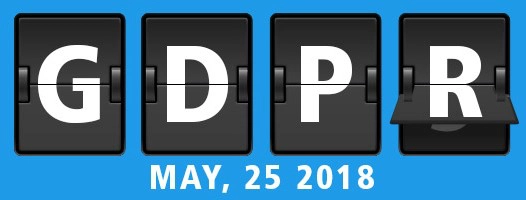
    GDPR actually started 2 years ago. However, enforcement doesn’t begin until May 25, 2018. So as the humans we are, everyone has waited until the last minute to grasp these new regulations with both hands.

    What are the key facets of GDPR?

    You must have grounds for the lawful holding and processing of data. These include:

    • Consent
    • Fulfilment of a contract
    • Legal obligation
    • Necessary for interests of the individual or for the greater public good

    Consent is getting a great deal of attention as marketing now requires explicit “provable consent” in order to be considered lawful under the GDPR. For example, if you haven’t explicitly asked an EU resident in your database if they’d like to hear about some of your upcoming events, you probably can’t lawfully market to this person!

    Other important facets beyond the concept of lawful processing and consent include:

    • An individual may request access to all of their personal data. This may include any information stored in your main database, including contact information, login tracking, clickthrough tracking in a 3rd party marketing system, transaction data, etc.
    • An individual may request that their personal info be removed. (a.k.a. The Right to be Forgotten), meaning that they can request that their records be deleted or anonymized in such a way that it is no longer personally identifiable. (This includes data in backups and in any 3rd parties systems that may have acquired the data from you.)
    • Data Breach Notification to certain authorities and individuals within particular timeframes.

    Are Membership Organizations (Trade Associations, Professional Societies), Not-for-Profits, and Non-Profits exempt from GDRP?

    No. They are not exempt.

    But … Wouldn’t someone joining my association as a member be implicitly giving me lawful grounds to process their data?

    Not necessarily. If they join as a member, it would probably be lawful processing to send them a confirmation of their membership, but you can’t start marketing association products and services to them without consent. This is an area where a GPPR consultant could be useful to you, if you have a lot of EU residents in your data or you actively market/appeal to persons living in the EU.

    How is GDPR going to be enforced?

    The penalties and fines, which will kick in starting May 25, 2018, are steep. There are obvious ways that EU-based organizations and foreign organizations with EU locations can be penalized. The question of how external organizations will be held to GDPR compliance is being discussed in a variety of articles and posts.

    Next up, we’ll discuss how to become GDPR compliant. Stay tuned!


    This is the first of severalMatrix installments on GDPR, Privacy, and Security. Please note: we at Matrix are not lawyers or GDPR consults; do not take this info as absolute. Use this information as a starting point in:

    • Gathering the documentation, processes and tools you need to assess and support your obligations under GDPR
    • Planning for a future where respect privacy and security are implicitly baked into our all our processes and systems, regardless of country


  • Top 5 Ways to Improve Your Facebook Page Reach

    Top 5 Ways to Improve Your Facebook Page Reach

    Have you noticed that the likes and interactions on your Facebook page are decreasing? If so, you’re not imagining it – organic reach on Facebook brand pages fell by 52% last year alone, and Facebook has even admitted that only about 16% of your fans see your updates. Yuck!

    Why is this happening? With an overwhelming amount of content being published to Facebook every second and a limited amount of real estate in each user’s News Feed, Facebook tries to tailor each individual’s feed to deliver what it believes to be the most relevant and interesting for that person. It’s not too surprising then to hear that Facebook prioritizes posts from the friends and family that you interact with the most, and posts from your friends that are linked with your interests. All of this to say, it’s now harder than ever for updates from brand pages to be prioritized and seen.

    In addition, Facebook is a business.  They’ve found that many brands are willing to pay to boost their posts in order to reach more people, providing Facebook with a nice little (ok, large) revenue stream.

    But what if your budget doesn’t support boosting Facebook posts? Don’t worry – it doesn’t mean that you can’t improve your reach without getting out your organization’s AmEx card. Here are five things you can do to improve your Facebook page, reach more people, and get more likes and comments, without spending a penny:

    1. Always include an image with your link posts. The best way to make sure your link shares are prioritized and seen is to include a large preview image (1200 x 630 for the best display on high-resolution devices). The Facebook algorithm demotes links with low resolution photos or links with no photo at all, meaning your fans will probably never see the shared content.
    2. Know what’s even better than images? Video! Social video generates 1200% more shares than text and images combined. Wow! When uploading videos to Facebook, make sure that it’s an original video that you upload directly to Facebook, not a YouTube embed. Facebook prioritizes posts with native video that it can auto-play and caption.
    3. @ mention people and organizations. Get people to tag themselves in your updates. Doing this gives your post more velocity because they will show up on other people’s and organizations’ timelines and feeds. Plus, people get notified when they are @ mentioned and tend to like those posts.
    4. Be original and keep a dialogue going. When sharing posts from other people or other organizations, make sure you are including an original comment. Facebook likes to display posts that have been personalized in some way by the poster, that encourage new thought and dialogue. Also be sure to respond to comments and engage your audience, because this is social media, and consistent, thoughtful responses and dialogue is what will keep them coming back for more.
    5. Encourage direct visits to your Facebook page, and ask your fans to turn on notifications. Direct visits, or visits where people went to your page directly, and not in a feed, indicate special interest and affinity. When people do this, Facebook will tend to prioritize your posts for those people. Encourage direct visits by promoting your Facebook page and specific posts on your website and in emails. Also be sure to ask your fans to turn on notifications for your posts, and even to select “show first in news feed” under the follow options on your brand page, so they never miss a post.

    Bonus tip: Always keep a pulse on the social media and search algorithm updates, but don’t let them rule you. Test, tweak, and test again to see what works best for your organization and your audience.

  • How to Have a Really Great Search on Your Website

    How to Have a Really Great Search on Your Website

    We hear this a lot from people who manage websites and navigate websites, “the site search sucks!” So what can you do to make search not suck on your site?

    Here at Matrix Group, we believe a good site search is the result of many things:

    • Good search technology. There are many products on the market, from the free Google custom search, to the very pricey Google Search Appliance, to commercial products like SearchBlox and open source products like Solr and Lucene. Your vendor can help you navigate the products and find one that is right for you. We like SearchBlox and here’s my Director of Software Engineering on the many reasons why we prefer to implement SearchBlox these days.
    • Effective site search setup. I’m working with a client on a search project and here are just some of her organization’s requirements: she needs her search to index multiple websites, allow filtering of the results by category and source website, index members-only content, support featured results, and allow some content collections to be prioritized over others. A good search solution supports all of these requirements and more. A good search partner helps you develop effective requirements and can implement the solution properly.
    • Good, deep content. Our association and nonprofit clients rarely lack good content, but it is important to take stock of your content, archive what’s outdated or redundant, and keep only the best online. I ask clients to meet as an organization and come up with the topics that they want to be known for on the web, and then audit their content to see if they have ample content on that topic. For example, if I ran Worldchefs and I wanted my site to be known on the web as the place to go if you want to be a culinary chef, I would make sure we have the following types of content:
      • How to be a chef
      • The training you need to become a chef
      • How it takes to become a chef
      • Training for chefs
      • The qualities of a great chef
      • Are great chefs born or made?
      • Etc.
    • Good content preparation. It’s not enough to have good content. Your content has to be optimized for search. Here are some example of best practices: descriptive and unique title tags and H1 headlines on all pages, properties populated in PDF documents, all content available to be crawled, and categories populated and displayed on the page and in metadata.
    • A good understanding of what good search results look like. Sometimes, clients tell me their search sucks. So I ask them to give me examples of 20 searches that people conduct on their site and what great search results look like. If they can’t tell me, we work together to define it. Only then can we refine the search technology, weight the content, and customize the results for the best results.
    • Search analytics. How will you know that your site search is working (or not working?) if you don’t have good analytics? Did you even know that you can have search analytics? Here are some examples: you can track the volume of searches, the search terms being entered, the number of results, and so much more. If you have analytics, be sure to look regularly at what people are searching for and then conduct those searches yourself. Are the results what you expect and want visitors to see?

    My biggest concern with site search is that people complain a lot about it but organizations are rarely willing to invest the time and money to have a really great search. Search is undervalued in that way. I hope that with this post, more organizations understand what goes into having a really great search.


  • An Executive Director’s Guide to Getting the Most Out of Your Next Conference

    I recently had coffee with Carol Singer Neuvelt, Executive Director of NAEM. NAEM is a professional association that empowers corporate leaders to advance environmental stewardship, create safe and healthy workplaces, and promote global sustainability.

    Carol says that one of NAEM’s biggest member benefits is its peer-led educational program, during which members share what they’ve done at their companies.

    “How do you make sure members get the most out of these conferences?” I asked Carol.

    Turns out Carol has three rules for getting the most out of a conference and she doesn’t hesitate to remind her members of these three rules at every turn.

    1. Learn something. This sounds so obvious, but how many of us decide to learn something? Carol says that if we go into each session with an open mind and a keen intention to learn at least one thing, the conference will be a success.
    2. Participate in the conversation. Carol says passively attending a conference is not enough. We should ask questions during sessions, interact with the speakers and attendees during the breaks, post comments on social media, and otherwise make our voices heard.
    3. Make a friend. This is my favorite pro tip from Carol. She’s basically telling us to get off our phones and make a new friend. At lunch, during dinner, at breakfast, during a reception. Introduce yourself, explain what you do and why you’re at the conference, and look for ways to connect with others.

    I loved these tips so much, I had to share. They’re so obvious and yet so wise and so needed. I hope you’ll think about these tips as you head out to your next conference and encourage your staff and co-workers to do the same.

  • Members Want Curation and Insight from Their Associations – Part One

    Members Want Curation and Insight from Their Associations – Part One

    One of the best parts of my job is conducting user interviews. Nearly every Matrix Group project starts with a User Persona exercise where we interview staff to glean their most important target audiences. Then a team of Matrix Group staff interview people in each group. Whenever I can, I help conduct these interviews because I like doing them and I learn so much about what members and non-members want, their pain points, their challenges, and what ultimately motivates them to act.

    Over the past year, across industries and professions, across trade association and professional societies, here’s what people have told us:

    • Surfing to find out what’s new is dead. It doesn’t happen anymore. Any web surfing is done to meet a specific need.
    • People are overwhelmed with data and information. When they Google, they get too many results. They find their association home pages too cluttered.
    • Members wants their associations to keep them up to date on important trends and give them insight into the future.
    • Members want fewer emails, shorter emails, less cluttered web pages.

    Over and over again, we heard, “Our association needs to tell us what we should be paying attention to. I don’t want the same news I can get elsewhere. Tell me the 5 or 6 most important things I should be doing, reading, attending.”

    Even if Matrix didn’t do interviews for you this past year, I bet your members would say much the same things. And if your members are hungry for curation and insight, what are YOU going to do about it?

  • Getting Started with Facebook Live

    Getting Started with Facebook Live

    A couple of Saturdays ago, my friend, co-worker and Director of Biz Dev, Bryan Clark, was taking his first-degree TaeKwonDo black belt test. I was attending as a black belt to help with the sit ups and push ups, to cheer Bryan on since he’s my sparring and workout buddy, and to post updates to the studio’s social media pages.

    In the past, I’ve taken photos and videos and posted them to Facebook in a continuous stream during the event. As I was leaving work on Friday night, a co-worker asked me to wish Bryan good luck and please stream the test live so she could watch from Pennsylvania. Live stream? Could I do it through Facebook Live on Be Ryong’s Facebook page? I decided to give it a try.

    Over the course of the next three hours, I live streamed snippets of the test, I took photos, I shot video, I used my iPhone 6 and my DSLR camera to document the test, and I helped out with the test. I texted friends and co-workers to let them know I was live streaming the event, and I posted updates to Bryan’s Facebook page to let HIS friends know about the test and the live updates.

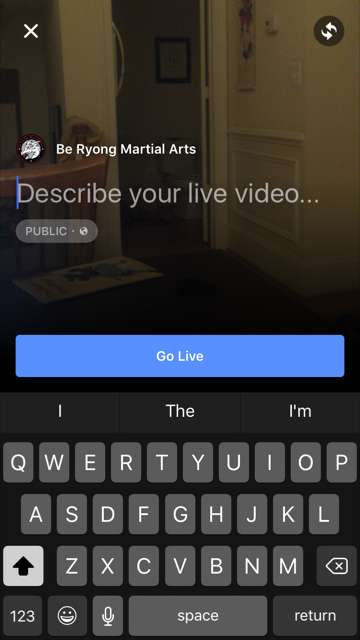
    Facebook Live is ridiculously easy to do. From your personal page or a brand page that you manage, press Publish, then select Live Video.

    You’ll be asked to enter a description. Once you’re ready, you click Go Live. Yes, it’s that easy.


    FBlive-circle_sm FBlive_2

    Things I Learned

    Here’s what I learned from using Facebook Live during the test and during a few classes since then:

    • Be sure to advertise that you’ll be streaming your event live well in advance of the event so that people know to tune in. The decision to live stream was sort of made on the fly, and I could have built up excitement and views if I had done more promoting ahead of time.
    • Make sure you have a good Internet connection. Turns out that one side of the studio had better WiFi than the other, so I stayed on the good side. When I ventured to the bad WiFi side, the video suffered.
    • Have a stand or other means for holding your phone or tablet up and steady. Because I was holding my phone and panning to get the full layout of the studio as the students moved around, the video got a little shaky at times. If I had had more time, I would have set up my phone on a stand in one part of the studio and just occasionally zoomed to get better coverage of a student or routine.
    • Your video will be live in near real time, but not instantaneously. Out of curiosity, I asked a friend to check the studio’s Facebook page while I was live streaming. We discovered the stream was about 30 seconds behind, which we thought was pretty darn great. I remember the days of needing a fiber or satellite connection, a camera, a real-time encoder, yada, yada. And here I was, live streaming with my phone!
    • If you want a copy of the video, shoot the video with your phone or camera, don’t live stream it. I didn’t realize it until later, but I ended up without a local copy of the videos I live streamed because they were uploaded directly to Facebook.
    • If you want HD video, shoot the video from a quality digital camera. The quality of the live stream is good but not HD. Some of the streams were actually fuzzy. So for the breaking part of the test, I chose not to live stream. Instead, I took HD videos and then uploaded them afterward to Facebook. The quality is better, AND I have copies to give to the students.
    • For short bursts of activity, you can choose to live stream OR shoot video and then upload. Uploading video to Facebook is so ridiculously easy, especially if videos are a couple of minutes or less. For these short videos, Facebook Live is less compelling.
    • Facebook will archive your live streams so even if your followers don’t watch in real time, they can still watch on demand.

    All in all, Facebook Live is fabulous tool for live streaming your events. Want family overseas to watch your daughter’s wedding from afar? You can live stream on Facebook. But just be sure get a quality, HD archive as well.

    If you want to see samples of Facebook Live streams from the black belt test, visit the BeRyong Facebook page. I’d love to hear about your Facebook Live adventures!

  • The Great Banana Bread Experiment: Are People Really Reading Your Emails?

    The Great Banana Bread Experiment: Are People Really Reading Your Emails?

    bread_500pxA couple of weeks ago, I sent out an important message to my entire staff about IT support. We had recently put in some technologies to make it easier for staff to request IT support during business and non-business hours, and some of our procedures had changed. The subject line began with PLEASE READ, and it came directly from me, Joanna Pineda, CEO and the person who signs everyone’s paycheck.

    The email was longish so I decided to do a test. At the very bottom of the email, I wrote:

    “BTW, if you read all the way down to this message, send me an email with the words “banana bread” in the subject line. I’ll bring in banana bread for you next week and for God’s sake, don’t give this away on Slack or any other method. Curious to see how many people will read this message. Cheers.”

    So how many people sent me a banana bread email? Out of 40 people, seven people sent me emails. Seven – that’s it!

    To be fair, the IT team already knew the procedures. And I had discussed the procedures with a few staff before sending the emails.

    kate_bread_smDuring staff meeting last week, I asked everyone if they had: read but not responded, skimmed and not read my banana bread message, or if they didn’t read the message at all. I gave everyone amnesty if they told me the truth. I got these responses:

    • I already know the policies
    • I skimmed the part about the policies to make sure I knew what I needed to know
    • Too long, didn’t read
    • I don’t like banana bread
    • I didn’t see the email

    I conducted a similar experiment a couple of months back when I sent an email to my son’s Cub Scout pack, of which I’m the committee chair. The email contained information about the next pack meeting, an upcoming camping trip… Yada, yada – if you’re a Scout parent, you understand me. At the bottom, I said:

    “Okay, thanks for reading this far. If you got this far, email me and put the word “magnet” in the subject line and I’ll give you a Friends of Scouting magnet at the next meeting.”

    Out of 60 people on the list, three responded. Two said they’d take a magnet and one said, “Magnet – but I don’t need a magnet. What fun!”

    I know this wasn’t a scientific test, and the emails weren’t life or death, but I think these experiments are pretty illustrative of what really happens when we send out emails. We look at our open and click rates and pray that those who opened actually read the message. Are they actually reading your message in its entirety? God, most likely not.

    What are the takeaways here? For starters:

    • Keep your emails short(er)
    • Don’t bury important calls to action at the bottom of your message
    • Test your campaigns

    If you’ve read all the way to the bottom of this blog post, submit a comment on this post using the word SWAG, and I’ll send a Matrix Group pen to the first 25 people. And if you decide to bury an Easter Egg in your next email newsletter, please write the results of your experiment in the comments as well or send me an email.

  • Why Every Organization Should Care About Search Engine Optimization (SEO)

    Why Every Organization Should Care About Search Engine Optimization (SEO)

    Internet search conceptEvery once in a while, a client or prospect will tell me their organization doesn’t care about search engine optimization (SEO). Why? I get these reasons:
    • The organization targets a very specific, very niche set of audiences.
    • The organization has a defined universe and they are largely known to the association and vice versa.
    • The organization doesn’t have e-commerce on the website so they don’t need to reach out a wide audience to make sales.
    Even if all of this is true, I say that EVERY organization should care about SEO because:
    • A huge number of people use Google (or another search engine of choice) to access a known website. We know this because when Google used to make search terms available, it was shocking to see that so many people type specific URLs into Google. Evidently, there are people who just always start with search without even realizing it.
    • Your target audiences may know your organization very well, but they may not know your URL off the top of their heads. So what they do? They Google for it. Again, looking at search terms tells us a whole lot of traffic comes from Google, from people who know the specific organization they seek.
    • Many, many people rely on Google to search a website because the internal site search sucks. During many user interviews, members tell us they use Google to find what they are looking for on a specific site because the site search wasn’t effective.
    • If your organization is a trade association, you may “know” all of your member companies, but new member company staff may not who are you and what your organization does.
    • No matter how good your marketing and how often you mail or email, the vast majority of your customers do not know everything your organization has to offer. For example, Suzie Smith attends your annual conference ever year but she doesn’t know that you also publish a certain publication on a specific topic, so what does she do? She Googles for it!
    If your website isn’t search-engine friendly because you think SEO doesn’t matter, I hope you’ll think again. Even people who know your organization still rely on Google to find your site and search your site. If Google can’t find your site and can’t index the content properly, you may be losing out on traffic from the very people you think are going directly to your site.
  • 2015 Top Resolutions for Managing Your Website Better

    2015 Top Resolutions for Managing Your Website Better

    resolutionsI was in the car yesterday and a radio talk show host was already talking about failed New Year resolutions! C’mon, it’s not even the middle of January! Surely we have a few more weeks (and months!) of trying to change behavior before throwing in the towel on failed resolutions.

    Me, I’m resolving to stretch more and eat less sugar. As for my company website and blog, here are my top resolutions. Don’t know if these resolutions will be easier or harder to live up to, but they’re equally important if you’re a marketer.

    1. Update your website more often and according to a schedule. We all get busy and somehow, website updates take a back seat to other things. I have clients who would never NOT publish their monthly magazine, but they routinely get “too busy” to update their website. But your website is arguably more valuable as an information resource to your members, customers and prospects, has a wider reach, accessible to search engines and available 24/7/365 to the whole world (but you already know all this!). Get posting!
    2. If you don’t already have one, create an editorial calendar that maps out topics by platform and week/month. For example, in December, my design team usually blogs about trends for the coming year. Even though we don’t know in January what trends we’ll be blogging about in December, we know that we’ll have at least a couple of posts on the topic. So that topic goes into the calendar and we assign appropriate staff.
    3. Add video to your toolbox. Video continues to rock the web. Pages with video get more views and visitors will spend more time on your site, etc., etc. So what’s stopping you? You don’t need a gigantic budget (although budget always helps!). Create screencast that shows people how to navigate your members-only site or interview senior staff and members about challenges facing your organization, industry or profession. Video adds authenticity to your website more deeply than text and images.
    4. Take your analytics to the next level. I was talking to a client yesterday about a much anticipated microsite they had just launched. He was happily reporting on the usage that the new site was generating, including referrals from their blast email. If you’re not already doing it, you should be checking your usage reports regularly and this data should be guiding your marketing decisions. This year, resolve to integrate your analytics with your CRM so that you know *who* is visiting your website. What percentage of your traffic is coming from members? Primary contacts? New members? What are members interested in doing on?
    5. Get serious about mobile. If your website isn’t responsive, if you’re not thinking about a mobile app, and/or if you’re not looking at your mobile traffic, 2015 is the time to get serious about mobile. Making your website mobile-friendly will generate an explosion of mobile traffic — promise! While you’re at it, make sure your emails are responsive as well since more email is read on a phone than a desktop these days.

    Well there you have it— my top 5 resolutions. Stuff you already know. So just do it.

    What are your resolutions?