Matrix Group International

Month: October 2010

  • Are You and Your Organization Vulnerable to Social Engineering?

    Are You and Your Organization Vulnerable to Social Engineering?

    A couple of years ago, I discovered strangers walking through our office unescorted.  They told our receptionist that they were looking at office space in the building; they were well dressed, the referenced the name of our landlord and they asked nicely if they could just walk around and take a look at our space.  Our receptionist, ever on the lookout for ways to be helpful, let them wander the halls.

    A couple of months ago, someone claiming to be an exhibitor at a client’s trade show called, asking for the client’s logo so they could use it in an e-mailing going out.  The person said they had the approval of the client.  My responsive Project Manager opened up a work request and got the logo sent out asap.

    In both cases, the persons making the requests were legitimate and no harm was done.  BUT, they just as easily could have been hackers or scammers and my helpful staff could have been duped into giving them information or access they were not authorized to have.  Which is why Matrix Group covers security during orientation and training for all new hires and we recently brought in a security expert to discuss social engineering.

    Social engineering is “the act of manipulating people into performing actions or divulging confidential information, rather than by breaking in or using technical cracking techniques.” Kevin Mitick, the famous computer hacker, claims that it’s “much easier to trick someone into giving a password for a system than to spend the effort to crack into the system.”  There are many social engineering techniques, including:

    • Pretexting is the act of getting people to divulge small pieces of information, which hackers use to obtain more information from the next person.  Knowing bits of information establishes legitimacy in people’s minds and makes them more willing to divulge even more information.
    • Phishing is used to fraudulently obtain private information.  Phishers typically impersonate legitimate businesses via phone or e-mail and convince victims to divulge sensitive or private information.  Think of the hundreds of e-mails you get that look like they’re from your bank; nearly all of them ask you for your account information, login information and/or SSN.
    • Baiting is a technique whereby hackers leave CDs or USB sticks containing viruses or trojans in public places, in the hopes that a curious person will pick up the items and insert them into their systems, effectively infecting them and making them vulnerable to hacker attacks.

    Social engineering is highly successful because of the natural human tendency to trust other people. In addition, most people want to be helpful.  In fact, we train our staff to be helpful because helpfulness is key to a successful business.  If you’re wondering if you or your organization are vulnerable to social engineering tactics, ask yourself these questions:

    • How easy or hard would it be for someone to gain access to your office by mentioning the name of the CEO and some key staff?
    • How difficult would it be for someone to impersonate you by providing your name, address, SSN, mother’s maiden name, spouse name, etc.  I’ll bet a lot of this information is on public Web sites and social networks.  Just look at some of your friends’ profiles on Facebook; you’ll find hometown, e-mail, birthday, the works!
    • How hard would someone have to work to impersonate someone and convince a network admin to divulge or reset a password?
    • Have you held the lobby door open for someone off the street while entering a secure building?

    Okay, now that you’re paranoid, what are you going to do about this potential threat to you and your organization?


  • It’s Time To Audit Your Facebook Privacy Settings

    It’s Time To Audit Your Facebook Privacy Settings

    I found out recently that the iPhone version of the Facebook app synchronizes with personal profiles on Facebook.  Which means (gasp!) that if a friend has your private phone numbers in his/her phone, it’s possible that those numbers are now on Facebook.  Egads!

    While I love Facebook, Twitter, instant messenger, etc., I try very hard to limit the amount of personal information that I share on those networks, including and especially my address, home phone number, information about my family, etc.  But with the social networks constantly updating their terms of use and adding new functionality to their sites and apps, it’s hard to keep up with the changes and monitor the impact on our privacy.

    Which is why I recommend an audit of your Facebook (and other social network) privacy settings on a regular basis. Here’s how:

    • Log in to Facebook and click on Account in the top right corner of any Facebook page.
    • You’ll get a dropdown of options; click on Privacy  Settings.

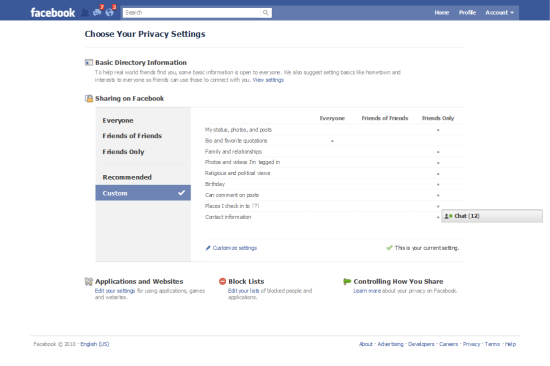
    Facebook Privacy  Settings Landing Page

    Here’s what your Facebook Privacy Settings Landing page looks like.  Note that you can share parts of your profile with Everyone, Friends of Friends and Friends Only.  I have edited my profile so that nearly everything about my profile is visible to Friends Only.  But wait, this page only shows you a fraction of the privacy settings available to you.  To view and edit all of your privacy settings, click on Customize Settings.

    You’ll also notice two navigation items on the left for Recommended and Custom.  Click on Recommended and you’ll see that Facebook recommends that a great deal of your profile be available to everyone.  You can select these default settings with a click.  Me, I definitely opted for the Custom Settings.

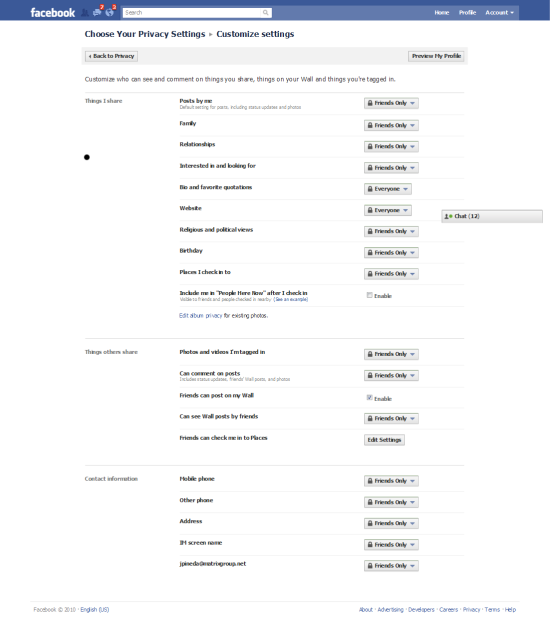
    Customize Settings Page

    Here’s what the Customize Settings page looks like.  You’ll see that you can select who can see elements of your profile.  Here are my recommendations:

    • If you post photos of your family, especially your children, make Posts By Me visible to Friends Only.
    • Be sure to pay special attention to the Things I Share section.  This is the section where you can control what others are doing, including tagging you in photos and videos, checking you into Facebook Places, etc.  This allows you to NOT allow friends to check you into a bar or party, and stops them from tagging you in photos and videos and thereby making your photo visible to their friends.  Here’s a blog post about how someone nearly sabotaged a dinner party by checking all the guests into Facebook places.
    • If your Facebook network is vast, consider creating custom lists and then specifying with each post and update which list can see your updates.  For example, I have a Family list that I use to share family photos and insider updates.
    • Be sure to audit your privacy settings for existing photo albums. If you created albums before Facebook rolled out its new privacy settings, you may find that all or many of your albums are available to Everyone (I know I did!).

    As for that pesky iPhone app that uploads your personal information to Facebook, unfortunately, there’s nothing you can do about that.  Facebook did recently add a warning to the app, warning users to make sure their friends are comfortable sharing their information with others.  This is a small consolation to me; I would venture to guess that most people don’t think about the privacy ramifications of their actions and apps and will blow right past this user agreement.  What to do?  This may sound dorky, but here’s what I’ve told my friends:

    • Please don’t sync your iPhones with Facebook.
    • Don’t try to check me into Facebook places.
    • When you’re at my house, never check into Facebook Places or FourSquare so you don’t reveal my home information.
    • Please don’t upload photos and videos that are unflattering to me and my friends/guests.  (When I throw Rock Band parties at my house, videos are not allowed; we DO allow photos of us band members looking cool with our instruments.)

    How about you?  Have you audited your Facebook privacy settings recently?  Any revelations?  Any privacy disasters?  What are you doing, if anything, to maintain a semblance of privacy online?