Matrix Group International

Month: April 2010

  • “Become a Fan” Has Been Replaced with “Like” on Facebook Fan Pages

    “Become a Fan” Has Been Replaced with “Like” on Facebook Fan Pages

    In late March, Facebook announced that “Become a Fan” would be replaced by “Like” on Facebook fan pages.  The change rolled out in early April and today, the ubiquitous Facebook “Like” button is on all Facebook fan pages, next to the company/organization/page name.
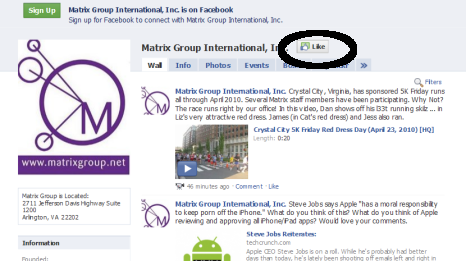
    Image of Matrix Group Page on Facebook

    Facebook’s Rationale for the Change to “Like”

    Facebook says it changed “Become a Fan” to “Like” to offer businesses a more light-weight and standard way to connect with people, things and topics in which you are interested.

    In addition, changing to “Like” aligns with Facebook’s overall strategy of populating the Web with “Like” buttons so that Web surfers can announce their like of pages anywhere around the Web and have these “likes” posted to their personal Facebook pages.  (More on this in a future blog post.)

    It seems Facebook wants to corner the “Like” market.

    For the Most Part, Facebook Pages are NOT Changing

    Aside from changing the language in the button from “Become a Fan” to “Like,” the Facebook pages aren’t really changing.

    • Status updates on Facebook pages will still appear on fan (er liker) profiles.
    • Facebook page owners can still call people who like their pages “fans.”
    • When a Facebook subscriber “likes” a page, it will show up in their Profile under Info –> Pages.

    What IS Changing About Facebook Pages

    • Facebook now allows you to customize the order in which Pages appear on your profile. You can even move some Pages behind a “See all” link, so that you can still connect to Pages without displaying all of them prominently on your profile.
    • Instead of seeing a random selection of fans + a link to See All, there are now two boxes:  “xx Friends Like This” tells you how many of YOUR friends also “like” a page while “xx People Like This” tells you the total number of likers or fans.
    (more…)

  • Dear Restaurant Owner, Please Ditch the All-Flash Web Site

    Why do restaurant owners love Flash so much that their entire Web sites are in Flash? Don’t get me wrong, I love Flash and I make a living selling Flash movies, branding areas, yada, yada. But most Web sites should not be all Flash!

    Here’s an example of an all Flash site that is annoying and borderline useless. I was scheduling lunch with a friend, who asked me to recommend a restaurant and send him the physical and Web addresses. No problem, right? Wrong.

    Check out the Web site for Kora in Crystal City – http://www.korarestaurant.com/ The Web site is pretty, but if you’re trying to get an address and send it to a friend, it’s not user-friendly at all!

    • It took me 5 minutes to find the address.  It’s not on the home page, nor under Hours and Directions.  It’s under Contact Us and Reservations.
    • Because the site is entirely in Flash, I couldn’t copy the address and paste into the e-mail I was sending my friend.
    • I also could not copy and paste the address into Google maps so that I could send my friend directions from Reston.
    • Forget being able to bookmark specific pages because the URL never changes in the single Flash file for the entire site. So I couldn’t send my friend the URL of a menu page.  Aaaargh.
    • Oh yeah, you can’t print Flash pages either unless print-friendly pages have been specifically created; most designers don’t bother.  So if you want to print Kora’s Hours and Directions page, you’re out of luck.

    Since I’m lazy and did not want to re-type the address, I simply went to Google, typed “Kora Arlington, VA” and got a link to a map and directions from Google maps.  God bless Google.

    I’m sure Kora paid good money for its beautiful, all Flash site, but I bet it’s a pain to update and it’s not very accommodating for visitors who just want to copy and paste an address.  Good grief!

    How about you?  Got your own rants against an all Flash site?  Post links and comments!

  • Sometimes It Pays To NOT Listen To Your Customers

    Sometimes It Pays To NOT Listen To Your Customers

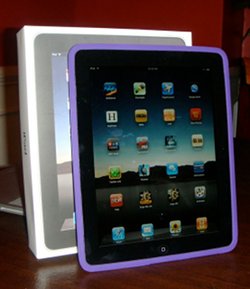
    Photo of Joanna's iPadI got an iPad last week and I’m already in love with it. Yes, I already have an iPod Touch and I’m running a lot of the same apps on both devices, but somehow, the iPad experience is new and different.  Is it a tablet PC?  Not quite.  Is it a Netbook?  Definitely not.  So what is it and why do we need one?  More importantly, why do we want one?

    I find it fascinating that Apple has managed to capture the zeitgeist of our age and intuit our desires for computers and devices.  And yet, in a review of the iPad, Time Magazine reveals that, “(o)ne of the things that makes Apple unique is that it never holds focus groups. It doesn’t ask people what they want; it tells them what they’re going to want next.” 

    So how does Apple know what customers will want?  And what lessons can mere mortal companies learn from Apple’s product development process?

    A few years ago, the MatrixMaxx team at Matrix Group was developing the product road map for the coming year.  A couple of us were arguing for a total redo of the system’s user interface.  We also advocated a lot of new reports that basically repackaged data already available through exports.  The rest of the team argued that clients weren’t asking for these enhancements and it would be risky and a lot of time for little benefit to move forward with such a radical overhaul of our association management software.

    After a lot of bargaining re: scope and timeline, the entire MatrixMaxx team agreed to a redesign of the system’s user interface and a new export/report framework.  The effort ended up  behind schedule and it introduced a lot of bugs into the system.  And yet, when the dust finally settled and we got the bugs under control, the end result was fabulous and clients loved it.  The new interface makes it much easier to find information and gave the product a new vibrancy.  The export framework has been universally applauded by clients.
    (more…)

  • The Washington Animal Rescue League Web site Redesign

    The Washington Animal Rescue League Web site Redesign

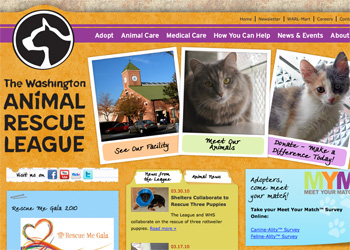
    Matrix Group partnered with the Washington Animal Rescue League to launch a redesigned Web site, www.warl.org.  In order to help animals in need, the League relies on support from the local community –  The goal of the redesign was to help the League expand its support network within the Washington D.C. metro area, increase animal adoptions and program funding, highlight its innovative new shelter facilities and continue to create community awareness about proper animal care.

    Matrix Group:

    • Developed a clean, updated site design, showcasing the shelter’s new facilities, and the many animals the League helps. The site’s design also motivates visitors to take action:  adopt a pet, make a donation, and volunteer.
    • Created a simple, user-focused navigation and searchable site layout, so visitors can easily find information on adoption fairs and special events, veterinary services, and how they can support the respected animal shelter.
    • Implemented a user-friendly CMS (Expression Engine) so League staff can easily update the Web site. Where previously, changes to the site were difficult and time-consuming to make, the staff can now update the entire site easily and immediately.
    • Incorporated the existing animal search database into the redesign, so site visitors can find their ideal companion by filtering pets available for adoption by animal type, age, size or find a pet by name.
    • Integrated social networking sites Twitter, Facebook, Flickr and YouTube and provided League staff with best practices on how to incorporate social networking into its marketing, communications and fund-raising efforts.

    Visit the new Washington Animal Rescue League Web site

  • The Association of Small Foundations Web site Redesign with MatrixMaxx Implementation

    The Association of Small Foundations Web site Redesign with MatrixMaxx Implementation

    Matrix Group partnered with the Association of Small Foundations (ASF) to launch a redesigned Web site, www.smallfoundations.org which includes full integration with MatrixMaxx.  ASF wanted to redesign their Web site to improve the design of the Web site and make information more easily accessible to key audiences.  In addition, ASF wanted to integrate their site’s new design with an upgraded member database to make it easier for ASF staff to search, view, and update membership information.

    Matrix Group:

    • Created user profiles that helped in guiding the entire design and development process
    • Developed a site design that showcases the benefits of being an ASF member, including educational programs and events, as well as other tools and publications to help small foundations be successful
    • Implemented a content management system (CMS) that gives ASF staff full control over the entire site and supports a multi-leveled taxonomy
    • Implemented MatrixMaxx, Matrix Group’s enterprise association management software for associations and professional societies.

    Visit the new ASF Web site

  • Who Watches TV During Regular Broadcast Hours?

    As I write this, I’m watching an episode of NCIS that I purchased from iTunes and streamed to my Apple TV. Last weekend, I was swapping stories with friends about our favorite TV shows and when someone mentioned a show I didn’t recognize, I asked when it was on. The answer? “I don’t know, I TiVo everything.”

    That’s when I realized that I nearly never watch TV shows during regular broadcast hours.  Instead, I rely on recordings and purchases to watch shows I’m interested in, when I want them.  And since the networks now stream shows on their Web sites and Hulu, who needs to be a slave to the TV schedule anymore?

    In a report titled “Television, Internet and Mobile Usage in the US,” Nielsen calls this phenomenon “timeshifted TV” because viewers are watching shows on their own schedule.

    Who’s been hurt by this phenomenon?

    • The networks that rely on advertising since so many of us fast forward through commercials or purchase commercial-free shows.
    • Providers of schedules, like TV Guide and the newspapers, since we use our devices to view or purchase what we need on demand.

    Who’s benefiting?

    • Companies that allow us consumers to watch shows on demand, like Netflix, iTunes, Comcast, Verizon, etc.
    • Companies that can develop non-traditional advertising and PR campaigns and don’t just depend on viewers watching shows and sitting through commercials.

    How about you?  What are your viewing habits?  What other disruptive technologies and trends are helping us say bye-bye to traditional forms of leisure?

  • Virgin America Has Made it Fun to Fly Again

    Virgin America Has Made it Fun to Fly Again

    Whenever Matrix Group flies Creative Director Alex Pineda to the DC area (from San Francisco, where he is based), he asks to fly Virgin America.  Alex says the Virgin flying experience is “superior to other airlines.” Last week, I got to experience why Alex likes Virgin so much.

    For my son’s Spring Break, my family spent a week in San Francisco and we flew round trip on Virgin America.  After two flights, I am a total fan, so much so that I told my husband that from now on, whenever possible, we will fly Virgin.

    Just what makes the Virgin America user experience so different?

    Virgin America doesn’t use different or larger planes.  The airfare was comparable to other airlines when I was booking on Orbitz.  We had to pay $20 to check our bags.  The legroom on the plane wasn’t more than on other planes I’ve flown recently.  The food and alcohol weren’t free.  And I didn’t get a blanket or pillow.

    What made Virgin America different was the entertainment and how food and beverage were dispensed.

    • The beverage carts only  made one pass through the plane.  But for the rest of the 5+ hour flight, if we wanted food or drink, we used our touch screens to place an order.  If I wanted water, I touched water and a flight attendant came by within minutes with a bottle of water – for free.  When my son wanted cookies, chocolate or a sandwich, I swiped my credit card, and the flight attendant came by with his order.  So for the entire flight, instead of just the couple of times the carts come around, we had access to food and beverages.
    • There was Wi-Fi on the plan! For about $8, I could get wi-fi and check e-mail and surf the Web!  Unbelievable!  And each seat had regular AC power so I could keep my laptop plugged in during the whole flight!
    • I loved the free Dish Network. No kidding, I caught an NCIS marathon the way to SF and a House marathon on the way back.  Truly decadent!
    • (more…)