

Matrix Group International

Month: February 2017

  • “What’s Special About Today? Life Lesson from a Six-Year-Old”

    “What’s Special About Today? Life Lesson from a Six-Year-Old”

    I was trying to get my 6-year old out of bed the other morning. He wouldn’t budge. Finally, he challenged me by asking, “What’s special about today?

    That stopped me my in tracks. “What IS special about today?,” I thought. I named a few things: “I’m picking you up early. You have TaeKwonDo. I’m making pasta.” Satisfied, MJ bounded out of bed and ran downstairs. The day proceeded normally, better than normal even.

    As I’ve blogged about in the past, my children make me better by making me see the wonder in life. Is it really special that we’re having pasta tonight? And yet, by simply asking the question and coming up with an answer, I reframe my day and change my perspective. You know, it IS special that we’re having pasta because it’s my son’s favorite pasta and he’s happy when I make it.

    At work, perhaps it’s special that my team hit all their deadlines today. That my most recent project is under budget. That I had a great conversation with my mom. Or that the downstairs deli has an especially great egg salad sandwich today. But how often do we acknowledge and celebrate these victories every day?

    Research shows that feeling awe makes us more spiritual, generous and content. Research also shows that being grateful can transform our lives.

    In 2017, one of my resolutions is to recognize more of these special moments and acknowledge them as special. Now when any member of the family is a sleepyhead in the morning, we ask, “What’s special about today?” It’s a great way to start the day.
  • Favorite Tool: Google Page Analytics Chrome Extension

    For me, 2017 is all about productivity hacks and working more efficiently. Recently, I’ve been diving deep into the world of Google Chrome extensions to help me streamline as much of my work (and personal life) as possible.

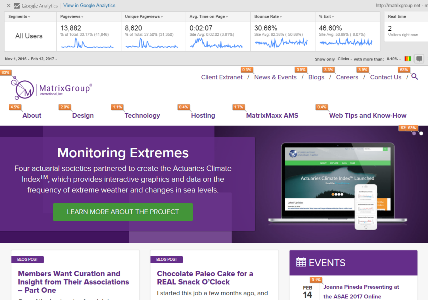
    One of my current favorite tools is the Page Analytics extension for Chrome. With just a quick glance, it shows you how your users are interacting with your site, in an easily digestible format.

    How does it work?

    Once you have the extension installed and turned on, you will see the analytics data pop up on any webpage you visit that you have access to in Google Analytics. Keep in mind that this requires that you are logged into the Google account in Chrome that is tied to your Google Analytics account.

    When the extension is turned on, you’ll be able to see:

    • Metrics such as pageviews, unique pageviews, average time on page, bounce rate, and exit percentage. You can also use the date comparison and segmentation tools directly in the extension for these metrics.
    • The number of active, real-time visitors on your site.
    • In-page click-through rate analysis.

    I love that in the middle of a marketing meeting when someone asks, “Hey – does anyone know if our users are actually clicking on the calls to action in our rotating branding area?” I can quickly pull up our website to see how many people have clicked through in the last month. It’s also a heck of a lot easier to take a quick, high-level peek at the traffic on any given page of our website than it is to log in to Google Analytics and dig for that information. Pretty great, right?

    While I still very strongly suggest doing a deep dive into your Google Analytics reports once a month at minimum, it’s great to be able to get a rough idea of what pages users are visiting, what’s working, and what’s not working in a matter of seconds.

    One very important thing to note about the click analysis, however, (and one of my only gripes with this extension as I think it’s a bit misleading at first glance), is that the click-through rate is for each destination page. For example, if you have three separate links to your events page on your homepage – in the navigation, right rail, and footer – they will all show the same number of clicks, even though the link in the navigation may have gotten the most number of individual clicks. Therefore, the click analysis isn’t good indicator of the success of link placement. Just something to keep in mind!

    What are some of your favorite Chrome extensions for working more efficiently?

  • Members Want Curation and Insight from Their Associations – Part One

    Members Want Curation and Insight from Their Associations – Part One

    One of the best parts of my job is conducting user interviews. Nearly every Matrix Group project starts with a User Persona exercise where we interview staff to glean their most important target audiences. Then a team of Matrix Group staff interview people in each group. Whenever I can, I help conduct these interviews because I like doing them and I learn so much about what members and non-members want, their pain points, their challenges, and what ultimately motivates them to act.

    Over the past year, across industries and professions, across trade association and professional societies, here’s what people have told us:

    • Surfing to find out what’s new is dead. It doesn’t happen anymore. Any web surfing is done to meet a specific need.
    • People are overwhelmed with data and information. When they Google, they get too many results. They find their association home pages too cluttered.
    • Members wants their associations to keep them up to date on important trends and give them insight into the future.
    • Members want fewer emails, shorter emails, less cluttered web pages.

    Over and over again, we heard, “Our association needs to tell us what we should be paying attention to. I don’t want the same news I can get elsewhere. Tell me the 5 or 6 most important things I should be doing, reading, attending.”

    Even if Matrix didn’t do interviews for you this past year, I bet your members would say much the same things. And if your members are hungry for curation and insight, what are YOU going to do about it?