Matrix Group International

Month: October 2013

  • When Is It Time to Implement Responsive Design?

    When Is It Time to Implement Responsive Design?

    Responsive design illustrated on multiple devicesA few weeks ago, I conduced a webinar on implementing a “Mobile First” strategy. By mobile first, my co-host Alex Pineda and I mean a strategy where you consider the needs of mobile users first. Why? Because mobile usage is growing faster than desktop usage, because mobile usage is greater than desktop in some countries (like India), and because designing for mobile (especially smartphones) is harder than designing for tablet and desktop. During the webinar, a big topic of discussion was, “When is it time to implement responsive design?”

    My answer to this question is: NOW. Here’s what I usually hear from prospects and clients.

    Objection #1: “My mobile traffic is tiny.” This might be true today but mobile usage is growing really fast. More importantly, every single one of our client sites that went responsive is now seeing huge increases in mobile usage, with mobile now representing double digits. This tells us that visitors keep coming back when you reward them with a great mobile experience.

    Objection #2: “Responsive is expensive to implement.” It’s true that responsive can add up to 20% more to the overall design and implementation budget. Whenever we can, we use wireframes and designs to explore ways in which websites should look and behave differently on different devices, based on the tasks we believe users need to accomplish on said devices. These discussions, the development work and the testing are often labor-intensive. The good news is that most CMS platforms (we like Sitefinity and WordPress) make it much easier to implement responsive design. In fact, if budget is limited, we can implement default responsive templates. So please don’t let budget stop you from going responsive with your website.

    Objection #3: I’ll wait until our next redesign.” While it’s tempting and certainly easier to embark on responsive when you’re in the thick of a redesign, unless your redesign is happening right now, I don’t think you should wait. Can you really ignore the needs of the 25% mobile-only audience and the 22% market share of mobile devices for overall traffic?

    Objection #4: Search isn’t that important to my online strategy. Even if you think your target audiences won’t look for your products and services via search, you can’t ignore this statistic from Search Engine Journal: 93% of all Internet traffic starts with search. Further, Google is demoting sites that aren’t mobile-friendly because 25% of search clicks are from mobile devices, and climbing.

    If you’re still not convinced, just look at your own mobile device usage and think about how wonderful it is when your favorite news or retailer site has a great mobile site and you can do what you need on a phone or tablet.

    It’s time to go mobile. It’s time to go responsive.

  • What Happened to My Button? How iOS 7 Will Influence Web Design

    What Happened to My Button? How iOS 7 Will Influence Web Design

    I upgraded my iPhone to iOS 7 over the weekend and immediately realized why the Internet is buzzing about this OS upgrade. I did a webinar last week on mobile strategy and one of the attendees asked, “how will iOS 7 affect web design?” Once again, it seems Apple is leading the way and creating a new aesthetic for good mobile design.

    After playing with iOS 7 for a few days, here’s what I’m realizing the following:

    iOS 7 celebrates flat design. In a recent SnackOClock post, Matrix Group Creative Director Alex Pineda pronounced the death of skeumorphism. Wikipedia defines skeumorphism as “an element of design or structure that serves little or no purpose in the artifact fashioned from the new material but was essential to the object made from the original material.” Check out the new iMessage interface below. The buttons are all gone! The only things distinguishing Messages from Richard and Contact are color and position. Even Send at the bottom of the screen is just simple text! Apple is basically saying, “you know what this navigation means, we’re not going to use beveling and gradients and such to tell you that something can be clicked.”

    screenshot of iMessage in iOS 7

    iOS 7 is encouraging the device and the OS to get out of the way and let the content shine. For example, when I browse a website in the new Safari, back and forward buttons are gone as well. I can swipe to the left and right to visit previously accessed pages.

    Mobile design trends will influence web design overall. It used to be that mobile design came after desktop and now mobile and desktop are on equal footing when it comes to designing a user experience. In some cases, I’m even recommending that clients design for mobile first so mobile will set the tone for the overall experience. However, desktop and mobile can’t be the same because think about it: on a small screen, you’ve got to be very focused with your design. On a large screen, there’s usually a lot going on so we will probably always need skeumorphic elements to create focus and paths through our websites.

    The Apple Developer website says iOS 7 embodies the following principles:

    Deference. The UI helps users understand and interact with the content, but never competes with it.
    Clarity. Text is legible at every size, icons are precise and lucid, adornments are subtle and appropriate, and a sharpened focus on functionality motivates the design.
    Depth. Visual layers and realistic motion impart vitality and heighten users’ delight and understanding.

    Pretty fancy language and if I just read the above, I’m not sure I would understand it. But after playing with my iPhone for a few days, I think I get it. Next stop, upgrade the family iPads (we have 3!).


  • National Electrical Contractors Association Mobile App

    National Electrical Contractors Association Mobile App

    The National Electrical Contractors Association (NECA) is the voice of the $130 billion electrical construction industry that brings power, light, and communication technology to buildings and communities across the United States.

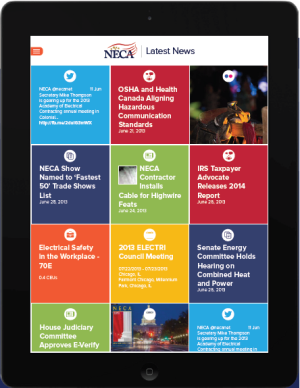
    Now available for download from iTunes and the Google store, the new NECA news app aggregates feeds from the NECA main site, foundation site, magazine site, convention site, conference sites, Twitter feeds, YouTube channel, Flickr and blogs. Members can find out what’s new at NECA for the last 90 days  or view articles, stories, social media updates and videos based on green construction, safety or labor relations.

    The app rolled out just in time for the association’s annual convention, NECA 2013 Washington D.C., which brings together industry professionals from across the nation.

    Download the news app at http://www.necanet.org/neca-news-app/

    Learn more at www.necanet.org.

  • 5 Top Sources for Free Stock Photos

    Stock photography, when used properly, can be a real visual asset to your site. However, there is a lot of garbage to sift through to get to the good stuff and the process can be down right tedious and expensive. If you have a website or blog, there is a solid chance Professional photographer takes posed photoyou’ve run into the problem of finding quality images at an affordable price.

    The major problem with stock houses is that their overly posed, stiff images tend to be severely dated, but yet they still want you to pay a premium for them. That doesn’t always seem like a good deal to me, so when I have time—and a small budget—as a designer, I tend to look at these top five free stock photography sites first.

    1. Wikimedia Commons

    All of the images on this site are uploaded with Creative Commons licensing, and are owned by the individual users, not Wikimedia. Creative Commons licensing basically means the photographer is graciously letting you use their image for free, but be sure to read the terms, sometimes there are conditions.

    2. Compfight

    This site is great because it allows you to filter Flickr images though Creative Commons, making the process much easier. The images are all uploaded by real users, and therefore appear much less stocky.

    3. Stock.xchng

    This is a more traditional stock house, just without stock house pricing.

    4. morgueFile –  The word “morgue” is taken from the name of the room from the publishing world in which all clippings and image files were kept. Probably not what most people think of when they hear “morgue.”

    5. Wylio

    This site was set up with the blogger in mind. They make it easy to search, resize, download and imbed images into your blog all at once. 5 free images per month, with reasonably priced upgrades. You just have to grant access to your Google picasa web album.

    Bonus! 6. Unsplash

    This is technically a Tumblr page, not a searchable stock site. It’s full of beautiful, artistic, completely free, do whatever you want to them, images created by the people at ooomf. If you subscribe to their page, they’ll send ten new images to your inbox every ten days. And who doesn’t want eye candy sent to their inbox?

    Knowing when you can and cannot legally use an image can be challenging, so make sure you read—and follow— the licensing info that accompanies the image. You don’t always have to “get what you paid for,” you just have to know where to look.

    What’s your favorite free or low-cost resource for stock imagery?