Matrix Group International

Month: June 2012

  • Are You Suffering From Social Media Fatigue?

    Are You Suffering From Social Media Fatigue?

    Tired Woman Asleep In Front of Her KeyboardA friend asked me recently if I’m on Pinterest, the hot, new social network where users “pin” products, places and articles they like to Pinterest and explore the feeds from their friends. Confession: I’m on Pinterest and I have pinned exactly one thing as of this evening: a beautiful photo of Angkor War in Cambodia.

    BTW, I’m not on Banjo, Path, Glancee or Instagram. I’ve abandoned Amplify (which I just learned tonight is shutting down), Bebo and FoodBuzz.

    Yeah, I know, I blog about social media. I’m supposed to try out everything new, but the truth is, I’m suffering from a bit of social media fatigue. I tweet every day (most days anyway), I do a weekly YouTube interview, I blog for Matrix Group once a week, I blog occasionally as a mom, I post to Facebook personally and for Matrix Group, I try to post to my Google+ page, and I write for several other blogs. Today, there simply isn’t room in my schedule for another nifty site.

    I’m not alone. A recent study by JWT Singapore  found that “50% of young adults find it too time consuming to keep up with all their social media commitments.”

    And yet, 94% of marketers say they use Facebook in their marketing efforts, 74% use Twitter, 41% use blogs and 30% use YouTube.

    It’s clear that social media across a multitude of platforms is here to stay. So how do we, as marketers, prevent social media burnout? Here are some suggestions:

    • Create an editorial calendar that details the topics and themes you want to post about. This prevents a lot of wasted time worrying about what to blog or post about.
    • Develop a reasonable schedule. If you are on social media sites for business, it’s okay to NOT post on the weekends. And if you can’t tweet 10 times a day or update Facebook every day, scale back to a schedule you can manage and stick to.
    • Test out new platforms one at a time, at your own pace. Even though new platforms are coming online every day, you don’t need to be on every single one, unless you have the time and inclination. I like to try something new every few months; it takes that long to figure out how it works, what it’s good for, and if it will work for us or our clients.
    • Abandon platforms that aren’t working. For example, just because 200M people and businesses are tweeting doesn’t mean that you should be, too. If Twitter isn’t meeting your business needs, you’re not getting enough return, or you haven’t figured out how it can be useful in your marketing toolbox, stop using it for a while and evaluate whether your time could be better spent on another platform.
    • You don’t need to be on social media, all the time. I used to beat myself up when I missed tweeting for a day or two. Today, I realize that’s just part of the ebb and flow of my day and frankly, I don’t think my followers notice if I miss tweeting every once in a while. If I stop tweeting altogether, that’s a different story.

    How about you? Are you suffering from social media fatigue? What are you doing to combat it?

     

  • Liquipel

    Liquipel

    This nanotech product will make your phone safe from dunks in the sink, pool or ocean. Amazing!

  • JP Rule #10: Never Deliver Bad News Via E-mail or IM. Never.

    Just as our moms and Miss Manners tell us to never to break up with someone via email or Facebook, I tell my Project Managers to never, ever deliver bad news to clients or staff via e-mail or instant messenger (IM).

    Delivering bad news via email or IM is just plain bad business so why do people do it? They do it because they’re pressed for time. Or they don’t want to face the client and answer tough questions. Or they’re clueless and think sending an email will fix the problem. Or they don’t know how to deliver the bad news and negotiate a solution. Here’s what I tell my team:

    • If you have bad news, you owe it to the other side to deliver the bad news by phone, if not in person. This shows respect and thoughtfulness. Most importantly, a meeting or call is a two-way conversation, not a one-sided delivery.
    • Bad news is any news that might upset someone. The news could be monumental, e.g., Mr. client, we need more time to test the new database. Or less so, e.g., Ms. staffer, you can’t take off next Friday because we have a new site gong live.
    • Some news, even if it’s not bad, deserves a call or meeting. For example, we made the changes the client requested to the home page designs and they don’t look great so we want to discuss alternatives.
    • Email messages, no matter how carefully crafted, can be easily misinterpreted because they don’t have benefit of tone, body language or conversational context.
    • Staff deserve the same thoughtfulness and regard as clients. In other words, don’t assume that because someone works for you, you can deliver bad news via email or IM.
    • In general, IM is a bad way to communicate complex messages and a bad medium for a discussion.
    • When in doubt, pick up the phone or get advice from your manager.
    • Clients and staff aren’t Facebook friends you can post updates to. They are people and they deserve your time and attention.

    I have actually found that it’s our ability to turn around a mistake or a bad situation that cements our client relationships. If we have bad news, it’s an opportunity to explain how we got there and what we’re going to do to make the situation better. This can never, ever be done via email or IM.

    How about you? Have you ever received bad news via email or IM? What did you do?

  • National Association of Episcopal Schools Website Redesign

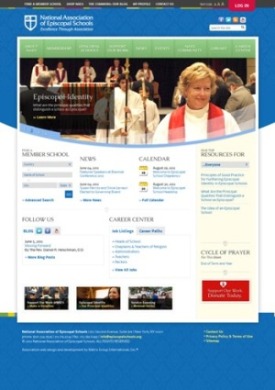
    National Association of Episcopal Schools Website Redesign

    The National Association of Episcopal Schools (NAES) is an independent, voluntary membership organization that supports, serves, and advocates for the vital work and ministry of 1,200 Episcopal schools, early childhood education programs, and school establishment efforts throughout the Episcopal Church.

    NAES wanted to redesign its website to enhance the value of its membership, promote the unique character of an Episcopal education among the general public and communicate its new, fresh identity.  As part of the website redesign, NAES wanted to add more functionality to the website, allowing members to register for events, make donations online, have more access to online resources, and participate in thoughtful discussions.

    To help make their vision into a reality, Matrix Group:

    • Created a fresh, new design that reflected the association’s re-branding.
    • Re-vamped the website’s navigation to address the needs of its users, as well as educate the public on the value of the Episcopal school education.
    • Expanded their library to included publications and meetings.
    • Implemented the website in the Sitefinity content management system (CMS), giving  NAES the ability to update every portion of their site.
    • Expanded integration with the site’s association management software to allow donations.

    Visit the National Association of Episcopal Schools Website.

  • So What Happens If Your Laptop Is Lost or Stolen?

    So What Happens If Your Laptop Is Lost or Stolen?

    Photo of a thief running away with a purse and a laptopA couple of months ago, a NASA laptop containing personal information about employees was stolen. Apparently, this is not a rare occurrence. If you google for “stolen laptop containing personal information,” you get thousands of hits. Ugh.

    I used to lose sleep at night because so many of my staff use laptops as their primary work machine. All of my Project Managers, New Biz team members and Directors carry laptops. We even have Netbooks that staff can check out if they are headed to a meeting. The risks are obvious. Laptops contain company confidential proposals and reports. They have passwords stored in browsers to make it easier to visit websites. They store passwords so we can VPN into our intranet and check e-mail.

    While Matrix Group has an amazing track record of zero loss/zero theft of laptops and PCs (knock on wood), I still lost sleep. What would happen if a laptop were lost or stolen? Forget the cost of the machine. What would it take to recover from the loss? How quickly could credentials be changed? How much damage would we suffer if confidential information were released publicly? Would we even know about all of the passwords that would need to be changed?

    Today, all Matrix Group laptops have encrypted hard drives. Windows laptops use TrueCrypt, a free, open source tool for encrypting hard drives. Mac users take advantage of the built-in encryption capabilities through FileVault2. Yes, laptop users need to login to their machines twice: once to unencrypt the hard drive and a second time to login to the machine/network. We also use strong, long passwords so it takes a few extra seconds to type our passwords. And yes, there is a bit of lag while we wait for the hard drives to become available.

    Is encrypting the hard drives worth the effort, hassle and wait time?

    Absolutely! My encryption password is 34 characters long and contains letters, characters and numbers. While I know that any password can be cracked but it will take a really, really long time to crack my password. So, for all intents and purposes, if my laptop were to get lost or be stolen, the machine would be a nice paperweight until the hard drive is reformatted. Although I love my Sony laptop (I have a nice one with a carbon fiber body and a solid state drive), I can always get another one. It’s the data that I really care about.

    The Ponemon Institute last year reported that 329 organizations surveyed lost more than 86,000 laptops over the course of a year. The Institute further calculated each loss to be worth $49,246, which meant these 329 companies alone lost over $4 billion! (Can you even imagine how 329 companies lost 86,000 laptops? What are they doing to these things?)

    So, my question to you is: what would happen to you and your organization if your laptop were lost or stolen?

    Addendum to this blog post from December 7, 2016: In 2014, development on TrueCrypt was discontinued. When I upgraded my laptop to Windows 10, I started using device encryption from Microsoft. Here’s a great article from comparitech that answers questions about TrueCrypt and provides alternatives for encrypting your drives. Whatever you do, use something to protect your drives, especially laptop drives. Don’t just “hope” your laptop doesn’t get stolen and “hope” that the folks who steal your laptop don’t care about your data.

  • Window Crayons

    Window Crayons

    Lucky enough to have a window? Turn your window into a work of art or organizing board with these washable markers.