Matrix Group International

Month: April 2012

  • Skylanders

    Skylanders

    Great for young and old alike, this game uses figurines that you place on a portal to put into action. You can play on the Wii, on the iPad and online! If you have kids, this is a must have!

  • Google’s Project Glass

    Google’s Project Glass

    Google’s Project Glass envisions a world where our glasses gives us weather and temp, lets us reply to e-mail, video conference, and take pictures.

  • Just Say No to Adding More PDFs to Your Website

    We build a lot of websites at Matrix Group and most of them are loaded with PDF files. Clients post PDF files of their newsletters, their legislative updates, their magazines, their white papers, and on and on. While it’s easy to create a PDF from Word, InDesign, Quark or Illustrator, and yes, PDFs look pretty, I think organizations should post fewer PDFs and convert more of their content to html. Here’s why:

    PDF Files Are Not Search-Engine Friendly

    • The user experience when reading a PDF on a monitor or mobile device can be miserable. So many PDFs are formatted with columns, but since screens aren’t necessarily the same size as a printed page, readers often have to scroll up and down to read the same page or reduce the overall size of the PDF, which makes reading the PDF much harder.
    • If you post your entire newsletter or magazine as one PDF file only, you can’t post individual articles to other parts of the site and you can’t tag them by category. Imagine this: a visitor types “green energy” into your site search and she gets back your organization’s legislative position on green energy, several news items, articles from past issues of your magazine, and articles from past issues of your newsletter. If you post your entire newsletter as a PDF, your site search will pull up the issue, but visitors will have to navigate the entire issue to find the specific article.
    • PDF files often don’t contain proper titles needed by search engines. For example, most people just use a PDF creator to create PDFs, never bothering to populate the file’s properties, including Title, Author, Subject and Keywords. Remember that Google first looks at the file’s title and properties to try and figure out what a page is about. If there isn’t a helpful filename or document title, Google scans the document’s content and tries to guess what the page is about, often incorrectly.
    • PDF files don’t contain the markup that provide helpful information to search engines. For example, html files usually contain title tags, body tags and headline tags. The text in your H1 tag provides search engines with the most important topic covered in the the page. PDFs do not contain H tags, again leaving the search engines to guess the topic or most important content in the document.
    • You can’t add mobile styling to PDF files. These days, we use mobile stylesheets and responsive design to make pages behave appropriately for different size screens. A legislative alert on a phone might turn into a single column of text, with no left or right rails; this makes the text readable on a small device without a lot of pinching and zooming. But a PDF stays fixed, which means a person on a phone has to zoom in and out to read your alert; not a great user experience.

    When Should You Use PDF Files?

    • If you want to post an exact replica of the original document. For example, if your organization sent a letter to the White House, you may want to post the text of the letter as html to the site and have a linked PDF of the original letter.
    • If the document needs exact styling. I often see organizations post information in html about a conference and allow visitors to download the beautifully designed brochure as a PDF.
    • If you want to make the full-text of the reference document available. Some of my clients issue lengthy, detailed research reports. To me, it makes sense that they post executive summaries in html but post the entire report as a PDF because most people will want to download or print the full-text of the report.

    Ways to Make Your PDFs More Search-Engine Friendly

    If your site does have PDF files, follow these tips to make the files more findable by search engines.

    • Create PDF files from original electronic files or OCR a scanned document. This way, the text of the document is available to the search engines.
    • Fill out the file’s properties.
    • Rename the file to something meaningful to search engines. If web pages need friendy URLs, PDF files need meaningful and friendly titles as well.

    Want to learn more?

    • Duff Johnson talks about why PDFs are problematic for search engines.
      Joel Geraci has great tips for making your PDF files more search-engine friendly.
    • Mark Aaaron Murnahan talks about how the heading tags improve search engine placement.
    • Galen DeYoung has 11 tips for optimizing PDFs for search engines.
  • Realtor.com iPad app

    Realtor.com iPad app

    The Realtor.com iPad app is a great way to look for homes for sale, check out comps and explore neighborhoods. The virtual tours are great!

  • HOP the movie

    HOP the movie

    Kids and grown-ups will enjoy this movie about an Easter Bunny who wants to pursue his dream to become a rockstar drummer.

  • The iPad Scales Websites So They All Display at the Same Resolution and Look Great

    The iPad Scales Websites So They All Display at the Same Resolution and Look Great

    I love my iPads (I have an iPad1, iPad 2 and my 3 is on the way). I think most iPad owners feel the same way. I’ve owned an iPad for nearly two years but it wasn’t until recently that I realized just why websites look so good on this device. The iPad automatically scales pages up and down so that they display at the full resolution of the iPad. Let me explain.

    As Web designers, we’re used to thinking in terms of pixels. At Matrix Group, we normally design sites for a 1024 pixel width resolution. This means that on a 1024 resolution monitor, the website fills the screen. On a widescreen or higher resolution monitor, the website is centered and there is space to the right and left of the page. Check out the Matrix Group website on my widescreen monitor.

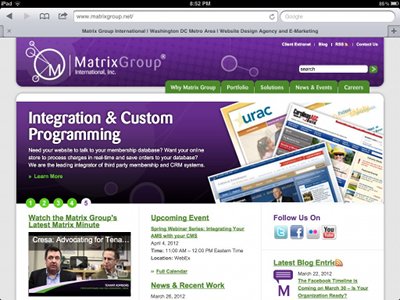
    In fact, most websites look like this on my widescreen monitor at home and laptop at work. But on an iPad, most sites look like this:

    This is the Matrix Group home page on an iPad in portrait mode.


    This is the Matrix Group home page on an iPad in landscape mode.

    What I love about scaling is that I’m making the most of the real estate on the tablet and most sites are fairly readable, without a lot of pinching and zooming.  I’m told that there are ways to prevent this automatic scaling on an iPad but I don’t really see why a web designer would do so.

    Next week, after I get a chance to play with my iPad 3, I’ll blog about how the new version supports high resolution images and how we web designers can start creating images that fit the type and resolution of the device. Very cool stuff!


  • Dwell Magazine

    Dwell Magazine

    Love the inspirational design, photos, furniture and gadgets. Web design is very much inspired by architecture and interior design and this is one of my faves.